



 Full Games List
 Featured Games
 New Games
 Reviews
 Media
Media Images
 Blogs
Blogs Game Updates
 Images Feedback Summary
 Game Design Highlights
 Tutorials
 Articles
 Scripts
 Utilities / Plugins
 Resources
 Engines
 Engine Bulletins
 What is Makerscore?
 Past Events
 Achievements
 Misaos
 Forums
 Post History
 Chat
Chat New to RMN?
 Full Store List
 RMN Music Pack (free)



[RMVX ACE] MINING EVENT HELP
Posts
Pages:
1
 reggird
 View playlists
 Close
CloseHey guys! I recently decided to start making my own rpg. For that I wrote a somewhat small mining event. I'm fairly new at this so bear with me please :D
You get that pickaxe and interact with the rock.

Here is the event page of the mining event of the rock.
The rock gets a random durability at the start of the event and then prompts the player to press 1 of 4 keys in a timely manner in a loop. After each correct input a variable increases by 1.
For each wrong or too late input a sound plays to notify the player of it. No matter if the input was right or wrong the durability variable increases by 1. When it reaches the random number which was set at the beginning, the loop breaks and the player gets rewarded according to the amount of correct inputs and the rock collapses, rendering it "unmineable".
So, now my question: During that time window where the player has to press the correct key in a timely manner, you have to hold the correct key rather than pressing it once for it to get through. Is there a way to change it so that the player only presses the correct key once for it to count?
You get that pickaxe and interact with the rock.
Here is the event page of the mining event of the rock.


The rock gets a random durability at the start of the event and then prompts the player to press 1 of 4 keys in a timely manner in a loop. After each correct input a variable increases by 1.
For each wrong or too late input a sound plays to notify the player of it. No matter if the input was right or wrong the durability variable increases by 1. When it reaches the random number which was set at the beginning, the loop breaks and the player gets rewarded according to the amount of correct inputs and the rock collapses, rendering it "unmineable".
So, now my question: During that time window where the player has to press the correct key in a timely manner, you have to hold the correct key rather than pressing it once for it to get through. Is there a way to change it so that the player only presses the correct key once for it to count?

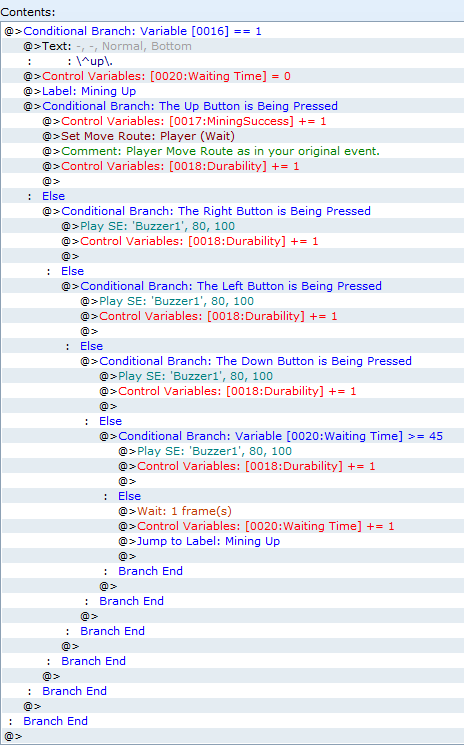
The problem is that with your current setup, the event only checks whether the correct button is being pressed at the end of your set time frame, instead of whether it's being pressed at any point during that time. You'll have to change it so that a loop restarts your conditional branch that checks for the button input over and over again during the time window, so that it picks up the correct or incorrect button input at any time.
What you'll want to do is this:
(I'm starting at the point just after the random number that determines the direction the player has to press has been set.)
(I also used Labels rather than Loops for this, because Labels are much more flexible than Loops and don't cause as much delay in the engine, either.)
Now you'll just have to build a corresponding setup for the other four directions, and it should work just fine. Also, this way, the event will only pick up whether one of the directional keys has been pressed, or if there was no button input at all, but it will no longer count other buttons. That way, if the player accidentally presses Enter or tries to open the menu or something similar, the game won't count that as making a mistake for the purposes of this minigame.
I hope this helped. Best of luck with your game!
What you'll want to do is this:
(I'm starting at the point just after the random number that determines the direction the player has to press has been set.)
(I also used Labels rather than Loops for this, because Labels are much more flexible than Loops and don't cause as much delay in the engine, either.)
Now you'll just have to build a corresponding setup for the other four directions, and it should work just fine. Also, this way, the event will only pick up whether one of the directional keys has been pressed, or if there was no button input at all, but it will no longer count other buttons. That way, if the player accidentally presses Enter or tries to open the menu or something similar, the game won't count that as making a mistake for the purposes of this minigame.
I hope this helped. Best of luck with your game!
No problem, I'm glad I could help! Hopefully the event will work without issues now. If it turns out something doesn't work the way you want it to, feel free to let me know.
And yeah, labels are amazing. After variables and conditional branches, they're easily among the most useful event commands in RPG Maker.
And yeah, labels are amazing. After variables and conditional branches, they're easily among the most useful event commands in RPG Maker.
Pages:
1

