



 Full Games List
 Featured Games
 New Games
 Reviews
 Media
Media Images
 Blogs
Blogs Game Updates
 Images Feedback Summary
 Game Design Highlights
 Tutorials
 Articles
 Scripts
 Utilities / Plugins
 Resources
 Engines
 Engine Bulletins
 What is Makerscore?
 Past Events
 Achievements
 Misaos
 Forums
 Post History
 Chat
Chat New to RMN?
 Full Store List
 RMN Music Pack (free)



[RM2K3] NEED HELP WITH VEHICLE 2
Posts
Pages:
1

 idontwantyoutoknowme
 View playlists
 Close
CloseOkay so this is the problem I have, I made the sprite of the boat on the water, then when I get into it, I make the boat change to the other vehicle where the hero is above the vehicle, it works, but I have another problem! how do I undo it? I mean when I want the hero to get off the boat I want the boat sprite to be on the water, not this...
t
HERE IT'S PERFECTLY FINE...

HERE THE SPRITE MOVES ON THE BOAT.

This is what happens when I get off the boat
the options I put


Please help...
t
HERE IT'S PERFECTLY FINE...
HERE THE SPRITE MOVES ON THE BOAT.
This is what happens when I get off the boat
the options I put
Please help...

I seem to recall there being some small problem with what I'm about to suggest... but the basics would be to have a parallel process running (likely a common event) that constantly checks to see if you're in a boat or not.
On the second page, you'll see Vehicle _____ is driven. Select that with an else case.
If driven, set vehicle graphic to the manned version. If not, set vehicle graphic to empty.
Make sure to put a wait 0.0 somewhere in there or it'll lag.
On the second page, you'll see Vehicle _____ is driven. Select that with an else case.
If driven, set vehicle graphic to the manned version. If not, set vehicle graphic to empty.
Make sure to put a wait 0.0 somewhere in there or it'll lag.
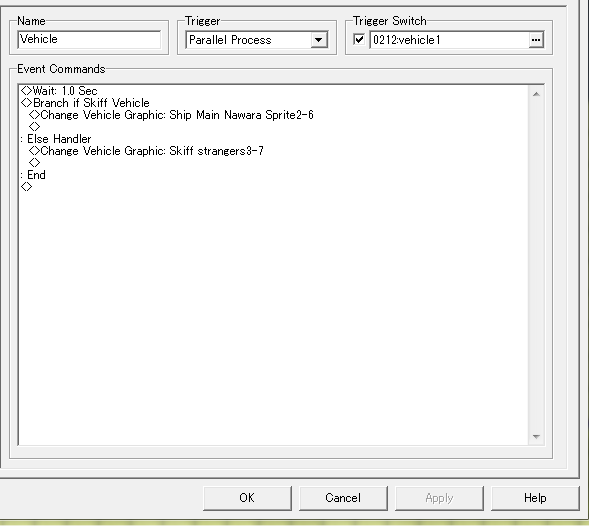
I tried, it still won't work :(
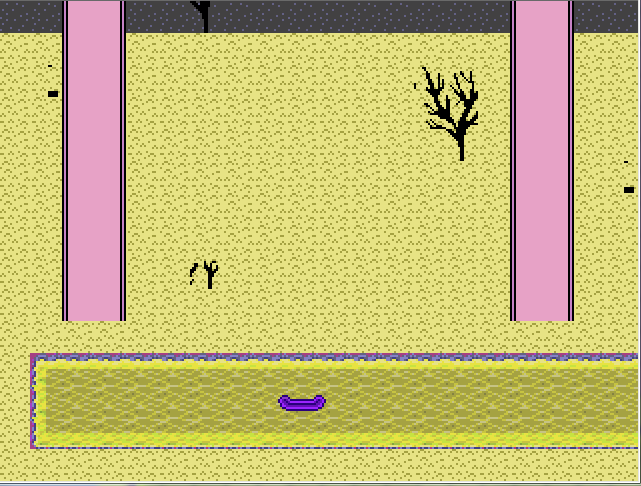
This is what I get instead though
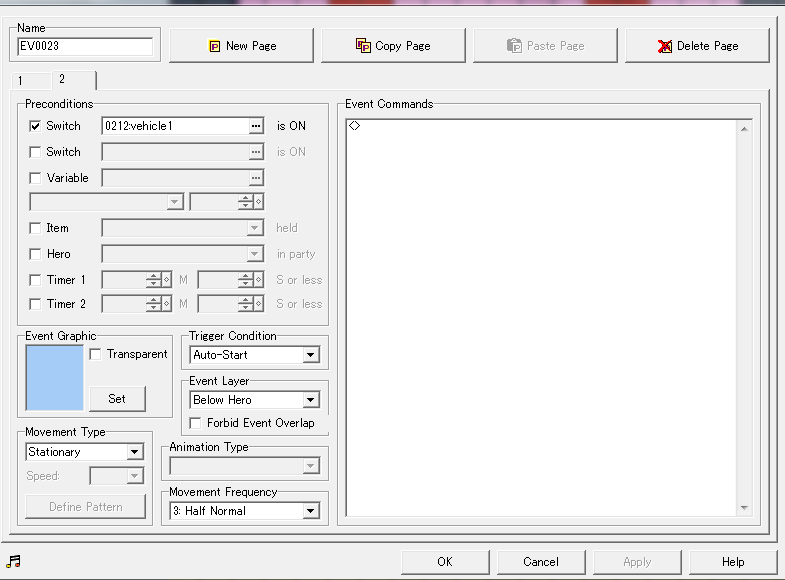
this is the switch i've set as autostart..
No, but just follow these steps.
Create a common event, set it to parallel processing, then make a wait command for 0 seconds (this will cause the process to wait a single frame before loop, reducing lag).
1) Create a conditional branch.
2) Go to page 2, select the "vehicle ___ is driven" radio button, then select the vehicle you're working with.
3) Select the "set handling when conditions do not apply" checkbox.
4) In the Condition Branch part, set the vehicle's graphic to the version where the character is riding in it.
5) In the Else part, set the vehicle's graphic to the version where the character is not riding in it.
The logic here is simple and the conditional branch, written in English, looks like this:
"If player is in boat, then set the boat's graphic to characterInBoat.png. Otherwise, set the boat's graphic to emptyBoat.png"
Now, again, I seem to recall there being some weirdness with this simple code that I had to work around in Ara Fell, but this basic idea should do it.
Create a common event, set it to parallel processing, then make a wait command for 0 seconds (this will cause the process to wait a single frame before loop, reducing lag).
1) Create a conditional branch.
2) Go to page 2, select the "vehicle ___ is driven" radio button, then select the vehicle you're working with.
3) Select the "set handling when conditions do not apply" checkbox.
4) In the Condition Branch part, set the vehicle's graphic to the version where the character is riding in it.
5) In the Else part, set the vehicle's graphic to the version where the character is not riding in it.
The logic here is simple and the conditional branch, written in English, looks like this:
"If player is in boat, then set the boat's graphic to characterInBoat.png. Otherwise, set the boat's graphic to emptyBoat.png"
Now, again, I seem to recall there being some weirdness with this simple code that I had to work around in Ara Fell, but this basic idea should do it.

I... think the Common Event is correct? I don't have any version of 2K3 on my 'top installed to confirm. However, the Common Event requires a switch to be active (ie: turned on) to run. Is it activated anywhere?
Same deal with the event-page you're showing. It's an auto-start event that requires a switch to be active. So, it won't run continuously (and have higher priority than even allowing character movement) until said switch is active. Unless that's what's happening on Page1 of that event?
Same deal with the event-page you're showing. It's an auto-start event that requires a switch to be active. So, it won't run continuously (and have higher priority than even allowing character movement) until said switch is active. Unless that's what's happening on Page1 of that event?
Pages:
1

