



 Full Games List
 Featured Games
 New Games
 Reviews
 Media
Media Images
 Blogs
Blogs Game Updates
 Images Feedback Summary
 Game Design Highlights
 Tutorials
 Articles
 Scripts
 Utilities / Plugins
 Resources
 Engines
 Engine Bulletins
 What is Makerscore?
 Past Events
 Achievements
 Misaos
 Forums
 Post History
 Chat
Chat New to RMN?
 Full Store List
 RMN Music Pack (free)



GRAPHICS
Posts
Pages:
1
 ryu
ryu View playlists
 Close
Close Hi makers i need to make Progressive transparency on my two mountanis, the final result i need is like the first mountain, since i have photofiltre studio X i don't know how to do it !! (excuse my bad english)
I also need another graphic help, i need a running character horse like the example but on the black horse, since i searched in the net a running horse character but can't find it, it's all in the picture, i really appreciate any help, thanks in advance !!
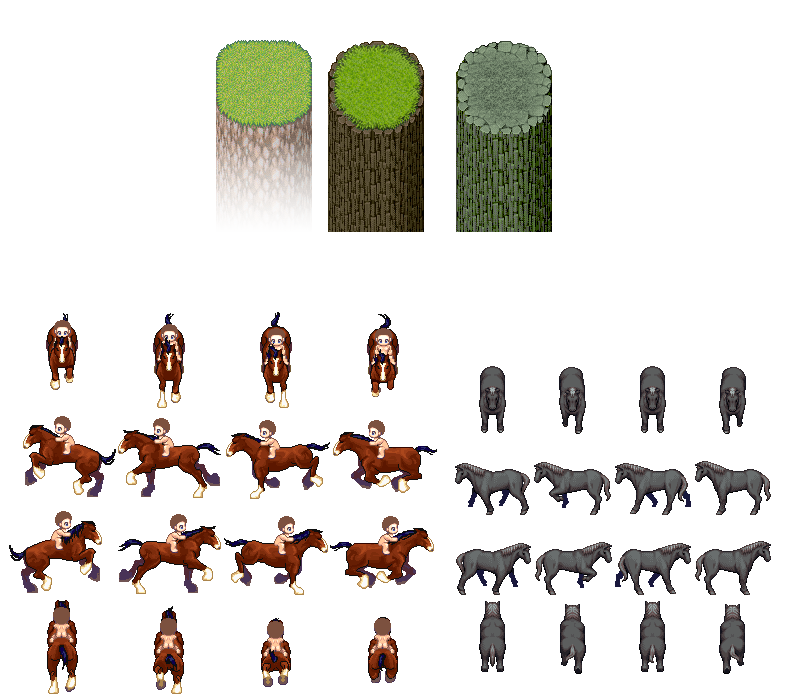
I also need another graphic help, i need a running character horse like the example but on the black horse, since i searched in the net a running horse character but can't find it, it's all in the picture, i really appreciate any help, thanks in advance !!


1. You should be able to do that with the gradient tool, making a gradient from black to transparent and putting that as a layer on top of your cliff images.
I do not know the tool you are using, but you can definitely achieve this effect with GIMP, which is free.
2. For a running horse character, if you want to use that exact image, you'll have to edit it yourself.
I made a rider sprite here: https://rpgmaker.net/resources/338/
And you can combine the rider with whtdragon's horses from this thread on RMW: https://forums.rpgmakerweb.com/index.php?threads/whtdragons-animals-and-running-horses-now-with-more-dragons.53552/
She made walking and running horses in several colours including black, and my riders are made to work with them.
Happy making!
I do not know the tool you are using, but you can definitely achieve this effect with GIMP, which is free.
2. For a running horse character, if you want to use that exact image, you'll have to edit it yourself.
I made a rider sprite here: https://rpgmaker.net/resources/338/
And you can combine the rider with whtdragon's horses from this thread on RMW: https://forums.rpgmakerweb.com/index.php?threads/whtdragons-animals-and-running-horses-now-with-more-dragons.53552/
She made walking and running horses in several colours including black, and my riders are made to work with them.
Happy making!
Thanks but...
i don't have Gimp it's very difficult for me, i use Photofiltre easier, can't you do the job for me ?
For the Horse sorry i can't use vx ace sprites i want Xp sprites and it's difficult to make exact sprite from vx ace to xp !!
i don't have Gimp it's very difficult for me, i use Photofiltre easier, can't you do the job for me ?
For the Horse sorry i can't use vx ace sprites i want Xp sprites and it's difficult to make exact sprite from vx ace to xp !!
I did the cliffs, granted they didn't turn out too great ;; People can't really do the horse one because of the poor quality of the upload. I might be able to take a look if you can upload the image in proper quality.
(Also, for future reference, you may want to avoid uploading with black backgrounds, it's just extra pain for everyone to edit)

I'm gonna be a pretentious asshole here for a second but those are MV sprites btw lmao
(Also, for future reference, you may want to avoid uploading with black backgrounds, it's just extra pain for everyone to edit)
author=ryu
For the Horse sorry i can't use vx ace sprites i want Xp sprites and it's difficult to make exact sprite from vx ace to xp !!
I'm gonna be a pretentious asshole here for a second but those are MV sprites btw lmao



Hi guys i reploaded the picture and now it's not in Black background !!
Kory-Toombs = i want to thank you but what did you excactly do ? My horse is always walking and i want it running like the 1st example plz !!
hhhh everyone know that's an Mv sprite but that's not the real problem, the example you give me is good job, but it's not what i wanted (sorry) the transparency you make is'nt exactly like the 1st cliff if you can see !!
I hope it's clear now !!
Kory-Toombs = i want to thank you but what did you excactly do ? My horse is always walking and i want it running like the 1st example plz !!
author=Frogg
I'm gonna be a pretentious asshole here for a second but those are MV sprites btw lmao
hhhh everyone know that's an Mv sprite but that's not the real problem, the example you give me is good job, but it's not what i wanted (sorry) the transparency you make is'nt exactly like the 1st cliff if you can see !!
I might be able to take a look if you can upload the image in proper quality.
I hope it's clear now !!
I saved your new image and uploaded it = it already has a transparent background. I'm not sure what you want? (I think I misunderstood what you were asking for. I thought you just wanted to change the backgrounds so they were transparent.)

I think in the case of the cliffs he wants a literal gradient from solid to alpha from top to bottom, not a proper wall bottom fadeout like you and frogge did.
I would gladly do it myself but I have no PC's nearby, sorry. :(
I would gladly do it myself but I have no PC's nearby, sorry. :(
author=Mirak
I think in the case of the cliffs he wants a literal gradient from solid to alpha from top to bottom, not a proper wall bottom fadeout like you and frogge did.
I would gladly do it myself but I have no PC's nearby, sorry. :(
I'm not sure what that is... Does he want the other 2 cliffs to be more faded out, like the first cliff. I might be able to do a similar effect with the eraser tool via changing the opacity to some percentage.
More like this, maybe? (with opacity set at 25%)


author=kory_toombs
Does he want the other 2 cliffs to be more faded out, like the first cliff?
Well...
author=ryu
...the final result i need is like the first mountain...
...I believe so?
Hey Kory-Toombs what Mirak say is exactly what i want = a literal gradient from solid to alpha from top to bottom can't you see the first cliff ? i put it specialy so you know what to do, it's clear !!
Yes Marrend you understood !!
Yes Marrend you understood !!

Okay, firstly, ryu, you're coming off as a little rude with the way you word things as demanding instead of asking. People are going to a lot of trouble to help you out when it's a bit hard to understand what you want, exactly, so please try to be a bit more polite in the way you talk to them.
Secondly, this might be better than nothing:

Secondly, this might be better than nothing:
Hey Liberty i swear i do my best to be polite as hard as i can (maybe it's cause of my bad english for sure) thanks to your hard work but the result isn't what i wanted, you can see the picture i made with your hard work to understand what i want as a result :
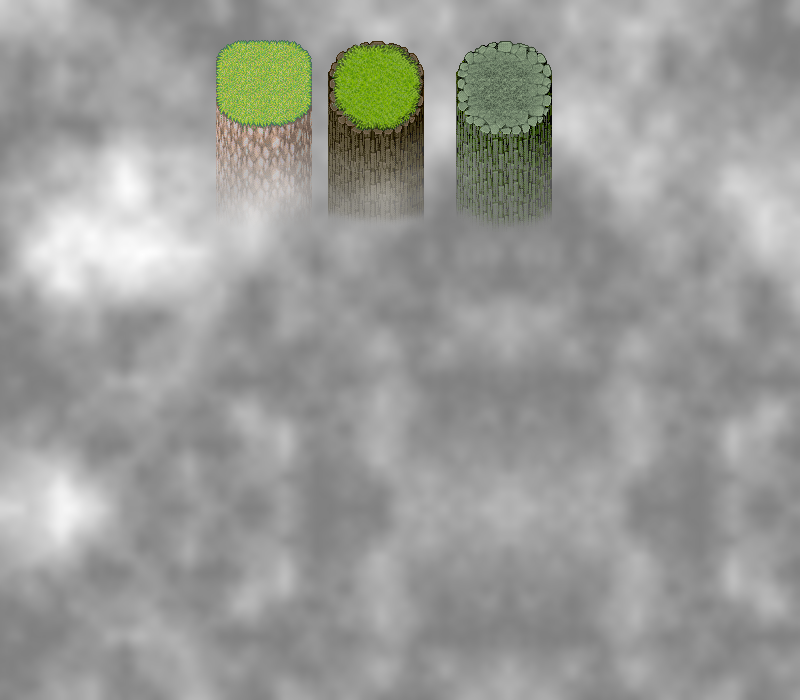
You can see that the 1st cliff is so realistic but the 2 others are not, so thank you !!

You can see that the 1st cliff is so realistic but the 2 others are not, so thank you !!
Pages:
1

