



 Full Games List
 Featured Games
 New Games
 Reviews
 Media
Media Images
 Blogs
Blogs Game Updates
 Images Feedback Summary
 Game Design Highlights
 Tutorials
 Articles
 Scripts
 Utilities / Plugins
 Resources
 Engines
 Engine Bulletins
 What is Makerscore?
 Past Events
 Achievements
 Misaos
 Forums
 Post History
 Chat
Chat New to RMN?
 Full Store List
 RMN Music Pack (free)



[RMMZ] PLAYER ACTION ADDING A BUILDING IN GAME?
Posts
Pages:
1
 Faldir
 View playlists
 Close
CloseI'm very new to RMN and the tools and have tried having an event add a building to an outside tileset in game.
However, my only present solution is to set up several events, each adding one tile as part of it's event image, until the full building appears on the map. Very time consuming and messy. My other idea is the have duplicated maps - one with and without the building. However, I plan several buildings constructed on the same map, so again, it would become quite messy. I have also tried to add the new building as a picture, but it moves with the player rather than staying on the target coordinates.
Does anyone here know of a, unlike mine ideas, clever way to let a player add buildings to an in-game map via events or perhaps a plugin that can do it?
However, my only present solution is to set up several events, each adding one tile as part of it's event image, until the full building appears on the map. Very time consuming and messy. My other idea is the have duplicated maps - one with and without the building. However, I plan several buildings constructed on the same map, so again, it would become quite messy. I have also tried to add the new building as a picture, but it moves with the player rather than staying on the target coordinates.
Does anyone here know of a, unlike mine ideas, clever way to let a player add buildings to an in-game map via events or perhaps a plugin that can do it?

I'm not sure how one would be able to access it through an MZ script-call, but, the map files have a "data" variable that, I suspect, includes tileset data in some way, shape, or form. I also suspect that variable also contains region data as well. The variable is laid out in the fashion of an array, so, I can further suspect that the first element of the array equates to the tile in the upper-left hand corner of the map (or (0,0)), but, more than that would be less certain.
I'll look into it, though as a novice my chances of success are slim.
Regardless, thank you very much for you help.
Regardless, thank you very much for you help.

I'M DOING THIS ON MV BECAUSE I DON'T HAVE MZ, BUT THIS WILL BE EXACTLY THE SAME FOR YOU.
This actually shouldn't be too difficult. How complicated this gets is going to depend on what you want the player to be able to do. If the player has no choice in which building is being placed or where it's being placed, that's going to be easiest. I take it back; this method would be simple enough that the eventing wouldn't be really complicated. This method would also probably be not what you were hoping for.
I would set up the map as a grid of roads with empty spaces for where the buildings will be. Only the roads would be passable. That would free me up to use pictures of buildings instead of using tiles piece by piece. And I mean that. Using picture files will save you a lot of headaches.
I would make the pictures by creating the buildings on a map, print screen (there's a button on the upper right of your keyboard for it), and then paste it into an editor like GraphicsGale or Asesprite. Standardize your size! Buildings with 2x3 or 3x3 faces and 2x3 or 3x3 rooves.
So, here, I made a map.
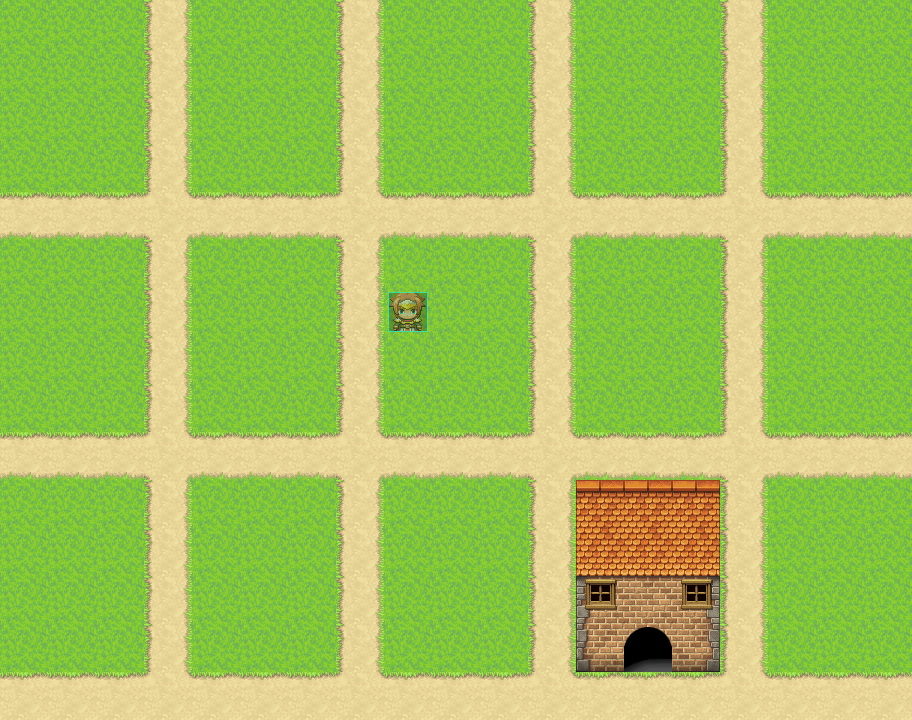
NOTE: Without scripting to fix the position of pictures, the game resolution must exactly match the map size. In this case, you would need to go into plugins (the first one), and set the size 912x720.
And here, I took the building and put it in its own picture file.

As picture files instead of tiles, you'll have a lot more freedom. You need to remember that a single tile is 48x48 pixels. It's crucial you remember this whenever working with picture placement. Next, set two events in each space. One will function as your door. Below:
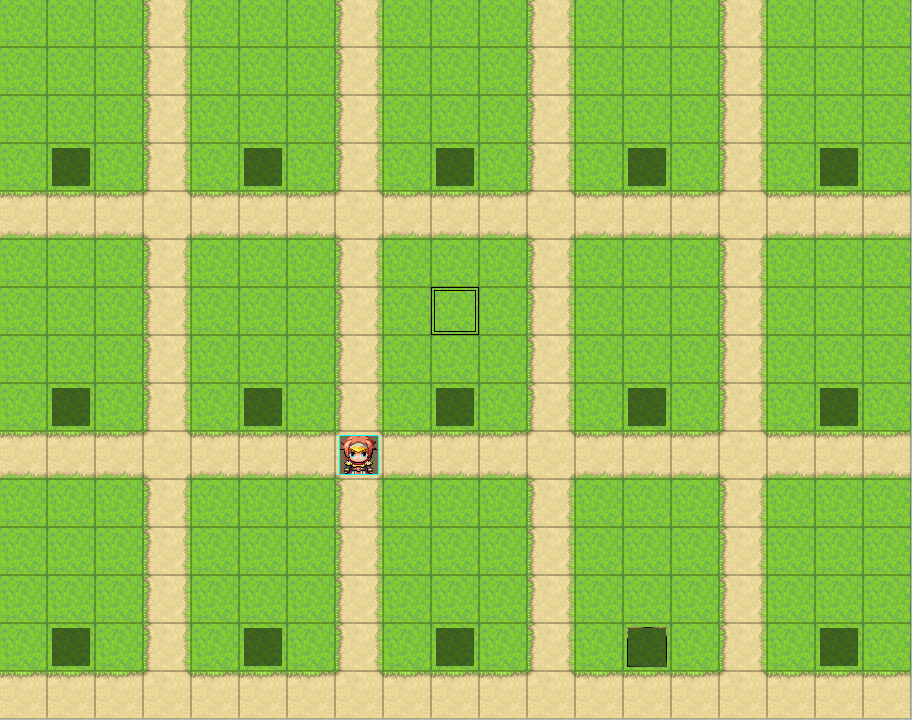
And the other will function as your building handler. Below.

Each plot will be tied to the same switch. Both events on plot 1 will start with blank pages. Both events on plot 1 will switch to page two with the switch Building 1. Like so.
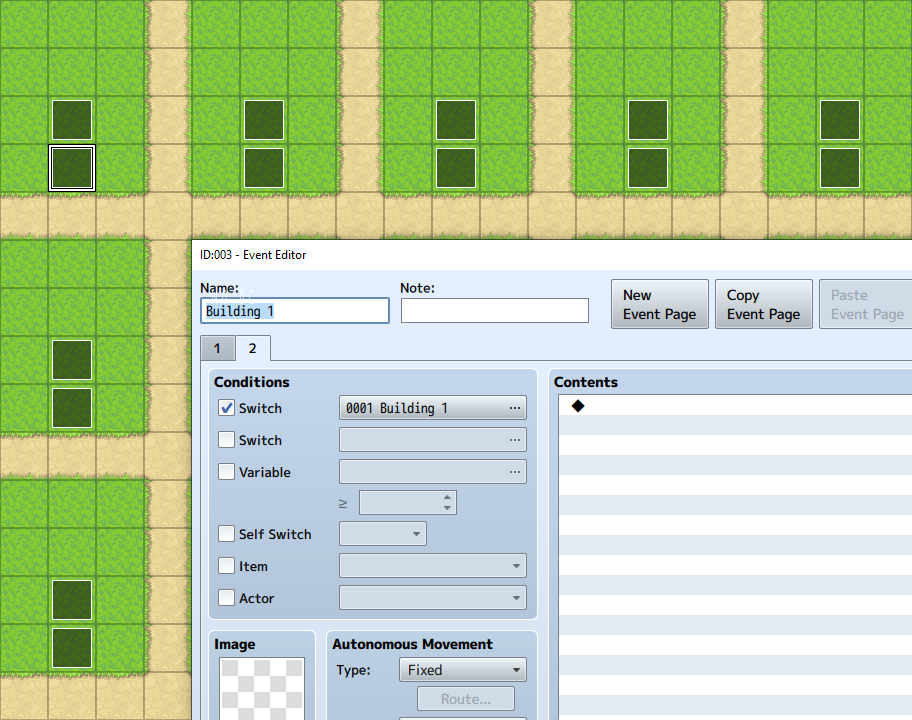
The door event, I don't have to talk about. That's just going to be the entry into your building, but the other event, that's where we're going to decide which building gets put down. I think we want to set page 2 of that event to autorun because we're going to turn the page when we're done with it. Maybe parallel process. I don't know. I making this up as I go. In the page 2 of that event, create a series of conditional branches. In those branches, if variable Building 1 = 1, variable Building 1 = 2. Etc. etc. How many buildings are available to the player? Number them. 1 through however many. 1 through 5. 1 through 10. 1 through 20. That's how many conditional branches will need to be created in this main branch.
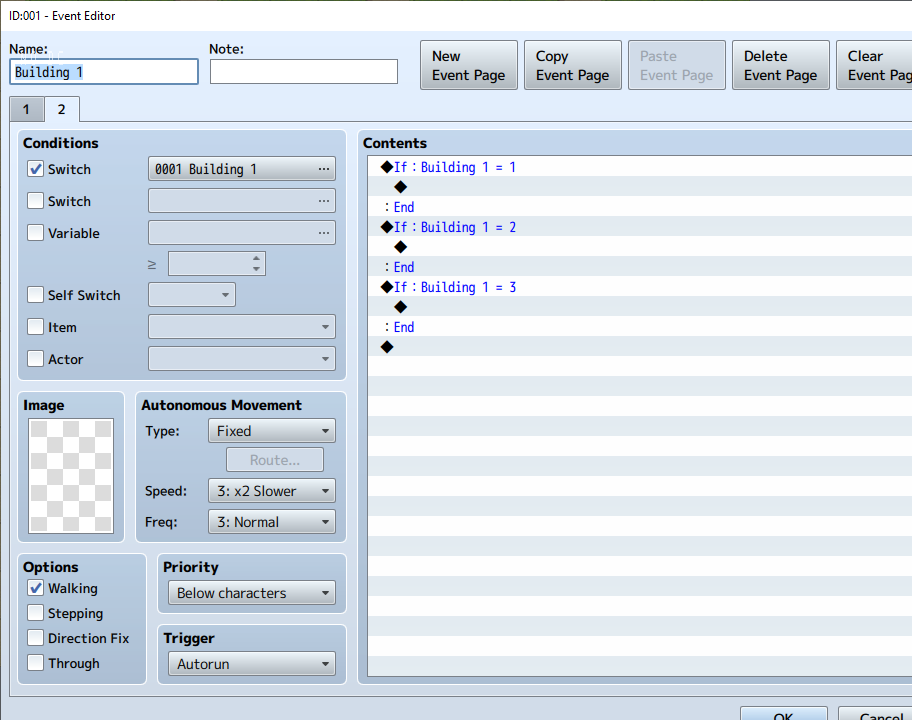
I'm only going up to three, by the way. Do this for each plot. Building 1, building 2, building 3, and on and on.
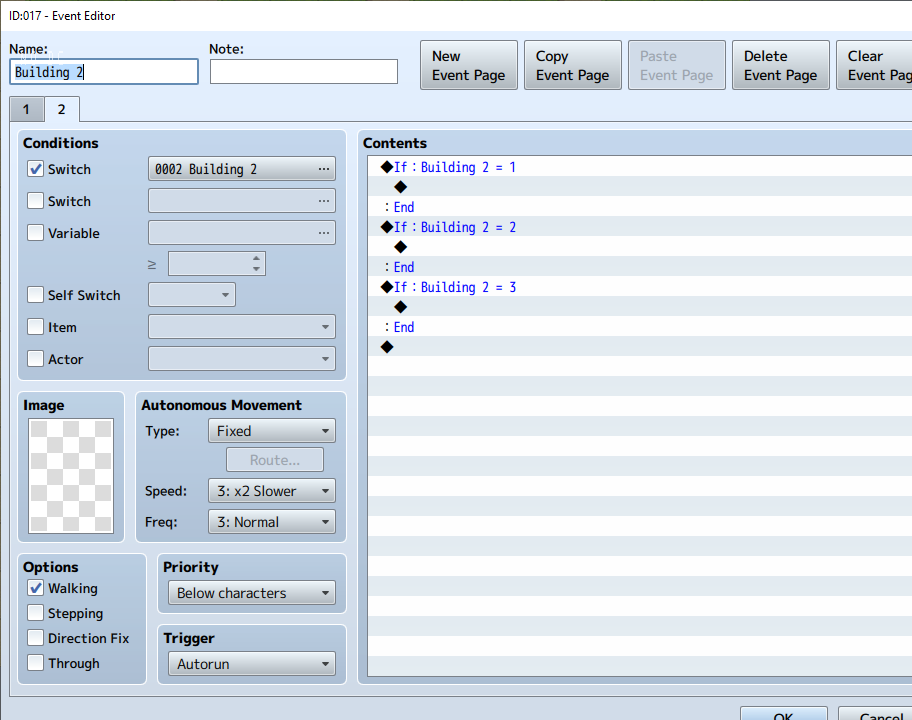
So you can clearly see! Each plot gets its own switch and variable. When selecting which number a variable is set to, you're choosing which building will be placed.
Now, create a common event. Set it to a parallel process. You should have 15 switches numbered 1 through 15. Create a new switch at 20 and set this one to be the one this parallel process acts on.
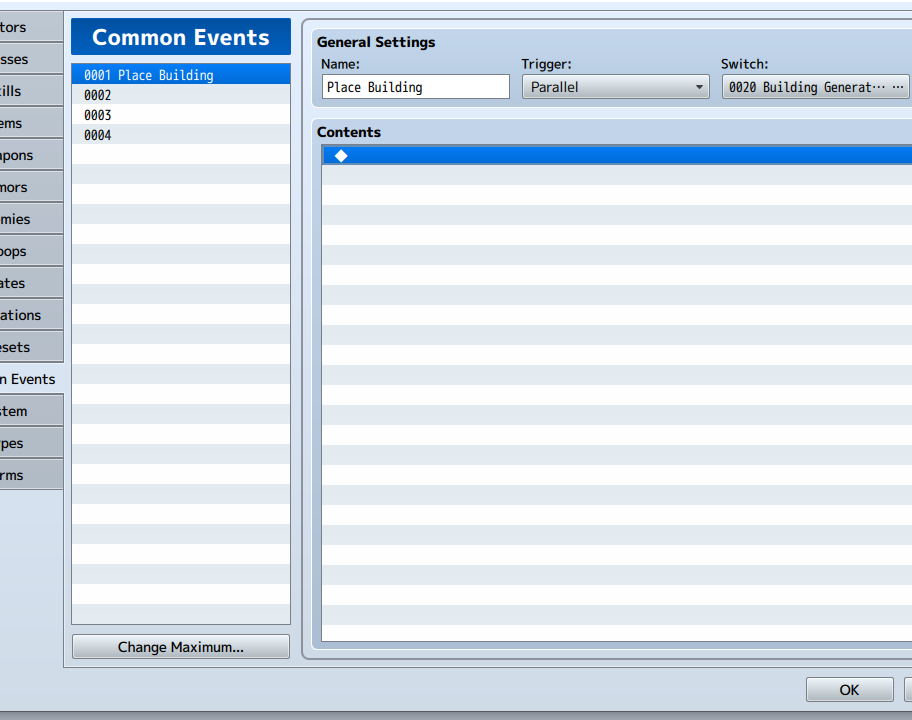
Somewhere on your map, turn this process on. Do this by setting an event to autorun, turning your 20th switch on in that event, and having that switch also turn on the second page of your event.
Now, go back to your common event and put a conditional branch in it. This conditional branch is waiting for you to press the SHIFT button, or any button except the OK button. In that conditional branch, show choice and ask which plot the player would like to place their building in.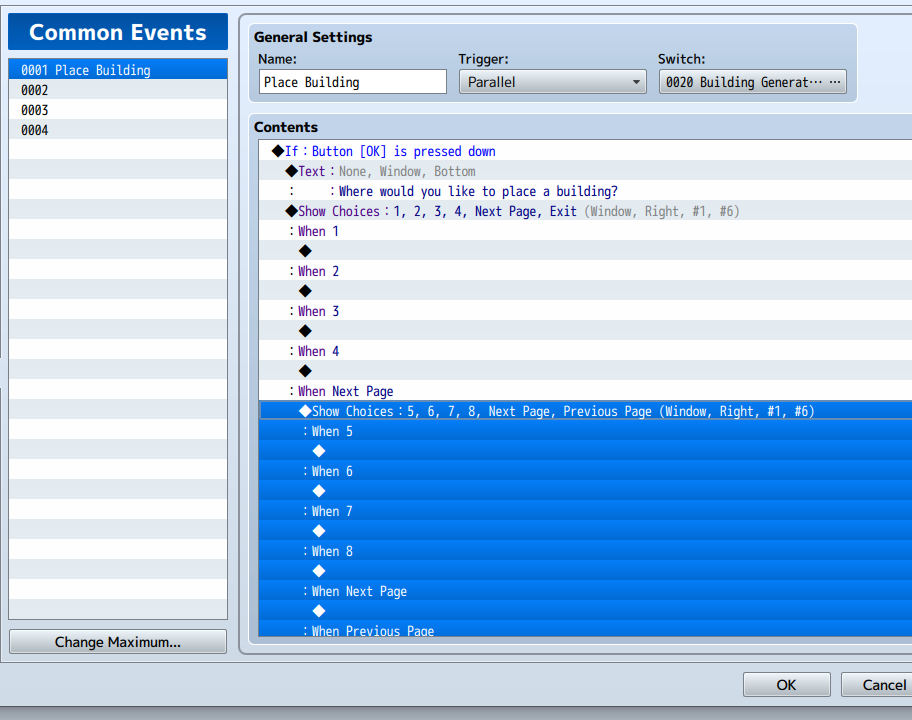
Now, I'M NOT GOING TO FILL OUT ALL OF THESE CHOICES! I'M JUST GOING TO PUT THE DATA IN THE ONE WE WILL BE USING TO MAKE SURE THIS WORKS!!! In each choice, have them select a building type. We will have numbers assigned to each type, but there's no need to give such numbers to the players, except Plot 1, Plot 2, etc. Depending on which choice is entered, turn on the switch for the plot when the plot is selected, and then set the variable to each choice. You will note that you are only turning on the variables here. Place a conditional branch to make sure your player doesn't select a plot that already has a building in it. In that conditional branch, if the relevant building variable is = 0, Text Command: "This plot already has a building in it." (For some reason, this function is refusing to work but I at least got it to turn off access if the player tries to select a plot with a building already in it.) In the else handler, put your show choice command in. Create a label called "1" at the very top of the common event. At the end of each choice, place "Jump to Label: 1". The label is important. The game will get caught in a loop, otherwise.

Now, finally, go back to your map and events there and go to that plot 1 event and set that second page to do something when the relevant variable is turned on. Turn on a switch turning this event to blank page three, and this does, in fact, work.

Now in the video, you can see this method works. As long as the grass is impassable, and you've got an event that players can interact with, you should be set. Now, for each plot, the picture will need different coordinates. In the current position, the coordinates are 0-0. If you want to move over to plot 2, remember that each tile is 48 pixels wide, meaning this building is 144 pixels wide. The road is an additional 48 pixels meaning that for Plot 2, coordinates would be 192-0. To move down to plot 6, the coordinates would be 0-240. The building is 192 pixels on the y axis, plus 48 for the road.
You can see it! It works!
This actually shouldn't be too difficult. How complicated this gets is going to depend on what you want the player to be able to do. If the player has no choice in which building is being placed or where it's being placed, that's going to be easiest. I take it back; this method would be simple enough that the eventing wouldn't be really complicated. This method would also probably be not what you were hoping for.
I would set up the map as a grid of roads with empty spaces for where the buildings will be. Only the roads would be passable. That would free me up to use pictures of buildings instead of using tiles piece by piece. And I mean that. Using picture files will save you a lot of headaches.
I would make the pictures by creating the buildings on a map, print screen (there's a button on the upper right of your keyboard for it), and then paste it into an editor like GraphicsGale or Asesprite. Standardize your size! Buildings with 2x3 or 3x3 faces and 2x3 or 3x3 rooves.
So, here, I made a map.
NOTE: Without scripting to fix the position of pictures, the game resolution must exactly match the map size. In this case, you would need to go into plugins (the first one), and set the size 912x720.
And here, I took the building and put it in its own picture file.
As picture files instead of tiles, you'll have a lot more freedom. You need to remember that a single tile is 48x48 pixels. It's crucial you remember this whenever working with picture placement. Next, set two events in each space. One will function as your door. Below:
And the other will function as your building handler. Below.
Each plot will be tied to the same switch. Both events on plot 1 will start with blank pages. Both events on plot 1 will switch to page two with the switch Building 1. Like so.
The door event, I don't have to talk about. That's just going to be the entry into your building, but the other event, that's where we're going to decide which building gets put down. I think we want to set page 2 of that event to autorun because we're going to turn the page when we're done with it. Maybe parallel process. I don't know. I making this up as I go. In the page 2 of that event, create a series of conditional branches. In those branches, if variable Building 1 = 1, variable Building 1 = 2. Etc. etc. How many buildings are available to the player? Number them. 1 through however many. 1 through 5. 1 through 10. 1 through 20. That's how many conditional branches will need to be created in this main branch.
I'm only going up to three, by the way. Do this for each plot. Building 1, building 2, building 3, and on and on.
So you can clearly see! Each plot gets its own switch and variable. When selecting which number a variable is set to, you're choosing which building will be placed.
Now, create a common event. Set it to a parallel process. You should have 15 switches numbered 1 through 15. Create a new switch at 20 and set this one to be the one this parallel process acts on.
Somewhere on your map, turn this process on. Do this by setting an event to autorun, turning your 20th switch on in that event, and having that switch also turn on the second page of your event.
Now, go back to your common event and put a conditional branch in it. This conditional branch is waiting for you to press the SHIFT button, or any button except the OK button. In that conditional branch, show choice and ask which plot the player would like to place their building in.
Now, I'M NOT GOING TO FILL OUT ALL OF THESE CHOICES! I'M JUST GOING TO PUT THE DATA IN THE ONE WE WILL BE USING TO MAKE SURE THIS WORKS!!! In each choice, have them select a building type. We will have numbers assigned to each type, but there's no need to give such numbers to the players, except Plot 1, Plot 2, etc. Depending on which choice is entered, turn on the switch for the plot when the plot is selected, and then set the variable to each choice. You will note that you are only turning on the variables here. Place a conditional branch to make sure your player doesn't select a plot that already has a building in it. In that conditional branch, if the relevant building variable is = 0, Text Command: "This plot already has a building in it." (For some reason, this function is refusing to work but I at least got it to turn off access if the player tries to select a plot with a building already in it.) In the else handler, put your show choice command in. Create a label called "1" at the very top of the common event. At the end of each choice, place "Jump to Label: 1". The label is important. The game will get caught in a loop, otherwise.
Now, finally, go back to your map and events there and go to that plot 1 event and set that second page to do something when the relevant variable is turned on. Turn on a switch turning this event to blank page three, and this does, in fact, work.
Now in the video, you can see this method works. As long as the grass is impassable, and you've got an event that players can interact with, you should be set. Now, for each plot, the picture will need different coordinates. In the current position, the coordinates are 0-0. If you want to move over to plot 2, remember that each tile is 48 pixels wide, meaning this building is 144 pixels wide. The road is an additional 48 pixels meaning that for Plot 2, coordinates would be 192-0. To move down to plot 6, the coordinates would be 0-240. The building is 192 pixels on the y axis, plus 48 for the road.
You can see it! It works!
Pages:
1

