



 Full Games List
 Featured Games
 New Games
 Reviews
 Media
Media Images
 Blogs
Blogs Game Updates
 Images Feedback Summary
 Game Design Highlights
 Tutorials
 Articles
 Scripts
 Utilities / Plugins
 Resources
 Engines
 Engine Bulletins
 What is Makerscore?
 Past Events
 Achievements
 Misaos
 Forums
 Post History
 Chat
Chat New to RMN?
 Full Store List
 RMN Music Pack (free)



IKA DEVELOPMENTS TOPIC
Posts

 WIP
WIP View playlists
 Close
CloseI don't really have anywhere else to post this, so...
10/11/2009
I worked on getting toolbars implemented and also map zooming for the map editor.
This is a view of the map editor zoomed out to 50%. The pink tiles are obstructions and the blue areas are zones.
http://rpgmaker.net/media/content/users/1/locker/iked_map_editor_03.png
Next things:
1) Show zoom level somewhere.
2) Implement the other tools.
3) Rework the side panel that is currently showing layer info. Going to be trying to emulate a Photoshop-esque interface.
10/20/2009
I didn't work on this part, but Swordsman (cool dude) tweaked the OpenGL code, drastically improving the map editor performance. This means we can actually zoom out and not get terrible performance. Next up is working on tools and undo/redo.
10/11/2009
I worked on getting toolbars implemented and also map zooming for the map editor.
This is a view of the map editor zoomed out to 50%. The pink tiles are obstructions and the blue areas are zones.
http://rpgmaker.net/media/content/users/1/locker/iked_map_editor_03.png
Next things:
1) Show zoom level somewhere.
2) Implement the other tools.
3) Rework the side panel that is currently showing layer info. Going to be trying to emulate a Photoshop-esque interface.
10/20/2009
I didn't work on this part, but Swordsman (cool dude) tweaked the OpenGL code, drastically improving the map editor performance. This means we can actually zoom out and not get terrible performance. Next up is working on tools and undo/redo.


I don't see any way of easily implementing overhanging tiles (the "upper level" in RM*). Is there a way that I am just not seeing? Otherwise, it's looking very easy to use.
Although many people are used to using inherent tile obstructions, using separate obstructions is much better for more interesting and less blocky mapping (I can assure everyone who is reading and wondering). Is there any way to set multi-level obstructions? For instance: cliff edges that run on to movable areas? Are obstruction tiles all-way or can they be more detailed?
edit: What I didn't point out is that I am excited about work being done on this!
Although many people are used to using inherent tile obstructions, using separate obstructions is much better for more interesting and less blocky mapping (I can assure everyone who is reading and wondering). Is there any way to set multi-level obstructions? For instance: cliff edges that run on to movable areas? Are obstruction tiles all-way or can they be more detailed?
edit: What I didn't point out is that I am excited about work being done on this!

post=102051
I don't see any way of easily implementing overhanging tiles (the "upper level" in RM*). Is there a way that I am just not seeing? Otherwise, it's looking very easy to use.
ika is more flexible on this point than RM*. You can paint multiple layers of tiles and change the layer that an object is on.
Always good to see ika development.
post=102051
I don't see any way of easily implementing overhanging tiles (the "upper level" in RM*). Is there a way that I am just not seeing? Otherwise, it's looking very easy to use.
DF already responded to this and so I just wanted to clarify some more. ika uses multiple layers of tiles for the maps. If you want to paint "overhanging tiles", you just switch to a different layer. And also, each layer has its own obstruction data.
Typically with my maps, they are 3 layered: full background tiles (underneath the player), object tiles (underneath the player) and foreground tiles (in front of the player). I typically keep all entities on the middle layer. With more advanced maps, you can add more "object" layers for things like bridges and so forth, that you might want to have entities walk across.
That's good news, and it sounds more in line with the way most SNES RPGs are handled (since they have two layers they use in conjunction with each other to paint backgrounds, as well as the sprite layer).
I'm not sure if you answered my other question about each individual tile having multiple directions for obstruction. Another question that ties in hand and hand with this is over/under layer switching, where a bridge is over the player one moment and under the player the next. Is this possible?
I am very curious about mapping because, truthfully, unless a program has ridiculously simple mapping I am never going to find out about the other features. It's because I am stupid.
I'm not sure if you answered my other question about each individual tile having multiple directions for obstruction. Another question that ties in hand and hand with this is over/under layer switching, where a bridge is over the player one moment and under the player the next. Is this possible?
I am very curious about mapping because, truthfully, unless a program has ridiculously simple mapping I am never going to find out about the other features. It's because I am stupid.
It does not have multi-directional obstruction support. I've thought about it before but haven't put anything in yet.
And yes, layer switching is easy and seamless.
And yes, layer switching is easy and seamless.
Slight update.
I didn't work on this part, but Swordsman (cool dude) tweaked the OpenGL code, drastically improving the map editor performance. This means we can actually zoom out and not get terrible performance. Next up is working on tools and undo/redo.
I didn't work on this part, but Swordsman (cool dude) tweaked the OpenGL code, drastically improving the map editor performance. This means we can actually zoom out and not get terrible performance. Next up is working on tools and undo/redo.
Update on the new iked map editor.
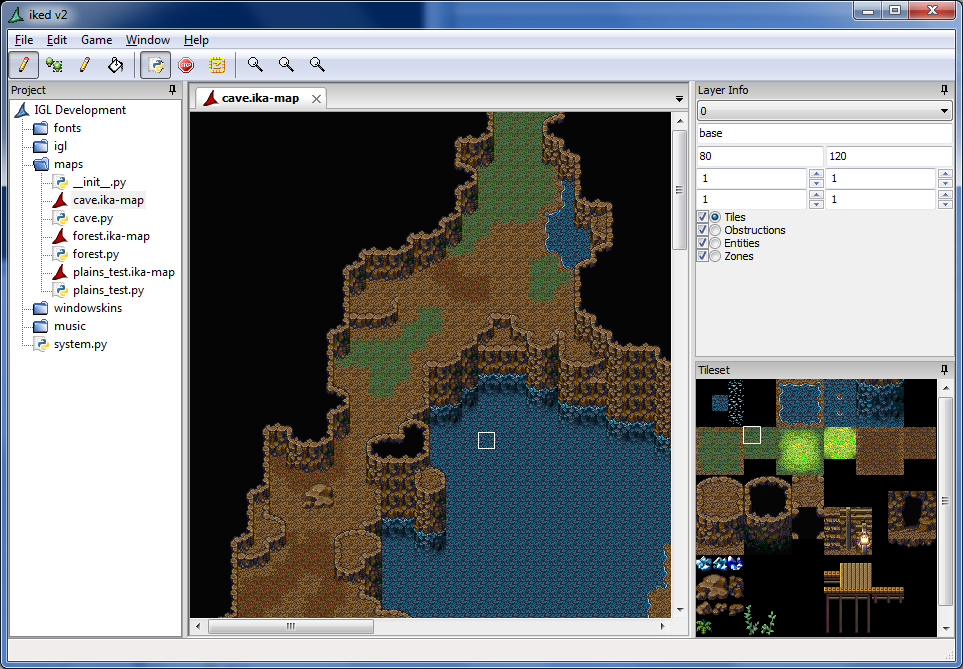
Tileset selection area, but only single tile selections right now. The layer panel is ugly and we need to rework it.
Tileset selection area, but only single tile selections right now. The layer panel is ugly and we need to rework it.

geo, that right side is resizable by the user so that won't work. =)
Actually our design is going to mimic the layer selection in ikaMap, which looked mostly like Photoshop's.
Actually our design is going to mimic the layer selection in ikaMap, which looked mostly like Photoshop's.

Screw RPGmaker, I'm using ika. I want a visual to that affect which seems impossible in 2k3 (I refuse to pay for VX, or use other methods.)...Just to be clear, this thing has a database type thing, right?I'm going to check out the script tutorials, but I need to get python again... I'll wait till the iked thing comes out, or something.
Is iked a separate entity from ika? I mean, they are obviously connect to one another, but are they separate programs or just... different functions of the same window?
also I am really excited about ika development because the easier it gets to use the more likely a lazy jerk like me can switch to a better 16x16 tile based engine. :D
also I am really excited about ika development because the easier it gets to use the more likely a lazy jerk like me can switch to a better 16x16 tile based engine. :D
BMC, the new stuff we are working on does include a database system.
Kaempfer, iked is just the editor for ika. They are separate systems.
Kaempfer, iked is just the editor for ika. They are separate systems.
post=116825
BMC, the new stuff we are working on does include a database system.
Kaempfer, iked is just the editor for ika. They are separate systems.
Nice. If this gets enough publicity it could knock 2k3 off the face of the internet.

post=116827
Nice. If this gets enough publicity it could knock 2k3 off the face of the internet.
I don't know about that. 2k3 has a pretty damn strong following that's held up for a lot of years (read: most of this site) and a new engine (albeit a very fancy, awesome one like ika) coming along probably isn't going to upset it from its pedestal.
That said, I think it's unfair to compare the two, seeing as 2k3 is essentially Lincoln Logs to ika's well respected professional construction firm. To put it loosely, at any rate. ika is a much, much more powerful engine in terms of flexibility and adaptability. Furthermore, it's not pirated software (read: GPL), and games made in ika could reach a much wider audience than those made in RPG Maker 2003.
True, I figured t2k3's following wouldn't go quietly, but it's sort of like the VX argument, only this out classes both of those. Ika might be able to put a little bit of a dent in 2k3's popularity, but never knock it off the pedestal that was practically built by kentona, Lun Casari (it was 2k, but still makes it's successor popular) and maybe Ocean? Point being, the 2k3 games are sort of like then SNES games everyone wants to play, and I figured they'd eventually fall to superior stuff and be like the games everyone uses emulators for.
I am a pretty die hard Rm2k3 fan but I will probably use future releases of ika for any new projects I start after I'm finished with my current one.
One of the biggest gripes I have with the new makers is their ridiculous resolutions: it's really the only reason I like Rm2k3. Give me the tools to use my rips/preferred style for custom graphics, and I'm golden.
Why, though, is iked a separate program? Couldn't it operate in a tab from the same shell? It seems like it is pretty necessary for ika to be useful, and having to switch between programs on the fly to change minor things would add an unnecessary step. Unless, of course, editing in one updates the other in real time...
One of the biggest gripes I have with the new makers is their ridiculous resolutions: it's really the only reason I like Rm2k3. Give me the tools to use my rips/preferred style for custom graphics, and I'm golden.
Why, though, is iked a separate program? Couldn't it operate in a tab from the same shell? It seems like it is pretty necessary for ika to be useful, and having to switch between programs on the fly to change minor things would add an unnecessary step. Unless, of course, editing in one updates the other in real time...


