



 Full Games List
 Featured Games
 New Games
 Reviews
 Media
Media Images
 Blogs
Blogs Game Updates
 Images Feedback Summary
 Game Design Highlights
 Tutorials
 Articles
 Scripts
 Utilities / Plugins
 Resources
 Engines
 Engine Bulletins
 What is Makerscore?
 Past Events
 Achievements
 Misaos
 Forums
 Post History
 Chat
Chat New to RMN?
 Full Store List
 RMN Music Pack (free)



KEY INPUT FISHING MINI-GAME, PLEASE HELP POINT ME IN THE RIGHT DIRECTION.
Posts
Pages:
1

 Darkflamewolf
 View playlists
 Close
CloseOkay, I have a mini-fishing-game where depending on the random fish that may be on the other end of the line, a picture will pop up on screen with the key input sequence you must enter before time runs out. (for example, you get a simple salmon, you get a picture on screen of "UP, DOWN, ESC, ENTER", press all four keys in sequence within the time limit and you snag the fish. If not, you lose it)
Now in rm2k3 (rpgmaker 2003), how would I be able to pull off this mini-game? I have a feeling it has something to do with key inputs. Not sure where to go from there. Any help would be appreciated. Thanks.
Now in rm2k3 (rpgmaker 2003), how would I be able to pull off this mini-game? I have a feeling it has something to do with key inputs. Not sure where to go from there. Any help would be appreciated. Thanks.

Yeah, it's possible. What I'd recommend is setting up two events. The first one is the passcode event. It basically grabs the correct key's input using that event command (I forget the name of it in 2K3). You'd just have one of those for each key that needed to be pressed.
The other event would run in parallel and essentially kill the other event if time ran out.
The other event would run in parallel and essentially kill the other event if time ran out.
okay, that gives me a broad overview. But not really some of the details I'm needing to actually pull this off. Keep going, I'm glad you know where I want to go with this at least.

Let's say the start of it all is just an ordinary event triggered by the action button.
That event would first set a random value to a variable.
Then make branch conditions for each value = each fish.
Inside each branch, show pic (fish pic, key sequence pic)
Trigger a switch
That switch will turn on another event, a parallel event.
That event should have one page for each fish.
First thing of this event is a key input process. Set the value of the key into a variable (KEY).
You need another variable to determine which part of the sequence the player is in (first key, second key, etc.). Let's call this variable ORDER.
Now use branches.
Suppose the first key is down (1) then up (4).
Cond ORDER = 1
Cond KEY = 1
ORDER + 1
else
Terminate event
Cond ORDER = 2
Cond KEY = 4
ORDER + 1
else
Terminate event
etc
That event would first set a random value to a variable.
Then make branch conditions for each value = each fish.
Inside each branch, show pic (fish pic, key sequence pic)
Trigger a switch
That switch will turn on another event, a parallel event.
That event should have one page for each fish.
First thing of this event is a key input process. Set the value of the key into a variable (KEY).
You need another variable to determine which part of the sequence the player is in (first key, second key, etc.). Let's call this variable ORDER.
Now use branches.
Suppose the first key is down (1) then up (4).
Cond ORDER = 1
Cond KEY = 1
ORDER + 1
else
Terminate event
Cond ORDER = 2
Cond KEY = 4
ORDER + 1
else
Terminate event
etc
Ah, so Key Input function assigns a value input into a single variable. So if the key is pressed, then that variable returns back as 'true' and fulfills the conditional branch. Am I understanding this right? And you must have individual variables for each and every key input the player would have to press? I'm trying to understand this function I've never used before.
When you select the key input command, you choose one single variable. Every time the player presses a key, a corresponding number will be set to that variable.
Just click "key input processing" and you'll see how it works.
Just click "key input processing" and you'll see how it works.
Okay this is what I have, its not entirely working but:
This is the initial event that gets triggered by the player manually: (ignore that fact that the random variable picks a number between 1 and 1. This is for testing only.

This is one of two events that sets up the time limit. This 'seems' to work okay and doesn't seem to have any problems doing its job:

Revised coding in the post below.
Now what happens is that I press up which gives me a proper 'correct' sound response, but my player moves in conjunction with the movement and any other key input results in the 'failure' sound response. I can't seem to get it to work properly.
This is the initial event that gets triggered by the player manually: (ignore that fact that the random variable picks a number between 1 and 1. This is for testing only.
This is one of two events that sets up the time limit. This 'seems' to work okay and doesn't seem to have any problems doing its job:
Revised coding in the post below.
Now what happens is that I press up which gives me a proper 'correct' sound response, but my player moves in conjunction with the movement and any other key input results in the 'failure' sound response. I can't seem to get it to work properly.

Cool, I will do a fishing minigame myself. I haven't thought of the system yet, but it's interesting to see another's take on it. For which game is this? Any chance to see it in-game?
Here is the new revised code:

I cannot lock the player in place, he moves when I do the inputs. I want him to stay there while he's fishing. Furthermore, any move past the first 'correct' move doesn't register as being 'correct' even though the coding says it should 'progress' to the next branch with the sequence order now being '2' after getting the first sequence button correct. Help?
I cannot lock the player in place, he moves when I do the inputs. I want him to stay there while he's fishing. Furthermore, any move past the first 'correct' move doesn't register as being 'correct' even though the coding says it should 'progress' to the next branch with the sequence order now being '2' after getting the first sequence button correct. Help?
This will probably just make the game freeze, but if you don't want them to move you could try setting it to Autorun.
well that stopped me from moving, but didn't solve my problem as to why it won't go onto the second key input and onward.

do you have the "wait until key input" box checked?
do you have some event further down the road that halts the repetition of the event?
and aside from that, then this would prove as a perfect example of something which could be used to practice the pointers of rm2k3.
by listing up the different keys of the sequence into a list of variables and having a variable refer to their ID's
let's say you the sequence keys span over variable 21 to 28, then you'd have the sequence order variable start at value 21, you have a key comparison variable which takes the value of the index of the sequence order variable (right below the option which let's you use the value of a variable) .
you check if the input key equals the key comparison variable and increase the sequence order by 1 as you already do.
the advantage of doing this now won't be much except from reducing the amount of code considerably, but the practice using pointers and knowing how to using them can come very handy to future mini games you might wanna make.
do you have some event further down the road that halts the repetition of the event?
and aside from that, then this would prove as a perfect example of something which could be used to practice the pointers of rm2k3.
by listing up the different keys of the sequence into a list of variables and having a variable refer to their ID's
let's say you the sequence keys span over variable 21 to 28, then you'd have the sequence order variable start at value 21, you have a key comparison variable which takes the value of the index of the sequence order variable (right below the option which let's you use the value of a variable) .
you check if the input key equals the key comparison variable and increase the sequence order by 1 as you already do.
the advantage of doing this now won't be much except from reducing the amount of code considerably, but the practice using pointers and knowing how to using them can come very handy to future mini games you might wanna make.
I sort of get what you are saying, but it is hard to visualize in code form how you'd go about it. Could you show me similar to how Calunio did his example? Sorry if its a bother, but I really want to get this right.
EDIT: And to answer your question: yes I have the 'wait until key input' box checked. And no, I don't see anything that would halt said event. Parallel Process should allow it to loop over and over again, at least I think it should.
EDIT: And to answer your question: yes I have the 'wait until key input' box checked. And no, I don't see anything that would halt said event. Parallel Process should allow it to loop over and over again, at least I think it should.
I solved it. Apparently the Set Order variable function was at the top of the parallel process event, which kept resetting the entire process and prevented me from moving onward in the 'input' sequence. So now that, that is out of the way, it works perfectly and I have my cool little mini-game. It isn't fancy or razzle dazzle with effects, but it should suffice as a nice diversion from the main quest.
EDIT: Now that is done. Does anyone know where I can find the Tree of Tranquility fish sprites/images that you can view when in your submenu and look at your collection lists?
EDIT: Now that is done. Does anyone know where I can find the Tree of Tranquility fish sprites/images that you can view when in your submenu and look at your collection lists?
This is something along what I meant
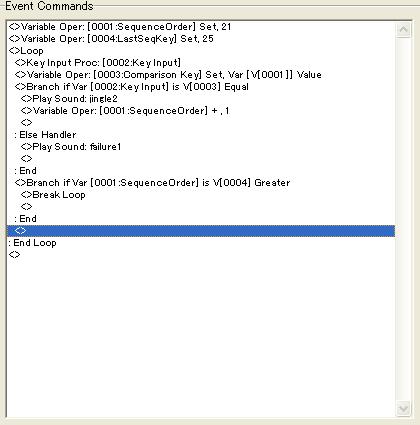
Should be doing the same as the bunch of branches except that it's obviously less code.
This one takes a 5 key sequence, where the different key's for the correct sequence is stored in the variables 21 to 25.
It doesn't really add more functionality, but can be good practice for future cases, where pointers are pretty essential (of course depending on the complexity of the mini games you'd be making).
also, it's easier to maintain or do small fixes to tinier pieces of code rather than lot's of branches
Should be doing the same as the bunch of branches except that it's obviously less code.
This one takes a 5 key sequence, where the different key's for the correct sequence is stored in the variables 21 to 25.
It doesn't really add more functionality, but can be good practice for future cases, where pointers are pretty essential (of course depending on the complexity of the mini games you'd be making).
also, it's easier to maintain or do small fixes to tinier pieces of code rather than lot's of branches
Very interesting, I'll stick with what I have now since its basically finished and working properly and I don't feel like overhauling the code. But I'll keep this tactic in mind for future mini-games that requires aspects like this! Thanks!

Pages:
1

