



 Full Games List
 Featured Games
 New Games
 Reviews
 Media
Media Images
 Blogs
Blogs Game Updates
 Images Feedback Summary
 Game Design Highlights
 Tutorials
 Articles
 Scripts
 Utilities / Plugins
 Resources
 Engines
 Engine Bulletins
 What is Makerscore?
 Past Events
 Achievements
 Misaos
 Forums
 Post History
 Chat
Chat New to RMN?
 Full Store List
 RMN Music Pack (free)



(RM2K3) I CAN'T GET MY DYNAMIC DAY/NIGHT CYCLE TO WORK.
Posts
 MKID232
 View playlists
 Close
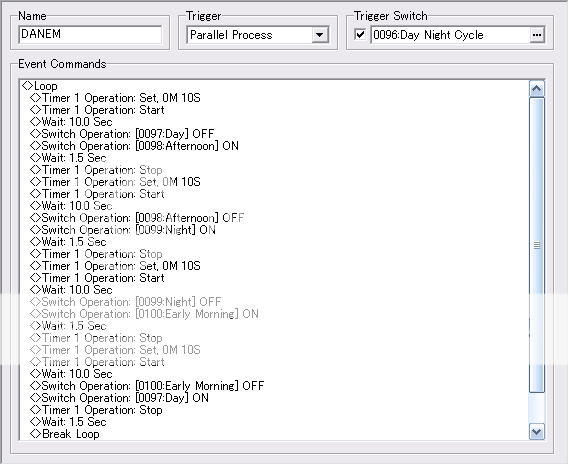
CloseI'm trying to make it where my game turns from day to night and in-between, but everytime I try to test it, nothing happens. Here's the event in its entirety.



it doesn't work cuz the event doesn't wait until the counter has reached 0. as soon as you start the timer it moves to the next command, and given that you keep setting the timer to 0, there won't be much happening
Try using variables instead of the timer system. It allow's you to do much more with the actual time that is counting.
start with a parallel process that ticks off seconds:
wait 1 second
variable SECONDS +1
and seperatly have this going:
if SECONDS = 60 > then MINUTES +1
if MINUTES = 5 > then (do whatever to make it night)
if MINUTES = 10 > then (do whatever to make it morning)
once you get to the last cycle reset the minutes, or something
this is how I keep track of the Time Played, with variables in a common event
wait 1 second
variable SECONDS +1
if seconds = 60 then minutes +1, and set seconds to 0
if minutes = 60 then hours+1, and set minutes to 0
if hours = 24 then days+1, and set hours to 0
start with a parallel process that ticks off seconds:
wait 1 second
variable SECONDS +1
and seperatly have this going:
if SECONDS = 60 > then MINUTES +1
if MINUTES = 5 > then (do whatever to make it night)
if MINUTES = 10 > then (do whatever to make it morning)
once you get to the last cycle reset the minutes, or something
this is how I keep track of the Time Played, with variables in a common event
wait 1 second
variable SECONDS +1
if seconds = 60 then minutes +1, and set seconds to 0
if minutes = 60 then hours+1, and set minutes to 0
if hours = 24 then days+1, and set hours to 0
I would say the same thing about the way you went about it xD What is the point of setting the Timer to 10S when you just have a wait of 10 seconds? There isn't even a branch checking for the time of the timer. It's simply waiting 10 seconds based on the wait command and the timer isn't being used.
Also, depending on what your doing with it, you could use 1 variable instead of 4 switches to determine what time of day it is.
I don't know much about the way timers work, but with variables your time would always be accurate between maps and you could have a switch trigger to stop time at any point and it would always retain its values when you turn it on.
(To anyone who knows about Timers) Do timers work like that? If your timer is in the middle of counting down and you teleport to a new map or shut if off, would it simply continue where it left off when it's triggered back on?
Also, depending on what your doing with it, you could use 1 variable instead of 4 switches to determine what time of day it is.
I don't know much about the way timers work, but with variables your time would always be accurate between maps and you could have a switch trigger to stop time at any point and it would always retain its values when you turn it on.
(To anyone who knows about Timers) Do timers work like that? If your timer is in the middle of counting down and you teleport to a new map or shut if off, would it simply continue where it left off when it's triggered back on?
I found my problem area. The four switches that change the color of day aren't working at all...Because I forgot to add the correct switch to them. *Facepalm* (AKA, I forgot to add the Day switch to the Day event, the Night Switch to the Night event, ect.)

Okay, so the switches work, the variable goes up, everything should be fine. But when the variable hits the spot where it SHOULD change color, it doesn't.
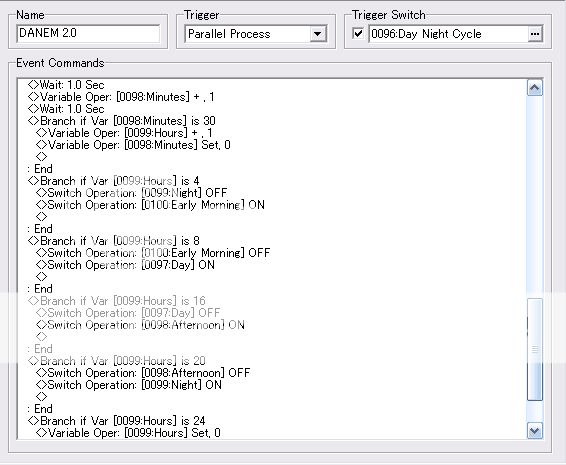
Why not just add the tint to the hours area to make it simpler? Like:
If Hours = 8
Early morning off
Day on
Tint change
END
If Hours = 8
Early morning off
Day on
Tint change
END
So yeah, that tint did the trick...My afternoon looks horrid!

Afternoon R140 G040 B040
This just doesn't look natural at all.
EDIT: Well, it probably would look natural in a volcano.
Afternoon R140 G040 B040
This just doesn't look natural at all.
EDIT: Well, it probably would look natural in a volcano.
Well the afternoon should be no tint at all. Dawn or dusk would have a slight reddish tint and night would have a blackish/blue tint, I would say.
It's indoors though. Maybe it should only tint when outdoors?
It's indoors though. Maybe it should only tint when outdoors?
It's okay, you're just overcompensating the colours. You don't need them to go all out.
For an evening look, try:
R170
G090
B030
S070
The fourth option changes how saturated the colours are. You'll probably use more saturation for early morning colours, and less during the evening/at night.
Also, have it so that when you go inside a house the lighting changes to inside colours. One way of doing so is to have a switch you turn on everytime you enter a house and turn off every time you leave. Then in the place where you've got your tints add a conditional branch so it looks like so:
If Hours = 8
Early morning off
Day on
---IF INSIDE SWITCH ON
Inside Tint change
ELSE
Outside Tint change
END
END
For an evening look, try:
R170
G090
B030
S070
The fourth option changes how saturated the colours are. You'll probably use more saturation for early morning colours, and less during the evening/at night.
Also, have it so that when you go inside a house the lighting changes to inside colours. One way of doing so is to have a switch you turn on everytime you enter a house and turn off every time you leave. Then in the place where you've got your tints add a conditional branch so it looks like so:
If Hours = 8
Early morning off
Day on
---IF INSIDE SWITCH ON
Inside Tint change
ELSE
Outside Tint change
END
END

Thanks. My entire day/night dynamic works now without fail. I even have it set to where it only works with a certain switch activated so that way I can turn it off if I need it to be a certain time of day for story purposes. Colorwise it's still weird, but less so. Thanks for all your help!

If you're still looking for tint, you'll want each phase to be distinct and identifiable. Day would be white light (default), dusk would be red (tone it down; most of the red appears close to the sun), night would be deep blue, and dawn could be a lighter blue, fading back to white.
LockeZ

I'd really like to get rid of LockeZ. His play style is way too unpredictable. He's always like this too. If he ran a country, he'd just kill and imprison people at random until crime stopped.
5958
I don't think the sun is blue during dawn. I think it's the same color as dusk.
Pretty sure the only time I've ever seen a blue tint outside is underwater, or during an alien invasion.
Pretty sure the only time I've ever seen a blue tint outside is underwater, or during an alien invasion.
post=201607
I don't think the sun is blue during dawn. I think it's the same color as dusk.
Pretty sure the only time I've ever seen a blue tint outside is underwater, or during an alien invasion.
The sun isn't blue, but the light filtering through the atmosphere is. I don't even think he's showing the sun.
Corfaisus

"It's frustrating because - as much as Corf is otherwise an irredeemable person - his 2k/3 mapping is on point." ~ psy_wombats
7874
Shortly before the sun rises the view outside is very blue. You just have to go out there at the right time.

