



 Full Games List
 Featured Games
 New Games
 Reviews
 Media
Media Images
 Blogs
Blogs Game Updates
 Images Feedback Summary
 Game Design Highlights
 Tutorials
 Articles
 Scripts
 Utilities / Plugins
 Resources
 Engines
 Engine Bulletins
 What is Makerscore?
 Past Events
 Achievements
 Misaos
 Forums
 Post History
 Chat
Chat New to RMN?
 Full Store List
 RMN Music Pack (free)



WATER PANORAMA
Posts
Pages:
1

 Linkforce
 View playlists
 Close
CloseSo I've been looking for a good water panorama to put underneath a ship. The one I have now doesn't look too good; when you move it looks like the boat is floating. Does anybody have a good one I can use? Or perhaps direct me somewhere that I can find a good one? Thank you!

Well here's the actual map:
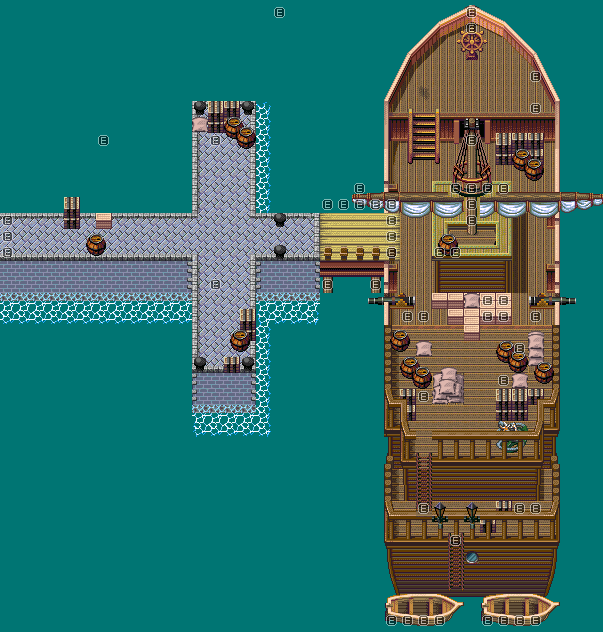
And this is the water that I'm using:

The reason I don't just use the water tiles is because there are certain parts of the chipset that cut off the water tiles so it looks odd.
And this is the water that I'm using:
The reason I don't just use the water tiles is because there are certain parts of the chipset that cut off the water tiles so it looks odd.


Geodude: I did that but it doesn't do anything for the panorama. I need a new water panorama not the actual chipsets water.
Max McGee: Thank you :) It took a while to get it right haha
Max McGee: Thank you :) It took a while to get it right haha

author=Linkforce
Geodude: I did that but it doesn't do anything for the panorama. I need a new water panorama not the actual chipsets water.
what he suggested will work. if you hold shift down while placing the water tiles from the chipsets, it will only use the 'middle' water tile, not the edge bits. so that would essentially solve your problem!
I don't think I was clear enough :S
The problem is the panorama itself. Using the water on the chipset is fine...except parts of the boat are on the same layer as the water is, so the water doesn't reach the boat in some places...which is why I use the panorama so that the entire map is covered in water as you can see by the screenshot. What I need is a better ocean panorama because the one that I use makes it look like the boat is flying over the water when the Hero moves.
I hope I cleared up what I meant in my first post.
The problem is the panorama itself. Using the water on the chipset is fine...except parts of the boat are on the same layer as the water is, so the water doesn't reach the boat in some places...which is why I use the panorama so that the entire map is covered in water as you can see by the screenshot. What I need is a better ocean panorama because the one that I use makes it look like the boat is flying over the water when the Hero moves.
I hope I cleared up what I meant in my first post.

Have you even tried doing the 'shift' thing? I mean, how do you expect us to help you if you don't listen?
Let's check again: select the water tile on the chipset, hold down the shift key, use the paint bucket tool. ta-da!
Additionally, post a screen of the result in case there is something wrong with it that we can't see.
And if you insist in using a panorama, all you need to do so it doesn't look like you're 'flying' over it, is making it the same size as the map you're using it on.
-good luck
Let's check again: select the water tile on the chipset, hold down the shift key, use the paint bucket tool. ta-da!
Additionally, post a screen of the result in case there is something wrong with it that we can't see.
And if you insist in using a panorama, all you need to do so it doesn't look like you're 'flying' over it, is making it the same size as the map you're using it on.
-good luck

You do know that if you use a water panorama, it won't show behind the water tiles, right?The water tiles in this chipset are transparent except for the wave effects. The chipset was made to be used with an ocean panorama.
Have you even tried doing the 'shift' thing? I mean, how do you expect us to help you if you don't listen?Have you even tried using the chipset in question? I mean, how do you expect Link to use a method that doesn't work with the chipset?
Sarcasm aside, I've used the chipset myself as well. The problem lies in that the water tiles and some of the tiles that make up the ship are on the same "Bottom" layer. I assume we all know that you can't have two tiles from the same layer stack over each other; in this case it's either the water tile or the ship tile, and either case results in a visually displeasing map. The ocean panorama that Link is currently using is made and provided by REFMAP because of this problem in the chipset's design; this is also why the water tiles for this chipset are transparent as I pointed out above. Judging from the REFMAP sample maps, the water tiles here are likely intended for a ship's wake and water that's lapping against stuff like piers.
Moral of the latter part of this post: Know what you're talking about before you accuse people of not listening.
EDIT: Visual representation:

Meh, I regret nothing... ;P
But seriously though, what an overly complicated way to set up a chipset. Perhaps, you're better off using another one...
But seriously though, what an overly complicated way to set up a chipset. Perhaps, you're better off using another one...
KingArthur pretty much got it spot on! I tried every possibility but it just doesn't work because of the panorama and the chipset itself...like KingArthur said.
Alterego what's different about this chipset? Did you move the ship parts to a different layer?
And tardis, the map is 42 x 47. If you could make a panorama that would be awesome! :)
Alterego what's different about this chipset? Did you move the ship parts to a different layer?
And tardis, the map is 42 x 47. If you could make a panorama that would be awesome! :)

happy birthday. that should be the exact pixel dimensions of your map unless i've fucked up really awfully. drop it in your panorama and it should get rid of your 'flying' effect.

Pages:
1

