



 Full Games List
 Featured Games
 New Games
 Reviews
 Media
Media Images
 Blogs
Blogs Game Updates
 Images Feedback Summary
 Game Design Highlights
 Tutorials
 Articles
 Scripts
 Utilities / Plugins
 Resources
 Engines
 Engine Bulletins
 What is Makerscore?
 Past Events
 Achievements
 Misaos
 Forums
 Post History
 Chat
Chat New to RMN?
 Full Store List
 RMN Music Pack (free)



2K3 YOUR WAY MAPS, NEED SOME ANSWERS.
Posts

 GreatRedSpirit
 View playlists
 Close
Close
author=Liberty
It can look really effective, though I kinda hate the use of it in VX. It annoys me that most of the VX crowd are like "Oh, your map looks okay, but have you tried using panorama mapping. It'd be 10000000 times better. Derhurp" It's a pet peeve.
have you honestly heard this from anyone other than YDS and i? seriously, show me all of these mystery VX games that allegedly use panorama maps. for some reason i am not seeing them.

Try checking out rpgmakervx.com. Every second screenshot in their screen shot thread is parralaxed. And no, I've not heard anything from either you or YDS on the subject. I didn't even realise you guys used panorama maps that much.
Key tip - not everything I say is about this site and the people therein. There are other sites out there that I am a part of. RMN just happens to be my favourite.
Key tip - not everything I say is about this site and the people therein. There are other sites out there that I am a part of. RMN just happens to be my favourite.

Most of the people at rmvx.net don't use parallax mapping since, you know, they acknowledge the existence of SwapXT.
Parallax mapping is a good way to "break the grid" and add light and shadow effects though.
Parallax mapping is a good way to "break the grid" and add light and shadow effects though.

author=heisenman
Most of the people at rmvx.net don't use parallax mapping since, you know, they acknowledge the existence of SwapXT.
Parallax mapping is a good way to "break the grid" and add light and shadow effects though.
Hence, it's used a lot. Check out the screen shot thread. It's definitely on the rise.
Yeah, there are a few games that used it, but that was mostly in junction with custom graphics and it wasn't as wide-spread when using RTP as it is now.
I check that site's screenshot thread quite often and though parallax mapping became relatively well-known since SamGreen's tutorial last September, is still not that much used among RMVX users.
Actually, the only site I've seen people discussing about parallax maps is rmvx.net.
Actually, the only site I've seen people discussing about parallax maps is rmvx.net.

Sorry guys I was frustrated when I made this thread as I tried cramming alot of stuff on one map for 2k3 with no grid and it was a total ugly disaster.
Panorama mapping wasn't what I mean't I wanted to make some maps from total scratch, I never knew Panorama mapping was super common I thought it was only used in Yume Nikki never noticed it much in space funeral apart from that one boat trip but it looks like a neat trick if its that effective.
Also I've never played a vx game with panorama mapping but I generally don't play much vx games unless its One night or the Beyond. I think I might have seen it ( panorama mapping in vx ) in this screenshot on rmvx.net.
The third game I mentioned Ascendence RSD VI is a canceled demo game that was incredible, its on this site, me not knowing too much about the simple wonders of panorama mapping and picture commands was blown out my mind just by the intro when you see the city skyline and tower and oh god!... But I now see its just some really cool tricks with pictures which should have been obvious but very well done.
I haven't used 2k3 seriously since 2009, feel kinda like a total newb again, come to think of it I haven't used rpg maker seriously since around then.
Any other mapping style I should know, I think theirs one with still backgrounds and pictures only like in Myst ( click on an image e.g a house to go to a closer image of the house then an images inside e.t.c ) you might also call this panorama mapping I guess.
Speaking of Myst here's a little memorabilia
Panorama mapping wasn't what I mean't I wanted to make some maps from total scratch, I never knew Panorama mapping was super common I thought it was only used in Yume Nikki never noticed it much in space funeral apart from that one boat trip but it looks like a neat trick if its that effective.
Also I've never played a vx game with panorama mapping but I generally don't play much vx games unless its One night or the Beyond. I think I might have seen it ( panorama mapping in vx ) in this screenshot on rmvx.net.
The third game I mentioned Ascendence RSD VI is a canceled demo game that was incredible, its on this site, me not knowing too much about the simple wonders of panorama mapping and picture commands was blown out my mind just by the intro when you see the city skyline and tower and oh god!... But I now see its just some really cool tricks with pictures which should have been obvious but very well done.
I haven't used 2k3 seriously since 2009, feel kinda like a total newb again, come to think of it I haven't used rpg maker seriously since around then.
Any other mapping style I should know, I think theirs one with still backgrounds and pictures only like in Myst ( click on an image e.g a house to go to a closer image of the house then an images inside e.t.c ) you might also call this panorama mapping I guess.
Speaking of Myst here's a little memorabilia
LockeZ

I'd really like to get rid of LockeZ. His play style is way too unpredictable. He's always like this too. If he ran a country, he'd just kill and imprison people at random until crime stopped.
5958
Well that's fine, it sounds like most of your questions have been answered then, except possibly the first one which I still don't understand.
author=LockeZ
Well that's fine, it sounds like most of your questions have been answered then, except possibly the first one which I still don't understand.
1st question by me:
How do I set each level on a map like a house for the lower map and then make a roof level e.t.c
I wanted to know which level or should have said layer goes on which color of the grid, It was cleared up also with some good response on a full summary of which grid color represents which layer by Liberty.
Note: don't try 2k3 making chip-sets without this info.
Also I have never used the term chip-sets since a while ago just called them maps or tiles.
Yeah, tilesets or chipsets are their layman names. Glad to see that you've worked it all out and have fun making your game~

I think if I understand what you want to do for your first question, you can just make each layer of your house as a seperate map, using whichever tileset you like. Then you can connect each one by having a teleport event for the door or stair case that leads to the next floor and back again. So it will work just like an other map but it will seem like layers of a house since you go to each one after heading up a flight of stairs...
I hope this is me actually helping and not just completely misunderstanding what you wanted.
I hope this is me actually helping and not just completely misunderstanding what you wanted.
author=Hoddmimir
I think if I understand what you want to do for your first question, you can just make each layer of your house as a seperate map, using whichever tileset you like. Then you can connect each one by having a teleport event for the door or stair case that leads to the next floor and back again. So it will work just like an other map but it will seem like layers of a house since you go to each one after heading up a flight of stairs...
I hope this is me actually helping and not just completely misunderstanding what you wanted.
Thanks, its a good tip for interior chip-sets.
and yes I will have fun making my game now with the wonders of panorama mapping.
I think 2k3 is the best for wide maps as you can use a wrapping effect like in yume nikki, I don't see any script or tool similar to this in any other maker. Oh wait they might be one for vx but its a rumor.
I have another question, this one doesn't need a straight answer just opinions:
So how do you guys go about making chip-sets;
>do you first create a concept piece e.g a few drawing on paper then convert your idea to pixel art and add it to a grid template, ( kinda what I'm doing )
>do you just edit alot of other chip-sets and combine them into something original, cut and paste chip-sets
with e.g custom coloring and excessive tweaking.
> do you just go straight into it with nothing but pure wild vision.
Just want to know some of your techniques to custom created chip-sets if any.
LockeZ
I'd really like to get rid of LockeZ. His play style is way too unpredictable. He's always like this too. If he ran a country, he'd just kill and imprison people at random until crime stopped.
5958
Personally I start making a map with an existing chipset. This chipset is almost never RTP, usually it's a rip. Each time I want to add something that's not in the chipset, I find or create that tile and add it to the chipset. If I can find it in another chipset I'll copy it, and if not I'll just zoom in and try to draw it (or shrink a photo down).
This method is very sensible in RMXP obviously, since adding new tiles to chipsets is very straightforward - there's no size limit so you can just keep adding more and more tiles to the bottom of your chipset as you need them. But it was how I worked in RM2K3 also. Doing it in RM2K3 just requires deleting unused tiles each time you add a new one, and/or putting some of your tiles in events.
Shrinking down photos can work better than you'd think! Often they'll blend right in with things that were drawn or ripped. Here's an example I did the other day. This is an enemy, but it appears on the map because of my CT battle system, so it has to look like a map object.
I did a google image search for "laser cannon" and got this photo:
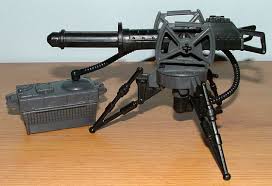
Shrunk it down to this and deleted some of the background:

Then shrunk it a little more, rotated it, and attached it to the head of Suikoden 2's Land Shark enemy sprite, to create a laser shark:

That's basically how I convert photos to RPG Maker graphics. I've done it with walls, signs, furniture, salsa, etc. Sometimes it stands out too much after I'm done, and I have to start over with a different photo, or go in and edit it pixel by pixel. But usually I can tell just by looking at the photo whether it'll work. (Hint: Pay attention to light reflections on curved surfaces. Try to avoid them if possible.)
This method is very sensible in RMXP obviously, since adding new tiles to chipsets is very straightforward - there's no size limit so you can just keep adding more and more tiles to the bottom of your chipset as you need them. But it was how I worked in RM2K3 also. Doing it in RM2K3 just requires deleting unused tiles each time you add a new one, and/or putting some of your tiles in events.
Shrinking down photos can work better than you'd think! Often they'll blend right in with things that were drawn or ripped. Here's an example I did the other day. This is an enemy, but it appears on the map because of my CT battle system, so it has to look like a map object.
I did a google image search for "laser cannon" and got this photo:
Shrunk it down to this and deleted some of the background:
Then shrunk it a little more, rotated it, and attached it to the head of Suikoden 2's Land Shark enemy sprite, to create a laser shark:
That's basically how I convert photos to RPG Maker graphics. I've done it with walls, signs, furniture, salsa, etc. Sometimes it stands out too much after I'm done, and I have to start over with a different photo, or go in and edit it pixel by pixel. But usually I can tell just by looking at the photo whether it'll work. (Hint: Pay attention to light reflections on curved surfaces. Try to avoid them if possible.)
wow thats really cool, I should get my hand on a digital camera and try it ( after checking google images also ), so far all I have is a scanner maybe I can use a picture from a game magazine or something.
Sounds challenging but more effective than doing things from total scratch ( unless your already really skilled )
Sounds challenging but more effective than doing things from total scratch ( unless your already really skilled )

I think thats because the sharks cartoony but I don't mind I like mixed media like stuff with multiple styles combined rather that one basic style for everything but thats just me and my weird tastes maybe.
LockeZ
I'd really like to get rid of LockeZ. His play style is way too unpredictable. He's always like this too. If he ran a country, he'd just kill and imprison people at random until crime stopped.
5958
Do you have any idea how hard it is to find animated battlers
I mean Jesus Christ it's like Stalin burned them all or something
If some of them end up slightly different styles than others, I will count my blessings. Each frame only appears on screen for one fifteenth of a second anyway. For non-animated things it's more noticable, you probably wouldn't want to use that gun with cartoony graphics, you would want to use a drawn gun. (But I'm lazy and would still use this one because it appeared at the top of GIS)
I mean Jesus Christ it's like Stalin burned them all or something
If some of them end up slightly different styles than others, I will count my blessings. Each frame only appears on screen for one fifteenth of a second anyway. For non-animated things it's more noticable, you probably wouldn't want to use that gun with cartoony graphics, you would want to use a drawn gun. (But I'm lazy and would still use this one because it appeared at the top of GIS)


