Full Games List
 Featured Games
 New Games
 Reviews
 Media
Media Images
 Blogs
Blogs Game Updates
 Images Feedback Summary
 Game Design Highlights
 Tutorials
 Articles
 Scripts
 Utilities / Plugins
 Resources
 Engines
 Engine Bulletins
 What is Makerscore?
 Past Events
 Achievements
 Misaos
 Forums
 Post History
 Chat
Chat New to RMN?
 Full Store List
 RMN Music Pack (free)



EVENT GRAPHIC CHANGES ON ACTION BUTTON, DON'T KNOW WHY!
Posts
 Zzyxk
Zzyxk View playlists
 Close
CloseI have an event where a bunch of guards from an enemy castle move into the battlefield, combat begins, and when it ends it activates a switch which I use to activate the events I'm having problems with...
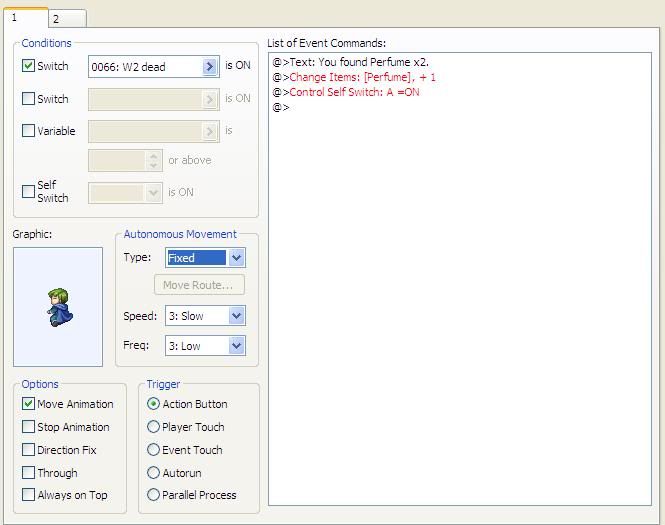
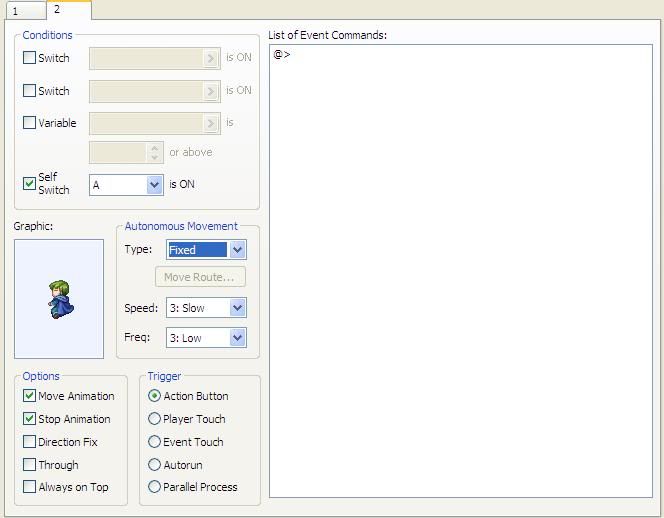
So the event Page 1 condition is the switch activated after combat. Trigger set to action button. Graphics used are downed characters (to show the dead enemies after combat). I have text so show you have found an item, change items potions and perfumes +1, then self control switch A is turned on. Page 2 is activated by this self control switch, where there are no event commands, just the graphic of the exact same down graphic.
When I try it out in game, all of the graphics are there as they were set, but the graphics change to something else in the down 01-04 pages while the text is up. When you hit enter it switches back.
Anybody know what my problem could be?
Thanks
So the event Page 1 condition is the switch activated after combat. Trigger set to action button. Graphics used are downed characters (to show the dead enemies after combat). I have text so show you have found an item, change items potions and perfumes +1, then self control switch A is turned on. Page 2 is activated by this self control switch, where there are no event commands, just the graphic of the exact same down graphic.
When I try it out in game, all of the graphics are there as they were set, but the graphics change to something else in the down 01-04 pages while the text is up. When you hit enter it switches back.
Anybody know what my problem could be?
Thanks

Is this rm2k/3?
Anywho, have you tried switching the Animation Type to "Fixed Graphic" for those graphics that change?
Anywho, have you tried switching the Animation Type to "Fixed Graphic" for those graphics that change?
author=InfectionFiles
Is this rm2k/3?
Anywho, have you tried switching the Animation Type to "Fixed Graphic" for those graphics that change?
Oops, my mistake. RPG Maker XP. How would I go about it on that?
I don't have XP, so from the top of my head I remember it being similar to RM2k3, so go to the event and Animation Type should be somewhere near/under "Trigger Condition(action key, touched by hero, etc) and "Event Layer"
But, I'm not sure.
Animation Type deals with the things like continuous, non-continuous, fixed graphic and spin around, so look for those things. (and this all should be in the event itself)
This might not even help, but it sounds like it might be the problem!
But, I'm not sure.
Animation Type deals with the things like continuous, non-continuous, fixed graphic and spin around, so look for those things. (and this all should be in the event itself)
This might not even help, but it sounds like it might be the problem!
author=Versalia
Zzyxk, can you post a screenshot of how you have the event set up?
http://i72.photobucket.com/albums/i193/goboenomo/ProblemEventPage1.jpg
http://i72.photobucket.com/albums/i193/goboenomo/ProblemEventPage2.jpg
Oh, maybe try "Direction Fix" too.
@Versalia- I was thinking that too, about the Move/Stop animation.
and lmfao, XPert. XD
@Zzyxk- You may want to try turning both of those off, and just trying Direction Fix.
@Versalia- I was thinking that too, about the Move/Stop animation.
and lmfao, XPert. XD
@Zzyxk- You may want to try turning both of those off, and just trying Direction Fix.
I think you might have an issue with Move Animation and Stop Animation. I THINK:
Move Animation = If this is checked, they WILL animate the walking pose when walking.
Stop Animation = If this is checked, they WILL animate the walking pose when not walking.
Not an XP expert though. .... ... not an XPert hahahahaaw
Move Animation = If this is checked, they WILL animate the walking pose when walking.
Stop Animation = If this is checked, they WILL animate the walking pose when not walking.
Not an XP expert though. .... ... not an XPert hahahahaaw
author=Versalia
I think you might have an issue with Move Animation and Stop Animation. I THINK:
Move Animation = If this is checked, they WILL animate the walking pose when walking.
Stop Animation = If this is checked, they WILL animate the walking pose when not walking.
Not an XP expert though. .... ... not an XPert hahahahaaw
That was one I had been testing that out on, it doesn't work with the stop animation checked off... I'll try without either on..
author=InfectionFiles
Oh, maybe try "Direction Fix" too.
@Versalia- I was thinking that too, about the Move/Stop animation.
and lmfao, XPert. XD
@Zzyxk- You may want to try turning both of those off, and just trying Direction Fix.
Direction fix worked! Thanks!
Do you guys know the text command that allows it so the user doesn't have to press enter for that text box to go away?
Also, is there a way to allow events to be able to walk over other events?
author=Zzyxk
Do you guys know the text command that allows it so the user doesn't have to press enter for that text box to go away?
Also, is there a way to allow events to be able to walk over other events?
Check the helpfile. It's backslash something.
Also: check the "through" box. That means "it can walk through stuff"
author=Versaliaauthor=ZzyxkCheck the helpfile. It's backslash something.
Do you guys know the text command that allows it so the user doesn't have to press enter for that text box to go away?
Also, is there a way to allow events to be able to walk over other events?
Also: check the "through" box. That means "it can walk through stuff"
Ah! Simple enough, thanks! First timer here on any RPG makers, now I understand the options!
You're quite welcome!
I know for 2k/3 the text command to automatically close the box is \.\.\.\.\.\.\^ for example, which isn't that long before it closes.
Try that.
The \. is like half a second or a full one, can't remember and the \^ is the actual command to make it shut automatically after how many \. were placed before it.
This is going to be a trial and error process to get it just right/not too fast
I know for 2k/3 the text command to automatically close the box is \.\.\.\.\.\.\^ for example, which isn't that long before it closes.
Try that.
The \. is like half a second or a full one, can't remember and the \^ is the actual command to make it shut automatically after how many \. were placed before it.
This is going to be a trial and error process to get it just right/not too fast
author=InfectionFiles
You're quite welcome!
I know for 2k/3 the text command to automatically close the box is \.\.\.\.\.\.\^ for example, which isn't that long before it closes.
Try that.
The \. is like half a second or a full one, can't remember and the \^ is the actual command to make it shut automatically after how many \. were placed before it.
This is going to be a trial and error process to get it just right/not too fast
Bleh, I tried that, it didn't work. Thanks tho.
The helpfile isn't showing it either :(
I found text commands for XP, here: http://www.bzpower.com/forum/index.php?showtopic=52875
Under "Tutorial 1: Custom Messages for RMXP"
I didn't realize that XP doesn't register text commands such as \.\.\.\^ like RM2k3 does, it has its own thing.
Hopefully these will help!
Under "Tutorial 1: Custom Messages for RMXP"
I didn't realize that XP doesn't register text commands such as \.\.\.\^ like RM2k3 does, it has its own thing.
Hopefully these will help!
author=InfectionFiles
\a : Automatically closes the message box after n frames.
\b: Banner mode. The text is centered both horizontally and vertically within the window. Can't be used with other tags and works with only one line of text.
\c Changes to one of the eight pre-defined colors. Use \d or \c to change back to the default color.
\d: Returns the font, font size, font color, and line height to default.
\f : Changes the font to font n in a set of pre-defined fonts. Use \d or \f, where x is the number of the default font, to return to the default.
\g : Shows a window showing how much money you have.
\h : Changes the line height to n. Useful if you want to show very large text without it clipping vertically. Use \d or \h to return the line height to default.
\i : Shows the icon and item name of the item with ID n
\j : Puts n pixels of whitespace at the current position within the message. Useful if you want precise spacing rather than relying on the font's space length.
\k : Shows the icon and skill name of the skill with ID n.
\m : Shows the icon and armor name of the armor with ID n.
\n : Shows the name of the hero with ID n.
\o : The alpha of the window text is n for this message.
\r: Right-justifies the text on this line. Must be the first thing in the line. \s : Changes the font size to n pixels high.
\v : Displays the value of the variable with ID n.
\w : Shows the icon and weapon name of the weapon with ID n.
\x: Centers the text on this line. Must be the first thing in the line.
\\ : Prints the "\" character.
I found these for XP, here: http://www.bzpower.com/forum/index.php?showtopic=52875
I didn't realize that XP doesn't register text commands such as \.\.\.\^ like RM2k3 does, it has its own thing.
Hopefully these will help!
Do I have to put it like this... \a ?
author=InfectionFiles
\a : Automatically closes the message box after n frames.
\b: Banner mode. The text is centered both horizontally and vertically within the window. Can't be used with other tags and works with only one line of text.
\c Changes to one of the eight pre-defined colors. Use \d or \c to change back to the default color.
\d: Returns the font, font size, font color, and line height to default.
\f : Changes the font to font n in a set of pre-defined fonts. Use \d or \f, where x is the number of the default font, to return to the default.
\g : Shows a window showing how much money you have.
\h : Changes the line height to n. Useful if you want to show very large text without it clipping vertically. Use \d or \h to return the line height to default.
\i : Shows the icon and item name of the item with ID n
\j : Puts n pixels of whitespace at the current position within the message. Useful if you want precise spacing rather than relying on the font's space length.
\k : Shows the icon and skill name of the skill with ID n.
\m : Shows the icon and armor name of the armor with ID n.
\n : Shows the name of the hero with ID n.
\o : The alpha of the window text is n for this message.
\r: Right-justifies the text on this line. Must be the first thing in the line. \s : Changes the font size to n pixels high.
\v : Displays the value of the variable with ID n.
\w : Shows the icon and weapon name of the weapon with ID n.
\x: Centers the text on this line. Must be the first thing in the line.
\\ : Prints the "\" character.
I found these for XP, here: http://www.bzpower.com/forum/index.php?showtopic=52875
I didn't realize that XP doesn't register text commands such as \.\.\.\^ like RM2k3 does, it has its own thing.
Hopefully these will help!
Do I have to put the # of frames in square brackets?
Yeah, I'm pretty sure you do.
I didn't see until after I posted that the n with square brackets wasn't showing up.
I didn't see until after I posted that the n with square brackets wasn't showing up.