



 Full Games List
 Featured Games
 New Games
 Reviews
 Media
Media Images
 Blogs
Blogs Game Updates
 Images Feedback Summary
 Game Design Highlights
 Tutorials
 Articles
 Scripts
 Utilities / Plugins
 Resources
 Engines
 Engine Bulletins
 What is Makerscore?
 Past Events
 Achievements
 Misaos
 Forums
 Post History
 Chat
Chat New to RMN?
 Full Store List
 RMN Music Pack (free)



A SOMEWHAT-TUTORIAL TO MAKE TREES (IN PIXEL ART)
Posts
Pages:
1

 orochii
 View playlists
 Close
CloseWell, I would like to start with a contribution to the community. This is something I did just a minutes ago (and posted it on some other forums). Anyway, let's do trees! Let's get it started already!
--
Oh, just a little note. This doesn't does wonders. You need at least minimal experience with pixelart/spriting.
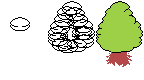
What do we have here? This image illustrates the three basic steps.
1.First you make a oval-shaped figure. It doesnt need to be perfect. Rather, it's better if isn't! It will be our "basic foliage ball" (you will understand why little grashopper).
2.Second, get mad and copypaste it a lot! Make a shape that you like, and that gets to something tree-like.
3.And lastly, erasing. Leave an outline, and make then a trunk. In the illustration is an example of trunk.
Now, the hard part... The shading. Since this is not a pixel-art tutorial, I'll leave it to your own technique. There are a load of ways to solve some puzzles, same goes for trees. You "solve" it at your own.
But, for the sake of learning I'll leave some suggestions:
a. Don't try to "draw" each leaf separately. Think about "folliage" sections.
b. When clearing the lines at step #3, you can select some of those lines, of course! They can be a good guide for detailing the folliage ;).
And here are two examples of trees made by myself. One is the example from past image, and the other one a tree I did for my own project.


Hope it gets useful to anyone, cheers and GL,
Orochii Zouveleki
--
Oh, just a little note. This doesn't does wonders. You need at least minimal experience with pixelart/spriting.
What do we have here? This image illustrates the three basic steps.
1.First you make a oval-shaped figure. It doesnt need to be perfect. Rather, it's better if isn't! It will be our "basic foliage ball" (you will understand why little grashopper).
2.Second, get mad and copypaste it a lot! Make a shape that you like, and that gets to something tree-like.
3.And lastly, erasing. Leave an outline, and make then a trunk. In the illustration is an example of trunk.
Now, the hard part... The shading. Since this is not a pixel-art tutorial, I'll leave it to your own technique. There are a load of ways to solve some puzzles, same goes for trees. You "solve" it at your own.
But, for the sake of learning I'll leave some suggestions:
a. Don't try to "draw" each leaf separately. Think about "folliage" sections.
b. When clearing the lines at step #3, you can select some of those lines, of course! They can be a good guide for detailing the folliage ;).
And here are two examples of trees made by myself. One is the example from past image, and the other one a tree I did for my own project.
Hope it gets useful to anyone, cheers and GL,
Orochii Zouveleki


Pages:
1

