



 Full Games List
 Featured Games
 New Games
 Reviews
 Images
 Blogs
Blogs Game Updates
 Images Feedback Summary
 Game Design Highlights
 Tutorials
 Articles
 Scripts
 Utilities / Plugins
 Resources
 Engines
 Engine Bulletins
 What is Makerscore?
 Past Events
 Achievements
 Forums
 Post History
 Chat
Chat New to RMN?
 Full Store List
 RMN Music Pack (free)

 Add Review
 Subscribe
 Nominate
 Submit Media
 RSS
RSS
 Game Design
What's behind the names Pt.2
 Emperors
Good day, everyone!
Continuing the last devlog, I'll be talking about names right now.
For a game with a deep story like this, deciding names has not been easy for me. So, I'm writing this to lay down my line of thoughts for future reference for me and maybe for someone else that needs it.
Before, I talked about the MC named Kadena, next I'll be talking about people around them.

Next up, I got the teacher. He's Kadena's martial art instructor. He was also a veteran and was regarded as a hero. Unfortunately, he got hurt so bad when he was blindly attacking the Z-being, resulting in it taking one of his arms and his friends from him. His aspiration to help Kadena besides being their instructor is because this is the least he can do, being a crippled veteran in the survivors' camp, and also taking revenge for his friends that died because of the attack. Thankfully, he can resonate with Kadena's power.
With his background, I searched for a famous adventurer's name. I found a lot of names but was leaning toward Vasco da Gama, the first European explorer to reach India by sea, because Vasco is a fitting name for this world.
The instructor's name is now Vasco.

I also have MC's childhood friend. He's the last survivor of the main lineage of the destroyed kingdom's royalties. Despite him, supposedly, being the next on the throne, he only knew about the research for the sentient weapon (that started the whole incident) after the incident happened. Driven by guilt, he asked Kadena so that he can join to help them. With him being part of the royalties, he resonates well with Kadena's power.
For this character, I'm focusing more on his visuals. Looking at the prominent red color on his hair and his eyes, I figured the best name for him is something that means red. Red is also the color for bravery. It also happens to be the color of luxury too. Searching a bit translating from other languages, I found Rojas as a fitting name for this world.
The last royalty and MC's childhood friend's name is now Rojas.
I'll be sure to write for the other NPCs, it's been fun to share what's on my mind. Please, stay tuned!
Thank you for reading, and don't forget to check out the game!
See you on the next blog!
------------------------------
Make sure to follow us on social media to not miss any important news!
Discord: Dragon Emperors Discord Server
Facebook: Dragon Emperors on Facebook
Twitter: @dragonemperorss
Tumblr: @dragonemperors
Instagram: @emperors.dragon
Continuing the last devlog, I'll be talking about names right now.
For a game with a deep story like this, deciding names has not been easy for me. So, I'm writing this to lay down my line of thoughts for future reference for me and maybe for someone else that needs it.
Before, I talked about the MC named Kadena, next I'll be talking about people around them.
Next up, I got the teacher. He's Kadena's martial art instructor. He was also a veteran and was regarded as a hero. Unfortunately, he got hurt so bad when he was blindly attacking the Z-being, resulting in it taking one of his arms and his friends from him. His aspiration to help Kadena besides being their instructor is because this is the least he can do, being a crippled veteran in the survivors' camp, and also taking revenge for his friends that died because of the attack. Thankfully, he can resonate with Kadena's power.
With his background, I searched for a famous adventurer's name. I found a lot of names but was leaning toward Vasco da Gama, the first European explorer to reach India by sea, because Vasco is a fitting name for this world.
The instructor's name is now Vasco.
I also have MC's childhood friend. He's the last survivor of the main lineage of the destroyed kingdom's royalties. Despite him, supposedly, being the next on the throne, he only knew about the research for the sentient weapon (that started the whole incident) after the incident happened. Driven by guilt, he asked Kadena so that he can join to help them. With him being part of the royalties, he resonates well with Kadena's power.
For this character, I'm focusing more on his visuals. Looking at the prominent red color on his hair and his eyes, I figured the best name for him is something that means red. Red is also the color for bravery. It also happens to be the color of luxury too. Searching a bit translating from other languages, I found Rojas as a fitting name for this world.
The last royalty and MC's childhood friend's name is now Rojas.
I'll be sure to write for the other NPCs, it's been fun to share what's on my mind. Please, stay tuned!
Thank you for reading, and don't forget to check out the game!
See you on the next blog!
------------------------------
Make sure to follow us on social media to not miss any important news!
Discord: Dragon Emperors Discord Server
Facebook: Dragon Emperors on Facebook
Twitter: @dragonemperorss
Tumblr: @dragonemperors
Instagram: @emperors.dragon
Game Design
What's behind the names Pt.1
Good day, everyone!
Another devlog from me. I'll be talking about names right now.
For a game with a deep story like this, deciding names has not been easy for me. So, I'm writing this to lay down my line of thoughts for future reference for me and maybe for someone else that needs it.

First off, we got the MC. The MC is one of the royalties, although not of the main lineage, of a certain kingdom that got destroyed in the incident. The MC, as the only hope of the survivors, got chosen as the bearer of the same power as the culprit of the first incident. Fortunately for the MC and the survivors, the MC actually resonates better with the power than the first host, leading to better power control.
With this in mind, I searched for a name that has the meaning of "resonates and song". That's where I found Cadence, which means "In rhythm". But, I also want the MC to have ambiguous gender, so I modified "Cadence" to "Cadena" and changed the C to K so it fits more in the world they live in.
The MC's name is now Kadena.
I'll be sure to write for the other NPCs, it's been fun to share what's on my mind. Please, stay tuned!
Thank you for reading, and don't forget to check out the game!
See you on the next blog!
------------------------------
Make sure to follow us on social media to not miss any important news!
Discord: Dragon Emperors Discord Server
Facebook: Dragon Emperors on Facebook
Twitter: @dragonemperorss
Tumblr: @dragonemperors
Instagram: @emperors.dragon
Another devlog from me. I'll be talking about names right now.
For a game with a deep story like this, deciding names has not been easy for me. So, I'm writing this to lay down my line of thoughts for future reference for me and maybe for someone else that needs it.
First off, we got the MC. The MC is one of the royalties, although not of the main lineage, of a certain kingdom that got destroyed in the incident. The MC, as the only hope of the survivors, got chosen as the bearer of the same power as the culprit of the first incident. Fortunately for the MC and the survivors, the MC actually resonates better with the power than the first host, leading to better power control.
With this in mind, I searched for a name that has the meaning of "resonates and song". That's where I found Cadence, which means "In rhythm". But, I also want the MC to have ambiguous gender, so I modified "Cadence" to "Cadena" and changed the C to K so it fits more in the world they live in.
The MC's name is now Kadena.
I'll be sure to write for the other NPCs, it's been fun to share what's on my mind. Please, stay tuned!
Thank you for reading, and don't forget to check out the game!
See you on the next blog!
------------------------------
Make sure to follow us on social media to not miss any important news!
Discord: Dragon Emperors Discord Server
Facebook: Dragon Emperors on Facebook
Twitter: @dragonemperorss
Tumblr: @dragonemperors
Instagram: @emperors.dragon
Game Design
How We Design the Monsters
Good day, everyone! I'm here with another devlog for our design choices in Song of the Bereaved.
This time, I'm going to tell how we design the monsters, both for the enemies and the allies.
First, we start with the enemies. A game jam has a short development time, yet, we'd like to give some challenges to the players. Our common formula for designing the enemies is to have them excel in one thing. For example, if we have stats for speed, then we'd like to have a type of enemy that is fast.
So, based on the stats we have in Song of the Bereaved, we decided to have 3 types of enemies; Speed, Tank, and Attacker.
After deciding the types of enemies, we started on the visual. We picked some features that represent their specialty. For speed type, we picked wings and somewhat a thin body; For tank type, we picked shell; And for attacker type, we picked big claws.
Then the artist started sketching. Some other key points are; that the enemies need to be corrupted; the features need to be able to be seen from the side view.
Here's the artist's rendition based on the decision above.

All of them look corrupted and definitely dangerous. Players should also be able to tell the specialty of each monster. And all of them would have different silhouettes when they got made into sprites.
Then, next, we started to design the monster for the player. Or as we call them familiars. These familiars will be summoned by the main character to help them in battle. The familiars gain power from the main character almost the same as how the enemies gain power from the last boss. They both infused their power into other things. The main character, however, infused it with their allies.
We then decided the type of the familiars the same way as the enemies; speed, defense, and attacker. The differences are that the familiars will have animal features that represent their types, and also the features of the main character.
So, from several animals we picked, we decided; that the speed type will be a fusion between blue jay with wind element; the defense type will be a fusion between armadillo or hedgehog with rock element; the attacker type will be a fusion between panther and fire element.
There is no artist rendition yet, but I'll be sure to keep you updated.
It was a great learning discussion for all of us on the team, and hopefully, you can learn a thing or two from this.
Thank you for reading, and don't forget to check out the game!
See you on the next blog!
------------------------------
Make sure to follow us on social media to not miss any important news!
Discord: Dragon Emperors Discord Server
Facebook: Dragon Emperors on Facebook
Twitter: @dragonemperorss
Tumblr: @dragonemperors
Instagram: @emperors.dragon
This time, I'm going to tell how we design the monsters, both for the enemies and the allies.
First, we start with the enemies. A game jam has a short development time, yet, we'd like to give some challenges to the players. Our common formula for designing the enemies is to have them excel in one thing. For example, if we have stats for speed, then we'd like to have a type of enemy that is fast.
So, based on the stats we have in Song of the Bereaved, we decided to have 3 types of enemies; Speed, Tank, and Attacker.
After deciding the types of enemies, we started on the visual. We picked some features that represent their specialty. For speed type, we picked wings and somewhat a thin body; For tank type, we picked shell; And for attacker type, we picked big claws.
Then the artist started sketching. Some other key points are; that the enemies need to be corrupted; the features need to be able to be seen from the side view.
Here's the artist's rendition based on the decision above.
All of them look corrupted and definitely dangerous. Players should also be able to tell the specialty of each monster. And all of them would have different silhouettes when they got made into sprites.
Then, next, we started to design the monster for the player. Or as we call them familiars. These familiars will be summoned by the main character to help them in battle. The familiars gain power from the main character almost the same as how the enemies gain power from the last boss. They both infused their power into other things. The main character, however, infused it with their allies.
We then decided the type of the familiars the same way as the enemies; speed, defense, and attacker. The differences are that the familiars will have animal features that represent their types, and also the features of the main character.
So, from several animals we picked, we decided; that the speed type will be a fusion between blue jay with wind element; the defense type will be a fusion between armadillo or hedgehog with rock element; the attacker type will be a fusion between panther and fire element.
There is no artist rendition yet, but I'll be sure to keep you updated.
It was a great learning discussion for all of us on the team, and hopefully, you can learn a thing or two from this.
Thank you for reading, and don't forget to check out the game!
See you on the next blog!
------------------------------
Make sure to follow us on social media to not miss any important news!
Discord: Dragon Emperors Discord Server
Facebook: Dragon Emperors on Facebook
Twitter: @dragonemperorss
Tumblr: @dragonemperors
Instagram: @emperors.dragon
Game Design
The Choices and Prototype for UI and The Problem with Resolution in RPG Maker VX Ace
The first blog post for Song of the Bereaved! Because I forgot to make one for a thing before.
So, we have discussed these two things: UI for Song of the Bereaved, and the problem with resolution in RPG Maker VX Ace. And I'd like to share it with you guys.
UI for the game
I'll start with UI first since it's less technical than the other one. We have two types of UI, the one you see on the menu and the one you see when you're playing. The menu's initial design, fortunately, has been delivered by the lovely artist here:
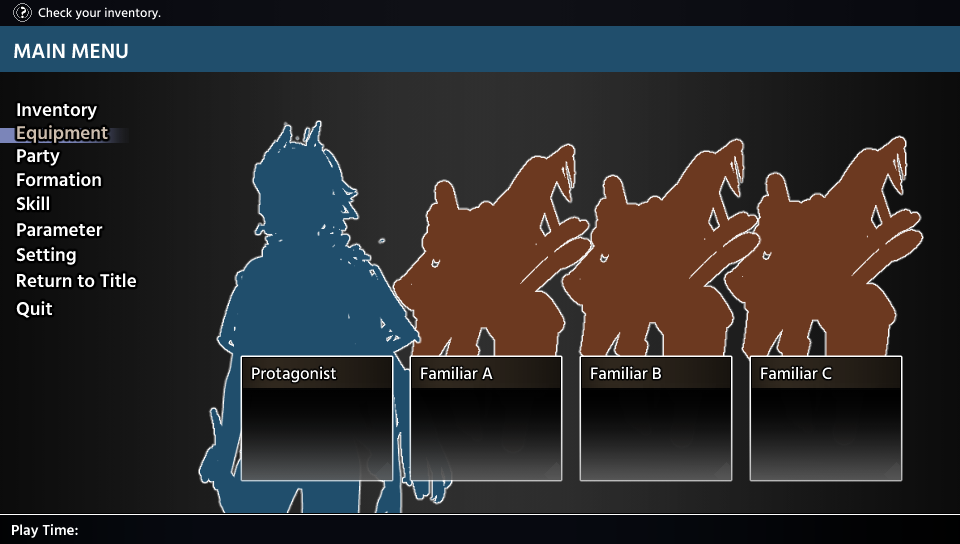
This is the menu you'll see when you press escape. The uppermost is the hint on what you should be doing. Then the next one is the name for the menu (it'll be changed later from 'main menu'). Then next are the menu choices to check or to customize something; Inventory is of course to check inventory; Equipment is to change the equipment for the party; Party is to check the status of the party; Formation is to set your initial places for the battle; Skill is to check and set the skills you'll use for the battle; Parameter is to set up your stats; Setting is to change options around the game; Return to the title is, of course, go back to the menu; and Quit is exit the game. In the center is the information summary of your current party, which familiar you bring, what skills the member party has, and the stats summary for each of them.
The artist said that they'll change a bit here and there, especially the font, so expect an update about this later!
The next one is the UI you'll see when you're playing (when you're not pausing). This UI's purpose is to help you, as the player, to know which map skill is currently active for the MC because the MC has several map action skills and the players need to change between all of them in regard to the situation. We got two choices for this, and both of them can be implemented and are cool to look at.
- The first one is a pop-up above the head when the skill is changed, then the sprite will change form to the skill you choose. It's minimalist and would be cool to look at the different forms the MC has.
- The other one is a constant UI on the top left of the screen. A framed icon and button prompt that will change when the skill is changed. This won't have the players memorize anything since they can check each time before using the skills.
It was a tough decision but we decided to implement the second one. It's better for the player to be able to check rather than to memorize each form and function, especially if the sprite might be too small on some screen and might not look that different.
The problem with the resolution
The next one is the resolution problem. If you might not know, RPG Maker VX Ace's default resolution is small compared to the screen's resolution that is popular these days. With the significant difference between them, players with a big screen resolution will either see a blurred picture or get uncomfortable with the small game window on the center of the monitor. Someone solved this and made a plugin so you can change the default resolution, but this led to a problem, which is a crash that might or might not happen to players that play with a big screen resolution. Then I remember someone re-implement graphic's function for RPG Maker VX Ace by making a replacement for the game.exe called RGDirect (is this the right paraphrase?), shout out to invwindy on the RPGMakerWeb forum. This game.exe replacement, however, led me to another problem, which is an incompatible plugin. The grid battle that I'm using for this game might be incompatible since I got 'crash to desktop' (CTD) several times when testing it. So, I need to change the battle system from a grid battle system to a simple ATB side-view battle system if I'm going to use RGD.
To summarize, I have a modified default game screen resolution and I would like to minimize any chance of CTD players might have when playing this game. We got three choices for this:
- One is to revert the default game screen resolution. This one has the least risk, only need to reduce the size of the pictures and revise the layout for a lot of things
- Two is to keep the resolution and use RGD, but change the battle system from grid ATB to simple side view ATB. This one has the most effort, from learning RGD, changing the skills and the AI for the battle, and maybe many more that we might discover.
- Three is to keep everything unchanged. This one has the least effort, but we got a risk of players crashing without being able to do anything about it.
After a long discussion, we've decided to revert and reduce the default game screen resolution to the RPG Maker VX Ace's default. Risking players CTD when playing the game might impact the impression of the game, and we don't have much time to learn RGD. We would like to, though, so be on the lookout when we finally implement RGD for our games in the future.
It was a great learning discussion for all of us on the team, and hopefully, you can learn a thing or two from this.
Thank you for reading, and don't forget to check out the game!
See you on the next blog!
------------------------------
Make sure to follow us on social media to not miss any important news!
Discord: Dragon Emperors Discord Server
Facebook: Dragon Emperors on Facebook
Twitter: @dragonemperorss
Tumblr: @dragonemperors
Instagram: @emperors.dragon
So, we have discussed these two things: UI for Song of the Bereaved, and the problem with resolution in RPG Maker VX Ace. And I'd like to share it with you guys.
UI for the game
I'll start with UI first since it's less technical than the other one. We have two types of UI, the one you see on the menu and the one you see when you're playing. The menu's initial design, fortunately, has been delivered by the lovely artist here:
This is the menu you'll see when you press escape. The uppermost is the hint on what you should be doing. Then the next one is the name for the menu (it'll be changed later from 'main menu'). Then next are the menu choices to check or to customize something; Inventory is of course to check inventory; Equipment is to change the equipment for the party; Party is to check the status of the party; Formation is to set your initial places for the battle; Skill is to check and set the skills you'll use for the battle; Parameter is to set up your stats; Setting is to change options around the game; Return to the title is, of course, go back to the menu; and Quit is exit the game. In the center is the information summary of your current party, which familiar you bring, what skills the member party has, and the stats summary for each of them.
The artist said that they'll change a bit here and there, especially the font, so expect an update about this later!
The next one is the UI you'll see when you're playing (when you're not pausing). This UI's purpose is to help you, as the player, to know which map skill is currently active for the MC because the MC has several map action skills and the players need to change between all of them in regard to the situation. We got two choices for this, and both of them can be implemented and are cool to look at.
- The first one is a pop-up above the head when the skill is changed, then the sprite will change form to the skill you choose. It's minimalist and would be cool to look at the different forms the MC has.
- The other one is a constant UI on the top left of the screen. A framed icon and button prompt that will change when the skill is changed. This won't have the players memorize anything since they can check each time before using the skills.
It was a tough decision but we decided to implement the second one. It's better for the player to be able to check rather than to memorize each form and function, especially if the sprite might be too small on some screen and might not look that different.
The problem with the resolution
The next one is the resolution problem. If you might not know, RPG Maker VX Ace's default resolution is small compared to the screen's resolution that is popular these days. With the significant difference between them, players with a big screen resolution will either see a blurred picture or get uncomfortable with the small game window on the center of the monitor. Someone solved this and made a plugin so you can change the default resolution, but this led to a problem, which is a crash that might or might not happen to players that play with a big screen resolution. Then I remember someone re-implement graphic's function for RPG Maker VX Ace by making a replacement for the game.exe called RGDirect (is this the right paraphrase?), shout out to invwindy on the RPGMakerWeb forum. This game.exe replacement, however, led me to another problem, which is an incompatible plugin. The grid battle that I'm using for this game might be incompatible since I got 'crash to desktop' (CTD) several times when testing it. So, I need to change the battle system from a grid battle system to a simple ATB side-view battle system if I'm going to use RGD.
To summarize, I have a modified default game screen resolution and I would like to minimize any chance of CTD players might have when playing this game. We got three choices for this:
- One is to revert the default game screen resolution. This one has the least risk, only need to reduce the size of the pictures and revise the layout for a lot of things
- Two is to keep the resolution and use RGD, but change the battle system from grid ATB to simple side view ATB. This one has the most effort, from learning RGD, changing the skills and the AI for the battle, and maybe many more that we might discover.
- Three is to keep everything unchanged. This one has the least effort, but we got a risk of players crashing without being able to do anything about it.
After a long discussion, we've decided to revert and reduce the default game screen resolution to the RPG Maker VX Ace's default. Risking players CTD when playing the game might impact the impression of the game, and we don't have much time to learn RGD. We would like to, though, so be on the lookout when we finally implement RGD for our games in the future.
It was a great learning discussion for all of us on the team, and hopefully, you can learn a thing or two from this.
Thank you for reading, and don't forget to check out the game!
See you on the next blog!
------------------------------
Make sure to follow us on social media to not miss any important news!
Discord: Dragon Emperors Discord Server
Facebook: Dragon Emperors on Facebook
Twitter: @dragonemperorss
Tumblr: @dragonemperors
Instagram: @emperors.dragon
Pages:
1

