Here's a little somthin I came up with; I tried to give it a good "bronze-y" look:
http://rpgmaker.net/media/content/users/8496/locker/bronzesoulidea.png
I only used the font I did because I don't have any script-style fonts that are bold enough to work.
Here's a screenshot of the bevel settings I used:
http://rpgmaker.net/media/content/users/8496/locker/bronzesoulbevelsettings.png
Note the contour shape, highlight/shadow modes, and shadow color. This gives it that metallic sheen. I chose green because I thought it looked nice, but you could use any color really.
..and to get the chrome reflection effect I did this:
-Create a new layer. Put in a few bands of white-to-transparent gradients. Rotated/shifted it around until it fits over the text the way I want it to.
-Ctrl+clicked the text layer in the layers window (which "magic-wands" the text).
-Contracted the selection by 5 (1+the size of my bevel, 4).
-Invert selection.
-Making sure I'm on the layer I made the gradients, delete selection (this erases everything outside the contracted text).
-Set layer to Color Dodge.
-Decreased the lightness of the gradients to make it orange-ish (or I could have just made the gradients grey to begin with).
Also, note the placing of the individual letters. There's something kinda cool in there...
 Full Games List
 Featured Games
 New Games
 Reviews
 Images
 Blogs
Blogs Game Updates
 Images Feedback Summary
 Game Design Highlights
 Tutorials
 Articles
 Scripts
 Utilities / Plugins
 Resources
 Engines
 Engine Bulletins
 What is Makerscore?
 Past Events
 Achievements
 Forums
 Chat
Chat New to RMN?
 Full Store List
 RMN Music Pack (free)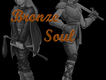

 Add Review
 Subscribe
 Nominate
 Submit Media
 RSS
RSS


 MKID232



 It lives... AGAIN!

 View playlists
 Close
Close