



 Full Games List
 Featured Games
 New Games
 Reviews
 Media
Media Images
 Blogs
Blogs Game Updates
 Images Feedback Summary
 Game Design Highlights
 Tutorials
 Articles
 Scripts
 Utilities / Plugins
 Resources
 Engines
 Engine Bulletins
 What is Makerscore?
 Past Events
 Achievements
 Misaos
 Forums
 Chat
Chat New to RMN?
 Full Store List
 RMN Music Pack (free)



 Profile
 Locker
 Play Lists
CORBANWOLF'S PROFILE

 Close
CloseSearch
Filter
 All
All Game Pages
 User Statuses
 How do you draw your pixel character sprites?
Hello, thank you both for a reply. I am not using RPG Maker software anymore. I used to but at this moment I am studying programming languages plus there are some nice engines like Godot or Stencyl so sprite frame and other things are not a limitation. Also I know the thing with chibi. I tried to recreate that style in my art however I could never achieve that. Whenever I copy someone's style it never looks the way it supposed to, so I stick my style which is realism proportions of head to the rest of the body.
I was worried while creating this topic because I drew one frame of an animation looking at a reference image and I was actually very satisfied with the result, but after drawing the rest of the frames out of my imagination (because the reference image was only image so I was unable to find other pictures or videos to reference to) was comparably much worse and not very represented the movement.
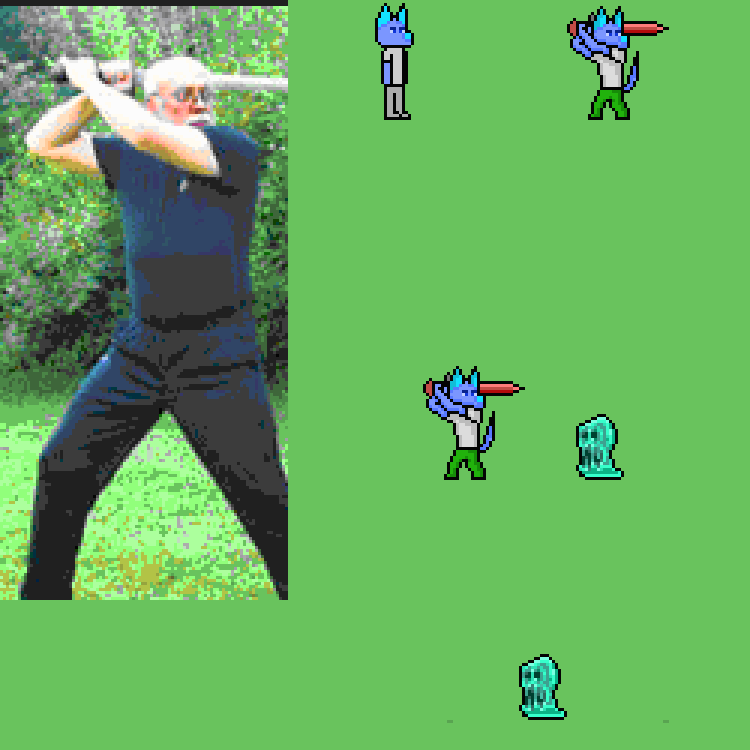
I was also thinking to myself "am I actually bad because I need a reference image and cannot use my imagination to imagine the pose that I need to draw?". Here I sent an imagine I referenced to and what I tried to accomplish. My main question was boiled into "Is using reference image making me a bad artist?". And how is your approach to drawing from reference image? I was seriously considering recording myself with a phone and then looking at the frames and trying to draw them. I would look goofy but it is the best way to create your custom reference image the way you need. As there is not that much animations or videos to find if you don't know where to look for (like me, I started from image and I am in a dead end because there is no reference image/video to look at. Oh and I am trying to make a smooth animation like here: https://youtu.be/Qx4nZJ5UPUQ
I like how smooth it looks, and how it looks like an action game. It seems very responsive. That's what I will try to achieve but not with chibi art style. I understand that the larger sprites the more difficult but my sprites aren't that large. Any tips?:
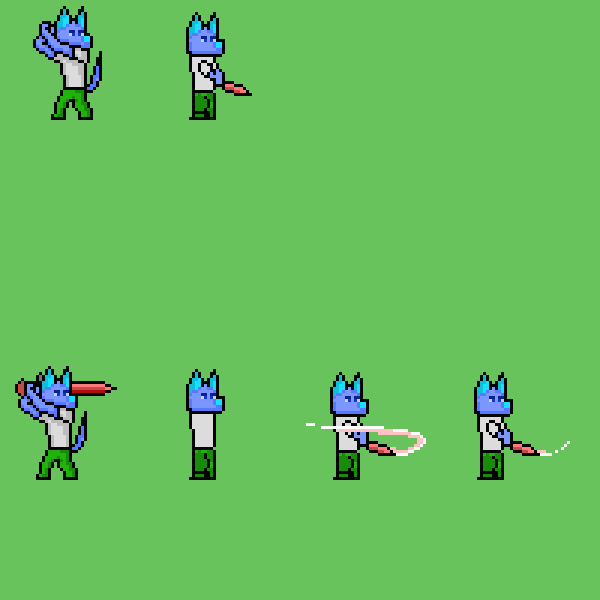
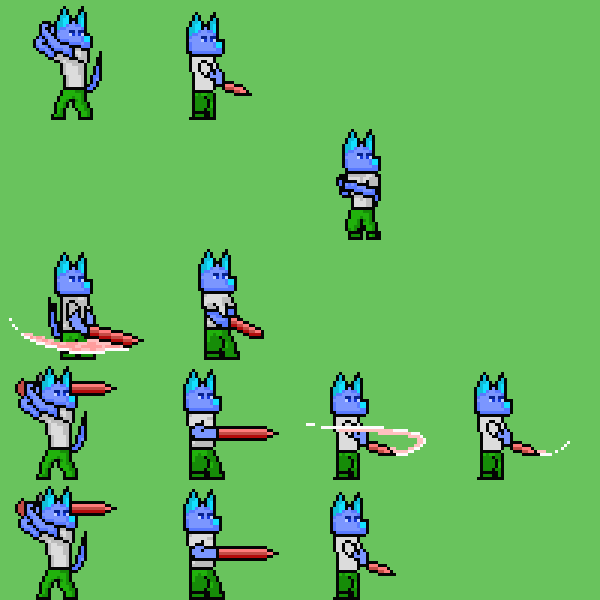
Also, I love Jake <3
I was worried while creating this topic because I drew one frame of an animation looking at a reference image and I was actually very satisfied with the result, but after drawing the rest of the frames out of my imagination (because the reference image was only image so I was unable to find other pictures or videos to reference to) was comparably much worse and not very represented the movement.
I was also thinking to myself "am I actually bad because I need a reference image and cannot use my imagination to imagine the pose that I need to draw?". Here I sent an imagine I referenced to and what I tried to accomplish. My main question was boiled into "Is using reference image making me a bad artist?". And how is your approach to drawing from reference image? I was seriously considering recording myself with a phone and then looking at the frames and trying to draw them. I would look goofy but it is the best way to create your custom reference image the way you need. As there is not that much animations or videos to find if you don't know where to look for (like me, I started from image and I am in a dead end because there is no reference image/video to look at. Oh and I am trying to make a smooth animation like here: https://youtu.be/Qx4nZJ5UPUQ
I like how smooth it looks, and how it looks like an action game. It seems very responsive. That's what I will try to achieve but not with chibi art style. I understand that the larger sprites the more difficult but my sprites aren't that large. Any tips?:
Also, I love Jake <3
How do you draw your pixel character sprites?
Hey
Recently been thinking about drawing some sprites, but not only walking in 4 directions but some advanced actions like striking with a sword or other weapons and it turns out I am crap at drawing characters in action. I have no problem with drawing them in idle state, however when I need to show some movement or some action the character doing the result is always mediocre.
So here's my question. How do you draw your sprites for attack and other actions? Do you look at a picture and try to redraw it? Or just intuitively from imagination? Is it bad to look at reference picture and draw what you see? I was thinking of grabbing some long item and record myself, my movement and then redraw myself in pixel as character sprite. What are your advices for that?
Recently been thinking about drawing some sprites, but not only walking in 4 directions but some advanced actions like striking with a sword or other weapons and it turns out I am crap at drawing characters in action. I have no problem with drawing them in idle state, however when I need to show some movement or some action the character doing the result is always mediocre.
So here's my question. How do you draw your sprites for attack and other actions? Do you look at a picture and try to redraw it? Or just intuitively from imagination? Is it bad to look at reference picture and draw what you see? I was thinking of grabbing some long item and record myself, my movement and then redraw myself in pixel as character sprite. What are your advices for that?
How to improve walk animation?
Ok. I have changed his legs and feet. I think it looks better now. I paste the old version and the new version to compare.
The old versions:
 x
x 
New versions:
 x
x 
What do you think? Does it look decently? Can I put this in my game or should I improve this to look better or it's ok now?
The old versions:
New versions:
What do you think? Does it look decently? Can I put this in my game or should I improve this to look better or it's ok now?
How to improve walk animation?
Hey. I've made some walk animations but they don't look good. I don't know how to make them look better. I paste 2 gifs. One with still background and one that character is in the center. (The character/background moves one pixel per frame. Character changes their graphic each 2 frames. for example. 1st and 2nd gis frame is character in front, 3rd and 4th frame is character with left lef forward, 5 and 6 front again, 7 and 8 right leg forward etc.)
x
Any advice how to improve them? That one where character is in the center looks quite ok, but the other one with still background do not. How can I improve them? Help ;/
Any advice how to improve them? That one where character is in the center looks quite ok, but the other one with still background do not. How can I improve them? Help ;/
[RMVX ACE] [RMMV] Dimensions of sprite pixels
Hello
I was making characters with dimensions 35x51 per one sprite. Why? Because it was comfortable to me to draw them in this size. But I thinking that I won't find any software that will support this dimensions or just software that I could adjust grid for this dimensions per tile for example 35x35 so I'm now thinking about redrawing them with dimensions that could be suitable for rpg maker software. And I'm wondering in which exactly size. In RM VX the diemnsions are propably 32x32 but I could stretch to more like 32x48. But What about RM MV, dimensions are propably 48x48 so there is my question. Should I make sprites with 32 or 48. I want my sprites to be universal and suitable for the newer and newest programs. Will 32pixel spriter be replaced with 48?
I was making characters with dimensions 35x51 per one sprite. Why? Because it was comfortable to me to draw them in this size. But I thinking that I won't find any software that will support this dimensions or just software that I could adjust grid for this dimensions per tile for example 35x35 so I'm now thinking about redrawing them with dimensions that could be suitable for rpg maker software. And I'm wondering in which exactly size. In RM VX the diemnsions are propably 32x32 but I could stretch to more like 32x48. But What about RM MV, dimensions are propably 48x48 so there is my question. Should I make sprites with 32 or 48. I want my sprites to be universal and suitable for the newer and newest programs. Will 32pixel spriter be replaced with 48?
 The Screenshot Topic Returns
Same class, different skills?
It is possible bou you need to know 'ruby'. You go to ~'ruby scripts' and ther's everything you can do. Good luck. XD :)
Same class, different skills?
Heh, you should just use "show text" in parrel event and set path to second event to look forward to 1st char. Then use "wait" enough long time and then "change screen tone". Just try do it by yourself or watch some tutorials or read "help" file to get to know. :]
Same class, different skills?
If I understood properly,hmmm you just should copy one class and call it like the first one, and set its different skills and whatnot. And set up on "B" char. this second one class.
 Games - Tester
 Games - Other
