



 Full Games List
 Featured Games
 New Games
 Reviews
 Media
Media Images
 Blogs
Blogs Game Updates
 Images Feedback Summary
 Game Design Highlights
 Tutorials
 Articles
 Utilities / Plugins
 Resources
 Engines
 Engine Bulletins
 What is Makerscore?
 Past Events
 Achievements
 Misaos
 Forums
 Chat
Chat New to RMN?
 Full Store List
 RMN Music Pack (free)



 Profile
 Locker
 Play Lists
JAMSENT'S PROFILE
JamSent
0
 Close
CloseSearch
Filter
 All
All Game Pages
 User Statuses
 Interactive Flashlight with no script.
author=Sated
Cool! You should submit it as a tutorial!
http://rpgmaker.net/submit/tutorial/
Just did! Please let me know if I did anything wrong.
Interactive Flashlight with no script.
author=kory_toombs
Maybe a resource? Because the picture is not in the default program.
Added link up top.
Interactive Flashlight with no script.
After some messing around with some events just trying to see if this could be done I finally figured it out! It's pretty simple now that i think about it...
So what you want to do is create a new event that's set up as a parallel process and create some control variables that are set up like this...
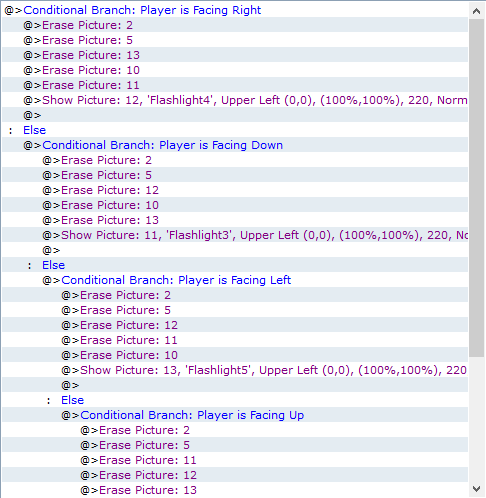
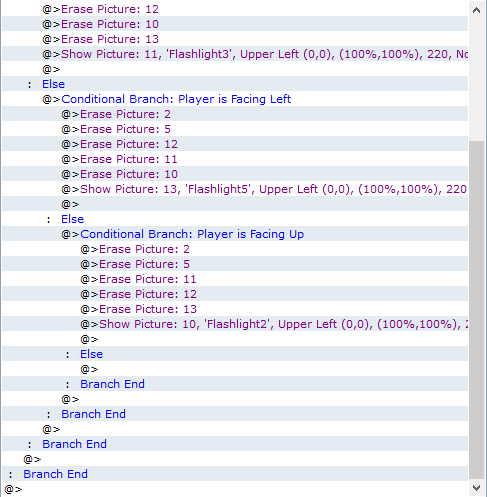
You need to replace the Erase picture 2 & 5 with any other images so it doesn't cause any conflicts. If needed you can add more erase images.
Here are the images I used for the light.




I will be putting up a demo if needed.
Photos: https://www.dropbox.com/s/o2nufbkrsgtl0ft/Photos.zip?dl=0
So what you want to do is create a new event that's set up as a parallel process and create some control variables that are set up like this...
You need to replace the Erase picture 2 & 5 with any other images so it doesn't cause any conflicts. If needed you can add more erase images.
Here are the images I used for the light.
I will be putting up a demo if needed.
Photos: https://www.dropbox.com/s/o2nufbkrsgtl0ft/Photos.zip?dl=0
 Galv's Keypad Input
Never mind re-read what you replied with and got the demo thank you for your help and i will defiantly be using this now.
Galv's Keypad Input
I need help using this. I know how to call it to an event and everything but i cant seem to get it working. So let's say my code is 123456 and i call the keypad and everything then what should i do to make that code work I've tried using a conditional branch with the variable as the code but it's not working please help.
Pages:
1
 Games - Tester
 Games - Other
