



 Full Games List
 Featured Games
 New Games
 Reviews
 Media
Media Images
 Blogs
Blogs Game Updates
 Images Feedback Summary
 Game Design Highlights
 Tutorials
 Articles
 Scripts
 Utilities / Plugins
 Resources
 Engines
 Engine Bulletins
 What is Makerscore?
 Past Events
 Achievements
 Misaos
 Forums
 Chat
Chat New to RMN?
 Full Store List
 RMN Music Pack (free)



 Profile
 Locker
 Play Lists
OMEGAMAGNUS11DA'S PROFILE

 Close
CloseSearch
Filter
 All
All Game Pages
 User Statuses
 +++ DynRPG - The RM2k3 Plugin SDK +++
I just recently added dynRPG for menu clock and now the battling is slower. I know one of the features is monster skill names being displayed longer but its really slowing the gameplay. Is there a way to turn that off? (so that monster skills doesn't slow the game too much)
[RM2K3] Windows 10 Updates Disabling RM2K3 From Going Full Screen? (Anotherfullscreen problem as well)
author=LockeZ
If you just want to install the old version of the driver, here you go. That's the old version of the driver from February for your Intel HD 520 graphics chip. The download is in the lefthand column - pick the .exe version and install it. Afterwards, do this to prevent driver updates from being automatically installed:
- Right click the Start button and select Control Panel.
- Make your way to System and Security.
- Click System.
- Click Advanced system settings from the left sidebar.
- Select the Hardware tab.
- Press the Device Installation Settings button.
- Choose No, and then press the Save Changes button.
Yeah those versions of 520 won't work because my 520 is custom manufactured for my computer (can't not install any version from intel site). It's weird because Windows thinks I have the same 520 or they found updates for my custom one, who knows.
I have prevented the driver updates after I did system restore but the farthest I could go back is 5/7. The constant 520 updates date back to 4/14 lol. The errors are still happening.
I guess I can just continue to edit and hope when it's time for release, others don't have the same issue as I do.
Ohhhhh good news: I found another .exe by Cherry that can make rpg_rt auto run in minimized and with anotherfullscreenmode! It's called "afm_game_starter". Even though AFSM isn't working for me, I won't get the fullscreen igdumdim32 error anymore, and a better chance of it being playable upon release (assuming users won't have the AFSM glitch as I do).
This is what happens when I use AFSM:

[RM2K3] Windows 10 Updates Disabling RM2K3 From Going Full Screen? (Anotherfullscreen problem as well)
author=LockeZ
Did it work before, or has it not worked since you got Windows 10?
You can easily revert those updates with System Restore, a tool built into Windows that lets you roll back system changes and software installations/removals without affecting your documents and personal files. Then you can simply disable non-critical updates. However, if RM2K3 hasn't ever worked, or hasn't worked in more than a month, that solution won't work.
It worked before the barrage of updates those couple of days. I would do system restore but I've downloaded some big programs/files that could be uninstalled and would be a hassle to reinstall. Thinking about it
[RM2K3] Windows 10 Updates Disabling RM2K3 From Going Full Screen? (Anotherfullscreen problem as well)
author=Kaempfer
It's not unusual for you to have both the 64 and 32 bit versions of a driver installed.
I have a few questions. What is your native resolution when running Windows? Have you tried connecting your device to a TV via HDMI cable to see if the TV can display it? Can you switch between full screen and non-fullscreen while running the game (with F5)?
The pics of 64 and 32 is to say that none have been deleted.
Native solution is 1080p (1920 x 1080). I also do not have an HDMI cable or access to a TV.
I can play test with minimized but if I bother going full with the f keys, the error still shows.
[RM2K3] Windows 10 Updates Disabling RM2K3 From Going Full Screen? (Anotherfullscreen problem as well)
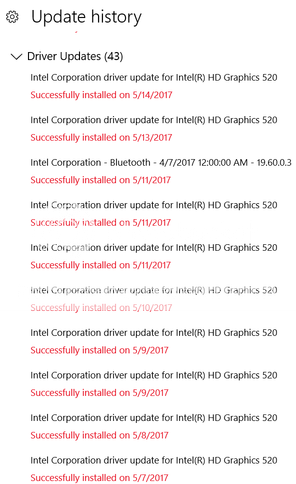
So windows 10 has been cranking out updates a lot over the past months, almost every day. The updates applied mostly to my graphics card: Intel HD Graphics 520 if this info can help). I guess windows 10 is refusing to use older software that rm2k3 needs. (Pic 1)
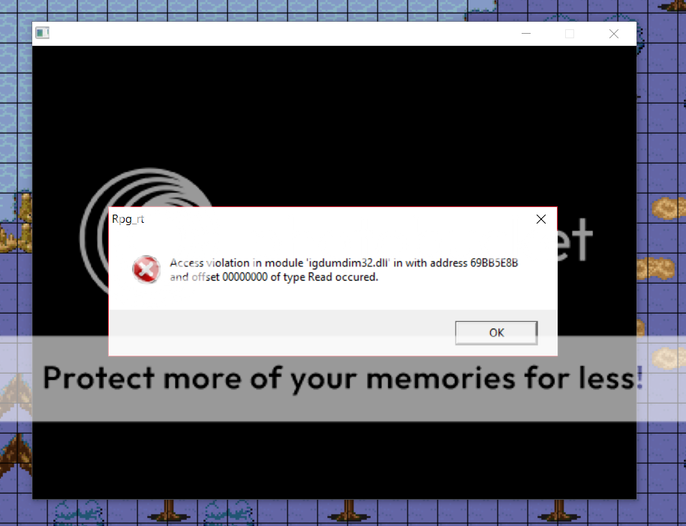
The updates may have been affecting my rm2k3's ability to play full screen, giving me this message: (Pic 2)
I can test play in the engine with minimized screen, but this will be a problem when players use RPG_RT since the default setup is fullscreen.
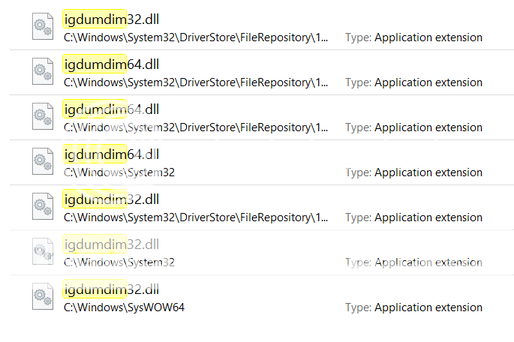
I've done all the compatibility settings for rpg_rt.exe and nothing. igdumdim32.dll has not been deleted from my computer but there is a 64 file version of it. (Pic 3)
On top of that anotherfullscreen no longer works. When executed, the rpg_rt.exe hides, my cursor disappears, and the only way out is Alt+F4.
I have seen a problem similar to mine once or twice with no addressed solution and I'm not necessarily an expert in rm2k3 troubleshooting, assistance needed.
The updates may have been affecting my rm2k3's ability to play full screen, giving me this message: (Pic 2)
I can test play in the engine with minimized screen, but this will be a problem when players use RPG_RT since the default setup is fullscreen.
I've done all the compatibility settings for rpg_rt.exe and nothing. igdumdim32.dll has not been deleted from my computer but there is a 64 file version of it. (Pic 3)
On top of that anotherfullscreen no longer works. When executed, the rpg_rt.exe hides, my cursor disappears, and the only way out is Alt+F4.
I have seen a problem similar to mine once or twice with no addressed solution and I'm not necessarily an expert in rm2k3 troubleshooting, assistance needed.


[RM2K3] How to hide resources and not trick RM3 game that they're gone
author=Dragnfly
When you do encrypt it, remember to keep the original somewhere else. Wouldn't want to need to fix bugs and then have to break into your own game.
But how do I encrypt it? Other than packing and the lackluster rm utility. There also isn't an encrypt option for when you want to create a game installer, like in the newer RM engines.
[RM2K3] How to hide resources and not trick RM3 game that they're gone
[RM2K3] How to hide resources and not trick RM3 game that they're gone
author=Magi
I'd advise against doing this, as it creates another layer of abstraction that potentially introduces new bugs and instability into your project. There's also the annoying side-effect of numerous anti-virus programs hating packed executables, mainly because it's a known method for distributing malware.
There are no other alternatives? I use the 'RM2K Plugin Utility' but it doesn't work well as I had hoped. Disable testplay and unopenable maps work fine but it does not convert all of my png files to xyz. I've also tried the unchecking and checking scenarios of the two sub-boxes. Renaming the others one by one to xyz makes them easily reversible.


[RM2K3] How to hide resources and not trick RM3 game that they're gone
I'd like to prevent a leak of my resourses by hiding the folders (not RTP folders) that allows the game to run without thinking the files are gone.
Simply right clicking for properties to mark 'hidden' and/or 'read-only' just won't cut it
Simply right clicking for properties to mark 'hidden' and/or 'read-only' just won't cut it
 Games - Tester
 Games - Other
