



 Full Games List
 Featured Games
 New Games
 Reviews
 Media
Media Images
 Blogs
Blogs Game Updates
 Images Feedback Summary
 Game Design Highlights
 Tutorials
 Articles
 Scripts
 Utilities / Plugins
 Resources
 Engines
 Engine Bulletins
 What is Makerscore?
 Past Events
 Achievements
 Misaos
 Forums
 Post History
 Chat
Chat New to RMN?
 Full Store List
 RMN Music Pack (free)



 Profile
 Locker
 Play Lists
WIDDERUNE'S PROFILE
Widderune

30
 Close
Close
Widderune was one of the main collaborators behind the WOLF RPG Editor English Project,
an English translation of WOLF RPGエディター.
He has retired from the translation work,
but he will try answering any questions regarding WOLF RPG Editor English.
Widderune Rumble Channel:
https://rumble.com/c/c-532377
an English translation of WOLF RPGエディター.
He has retired from the translation work,
but he will try answering any questions regarding WOLF RPG Editor English.
Widderune Rumble Channel:
https://rumble.com/c/c-532377
Search
Filter
 All
All Game Pages
 User Statuses
 Bhavacakra Maco
I did a small update to "Editor.exe" of WRPGE English 2.24Z
The Editor's command codes will appear slightly different, but it will help you see the order of commands on screen.
The "|" help you see the different levels of coding.
(No updates to the "Extras" folder yet. Sorry.)
https://twitter.com/Widderune/status/1285728712277860355
The Editor's command codes will appear slightly different, but it will help you see the order of commands on screen.
The "|" help you see the different levels of coding.
(No updates to the "Extras" folder yet. Sorry.)
https://twitter.com/Widderune/status/1285728712277860355
Bhavacakra Maco
There was an error discovered and reported to me by user Reptile https://twitter.com/Reptile94089979
After losing a battle, the player's characters were still in the 0 HP & Fainted state within the game menu.
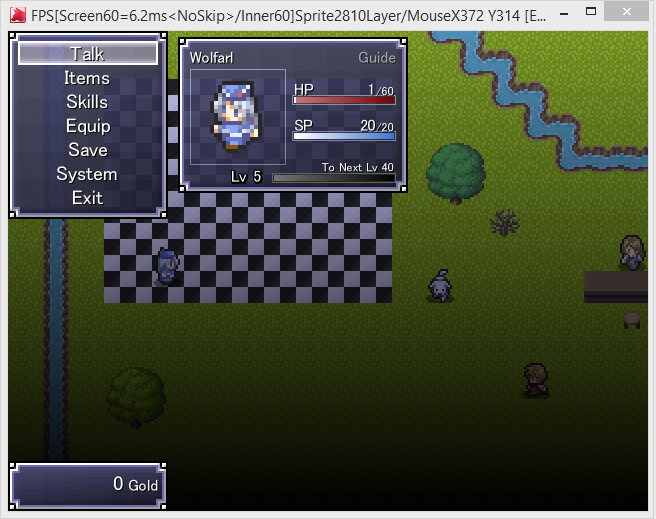
To fix the problem (unless I forgot), all you need to do is go to Common Event 75, Line 210.
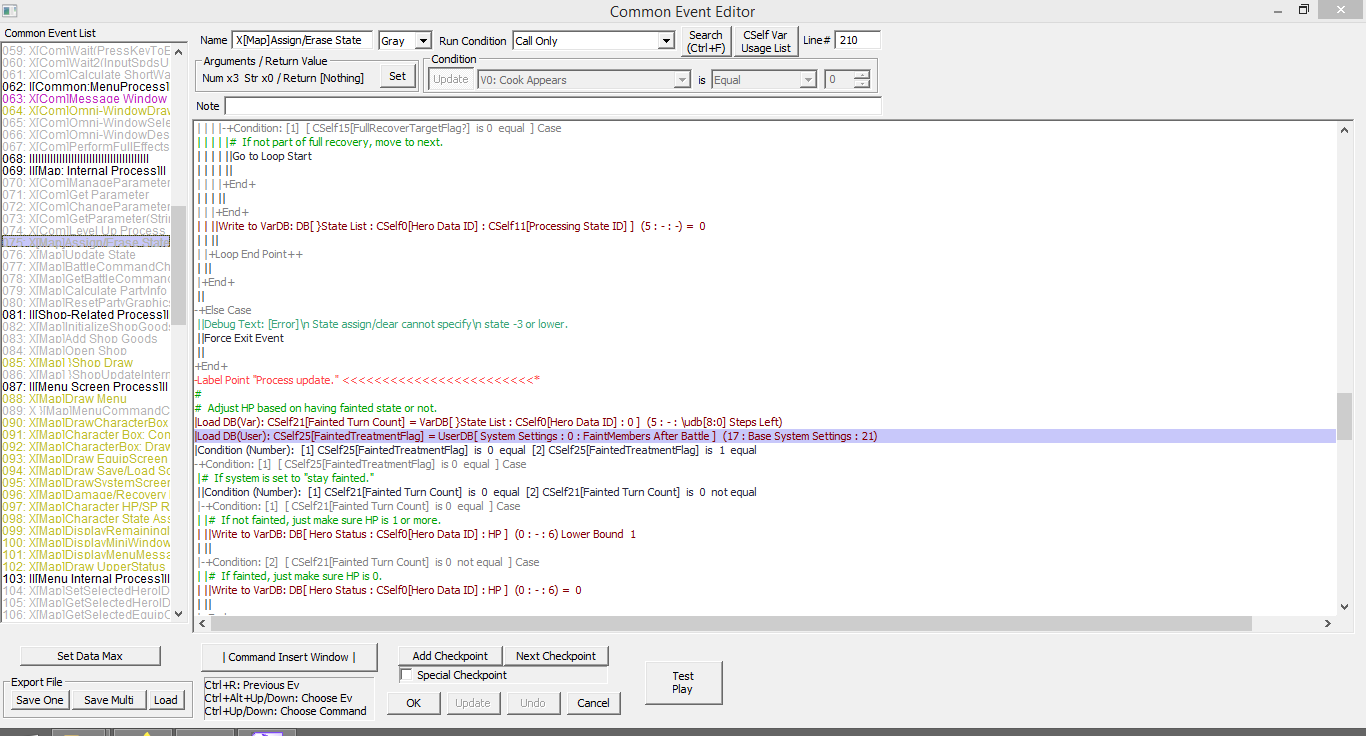
It should be a "Load DB" command for the User Database.
Change the entries for Type 17: Data 0: Field 21.
If done correctly, there should be a "FaintMembers After Battle" within the entry.
Thank you for your patience.
After losing a battle, the player's characters were still in the 0 HP & Fainted state within the game menu.
To fix the problem (unless I forgot), all you need to do is go to Common Event 75, Line 210.
It should be a "Load DB" command for the User Database.
Change the entries for Type 17: Data 0: Field 21.
If done correctly, there should be a "FaintMembers After Battle" within the entry.
Thank you for your patience.
Bhavacakra Maco
Attention! :
Fixed "Save/Load Game" glitch
of the "(Blank Data With Base System)" Data folder.
Check your "Save/Load Game" function.
If it is not working and you see the "green ribbon" error message, it's the glitch.
I only found this glitch when I was designing my own game.
It is only with the above mentioned folder, not anything else.
If anyone who is using the OLD Base System (before the fix),
please save & export your work and then slowly load & import it into the FIXED Base System.
I am sorry for the mess, but it cannot be overlooked.
Thank you.
Fixed "Save/Load Game" glitch
of the "(Blank Data With Base System)" Data folder.
Check your "Save/Load Game" function.
If it is not working and you see the "green ribbon" error message, it's the glitch.
I only found this glitch when I was designing my own game.
It is only with the above mentioned folder, not anything else.
If anyone who is using the OLD Base System (before the fix),
please save & export your work and then slowly load & import it into the FIXED Base System.
I am sorry for the mess, but it cannot be overlooked.
Thank you.
Bhavacakra Maco
The RPG Makers tend to have smaller resolutions.
RPG Maker MV's screen resolution is 816x624.
I believe all the RPG Maker resolutions are fixed to one size.
RPG Maker MV's screen resolution is 816x624.
I believe all the RPG Maker resolutions are fixed to one size.
Bhavacakra Maco
Good. Like I said 1280x720 is big for Windowed mode, so others (like me) would set Config to Full Screen.
Did you test it in Full Screen?
You better try it, just to be sure.
Did you test it in Full Screen?
You better try it, just to be sure.
Bhavacakra Maco
Bhavacakra Maco
You need to reconfigure your tilesets.
You can do quarter-tile setup for passable on some of your tiles. That way the character can be closer to objects and not have a major "invisible wall" look.

You can also give your tiles a Matches Lower Layer property, so you can put flowers in front of a building without altering the building's passable properties.

You might need to adjust your Basic Game Settings.
When you are running your game in Windowed mode, everything looks okay. But because you are using 1280x720 (which is rather big for a window), people like me are more likely to set the Config for Full Screen.
When your game is running in Full Screen, the images on screen look rough and your fonts appear jagged.
I suggest changing your Picture Scale Method.

Change your Picture Scale Method to "Smooth and Fuzzy". It will do anti-aliasing for everything on screen. It will fix your jagged font problem, but you will need to test to see how it treated your other images (From moving characters, tiles, and message images).
And I would also work on your "room" sizes (namely the "shop"), because a lot of the rooms appear big and bare. I would add more decor and NPCs. And if not, I would make the "rooms" smaller.
Coming from a gamer and game-designer perspective, I suggest you try doing all the above if you can.
Like I said earlier, your game does show promise.
You can do quarter-tile setup for passable on some of your tiles. That way the character can be closer to objects and not have a major "invisible wall" look.
You can also give your tiles a Matches Lower Layer property, so you can put flowers in front of a building without altering the building's passable properties.
You might need to adjust your Basic Game Settings.
When you are running your game in Windowed mode, everything looks okay. But because you are using 1280x720 (which is rather big for a window), people like me are more likely to set the Config for Full Screen.
When your game is running in Full Screen, the images on screen look rough and your fonts appear jagged.
I suggest changing your Picture Scale Method.
Change your Picture Scale Method to "Smooth and Fuzzy". It will do anti-aliasing for everything on screen. It will fix your jagged font problem, but you will need to test to see how it treated your other images (From moving characters, tiles, and message images).
And I would also work on your "room" sizes (namely the "shop"), because a lot of the rooms appear big and bare. I would add more decor and NPCs. And if not, I would make the "rooms" smaller.
Coming from a gamer and game-designer perspective, I suggest you try doing all the above if you can.
Like I said earlier, your game does show promise.
Pages:
1
 Games - Tester
 Games - Other
