



 Full Games List
 Featured Games
 New Games
 Reviews
 Media
Media Images
 Blogs
Blogs Game Updates
 Images Feedback Summary
 Game Design Highlights
 Tutorials
 Articles
 Scripts
 Utilities / Plugins
 Resources
 Engines
 Engine Bulletins
 What is Makerscore?
 Past Events
 Achievements
 Misaos
 Forums
 Post History
 Chat
Chat New to RMN?
 Full Store List
 RMN Music Pack (free)



+++ DYNRPG - THE RM2K3 PLUGIN SDK +++
Posts

 Cherry
 View playlists
 Close
CloseI don't know what you mean exactly? How should this work?
@Updating DynRPG: I know. But please mind I have a business running here and actually more work than time. I want to update DynRPG too, since I have many great ideas for it.
@Updating DynRPG: I know. But please mind I have a business running here and actually more work than time. I want to update DynRPG too, since I have many great ideas for it.
The database file that stores actors, skills, items, etc...
I want to have a translation of the game, right? I could present a choice to the player at the beginning, something like "Select language: Choice 1 / Choice 2", and based on a switch, present the corresponding text. HOWEVER, that still leaves the battle system strings untranslated. Monster names... item names... see?
So my idea is, that upon the selection, the plugin uses Database 1 for Language 1, and Database 2 for Language 2. And that in turn is saved, so when the user opens the game again, that selection is loaded up.
Makes sense?
I want to have a translation of the game, right? I could present a choice to the player at the beginning, something like "Select language: Choice 1 / Choice 2", and based on a switch, present the corresponding text. HOWEVER, that still leaves the battle system strings untranslated. Monster names... item names... see?
So my idea is, that upon the selection, the plugin uses Database 1 for Language 1, and Database 2 for Language 2. And that in turn is saved, so when the user opens the game again, that selection is loaded up.
Makes sense?

@Cherry: Transparency bugfix first (ips patch maybe?), then a full update later. We all realize you are a busy individual. :)
author=Large
The database file that stores actors, skills, items, etc...
I want to have a translation of the game, right? I could present a choice to the player at the beginning, something like "Select language: Choice 1 / Choice 2", and based on a switch, present the corresponding text. HOWEVER, that still leaves the battle system strings untranslated. Monster names... item names... see?
So my idea is, that upon the selection, the plugin uses Database 1 for Language 1, and Database 2 for Language 2. And that in turn is saved, so when the user opens the game again, that selection is loaded up.
Makes sense?
Yes, this would be possible. You could simply have two files english.ldb and german.ldb and have the plugin copy the right file to RPG_RT.ldb in onStartup. You could display a language selector the first time and store the setting in a file. If the user wants to change the language later, you could put an ingame option which calls a plugin function which deletes the "selected language setting" file and restarts the game so that the language selector is shown again.

It might be rather obscure, but is there any way to edit battle processing so that when enemy turns clash with a player's when they use a skill, the event code that's supposed to follow the action doesn't get canceled? It's wreaking havoc on what would otherwise be a completed battle system.
Going further, I execute my skills in my project by using dummy skills in the database with unique MP costs, and then having an event determine the MP used in order to figure out which skill codes to execute, which results in fancier animated, multi-hit skills with a plethora of additional effects...
...But again, if an enemy acts at the same time, all that goes out the window and the dummy skill still eats the character's MP. And that's doubly bad when my battle system is fast and losing MP to interruption like this could mean death.
Am I making sense here? I know some of the oldies know what I'm talking about. Anyway, if some kind of fail-safe could be implemented for that, I think that's all I could ask for from DynRPG. In terms of my project anyhow. It's the last technical issue I'm having that I can do absolutely nothing about.
Going further, I execute my skills in my project by using dummy skills in the database with unique MP costs, and then having an event determine the MP used in order to figure out which skill codes to execute, which results in fancier animated, multi-hit skills with a plethora of additional effects...
...But again, if an enemy acts at the same time, all that goes out the window and the dummy skill still eats the character's MP. And that's doubly bad when my battle system is fast and losing MP to interruption like this could mean death.
Am I making sense here? I know some of the oldies know what I'm talking about. Anyway, if some kind of fail-safe could be implemented for that, I think that's all I could ask for from DynRPG. In terms of my project anyhow. It's the last technical issue I'm having that I can do absolutely nothing about.
I do remember the method of using the MP to know which skill was cast before.
However, I'm pretty sure that you can KNOW for certain which skill is used with DynRPG, by getting the skill ID from the database. That could turn on a switch so the effects are applied in the system. I believe that could get rid of the clashing actions.
However, I'm pretty sure that you can KNOW for certain which skill is used with DynRPG, by getting the skill ID from the database. That could turn on a switch so the effects are applied in the system. I believe that could get rid of the clashing actions.
Yes, you can get the skill, its target, etc. with DynRPG.
About the cancellation problem: I think it would be possible to fix it by controlling the ATB bar values from a DynRPG plugin, so that the plugin prevents monsters from reaching 100% ATB while an action is still in progress...
About the cancellation problem: I think it would be possible to fix it by controlling the ATB bar values from a DynRPG plugin, so that the plugin prevents monsters from reaching 100% ATB while an action is still in progress...
Oh wow, all of that information could be gotten with dynRPG? That would....have saved a lot of time if I didn't already finish nearly all my skills using the MP method. /headdesk
But it sounds a hell of a lot more efficient. Stopping monster ATB bars from filling when an action is being taken would also fix the problem I suppose.
But what if their bar's already filled? Or does that actually not happen? I get a feeling that the second's lag between choosing the skill and the code executing causes ATBs to move forward, which results in monster's getting their turns mid-action.
...But I could be wrong.
But it sounds a hell of a lot more efficient. Stopping monster ATB bars from filling when an action is being taken would also fix the problem I suppose.
But what if their bar's already filled? Or does that actually not happen? I get a feeling that the second's lag between choosing the skill and the code executing causes ATBs to move forward, which results in monster's getting their turns mid-action.
...But I could be wrong.
I think you are right with your last suggestion, but I didn't test it.
When a monster reaches 100% ATB, it immediately executes an action unless a battle animation is shown or you are in a menu.
When a monster reaches 100% ATB, it immediately executes an action unless a battle animation is shown or you are in a menu.

author=Cherry
I don't know what you mean exactly? How should this work?
@Updating DynRPG: I know. But please mind I have a business running here and actually more work than time. I want to update DynRPG too, since I have many great ideas for it.
Just take your time on it. Even if you get only like 1 hour a week or so to do so, this adds up. If I knew enough to help, I definitely have the exact opposite problem.
author=Pepsi
@Cherry: Transparency bugfix first (ips patch maybe?), then a full update later. We all realize you are a busy individual. :)
Yea, or just have a plugin or something until the next update.
Is there way to have something like an Item Subset (maybe through a patch)? I want to have it so certain items don't show up in the item list, but you can use them up. Sort of like Rikku's Use command, or the Alchemy Items in Atelier Iris. I could do this with skills and variables, but it just isn't the same.

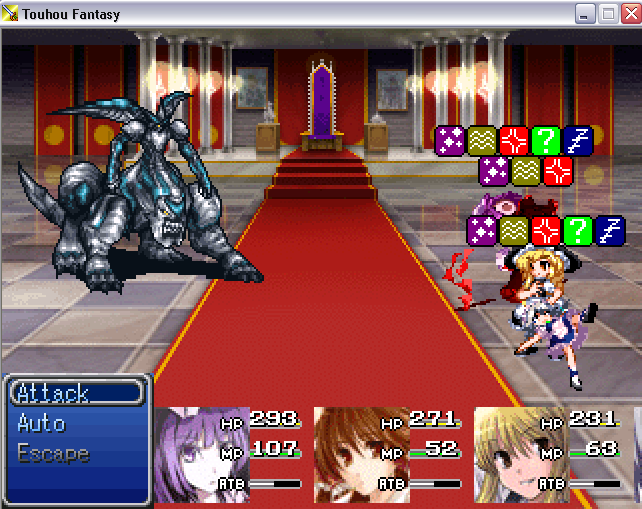
Bringing this back up now. It was one of the very first things done for DynRPG as I recall, as I suggested to Cherry forever ago. Now, I'm bringing this up again to see if anyone would be interested in customizing this more. As you can see, the icons don't exactly line up that well with characters (this is using battle animations too, so I don't know what it's based off of originally).
Now, I brought this up a long time ago, but would it somehow be possible to have these icons down by portraits (if using the portrait system) or in the menu (if using the menu system), while at the same time limiting it to like...4-5 icons, or 1, and having it cycle through the statuses a character has? That would make the screen far less cluttered and make it more organized, but again, I don't know if this possible to do or not, or how hard it would be to do...nor if it will mess with anything in anyone's projects or not. ^^;
If it's portraits, then you don't need a plugin just a common event and a whole lot of condition checks (and facesets). Nah, you could do some editing around the faceset. But the problem being then it'll obscure the facesets after a certain point. And the hp/mp/atb meters.
This does support transparency. Perhaps invest in see-through status symbols?
This does support transparency. Perhaps invest in see-through status symbols?
Well, that's why I'm asking as well if it's possible to make the icons cycle through one another, or limit how many appear at once and cycle through that way.
I don't know what you're talking about though. I'm kinda lost ^^;;
I don't know what you're talking about though. I'm kinda lost ^^;;
Xeno was just asking if it were possible to move the status icons elsewhere. Like above each character's battle portraits. As well as if it were possible to limit the amount shown and cycle through them at a set interval.
Based on that screenshot though, I can agree that placing them ON the characters is probably the worst place they could have gone no matter how you try to spin it. But hey!
Based on that screenshot though, I can agree that placing them ON the characters is probably the worst place they could have gone no matter how you try to spin it. But hey!
I'm thinking it's set to 96x96 battle animations too, since most of mine are 76 in height (so that they don't overlap each other TOO much. 76 height overlaps bad enough as you can see). So you can see the status icons for Sakuya at the bottom there being above Marisa there, and you can't even tell who has what statuses at the top at all. It almost looks like Patchouli (the top one) has both rows of statuses...but yes, that is what I was asking. ^^;
Quick edit, because pictures are worth a thousand words. But is this what you were referring to, Xeno?

Yes, that is exactly what I'm referring to. Something like that to keep the screen from being cluttered, and somehow making the icons cycle through one another if there's more than 4 statuses on one character. The question is, how doable is that (both setting it above the right portraits, so that Cloud's statuses are above Cloud's portrait and not above Barret's portrait, and setting it so that if you have 5 statuses, you'd see the 4 icons, but the first icon would cycle through between the first and the fifth)?
You would need onBattleStatusWindowDrawn, which has an "x" parameter in order to find out if the status window is shifted to the right because of the Attack/Auto/Escape window (as shown in the screen).
Of course, things would get easier if this window would have been removed (using the NoAutoBattle-Patch).
Of course, things would get easier if this window would have been removed (using the NoAutoBattle-Patch).
Hmm...I keep forgetting that patch exists, though that's the only way to escape 100% easily when you have First Strike (not that that should matter). That patch doesn't bug anything up, does it? Like would I be able to go back out from a character's menu to choose another character at all or...? I probably should keep an extra RPG_RT around just in case I need it if it's applied to that at all.
So I'm assuming that's how to position it right? I know nothing about C++ so I can't do this, but that's what I'm assuming from that. So that's at least possible...but what about the cycling of icons? Is that possible at all?
So I'm assuming that's how to position it right? I know nothing about C++ so I can't do this, but that's what I'm assuming from that. So that's at least possible...but what about the cycling of icons? Is that possible at all?
You can choose another character by pressing left/right. The idea about using this patch was making the development of such a plugin easier, but as said it would also be possible without (the difference is that without the patch, the horizontal position of the faces is not fixed because the autobattle menu shifts them to the right).
Of course cycling would also be possible.
Of course cycling would also be possible.

