



 Full Games List
 Featured Games
 New Games
 Reviews
 Media
Media Images
 Blogs
Blogs Game Updates
 Images Feedback Summary
 Game Design Highlights
 Tutorials
 Articles
 Scripts
 Utilities / Plugins
 Resources
 Engines
 Engine Bulletins
 What is Makerscore?
 Past Events
 Achievements
 Misaos
 Forums
 Post History
 Chat
Chat New to RMN?
 Full Store List
 RMN Music Pack (free)



[RMMV] MAKING BACKGROUNDS
Posts
Pages:
1

 MagiaVW
 View playlists
 Close
CloseYeah, not the best way for me to introduce myself, but I honestly need help. I was an English major so I have zero clue when it comes to programming. I try to add plugins, but they don't seem to work (yes, I made sure to go into plugin manager and apply them). It says I need three in-game screenshots before I can submit a game and ask for some proper help. I want my game to actually look like my characters are walking through a place (like they are in Fear And Hunger ). Does anyone know how I can at least get that done?

I think you're referring to doing parallax backgrounds instead of using the tile system:

You have to just draw your entire background separately, while keeping your game's screen size in mind. Then you can add it to your map in map properties and use Yanfly's restrictions plug in to block off the parts you don't want the player to walk through.
As for your plugins not working, I know that if you use a lot of different plugins from a lot of different sources they're not always compatible with each other. And also the stacking order matters for certain plugins, for example Yanfly's core plugin has to be at the top of the plugin manager in order for it to work.
And for taking screenshots, if you have windows 10 you can use the snipping tool by just typing "snipping tool" into your start menu search thingy and crop out a screen shot while your game is running.
Hope this helps.
You have to just draw your entire background separately, while keeping your game's screen size in mind. Then you can add it to your map in map properties and use Yanfly's restrictions plug in to block off the parts you don't want the player to walk through.
As for your plugins not working, I know that if you use a lot of different plugins from a lot of different sources they're not always compatible with each other. And also the stacking order matters for certain plugins, for example Yanfly's core plugin has to be at the top of the plugin manager in order for it to work.
And for taking screenshots, if you have windows 10 you can use the snipping tool by just typing "snipping tool" into your start menu search thingy and crop out a screen shot while your game is running.
Hope this helps.
author=daiconv
I think you're referring to doing parallax backgrounds as opposed to using the tile system.
You have to just draw your entire background separately, while keeping your game's screen size in mind. Then you can add it to your map in map properties and use Yanfly's restrictions plug in to block off the parts you don't want the player to walk through.
As for your plugins not working, I know that if you use a lot of different plugins from a lot of different sources they're not always compatible with each other. And also the stacking order matters for certain plugins, for example Yanfly's core plugin has to be at the top of the plugin manager in order for it to work.
Hope this helps.
Draw it all myself? That's gonna take a couple of decades. Having plugins incompatible with different ones is gonna be an issue since I need ones that are in one core and others from a different one...
Thank you for actually answering, though!

The fear and hunger screenshots look like they are using tiles, but with a parallax foreground layer for the fog.
There is definitely a plugin for foreground fog layer, I've seen it in lots of games.
They aren't using the default "RTP" tiles, not sure if they are unique to that game or come from elsewhere.
Another thing I'm possibly seeing is a "fog of war" where the map is covered in blackness and erased after you explored an area. It's a common mechanic but I haven't seen it elsewhere. Certainly something a plugin *could* do, but don't know if one exists already.
I'd actually suggest to pull back your scope, and concentrate on the things you are good at. If that's writing dialogue, you can make an interesting little game to show off your skills even using basic maps.
If you can draw a little, make custom sprites and character portraits. If you can't, use character generators.
ps: you don't need a game page to ask for feedback, you can put screenshots in forum posts or the discord
There is definitely a plugin for foreground fog layer, I've seen it in lots of games.
They aren't using the default "RTP" tiles, not sure if they are unique to that game or come from elsewhere.
Another thing I'm possibly seeing is a "fog of war" where the map is covered in blackness and erased after you explored an area. It's a common mechanic but I haven't seen it elsewhere. Certainly something a plugin *could* do, but don't know if one exists already.
I'd actually suggest to pull back your scope, and concentrate on the things you are good at. If that's writing dialogue, you can make an interesting little game to show off your skills even using basic maps.
If you can draw a little, make custom sprites and character portraits. If you can't, use character generators.
ps: you don't need a game page to ask for feedback, you can put screenshots in forum posts or the discord
author=coelocanth
The fear and hunger screenshots look like they are using tiles, but with a parallax foreground layer for the fog.
There is definitely a plugin for foreground fog layer, I've seen it in lots of games.
They aren't using the default "RTP" tiles, not sure if they are unique to that game or come from elsewhere.
Another thing I'm possibly seeing is a "fog of war" where the map is covered in blackness and erased after you explored an area. It's a common mechanic but I haven't seen it elsewhere. Certainly something a plugin *could* do, but don't know if one exists already.
I'd actually suggest to pull back your scope, and concentrate on the things you are good at. If that's writing dialogue, you can make an interesting little game to show off your skills even using basic maps.
If you can draw a little, make custom sprites and character portraits. If you can't, use character generators.
ps: you don't need a game page to ask for feedback, you can put screenshots in forum posts or the discord
I don't want to look exactly like Fear And Hunger. It's not a horror game. It's the style of where it looks like you're walking down actually roads to get places and not walking on brick paths to buildings the same size as you are.
As for backing up the scope, I have no ideas for any games which are basically just dialogue. It doesn't sound like it'd be very fun either.
With apologies to the Fear and Hunger devs for using their screenshot as a reference...
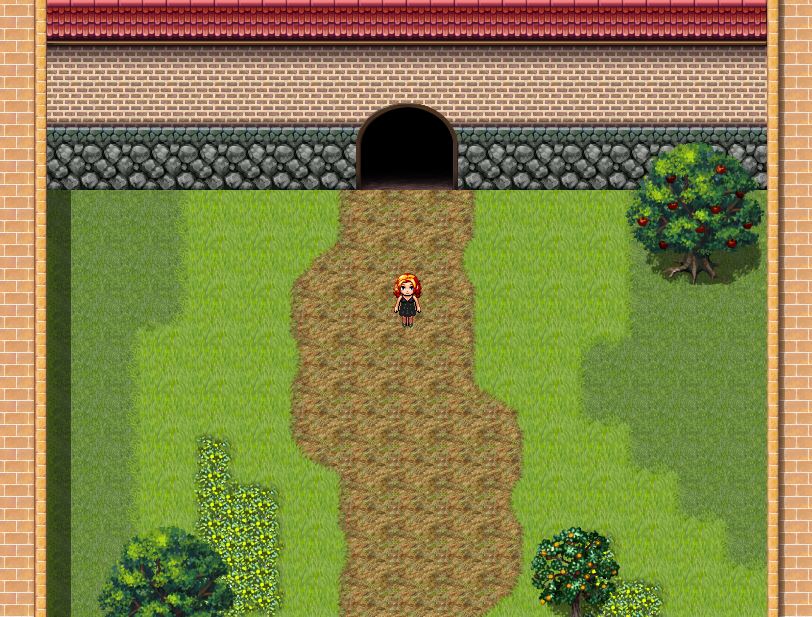
You can make something like this in a few minutes using the editor.
(Tileset is "first seed material: town of beginnings", a DLC pack - I mostly used it because it has 2-tile tall doorways, and chips to make the pathway edges look more natural)
The character sprite took me a lot longer than a few minutes, but the process is described in https://rpgmaker.net/forums/topics/24062/
You can make something like this in a few minutes using the editor.
(Tileset is "first seed material: town of beginnings", a DLC pack - I mostly used it because it has 2-tile tall doorways, and chips to make the pathway edges look more natural)
The character sprite took me a lot longer than a few minutes, but the process is described in https://rpgmaker.net/forums/topics/24062/
Well, it looks like I'm gonna have to use Of-Nihility's sprites since I ended up paying for them. Unfortunately, she doesn't have any battler sprites or clothes to use.
You'll get away with using a different template for battler sprites (or you can use a battle system which doesn't need them).
As for clothes, search for "pixel art" tutorials and find a tool that works for you.
What worked for me is to use layers and trace the template for fitted clothing parts, while drawing free hand for the loose parts.
As for clothes, search for "pixel art" tutorials and find a tool that works for you.
What worked for me is to use layers and trace the template for fitted clothing parts, while drawing free hand for the loose parts.
Pages:
1

