New account registration is temporarily disabled.
  • Add Review
  • Subscribe
  • Nominate
  • Submit Media
  • RSS
WIP Cave Map!!
  • StarlightShoals
  • Added: 04/03/2018 02:07 PM
  • Last updated: 01/30/2026 10:19 AM
  • 2465 views

Posts

Pages: 1
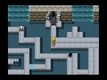
Here's a work-in-progress cave map!! I still need to add treasure chests and enemies and stuff...oh, and the black circle on the ground will teleport you to a cliff higher up on the map! I'm planning to implement the circles both as a puzzle feature and a convenient fast-travel mechanic, which should be kinda neat, maybe. :3

Also wondering if I should darken the screen a little when the player's in the caves...hmm...
Dyluck
For thousands of years, I laid dormant. Who has disturbed my slumber?
5184
The mapping looks nice, but I don't think the black pits with light brown edges were meant to be used with the darker brown floor tiles. You can see those straight lines between the edges of the pits and the dark brown floor.

I think darkening the screen a little would be good too, but not too dark.
Yeah, I see what you mean, Dyluck -- I think the reason is because the dark floor is normally supposed to be a ceiling tile, but I used that instead of the regular light brown tiles because I think it suits the inside of a cave better. :/

Maybe I'll test using the light brown tiles with a darker tint to the screen and see if that works best~ ^o^
Dyluck
For thousands of years, I laid dormant. Who has disturbed my slumber?
5184
Are you using the RTP Dungeon_A2 or Outside_A2 in this tileset? If so, there should be a special "dark hole" tile with transparent background, that you can put on top of any regular floor tiles.
I looked for it and the closest things I can find are the "Darkness" tile and the ones named "Hole (Stone Floor)", "Hole (Dirt Cave)" and stuff like that...I was using the dirt cave one, and I also realized I was using the dark ground tile and not the ceiling tile -- the problem is just that the dirt-cave-hole tile is apparently designed for the regular ground tile, not the dark one, which is a bit annoying. >_>

I guess I'll just go ahead and redo the floor with the lighter tiles, darken the screen and see if that looks better to me. Thanks a bunch for the help and suggestions, Dyluck!!
Dyluck
For thousands of years, I laid dormant. Who has disturbed my slumber?
5184
I was referring to this one in Dungeon_A2:


Although this one doesn't have as much of the little cliff going into the hole, like the one you were using.
Yeah I did give that one a try after your earlier comment, it looked the best of any of them mixed with the dark ground tile :D But it still leaves it with a grey metallic edge, not as noticeable but still there, so I figured I'd just overhaul the floor with lighter tiles. And I just finished doing that! ^-^

I think it looks a lot better now, so eh, I'm happy with it. I made the screen darker by a slight bit and that seems to give it enough of a caverny feel. Now I know what to do with the rest of the cave maps as I make them!!
Pages: 1