



 Full Games List
 Featured Games
 New Games
 Reviews
 Media
Media Images
 Blogs
Blogs Game Updates
 Images Feedback Summary
 Game Design Highlights
 Tutorials
 Articles
 Scripts
 Utilities / Plugins
 Resources
 Engines
 Engine Bulletins
 What is Makerscore?
 Past Events
 Achievements
 Misaos
 Forums
 Chat
Chat New to RMN?
 Full Store List
 RMN Music Pack (free)



 Profile
 Locker
 Play Lists
ENGLESNELLGROVE'S PROFILE

 Close
CloseSearch
Filter
 All
All Game Pages
 User Statuses
 Using a variable as multiple switches.
Kazesui,
I'm not saying my code is better or more powerful or even more elegant. I could never have imagined your code, because I didn't know how to convert from base-10 to binary before reading your tutorial! I learned a lot from your tutorial and from comparing it to the method I devised. Thanks.
E/S
I'm not saying my code is better or more powerful or even more elegant. I could never have imagined your code, because I didn't know how to convert from base-10 to binary before reading your tutorial! I learned a lot from your tutorial and from comparing it to the method I devised. Thanks.
E/S
Using a variable as multiple switches.
If I understand correctly, Kazesui's method is better for mass encoding and decoding of switches. Mine seems to be better for encoding fewer switches and checking their status with less lines of code.
Kazesui's method takes more steps to encode and decode. Switch #1, basically, is turned on or off by adding or subtracting 1 from the variable. That's simple; but switch #5 is turned on or off by adding or subtracting 16! As you can see in his code examples, he needs many lines of code to communicate the encoded value of any given switch number. By my math, you'd have to rename Switch #1 to Switch #0, then do something like this to find the encoded value:
Switch # encoded value = 2^(Switch #)
By that math, Switch #4 (previously known as Switch #5) can be turned on or off by adding or subtracting 16. I guess that could work, but because RM2k3 can't easily change variables by powers of n, the encoding and decoding uses several lines of code, including some limited looping or repeating conditional branches (which, again, you see in Kazesui's examples). As I'm saying, this is probably better for mass encoding and decoding. You can code five switches into a number as low as 31. (By my method, only three switches can be encoded in 105.)
But what my method can do is this:
Switch 3 is turned off or on by multiplying or dividing by 3; no need to convert. And, unless my math is faulty, you can check the status of an encoded switch simply by checking for a remainder after division by the switch number.
Make sense?
E/S
Kazesui's method takes more steps to encode and decode. Switch #1, basically, is turned on or off by adding or subtracting 1 from the variable. That's simple; but switch #5 is turned on or off by adding or subtracting 16! As you can see in his code examples, he needs many lines of code to communicate the encoded value of any given switch number. By my math, you'd have to rename Switch #1 to Switch #0, then do something like this to find the encoded value:
Switch # encoded value = 2^(Switch #)
By that math, Switch #4 (previously known as Switch #5) can be turned on or off by adding or subtracting 16. I guess that could work, but because RM2k3 can't easily change variables by powers of n, the encoding and decoding uses several lines of code, including some limited looping or repeating conditional branches (which, again, you see in Kazesui's examples). As I'm saying, this is probably better for mass encoding and decoding. You can code five switches into a number as low as 31. (By my method, only three switches can be encoded in 105.)
But what my method can do is this:
Switch 3 is turned off or on by multiplying or dividing by 3; no need to convert. And, unless my math is faulty, you can check the status of an encoded switch simply by checking for a remainder after division by the switch number.
Make sense?
E/S
Using a variable as multiple switches.
Yes, it is something like that. If I figure out just what he's doing there, I might be able to compare the methods better. (I suspect his method is more elegant and powerful.)
E/S
E/S
Using a variable as multiple switches.
I just wrote this up for my blog. I thought it might be useful for others to read it; and it would certainly be useful for me to see any comments or corrections. Give it a read if you have the time. (By the way, I'm a completely untrained programmer. I assume this stuff is pretty basic, but it's completely new to me.)
---
I am working within a branching conversation. You are talking with a character, and their responses change depending on what you say or do. Certain responses from the character lead toward a particular conclusion to the conversation. Once you have received these certain responses, the conversation ends.
I'll make this example more concrete:
Say you are a detective, and you are interrogating a suspect. You want to discover three holes in the suspect's alibi. Once you discover three holes, you know you will be able to convict the suspect.
So, when you are programming this hypothetical interrogation in RPG Maker 2003, you need to indicate to the program a) when a hole in the alibi is discovered and b) when three holes have been discovered.
You might simply create a counter (a variable) that increases whenever a hole is discovered. When the counter hits three, the conversation ends, and you've got your suspect. However, unless you ensure that the player doesn't ask the same question twice (and rediscover the same hole in the alibi), the counter will increase whenever any given hole is discovered or rediscovered. So the player could simply ask the same question three times, the game will assume he's found all the holes, and the conversation will end.
You can solve this problem by turning each hole into a switch. Then, instead of counting up to three and ending the conversation, the program turns on three different switches. When all three have turned on, make the conversation end.
I've programmed certain parts of "Aniktophlox" like this, and I find myself with lots and lots of switches! Today I discovered a better, more code-efficient way to do this.
I started thinking about the problem like this: instead of using a variable as a counter, maybe it could be used as a collection of switches. The easiest way to imagine this was to imagine a variable in which each digit is a switch: 001 (or 1) would mean the third switch is on; 010 would mean the second switch is on; 110 would mean the first two switches are on; and so on. But this didn't work, because I couldn't get RPG Maker 2003 to check those digits in the way I imagined. I tried using division and modulus operations, but nothing worked out.
Somehow, I hit on the idea of using prime numbers. I didn't know how I would use prime numbers, but I realized I could think of the problem like this: 2 contains 1 and 2; 3 contains 1 and 3, but not 2; 5 contains 1 and 5, but not three; and so on. I felt as though I was on the right track. I tried throwing a few non-prime numbers into the mix, but that idea didn't pan out. Eventually I decided that I needed to work with bigger numbers, so I took 3, 5, and 7 -- three primes -- and started multiplying them together:
3x3=9,
3x5=15,
3x7=21,
5x5=25,
5x7=35,
and so on...
I wrote down all these multiplication products and started dividing each one by 3, by 5, and by 7; then I looked at which multiples left remainders. {In RPG Maker 2003, you can manipulate a variable in this way: divide it by a given number and then change the original variable into what remains after the division. In my fantasy, I could somehow do this operation and then check if the variable had become a zero (0 = a switch turned off, in my original idea) or not (1 = a switch turned on, in my original idea).} So I started getting these numbers:
35
divided by 3 leaves a remainder of 2 ("3" is "on");
divided by 5 leaves no remainder ("5" is "off");
divided by 7 leaves no remainder ("7" is "off").
As I went through all my multiplication products, I eventually found all the various combinations of my three imagined switches being either off or on. I was amazed! But I had gone so far from my original conception of each digit as an imaginary switch (001, 010, 100, and so on) that I didn't know how to implement what I'd found. I thought a while, feeling very confused but very sure that I was figuring something out. Ultimately, I set up my version of the interrogation program like this:
I first set the variable to 1. This is my imaginary, multi-switch variable. At 1, every switch is off. Each imaginary switch is a prime number; and to turn a switch on, you simply multiply the variable by that prime number: e.g., 1x3=3. Now, if you check the variable (set to 3) by dividing by any given switch (i.e., prime number), here's what you get:
3
divided by 3 leaves no remainder ("3" is "off");
divided by 5 leaves a remainder ("5" is "on");
divided by 7 leaves a remainder ("7" is "on").
This is the opposite of how I want it! The imaginary 3 switch was suppsed to be on, not off! But this is easily remedied: instead of programming a remainder as an "on," program it as an "off!" Thus:
3
divided by 3 leaves no remainder ("3" is "on");
divided by 5 leaves a remainder ("5" is "off");
divided by 7 leaves a remainder ("7" is "off").
Let's bring this idea back to our interrogation program. The player is interrogating a suspect and wants to find three holes in the suspect's alibi. We will label each hole as a prime number. Whenever the player discovers a hole, we multiply our "multi-switch" variable (first set to 1) by that hole's prime number. But also, before that, to be certain the hole hasn't already been discovered, we first check to see if division by that hole's prime number returns a remainder or not. If a remainder isn't found, the imaginary switch has already been turned on and we don't need to turn it on again.
So, instead of having three separate switches for these three holes in the alibi, we can now check them all with one variable.
E/S
---
I am working within a branching conversation. You are talking with a character, and their responses change depending on what you say or do. Certain responses from the character lead toward a particular conclusion to the conversation. Once you have received these certain responses, the conversation ends.
I'll make this example more concrete:
Say you are a detective, and you are interrogating a suspect. You want to discover three holes in the suspect's alibi. Once you discover three holes, you know you will be able to convict the suspect.
So, when you are programming this hypothetical interrogation in RPG Maker 2003, you need to indicate to the program a) when a hole in the alibi is discovered and b) when three holes have been discovered.
You might simply create a counter (a variable) that increases whenever a hole is discovered. When the counter hits three, the conversation ends, and you've got your suspect. However, unless you ensure that the player doesn't ask the same question twice (and rediscover the same hole in the alibi), the counter will increase whenever any given hole is discovered or rediscovered. So the player could simply ask the same question three times, the game will assume he's found all the holes, and the conversation will end.
You can solve this problem by turning each hole into a switch. Then, instead of counting up to three and ending the conversation, the program turns on three different switches. When all three have turned on, make the conversation end.
I've programmed certain parts of "Aniktophlox" like this, and I find myself with lots and lots of switches! Today I discovered a better, more code-efficient way to do this.
I started thinking about the problem like this: instead of using a variable as a counter, maybe it could be used as a collection of switches. The easiest way to imagine this was to imagine a variable in which each digit is a switch: 001 (or 1) would mean the third switch is on; 010 would mean the second switch is on; 110 would mean the first two switches are on; and so on. But this didn't work, because I couldn't get RPG Maker 2003 to check those digits in the way I imagined. I tried using division and modulus operations, but nothing worked out.
Somehow, I hit on the idea of using prime numbers. I didn't know how I would use prime numbers, but I realized I could think of the problem like this: 2 contains 1 and 2; 3 contains 1 and 3, but not 2; 5 contains 1 and 5, but not three; and so on. I felt as though I was on the right track. I tried throwing a few non-prime numbers into the mix, but that idea didn't pan out. Eventually I decided that I needed to work with bigger numbers, so I took 3, 5, and 7 -- three primes -- and started multiplying them together:
3x3=9,
3x5=15,
3x7=21,
5x5=25,
5x7=35,
and so on...
I wrote down all these multiplication products and started dividing each one by 3, by 5, and by 7; then I looked at which multiples left remainders. {In RPG Maker 2003, you can manipulate a variable in this way: divide it by a given number and then change the original variable into what remains after the division. In my fantasy, I could somehow do this operation and then check if the variable had become a zero (0 = a switch turned off, in my original idea) or not (1 = a switch turned on, in my original idea).} So I started getting these numbers:
35
divided by 3 leaves a remainder of 2 ("3" is "on");
divided by 5 leaves no remainder ("5" is "off");
divided by 7 leaves no remainder ("7" is "off").
As I went through all my multiplication products, I eventually found all the various combinations of my three imagined switches being either off or on. I was amazed! But I had gone so far from my original conception of each digit as an imaginary switch (001, 010, 100, and so on) that I didn't know how to implement what I'd found. I thought a while, feeling very confused but very sure that I was figuring something out. Ultimately, I set up my version of the interrogation program like this:
I first set the variable to 1. This is my imaginary, multi-switch variable. At 1, every switch is off. Each imaginary switch is a prime number; and to turn a switch on, you simply multiply the variable by that prime number: e.g., 1x3=3. Now, if you check the variable (set to 3) by dividing by any given switch (i.e., prime number), here's what you get:
3
divided by 3 leaves no remainder ("3" is "off");
divided by 5 leaves a remainder ("5" is "on");
divided by 7 leaves a remainder ("7" is "on").
This is the opposite of how I want it! The imaginary 3 switch was suppsed to be on, not off! But this is easily remedied: instead of programming a remainder as an "on," program it as an "off!" Thus:
3
divided by 3 leaves no remainder ("3" is "on");
divided by 5 leaves a remainder ("5" is "off");
divided by 7 leaves a remainder ("7" is "off").
Let's bring this idea back to our interrogation program. The player is interrogating a suspect and wants to find three holes in the suspect's alibi. We will label each hole as a prime number. Whenever the player discovers a hole, we multiply our "multi-switch" variable (first set to 1) by that hole's prime number. But also, before that, to be certain the hole hasn't already been discovered, we first check to see if division by that hole's prime number returns a remainder or not. If a remainder isn't found, the imaginary switch has already been turned on and we don't need to turn it on again.
So, instead of having three separate switches for these three holes in the alibi, we can now check them all with one variable.
E/S
HELP: RM2k3 executes battle command that was cancelled.
author=Liberty
It's been seen before. Not sure if there's a fix, but I would recommend not doing it.
You mean you'd recommend not using the fix MarcL linked below? I've just tried it, and it certainly solves the issue.
author=MarcL
Cherry made a fix for that be sure to thank him ;) (only vor 2k3 v1.08)
Thanks! And thanks, Cherry, wherever you are.
E/S
HELP: RM2k3 executes battle command that was cancelled.
This glitch must be known. I came across it in Calunio's Polymorphous Perversity. I'll explain how it's manifesting in my game:
During a battle sequence, I select the "Use Item" battle command. This takes me to the Items submenu. I cancel out of this, then select a "Link to Event"-style battle command. Once the "Link to Event" command executes, RM2k3 apparently tries to execute the cancelled "Use Item" command. Whatever happens, I get an error -- "Event script referenced an item that does not exist" -- and then the game crashes. ((In Polymorphous Perversity, I remember the bug didn't crash the game; but it did cause the player to execute two battle commands in one turn, the one unintentional. So I suppose the same is happening in my game.)) I've scoured every referenced script for non-existent items, but I've found nothing amiss. I get this glitch whether the "Use Item" menu contains no items, unusable items, or useful items. The game always crashes.
What gives? Anybody seen this? Anybody solved this?
Thanks.
E/S
During a battle sequence, I select the "Use Item" battle command. This takes me to the Items submenu. I cancel out of this, then select a "Link to Event"-style battle command. Once the "Link to Event" command executes, RM2k3 apparently tries to execute the cancelled "Use Item" command. Whatever happens, I get an error -- "Event script referenced an item that does not exist" -- and then the game crashes. ((In Polymorphous Perversity, I remember the bug didn't crash the game; but it did cause the player to execute two battle commands in one turn, the one unintentional. So I suppose the same is happening in my game.)) I've scoured every referenced script for non-existent items, but I've found nothing amiss. I get this glitch whether the "Use Item" menu contains no items, unusable items, or useful items. The game always crashes.
What gives? Anybody seen this? Anybody solved this?
Thanks.
E/S
SOLVED: Switch-type Item Activation Problem
I wrote this little problem solution for future reference and posted it to my blog. I didn't find the same solution on these forums, so I decided to post it here, too. Maybe it will help someone, or maybe someone will have further information about the issue.
E/S
PROBLEM:
I have a "Switch"-type item, Rock Innards, which are currently usable only on the map screens. The player should be able to use the Rock Innards during a battle. So, on the Item screen, I checked the box to allow item activation during battle. However, when I tested this, the item remained unavailable during battle.
SOLUTION:
RM2k3 allows various types of items. Rock Innards are a "Switch"-type item. This item type is not, apparently, useful only to certain characters. By comparison, a "Skill Scroll" item can only be used by certain characters, and RM2k3 asks you to designate which characters on the item screen for such an item. It doesn't ask you this for a "Switch" item. However, for a "Switch" item, RM2k3 is secretly carrying over the "Usable By" information from the item screen that would appear if that "Switch" item were, say, a "Skill Scroll" item. So, in order to make my Rock Innards usable during battle, I not only had to check the "Battle" activation box, I also had to temporarily set my item as a "Skill Scroll" item (or a "Seed" item or any other with a "Usable By" setting) and check that my hero ("Tom Wilson") can use the item; then I set the item back to a "Switch"-type item. This solved the problem.
E/S
PROBLEM:
I have a "Switch"-type item, Rock Innards, which are currently usable only on the map screens. The player should be able to use the Rock Innards during a battle. So, on the Item screen, I checked the box to allow item activation during battle. However, when I tested this, the item remained unavailable during battle.
SOLUTION:
RM2k3 allows various types of items. Rock Innards are a "Switch"-type item. This item type is not, apparently, useful only to certain characters. By comparison, a "Skill Scroll" item can only be used by certain characters, and RM2k3 asks you to designate which characters on the item screen for such an item. It doesn't ask you this for a "Switch" item. However, for a "Switch" item, RM2k3 is secretly carrying over the "Usable By" information from the item screen that would appear if that "Switch" item were, say, a "Skill Scroll" item. So, in order to make my Rock Innards usable during battle, I not only had to check the "Battle" activation box, I also had to temporarily set my item as a "Skill Scroll" item (or a "Seed" item or any other with a "Usable By" setting) and check that my hero ("Tom Wilson") can use the item; then I set the item back to a "Switch"-type item. This solved the problem.
Help: Event stops executing after "Recall to Location."
author=LockeZ
Is it a parallel process or an auto-start event? If so, it will indeed stop processing as soon as the hero leaves the map.
No idea on the message box thing. My only thought is that perhaps if you teleport the player away from a parallel process that's running, the process will TRY to finish running, as long as everything else in it can be run instantly. But if there's something that requires waiting, like a message box or a wait command, it'll stop there. If this is true, it's more sophisticated than I would expect from RM2K3.
This is a map event that is called by a parallel process event (also on the map).
I'm inclined to agree with your above theory. The switch and variable operations shown above definitely do execute after the "Recall to Location" command. But, as you've said, any command that requires waiting, including a move command, ends the event processing.
Thanks for the replies!
E/S
 Aniktophlox
author=calunio
Is that supposed to be a good thing?
Not necessarily. The repetitious tasks and bureaucratic errands have some significance to the game's narrative themes. That can be good. But some gameplay aspects are conventional or rudimentary because a) I'm working harder elsewhere on the game design, and b) I'm still learning RPG Maker 2003. I just wanted to describe the game as it stands. Once I've completed all the maps, finalized the narrative, and programmed all the basic functionality, I will hopefully return to any gameplay aspects that flat-out suck, assuming the game deserves such tweaking.
E/S
Help: Event stops executing after "Recall to Location."
Thanks, but the wait command didn't help.
I solved this by comparing the event with a similar event elsewhere in the game. I basically copied the sequence of commands from the other event into the broken event. Now it works ... although I don't understand why.
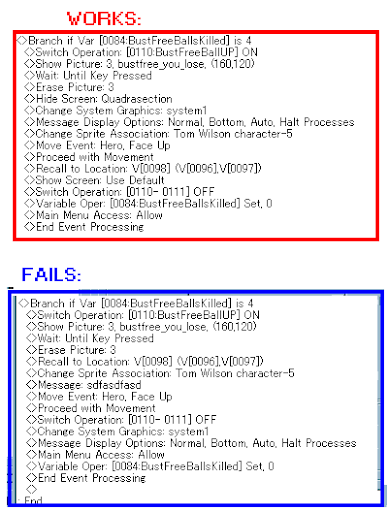
Does anyone see the crucial difference in these codes?
E/S
I solved this by comparing the event with a similar event elsewhere in the game. I basically copied the sequence of commands from the other event into the broken event. Now it works ... although I don't understand why.
Does anyone see the crucial difference in these codes?
E/S
 Games - Tester
 Games - Other
