



 Full Games List
 Featured Games
 New Games
 Reviews
 Media
Media Images
 Blogs
Blogs Game Updates
 Images Feedback Summary
 Game Design Highlights
 Tutorials
 Articles
 Scripts
 Utilities / Plugins
 Resources
 Engines
 Engine Bulletins
 What is Makerscore?
 Past Events
 Achievements
 Misaos
 Forums
 Post History
 Chat
Chat New to RMN?
 Full Store List
 RMN Music Pack (free)



THE SCREENSHOT TOPIC RETURNS
Posts

 CashmereCat
 View playlists
 Close
Closeauthor=yuna21
<img>
I think I had a little too much fun when making this town.
Looks fun. Just a curious question: what is the behaviour of your birds? Do birds fly overhead from one side of the screen to the other? Or do they fly away when you get near? Do they react to NPCs? Just curious.

@Yuna21 this looks so beautiful! For some reason, the atmosphere brings me partly to Ivalice. Which makes me mention that a FFXII fangame with this style and atmosphere would be beautiful. :v


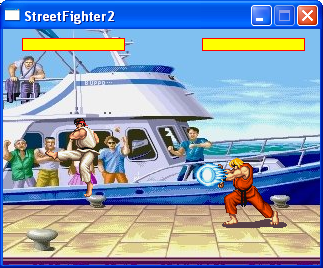
A tiny version of street fighter 2 Ive been making in the RPGToolkit for a little remake competition we've been having between a few friends.
It only has ken and ryu.
only has Standing punch, Sweep Kick, Jump kick and the 3 specials(Dragon punch, Fireball, Hurricane kick)
Ai is quite simple but seems quite good so far
Im just working the collisions in right now so you can actually hit each other :P

@Cashmere: Nah, the birds just fly overhead. I was sort of thinking of adding some sort of behavior pattern to them. Just not too sure how to implement it.
@JosephSeraph: Yeah, I was thinking of Balfonheim when mapping that town. I love FF12. XD
@JosephSeraph: Yeah, I was thinking of Balfonheim when mapping that town. I love FF12. XD
author=yuna21
@Cashmere: Nah, the birds just fly overhead. I was sort of thinking of adding some sort of behavior pattern to them. Just not too sure how to implement it.
I have a system that birds fly away when you get near them. I can PM it to you if you want.

author=grindalfA tiny version of street fighter 2 Ive been making in the RPGToolkit for a little remake competition we've been having between a few friends.
How the fuck did you pull that off?
@Everyone - Everything's been great lately truly, keep it up guys :D
A screenshot I don't think I've shown before. Doesn't mean I'm working on it again but just thought I'd share.

@Tau
Lots of code and a tiny resolution to keep the speed up :P
It doesn't have a lot of stuff.
Ive only added ken and ryu
and only one strength of attack(Compared to normally having 3)
But it still has the special moves and all the other screens(start screen, character selection screen, ect)
BTW: looks good you should work on it again :P
Lots of code and a tiny resolution to keep the speed up :P
It doesn't have a lot of stuff.
Ive only added ken and ryu
and only one strength of attack(Compared to normally having 3)
But it still has the special moves and all the other screens(start screen, character selection screen, ect)
BTW: looks good you should work on it again :P
um, QQ you guys... how do you make a screenshot of the whole map in RMXP?
do you patch together different screenshots like in olden times or is there s trick to it?
do you patch together different screenshots like in olden times or is there s trick to it?

Grindalf, that's madness. But props for actually making it. What are your friends making if you don't mind me asking?
Tau, that's a very solid screen. None of the graphics clash whatsoever. Surroundings are a little bit dark perhaps but because of the darkness it works well as a background.
Tau, that's a very solid screen. None of the graphics clash whatsoever. Surroundings are a little bit dark perhaps but because of the darkness it works well as a background.

@Tau, my only issue is that the monster sprite looks out of place. On a map like that, you probably should be using sprites more like the player character rather than a Final Fantasy side-view Battler. Otherwise it looks fantastic.
author=NebelSoft
um, QQ you guys... how do you make a screenshot of the whole map in RMXP?
do you patch together different screenshots like in olden times or is there s trick to it?
I know in VX Ace there's a script that can do it for you. But AFAIK in XP you just have to paste maps together, ol' skool.
@Tau Looks great, but as Alichains said, it does look a little bit clashing with the background. Perhaps create a shadow for how far it's hovering above the ground? I know you said you're not working on it, but yeah.


Short combat demo, since screenshots aren't really very good at showing what's actually going on. There's still a few display bugs I need to fix, but all that (hopefully) shouldn't get in the way of seeing what's going on overall. Still a WIP, warranty void if seal broken, standard disclaimers apply, etc:
Don't mind Ralph, he's there to trigger the combat sequence; It's supposed to start when enemies see you, but I haven't implemented the enemy line of sight stuff yet :<
Don't mind Ralph, he's there to trigger the combat sequence; It's supposed to start when enemies see you, but I haven't implemented the enemy line of sight stuff yet :<
@Kaelan That's a really complicated system. Hopefully you have a nice little tutorial to help newbie players like myself understand all the options. I also really like the sound effects right now. Especially ones like the one when that lady has to go past those people and she says, "Let me through, please!"
Keep it up.
~~~
Here's a couple of maps I made for Project RMW World, a little collaborative map-making event I'm helming over at RMW.


Keep it up.
~~~
Here's a couple of maps I made for Project RMW World, a little collaborative map-making event I'm helming over at RMW.

The top map has some problems with the heights regarding the walls to the left, otherwise I like it.
In the bottom map the cliffside just cuts off. I'm guessing you wanted to show the parallax background, but it doesn't look very natural.
Good use of elevation, something I often forget.
In the bottom map the cliffside just cuts off. I'm guessing you wanted to show the parallax background, but it doesn't look very natural.
Good use of elevation, something I often forget.
author=SnowOwl
The top map has some problems with the heights regarding the walls to the left, otherwise I like it.
Oh, you're right. I think it's causing an optical illusion because I forgot some shadows. Those snowy cliffs aren't on top of the walls, they're behind. But I understand what you mean. I'm usually very careful with elevation like that.
In the bottom map the cliffside just cuts off. I'm guessing you wanted to show the parallax background, but it doesn't look very natural.
Good use of elevation, something I often forget.
I think it's just because the RTP doesn't have a "floating cliff" tile, and I'm too lazy to make my own edit. Also, the guy below me in the grid decides to make a strange floating island with that mountain background. I had to go with it. Since there isn't any RTP tiles where cliffs cut off at the bottom, that's how it went. It still looks pretty unnatural, though. I can make it look better.
Thx for the feedback, yo. ;)
You guys make me feel LAZY. I really need to get off my ass and do something!
Also, the last two pages are beautiful. You've all been doing really awesome work lately!
Also, the last two pages are beautiful. You've all been doing really awesome work lately!

When I did floating cliffs I ended up with:

I made a upper layer tile that when from transparent to black so I could apply it to any tile to have it fade into the background (which basically has to be solid black too otherwise the fade looks awful). Unfortunately I couldn't find any way to make a tile that causes the base tile to fade into transparency without making an edit of every floating tile which took too much time. I like how the fade into black looks but being stuck only with black stinks :(
I made a upper layer tile that when from transparent to black so I could apply it to any tile to have it fade into the background (which basically has to be solid black too otherwise the fade looks awful). Unfortunately I couldn't find any way to make a tile that causes the base tile to fade into transparency without making an edit of every floating tile which took too much time. I like how the fade into black looks but being stuck only with black stinks :(

