



 Full Games List
 Featured Games
 New Games
 Reviews
 Media
Media Images
 Blogs
Blogs Game Updates
 Images Feedback Summary
 Game Design Highlights
 Tutorials
 Articles
 Scripts
 Utilities / Plugins
 Resources
 Engines
 Engine Bulletins
 What is Makerscore?
 Past Events
 Achievements
 Misaos
 Forums
 Chat
Chat New to RMN?
 Full Store List
 RMN Music Pack (free)



 Profile
 Locker
 Play Lists
SHURYOU'S PROFILE
Shuryou

30
 Close
Close
Hello all
Search
Filter
 All
All Game Pages
 User Statuses
 are these sprites good?
author=Relyt link=topic=3982.msg80463#msg80463 date=1244949151
What sort of game would this happen to be in anyways? If it's a FFVII remake...good luck?
hell no.
are these sprites good?
author=Ocean link=topic=3982.msg80193#msg80193 date=1244883519
I'm too lazy to continue this but it should give you a general idea. Basically, make the tones stand out more from each other. I like to use a middle grey background to test the contrast. If, zoomed out, I can't really see a difference, then I work on it so that the colors stand out more. I also tried looking at a pic of vincent to get an idea of what the hair would look like. Hair can be difficult though so don't be discouraged if you don't get it right the first few times. I have a pixel artist friend who's better than I am who hates doing hair.
I also try to clean up lineart, and not make colors feel too random. There's a tutorial on keeping clean lineart here:
http://www.derekyu.com/?page_id=221
I have other tutorials on my blog http://tilesettutorial.wordpress.com (plug ahoy), so feel free to check those out as well. I like the "So you like to be a pixel artist" link, as well as sprite art.
I like using a sort of pinkish/peach tone for highlights for red, and I tend to go to reddish/purple for shadows/dark reds. Then for grey, I try to make the darker colors more grey/blue while the highlights a little more yellow.
I don't really like the animation I did but I was lazy.
I hope it helps in some way.

wow. i'll try to see if i can learn something from the tutorial.
thanks so much! :D
are these sprites good?
thank you all!
is this one better? i managed to fix it a bit and recolor it (though its quite subtle as the grey outline became black and the main part became a slightly lighter shade of black):
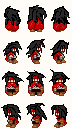
also, what do you mean by "flat"?
and no, im not making some kind of ff7 fan game.
is this one better? i managed to fix it a bit and recolor it (though its quite subtle as the grey outline became black and the main part became a slightly lighter shade of black):
also, what do you mean by "flat"?
and no, im not making some kind of ff7 fan game.
are these sprites good?
k first of all, i dont know where to post this so plz forgive me. :-\
ok on to the main part. i wanted to make sprites of Vincent (from ff7) using Charas.ex. thing is, his hair looked.......awful. so i decided to completely redo his hair. here is the result:
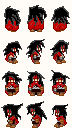
so now my question is, are the sprites i made decent? if not, what do i need to fix?
ok on to the main part. i wanted to make sprites of Vincent (from ff7) using Charas.ex. thing is, his hair looked.......awful. so i decided to completely redo his hair. here is the result:
so now my question is, are the sprites i made decent? if not, what do i need to fix?
Ranged WEapon Ammunition in RM2K
author=kaymera link=topic=3980.msg79944#msg79944 date=1244802182
So I know how to make ranged weapon ammunition in RM2K3, but I wanted to use RM 2K For It's Battle System, and was wondering. what would be the process to make an ammunition system on RM2K? I've dug around in the code a bit, and maybe i've just overlooked it, but I have no clue how to do so. anyway, thanks guys.
i really dont think it's possible to do it on 2k3 unless someone can make a miracle.
anyway i just wanna know, whats the problem in your coding?
Charas.EX help and more
author=Natook link=topic=3979.msg79920#msg79920 date=1244781406
1) 288 x 256, which should just be the boundaries of the image, don't resize your characters.
2) Google "Ultimate Paint", download it, open the file in it, save it as a .png in 256 colors (you can select it when you save)
3) Anything that you can draw with easily, most people actually just use MsPaint. I would suggest finding a template if you decide to. You can find those on Charas.net.
thank you! :D
one prob though. in the sprite sheet, i applied transparency to the background then i saved, but when i used the sprite in-game, its background wasnt transparent.
Charas.EX help and more
i made my own sprites using charas then i saved but when i imported it to RM2k3, it said invalid image size. do i have to resize it or something? if so, then to what size?
also, when i tried importing a file i made from Face Maker, it said "Invalid color depth" or something like that. any fix?
aaandd another question, whats a good program to make my own battle sprites?
also, when i tried importing a file i made from Face Maker, it said "Invalid color depth" or something like that. any fix?
aaandd another question, whats a good program to make my own battle sprites?
Day and Night system part 1 and 2
i have a problem. the translations in the Rm2k3 in the tutorial is different from the translations in mine. example, in the tutorial, it's called "Fork Operation" while in mine, it's called "Conditional Branch". so here's where i need help.
i need to know what the commands there mean, because the translation isnt the same as mine.
also, i need to know whose translation is the "official" one. mine or the one in the tutorial? the tutorial can be found here: http://uirpg.com/tutorials.php?act=view&tutid=181
here's my coding so far based on the tutorial (pls correct me if im wrong with anything in the coding):
COMMON EVENTS
NAME: Clock Trigger: Parallel Process Trigger Switch: 0200: Clock
<> Variable Oper: + 15
<> Branch if Var is 60 or more
<> Variable Oper: - 60
<> Variable Oper: + 1
<> Branch if Var is 24 or more
<> Variable Oper: - 24
<> Variable Oper: + 1
: Else Handler
<>
: END
<>
: Else Handler
<>
: END
<> Wait 1.0 Sec
<>
here's the 2nd part: http://uirpg.com/tutorials.php?act=view&tutid=180
another problem here, i dont know where "Set Screen Tone" is in my translation.
plz help!
i need to know what the commands there mean, because the translation isnt the same as mine.
also, i need to know whose translation is the "official" one. mine or the one in the tutorial? the tutorial can be found here: http://uirpg.com/tutorials.php?act=view&tutid=181
here's my coding so far based on the tutorial (pls correct me if im wrong with anything in the coding):
COMMON EVENTS
NAME: Clock Trigger: Parallel Process Trigger Switch: 0200: Clock
<> Variable Oper: + 15
<> Branch if Var is 60 or more
<> Variable Oper: - 60
<> Variable Oper: + 1
<> Branch if Var is 24 or more
<> Variable Oper: - 24
<> Variable Oper: + 1
: Else Handler
<>
: END
<>
: Else Handler
<>
: END
<> Wait 1.0 Sec
<>
here's the 2nd part: http://uirpg.com/tutorials.php?act=view&tutid=180
another problem here, i dont know where "Set Screen Tone" is in my translation.
plz help!
how do i make a skill do......?
how do i make a skill take out half (or 50%) of the enemy's current HP in rm2k3?
example, Slime has 100/200 HP but when i use the skill, its HP is reduced to 50/200 HP.
example, Slime has 100/200 HP but when i use the skill, its HP is reduced to 50/200 HP.
 Games - Tester
 Games - Other
