



 Full Games List
 Featured Games
 New Games
 Reviews
 Media
Media Images
 Blogs
Blogs Game Updates
 Images Feedback Summary
 Game Design Highlights
 Tutorials
 Articles
 Scripts
 Utilities / Plugins
 Resources
 Engines
 Engine Bulletins
 What is Makerscore?
 Past Events
 Achievements
 Misaos
 Forums
 Chat
Chat New to RMN?
 Full Store List
 RMN Music Pack (free)



 Profile
 Locker
 Play Lists
SHURYOU'S PROFILE
Shuryou

30
 Close
Close
Hello all
Search
Filter
 All
All Game Pages
 User Statuses
 How do i make a torch emit light?
its one of those things to make my game look realistic. i've never figured out how to do it, maybe it has something to do with the "Tint Screen" event but idk. is there any way to do this?
The Importance of Planning
planning is very important for me. usually, before i start with a new game project, i think of a story. after that, i ask my sis (the lead scriptwriter lol) to think of a good intro. then i start and do the coding. after that, i plan out the battle animations, chipsets and those other things found in the Database.
however, sometimes you really need to plan everything out since you might get off-track with the story. and yeah, thats all.
however, sometimes you really need to plan everything out since you might get off-track with the story. and yeah, thats all.
Biological warfare as a game's theme
i dunno i just thought about putting the theme in my game because themes like magic as a weapon is just.....kinda common and i wanted to try something new.
if you were to put bio-warfare as a weapon in the game's theme, how would you present it? would it make a good theme?
if you were to put bio-warfare as a weapon in the game's theme, how would you present it? would it make a good theme?
Status Condition Recovery in RM2k3
what's your "% chance to recover each turn" and "% chance of the condition abating" after taking a hit?
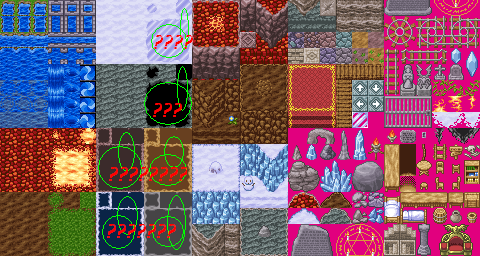
[RM2k3] hmm i dont see these tiles........
author=ChaosProductions link=topic=4058.msg82504#msg82504 date=1245825714
:P
I thought they actually didn't show.
hey, at least you tried answering :)
[RM2k3] hmm i dont see these tiles........
author=Chartley link=topic=4058.msg82502#msg82502 date=1245825356
Okay, this is hard to explain, but I am guessing you don't understand how "auto-tiles" work. Only the top left tile will actually show in the editor palette. Select that single tile that is shown in the map editor and try drawing with it.
The concept of auto tiles basically allows you to draw things such as paths, where the edges will be generated from the image file. It's basically just a time saver. The auto tiles are always located in the same place in the editor, which are the top 3 rows of tiles in the palette. You will mainly use rows 2 & 3, the first row is water auto tiles.
Does that help?
- Chartley
yes this helped. thank you! :)
[RM2k3] hmm i dont see these tiles........
hmm it's still the same. i copied the file, pasted it somewhere, deleted the file from the RTP folder, then imported it (to the Project1 -> ChipSet folder). the tiles still didnt show up so i deleted it from Project1 -> Chipset, then pasted the file back into the RTP folder, and it still remained the same.
actually, it's been like that since i first installed RM2k3. :|
actually, it's been like that since i first installed RM2k3. :|
[RM2k3] hmm i dont see these tiles........
author=ChaosProductions link=topic=4058.msg82493#msg82493 date=1245823510
Are there any other files in your chipset folder called "dungeon.png"?
This'd mess with the program when it tries to fetch the tile graphics.
well, that's the only "dungeon.png" file i have in my folder. should i try re-importing it?
[RM2k3] hmm i dont see these tiles........
author=ChaosProductions link=topic=4058.msg82491#msg82491 date=1245823103
...As in, they don't show in-game?
nope
 Games - Tester
 Games - Other
