



 Full Games List
 Featured Games
 New Games
 Reviews
 Media
Media Images
 Blogs
Blogs Game Updates
 Images Feedback Summary
 Game Design Highlights
 Tutorials
 Articles
 Scripts
 Utilities / Plugins
 Resources
 Engines
 Engine Bulletins
 What is Makerscore?
 Past Events
 Achievements
 Misaos
 Forums
 Post History
 Chat
Chat New to RMN?
 Full Store List
 RMN Music Pack (free)



THE SCREENSHOT TOPIC RETURNS
Posts

 chana
chana View playlists
 Close
CloseWell, obviously you've got a black square around a lot of the items (as if you hadn't fixed the transparency of the chipset), also your maps are quite empty.
LockeZ

I'd really like to get rid of LockeZ. His play style is way too unpredictable. He's always like this too. If he ran a country, he'd just kill and imprison people at random until crime stopped.
5958
Pretty much everything is wrong. Aside from what Chana said about the transparencies and the giant empty space, the other most serious problems are probably that you're using the walls wrong in the first screenshot, you're using the grass wrong in the second screenshot (how did you manage to do that on purpose? you have to hold down shift to do that!), and oh my god what the fuck is up with those fences. The buildings in the town screenshot are pretty bad too, especially the buildings with awnings that have... half of a table in the middle of their door?
Overwhelming you with a bunch of problems is probably not good, so that's all I'm gonna list for now. When you've fixed that stuff, feel free to post them again and I'm sure you'll get advice on the less serious problems.
Overwhelming you with a bunch of problems is probably not good, so that's all I'm gonna list for now. When you've fixed that stuff, feel free to post them again and I'm sure you'll get advice on the less serious problems.

author=cammenball
screens]
ok whats wrong with the screenshots
Let's start from the top - the black squares. When you import the chipsets to the game, click on the background colour - that would be black - to make it invisible. That will get rid of the black squares.
Next, content. From the top~
First: This map is far too big and empty. Try adding walls and the roof tiles to make it seem more like a room. Also, cut the size down a bit and add more stuff. You could add some wall decorations, pillars, suits of armour, NPCs, chairs, etc.
Second: Again, the black, but also another empty map. Fill it up a bit with properly-used grass tiles (you've not got the edges) and make them more than just square - odd shapes and broken up pieces instead of a big blob. Add in more trees, flowers, plants. Nature isn't just one tree on grass. Also, what's with the fences? Why are they needed? They look terrible. If they have a reason for being there, fine, otherwise, give them the boot.
Third: Again, emptyness. Try bringing the buildings closer together. There's plenty of room for it. Try to use more decoratiosn than just barrels. Again, flowers, grass, trees, paths, and proper edging will make it look much better.
Last: A much better effort than the last (you're improving!) but get rid of a lot of that space and you'll be much better. Make the room smaller - try about half the size. Again, roof tiles and use the wall tiles properly - they're not suppose to tile like that, over and over again.
And now a little something from me~

Ignore the character sets - they're place holders until I finish the new ones. Farm town never looked so good~

Yes, I'm just doing some last minute testing. Expect it today. OTL
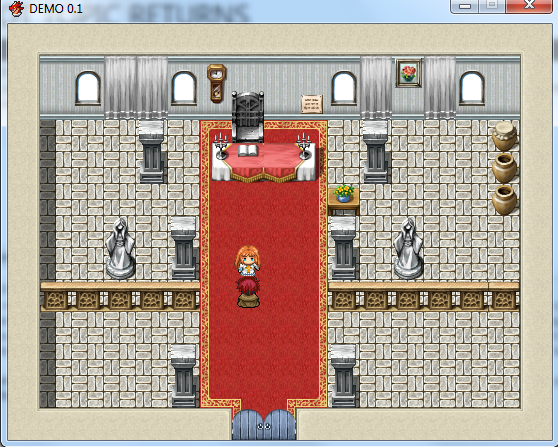
Devon Church, not much, but it's something. The girl there is a character you can recruit later on if you got 15000 Rune. You can also donate. That much Rune can move her to your castle.

Two screens from another arena combat styled side-project of mine. This is the standard battle system with DynRPG, Animated Monsters Plugin (can't see on the scrns), Battle Animations instead of Battlers (large player chars!) and many pages of event scripting to boost the dusty standard combats.
And yes, I am still suffering from the "too many projects" syndrome :-)


And yes, I am still suffering from the "too many projects" syndrome :-)
Spellbinder, why not move the heroes in the battle screen down in front of their names, or at least in some sort of formation that has them facing the enemy. That way you can move the enemy to the middle of the screen and have both opposing parties, you know, facing each other. Makes a bit more sense.
It does look really nice, though.
It does look really nice, though.
@Liberty: Good idea actually, i wanted to change the positions long time ago. the problem is this:
all heroes can be exchanged, and there are a lot of heroes and many class combinations. when i am not using the standard (automatic) placement of battlers, i am forced to place them manually by myself in the terrain tab of the editor. this is not possible as far as i know to do with variable party members. (difficult to explain, im not native english).
you can have 4 knights, or 2 knights and 2 wizards, or 1 knight, 1 wizard, 1 cleric and 1 thief and they all can be in slot 1,2,3 or 4 of your party. thats so many combinations its impossible for me to set their placement manually in the editor.
hope you understood the problem.
PS: sprites are from "shining force" (mega drive) and are supposed to face each other (down/up)
Thanks anyway!
all heroes can be exchanged, and there are a lot of heroes and many class combinations. when i am not using the standard (automatic) placement of battlers, i am forced to place them manually by myself in the terrain tab of the editor. this is not possible as far as i know to do with variable party members. (difficult to explain, im not native english).
you can have 4 knights, or 2 knights and 2 wizards, or 1 knight, 1 wizard, 1 cleric and 1 thief and they all can be in slot 1,2,3 or 4 of your party. thats so many combinations its impossible for me to set their placement manually in the editor.
hope you understood the problem.
PS: sprites are from "shining force" (mega drive) and are supposed to face each other (down/up)
Thanks anyway!
You can easily fit 12 sprites on there - have two rows - front and back. So give each separate character their own slot, dependant of where they are in the party slots. For example:

Each colour represents a type - knight, wizard, cleric, thief. You have four of them each - so a total of 16 characters all up. And each numbered one would be from left to right.
You then place them in strategic spots for them. So say a cleric would be one of the pink dots, a Knight would be red, thief blue and wizard, yellow.
If you have wizard 1, knight 2 and 3 and cleric 4, they'd be the ones to show up. If you had wizard 1, Knight 1, Cleric 3 and cleric 4, then you'd have a knight out front, and the mages in the back rows.
Do you get what I'm saying?
This way you just place the characters and don't worry about where they show up because even if you don't have them in an 'order' of leader to last place, you still have them in a strategic order that makes sense in battle.
Each colour represents a type - knight, wizard, cleric, thief. You have four of them each - so a total of 16 characters all up. And each numbered one would be from left to right.
You then place them in strategic spots for them. So say a cleric would be one of the pink dots, a Knight would be red, thief blue and wizard, yellow.
If you have wizard 1, knight 2 and 3 and cleric 4, they'd be the ones to show up. If you had wizard 1, Knight 1, Cleric 3 and cleric 4, then you'd have a knight out front, and the mages in the back rows.
Do you get what I'm saying?
This way you just place the characters and don't worry about where they show up because even if you don't have them in an 'order' of leader to last place, you still have them in a strategic order that makes sense in battle.
Hey, big thanks Liberty - that sounds like a real good idea!
I hope i can get this working as there are 9 different classes and 4 characters per class (36 characters to place). the automatic placement was just a very easy thing to do, so i preffered it over manually placing the heroes.
I hope i can get this working as there are 9 different classes and 4 characters per class (36 characters to place). the automatic placement was just a very easy thing to do, so i preffered it over manually placing the heroes.

@Spellbinder: I really like the first screenshot. It reminds me of how I used to draw dungeon maps like that on D&D like works. Works like a charm.


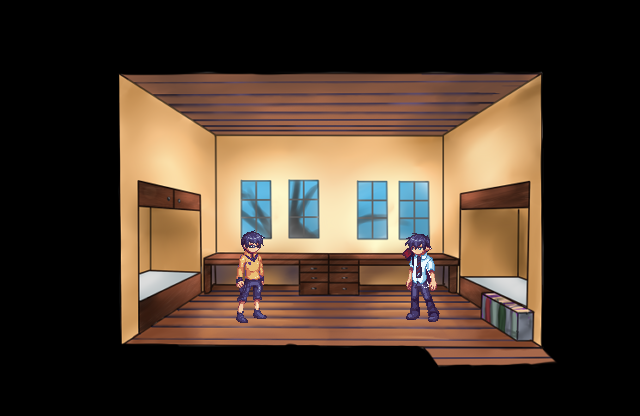
*rolls around*
the backdrop isn't quite done yet ;A;)b still needs roomy details like

Appropriate, but they're both a)orphans b)fairly poor c)in a school dorm
I think they both own a DS, but that's about it (and I assume that was a christmas present BEFORE they became orphans)
well technically their real dad is still alive but he's a watermelon so he doesn't count
I think they both own a DS, but that's about it (and I assume that was a christmas present BEFORE they became orphans)

@SpellBinder
I've considered this situation before. Trying to create an isometric battle system using the default or pre-made system.
What you can do is simply have four blank characters with no specific identity and place them diagonal manually. Meanwhile, actual character statistics are stored in variables. After the player finishes picking his/her party, you assign the variable values to the four characters in order of top to bottom, matching the player's choice. And, of course, write the continually upgrading character stats to the variables whenever the character leaves the party (or on a regular basis like after battle to avoid growth loss).
If you want to simulate a back row, use Eight characters and toggle Mighty Guard on the four 'Back' characters. You could also subtract a percentage from the character's Attack stat to simulate reduced backrow melee damage (unless he/she is ranged).
The only catch is, if you're using the default menu system, you'll have to remove Order and Row.
I've considered this situation before. Trying to create an isometric battle system using the default or pre-made system.
What you can do is simply have four blank characters with no specific identity and place them diagonal manually. Meanwhile, actual character statistics are stored in variables. After the player finishes picking his/her party, you assign the variable values to the four characters in order of top to bottom, matching the player's choice. And, of course, write the continually upgrading character stats to the variables whenever the character leaves the party (or on a regular basis like after battle to avoid growth loss).
If you want to simulate a back row, use Eight characters and toggle Mighty Guard on the four 'Back' characters. You could also subtract a percentage from the character's Attack stat to simulate reduced backrow melee damage (unless he/she is ranged).
The only catch is, if you're using the default menu system, you'll have to remove Order and Row.
author=cammenball
Okay this is the completed game with a few tweaks. are these better
Looking incomparably better, the library's a bit empty though.
author=chana
Looking incomparably better, the library's a bit empty though.
ok then thanks for the info i will try and make it better but one of the funnest things to make was the beggar, i reckon he provides comic relief
LockeZ
I'd really like to get rid of LockeZ. His play style is way too unpredictable. He's always like this too. If he ran a country, he'd just kill and imprison people at random until crime stopped.
5958
author=SorceressKyrsty
Appropriate, but they're both a)orphans b)fairly poor c)in a school dorm
I think they both own a DS, but that's about it (and I assume that was a christmas present BEFORE they became orphans)
You're only allowed to give them a DS if your game is a DS game. Since it's an RPG Maker game, they should both have RPG Maker on their computers.

author=SorceressKyrstywell technically their real dad is still alive but he's a watermelon so he doesn't count
Was their mom a bowling ball, and do they have a brother named Tom?


