• Add Review
  • Subscribe
  • Nominate
  • Submit Media
  • RSS
Click here for documentation (Includes material formats)

RPG 20XX is a redesign of RPG Maker 20XX... Which was an upgrade replacement for RPG Maker 2003's engine. This newer engine will have nothing to do with the RPG Maker series of engines apart from the familiarity of the editor and engine features.

RPG 20XX should provide lots of advanced features yet remain faithful to the retro scale of RPG Maker 2003. It should not require actual writing of program scripts and instead provide a clever implementation of a click-together event scripting system similar to the older RPG Maker engines. Most notably the ability to re-adjust the battle calculations purely through event scripting.

Lots of common tedium and annoyances of RPG Maker 2003 should be eliminated. RPG 20XX will provide global battle events for all battles, a quest system, simplified character development, local save variables per event, and other simple conveniences.

All of this is currently licensed under the MIT license so you can check out the source code any time if you really wanted to. It will be a community project, free as in price and in freedom to create the RPGs in a fun familiar way like you always wished RPG Maker 2003 could do these days.

If you use this software, you agree to use the software under the MIT license: https://opensource.org/licenses/MIT
Copyright © 2014, 2021 WolfCoder Workshop LLC


Latest Blog

RPG 20XX Asset Starter Pack

First things first, I'll need to gather stock assets to create RPG 20XX's default asset pack. It's like an RTP except "Run Time Package (RTP)" doesn't make sense here since all required assets get built into .2xg files and players of your game won't have to go download it separately. I'm organizing what I had found before with what I can find off stock asset sites, but I think maybe the RPG creation kit that was born on RMN ought to have assets from the community.

If you have assets you're willing to contribute that have lots of "Generic RPG Energy", let me know. You'll need to license them under a creative commons license so we can all use them. Don't worry about formatting, I'll convert them, just make sure they're drawn to 16x16 pixel tile scale.

The resulting asset pack will have all of the sources cited even when attribution isn't a requirement, so be sure to let me know how you want to be credited and if there's links to something you want to include.

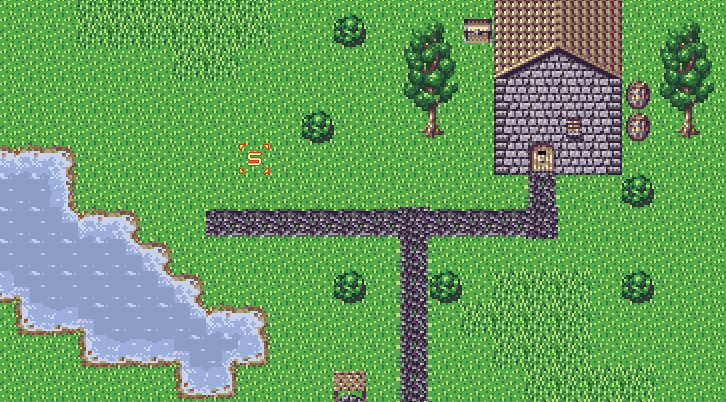
Anything simple and easy to map with but with an appealing retro generic RPG look is great. Here's an example I made using art I found elsewhere:

Posts

"Now rm2k3 WILL ACTAULLY BE FUN TO USE."

Once I can figure out how the hell they draw ocean I'll be going fast again. The way Emptybrain wrote the system, it's like putting together a broken effen Rubix Cube with boxing gloves on. It's the worst way to do autotiles ever.
This program works well with RMN Midsummer Dream and Dragon Kingdoms V (up until it reaches an RTP map at Map #330), but doesn't play nice with Befuddle Quest 5 (RTP?) and Alter A.I.L.A. Genesis (because it can't open XYZ files). In other words, it isn't working with RTP maps.
Oh yeah I forgot to mention it doesn't read the installed RTP folder, all your games must have resources you've manually added to your game. I always rename the RTP folder when I install 2003 so only my own files showed when editing the game.

I will not be supporting RTP either, you're going to have to copy them into your project so it could run on a machine with no other RPG Maker stuff installed (Hero's Realm does this). You don't need HARMONY.DLL though.

If you want, re-run the above with the RTP files copied into the games (except for .XYZ games). I will not be supporting .XYZ either until possibly in the far future- there's no reason to actually use the format and all it does is make things annoying.
post=NicoB
I'd love for the ability to show pictures of higher definition. You know, regular pictures as opposed to the 256 color scheme we are forced to use.

EDIT: Also, this is awesome.


I Strongly Disagree.
It's A Lot More Awesome Than That. :P
Until Cherry makes it so the editor can load and display 32-bit pictures, you could have a picture for the editor, and a second file beside it with -2x at the end. (main.png and main-2x.bmp for example). It'll have the result you see in the image I uploaded.
can you make rpg 2003 work on windows 7
RPG Maker 2003 already works on windows 7.
No it doesn't right away, you have to do some weird tricks to get it to work. Anyway, I'm developing 20XX on a windows 7 netbook so at least my engine itself will run in Windows 7. It'll even support the folder model from Vista and above for saves and global settings.
Great job on this! It's nice to see someone both sane and fluently English give a shot recoding the engine from scratch. (Since my lack of ability to understand French kind of undermines searching for whether that KingKadelf guy ever got near finishing his engine.)
That's funny because if it were not for my ability to read Japanese, I couldn't be anywhere near as complete as I am now. There's some really amazingly complete documentation on this sort of thing but it's in Japanese. I can't even seem to get the URL copy paste to work here because it's in that ugly web safe % code

でも日本語があまり上手じゃないね~

What's even funnier is I found an error in their tile decoding article, they had one pattern repeated twice. It's a wiki so I fixed it for em'
author=WolfCoder
No it doesn't right away, you have to do some weird tricks to get it to work. Anyway, I'm developing 20XX on a windows 7 netbook so at least my engine itself will run in Windows 7. It'll even support the folder model from Vista and above for saves and global settings.


Oh? Please do tell about these "tricks", especially since I was able to install RM2k3 on my win 7 laptop and get it working just fine with NO TWEEKING what so ever. :/
It pops up with some dialog saying something vague about it being the wrong operating system version. Or it can't run or something. I have to run it with Admin in Windows XP SP3 mode for it to work.

What's even stranger is that I only sometimes have to do this, sometimes it actually does just work- it's so random.

I'm not worried, the part I actually give to people has the engine and when my engine is finished it can ship out on Windows 7 just fine.
the one that you have up for download does not work on windows 7 ether when i try to start a new project it says that it is unable to do it
thought of a couple more things if you guys feel like it would fit in

under the "animations 2" tab, we can only have 32 different poses for in battle, which is actually kind of limiting for me, since I'm trying to do different severities for different status effects, or a unique casting animation for each element. If that number could be increased a good bit it would give people a lot more freedom.

Speaking of which, how about some sort of option to tell what statuses your party members and enemies are currently afflicted with? Is this doable?

Lastly, is changeable resolution for battles so we can have zoom modes impossible? I've had some ideas for really big monsters that I haven't been able to implement because they won't fit on the screen.
"the one that you have up for download does not work on windows 7 ether when i try to start a new project it says that it is unable to do it"

That's probably because my program is not an editor, only the engine.. Well that is my assumption since you're being very vague.

"under the "animations 2" tab, we can only have 32 different poses for in battle, which is actually kind of limiting for me, since I'm trying to do different severities for different status effects, or a unique casting animation for each element. If that number could be increased a good bit it would give people a lot more freedom."

Talk to Cherry for editor changes, my engine is only the executor. My engine doesn't care how long your animation files are.

"Speaking of which, how about some sort of option to tell what statuses your party members and enemies are currently afflicted with? Is this doable?"

For multiple status effect feature enabled, I'll actually have an extra optional resource that maps icons to skills. If this file is found, the icons inside will be displayed over battlers' heads. I'm not yet sure what convention I'll use to define what icon is what effect. It might be even something as crude as in-order where the third icon is the third effect.

"Lastly, is changeable resolution for battles so we can have zoom modes impossible?"

For any file, if it has another file with -2x at the end of the name, that file will be the actual one loaded in my engine. For example, a double resolution chipset for main.png would be main-2x.png. This is enabled for all resources, including things that aren't images (and it seems to work fine so far).

If your entire game is full of double resolution resources, you can add VideoSize=2 to the RPG_RT.ini file in order to force a minimum video scaling on the resolution. I'll be releasing these as a binary sometime later.
when you put up your next download could you inclod the editor
I do not have legal rights to distribute the RPG Maker 2003 editor. I also can't help you find a copy of RPG Maker 2003 because it's against the terms of service of this website. This is only a replacement for RPG_RT.exe, the engine that comes with RPG Maker 2003. You will need the original software for everything else.

It's not that hard to find and some members here can even help you purchase a legal copy (you'd then have to apply the RPG Advocates Patch though if you did since it's in Japanese)
Watching this project with great curiosity. Interested to see how it all turns out.
So... will this super rm2k3 also have a breaking damage limit thing? :D And have Attack power exceed 999? :D
author=J-Man
So... will this super rm2k3 also have a breaking damage limit thing? :D And have all stats exceed 9999/999? :D


Fixed. Though, since that's an editor based issue, I doubt it.

Also, don't we already break damage limit with custom damage handling anyway?