



 Full Games List
 Featured Games
 New Games
 Reviews
 Media
Media Images
 Blogs
Blogs Game Updates
 Images Feedback Summary
 Game Design Highlights
 Tutorials
 Articles
 Scripts
 Utilities / Plugins
 Resources
 Engines
 Engine Bulletins
 What is Makerscore?
 Past Events
 Achievements
 Misaos
 Forums
 Chat
Chat New to RMN?
 Full Store List
 RMN Music Pack (free)



 Profile
 Locker
 Play Lists
KAZESUI'S PROFILE

 Close
Close





Search
Filter
 All
All Game Pages
 User Statuses
 Recursively make map events
There is only one way to do it. Decide on a maximum amount of units for the player (and any enemy as well), and create an event ahead of time which shows the graphics of the different kind of units that event can represent (as well as some event pages to represent functions to be executed by the specific event).
You leave all events "inactive" initially and then summon them with "change event location", switches/variables and what not when needed.
Of course, choosing another program to create the game, like game maker or scirra construct would also make a lot of sense when making games like that.
You leave all events "inactive" initially and then summon them with "change event location", switches/variables and what not when needed.
Of course, choosing another program to create the game, like game maker or scirra construct would also make a lot of sense when making games like that.
Show me your Hands!

My style, which I've apparently been unable to grow out of. From what I remember this is far from ideal
Silly Question
Probably browser related or something, but you can try to hold down ctrl while using the scrolling wheel on the mouse to zoom in and out
Rm2k3 David Patch
RM2K3 Using pictures [Help]
Have a parallel event use a "move picture" with 0.0 wait with "wait until done" unchecked set to the screen relative coordinates of the hero, possibly with an offset (i.e. after getting the screen relative coordinates add or subtract some value the variables before using move picture)
and have a separate event which handles input toggle between the pictures in your animation with "show picture" at the same coordinates as those given in the parallel event.
and have a separate event which handles input toggle between the pictures in your animation with "show picture" at the same coordinates as those given in the parallel event.
 The Screenshot Topic Returns
author=Cray
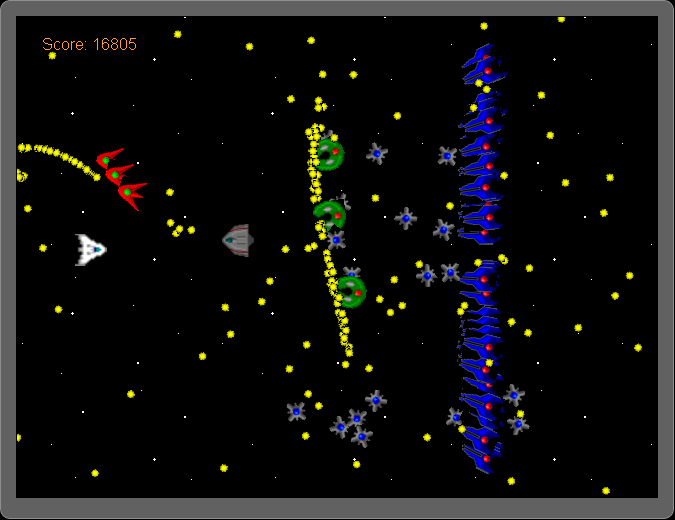
Can you really dodge and kill all of that, I think I wouldn't last a second in there without dying.
It looks good otherwise, are those graphics original?
Probably not. Ideally you'll destroy the enemy ships before they accumulate this much. And yes the graphics are original.
The Screenshot Topic Returns
Key Input Processes Help
Ever wondered what the purpose behind the variable you need to assign the key input process was for?
Yep, it returns the value of whatever key you pressed, which would be 20 for +.
use a branch to check if the variable has the value of the correct key right after the key input process.
Yep, it returns the value of whatever key you pressed, which would be 20 for +.
use a branch to check if the variable has the value of the correct key right after the key input process.
Hefty coding question: guards detecting thief
It's well worth getting good at trigonometry though, since there's tons of stuff you can use it for. Math is a good tool to get games do what you want. And you're going to have to look into the terrains idea either way, since the example uses it as well.
The tutorial should help you figure out how it works, but if anything is still unclear, feel free to ask. That way I might be able to improve the tutorial to be even more understandable
The tutorial should help you figure out how it works, but if anything is still unclear, feel free to ask. That way I might be able to improve the tutorial to be even more understandable
Hefty coding question: guards detecting thief
You could take a look at this:
tutorial including how to make guards not be able to look through walls
The tutorial is still pending, but I think you should still be able to access it.
It includes a tiny rm2k3 project which provides some examples for doing different stuff, with a guard of limited sight which can't look through walls being one of them
tutorial including how to make guards not be able to look through walls
The tutorial is still pending, but I think you should still be able to access it.
It includes a tiny rm2k3 project which provides some examples for doing different stuff, with a guard of limited sight which can't look through walls being one of them
 Games - Tester
 Games - Other
