



 Full Games List
 Featured Games
 New Games
 Reviews
 Media
Media Images
 Blogs
Blogs Game Updates
 Images Feedback Summary
 Game Design Highlights
 Articles
 Scripts
 Utilities / Plugins
 Resources
 Engines
 Engine Bulletins
 What is Makerscore?
 Past Events
 Achievements
 Misaos
 Forums
 Chat
Chat New to RMN?
 Full Store List
 RMN Music Pack (free)



 Profile
 Locker
 Play Lists
KAZESUI'S PROFILE

 Close
Close





Search
Filter
 All
All Game Pages
 User Statuses
 [DynRPG Plugin]Text Plugin
ok, this is getting fairly frustrating. Could you just upload the (however little) modified sample project or something?
I took a look at the source code from dhm's faster plugin but aside from a seemingly unrelated bug in it, I couldn't find anything which would cause any problems (and even adding the .dll to my own sample project doesn't seem to cause any errors either).
I took a look at the source code from dhm's faster plugin but aside from a seemingly unrelated bug in it, I couldn't find anything which would cause any problems (and even adding the .dll to my own sample project doesn't seem to cause any errors either).
[DynRPG Plugin]Text Plugin
The doesn't seem to be anything wrong with the save files either. I'm at loss here as to why you're getting that error message. There might be some tiny detail I'm missing, or possibly some bug with the SDK or something, but I just can't seem to find any problems, nor replicate any similar error messages.
I'm sorry =/
I'm sorry =/
(RM2k/3) Variables
author=Seena
Very bad idea! Referencing variables beyond the amount defined would reference memory that isn't allocated to the game.
I know this because I am a programmer.
And as a programmer, you'd know that this would depend on how the variable array is actually implemented. While it's true that it would be a very bad idea to try referencing beyond the scope of a normal array, it's not as big a problem with a dynamic one, which one has reason to believe that the rm2k3 one is alone by the fact that you can adjust the amount of variables in the editor(and I don't get the impression that rm2k3 is actually compiling code).
Cherry has also stated that the rpg maker dynamically allocated memory for variables by references like this (yes, in runtime), and if anyone would know (aside from the developers), he'd probably be among them.
[DynRPG Plugin]Text Plugin
Nothing wrong there either... and no matter how hard I try, I can't seem to recreate the error message. My last guess now is that the save file got corrupted somehow. If you go to the project folder, there should be a save file called Save01.dyn (if you saved in slot 1). Could you upload the save file which gives you the error message (rmn provides with a "locker" feature which allows you to upload files like that)?
[DynRPG Plugin]Text Plugin
[DynRPG Plugin]Text Plugin
Did you make any special changes to the map itself after having saved the game and exited? Just creating a second map and making use of the plugin shouldn't create any error messages on reloading (at least I haven't been able to create any when trying).
Changing stuff on a map after having saved there and then reloading might though. Not sure what might have caused it, but if you made some changes before trying to reload, maybe you can help me figure that bit out.
Changing stuff on a map after having saved there and then reloading might though. Not sure what might have caused it, but if you made some changes before trying to reload, maybe you can help me figure that bit out.
 Introduction to pixel movement in rm2k3
It's described in the last section of the tutorial. Basically, you take the pixel coordinates of the hero and check if it's outside the screen, and if so, panorate the map accordingly.
I suppose you could download the sample project, look at the code (the one for the screen should be on the second map somewhere as a map event i think), and crosscheck it with the variable values using the debug menu (F9 while in tesplay)
I suppose you could download the sample project, look at the code (the one for the screen should be on the second map somewhere as a map event i think), and crosscheck it with the variable values using the debug menu (F9 while in tesplay)
[DynRPG Plugin]Text Plugin
1) At the moment, they stay fixed on the screen rather on the map. I guess I should have added an extra option there. I might update the plugin in that respect.
2) I think cherry has a patch which allows for pictures to be called inside a battle. Theoretically, this should allow for the text plugin to work inside battles as well
2) I think cherry has a patch which allows for pictures to be called inside a battle. Theoretically, this should allow for the text plugin to work inside battles as well
[DynRPG Plugin]Text Plugin
For me to answer that you'll first have to help my understand what you mean by "skinning" the text messages.
The only thing that comes to mind is having the text "skinned" with a message box around it, in which case it's not implemented in this Plugin.
The only thing that comes to mind is having the text "skinned" with a message box around it, in which case it's not implemented in this Plugin.
[DynRPG Plugin]Text Plugin
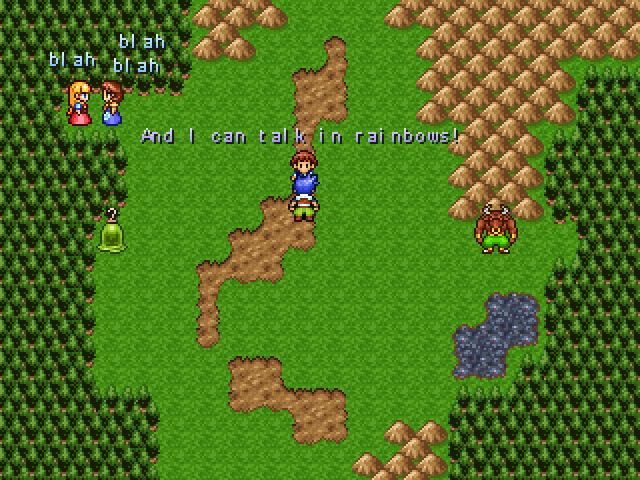
For the sake of some added visibility (than just posting it in the DynRPG thread), I felt like making a topic for this for once.
I've created a DynRPG plugin, which allows you to generate text at wish, and place it anywhere you like on the screen. You can move it, control it's transparency and change it to whatever once created as well. The text will share the same font as the rpg maker game uses itself.
This plugin can be useful in terms of creating HUD's on the screen, for an ABS, or could relieve you of creating a million pictures if you're making a CMS or CBS.
Download
Instructions on how to use the plugin is all described within the readme.txt which follows with the demonstration project.
I've created a DynRPG plugin, which allows you to generate text at wish, and place it anywhere you like on the screen. You can move it, control it's transparency and change it to whatever once created as well. The text will share the same font as the rpg maker game uses itself.
This plugin can be useful in terms of creating HUD's on the screen, for an ABS, or could relieve you of creating a million pictures if you're making a CMS or CBS.
Download
Instructions on how to use the plugin is all described within the readme.txt which follows with the demonstration project.
 Games - Tester
 Games - Other
