



 Full Games List
 Featured Games
 New Games
 Reviews
 Media
Media Images
 Blogs
Blogs Game Updates
 Images Feedback Summary
 Game Design Highlights
 Tutorials
 Articles
 Scripts
 Utilities / Plugins
 Resources
 Engines
 Engine Bulletins
 What is Makerscore?
 Past Events
 Achievements
 Misaos
 Forums
 Chat
Chat New to RMN?
 Full Store List
 RMN Music Pack (free)



 Profile
 Locker
 Play Lists
TRUJIN'S PROFILE
 Close
Close

Search
Filter
 All
All Game Pages
 User Statuses
 The Screenshot Topic Returns
The screenshots look fine in my opinion.
I must laugh at the way you take feedback btw, everything is awnsered with "I like it so I keep it that way". Not really a way to take part in a discussion XD.
Anyways, about the drab chipset comment of Dyhalto: he was just comparing the chip with the signs, he didn't say anything about drab being bad or something =p.
Ok this is weird, I just looked at your screens again and because of the square shadows it looks like every house is floating now XD.
I'm very curious about all the nitpicks you got from that other forum though =).
I must laugh at the way you take feedback btw, everything is awnsered with "I like it so I keep it that way". Not really a way to take part in a discussion XD.
Anyways, about the drab chipset comment of Dyhalto: he was just comparing the chip with the signs, he didn't say anything about drab being bad or something =p.
Ok this is weird, I just looked at your screens again and because of the square shadows it looks like every house is floating now XD.
I'm very curious about all the nitpicks you got from that other forum though =).
 Why your name?
My nickname must be the most stupid one around. Way back when I had the age of 14/15 I just got connected to the internet and like all my classmates and other random people from my age I kept changing my nickname every 2 damn weeks.
When I hit 16 I thought it was pretty stupid because of what Kentona said about the changing nicks the whole time. So I stuck with Trujin. Which is actually just a mix of Majin Trunks (yeah DBZ was totally it at the time XD).
When I hit 16 I thought it was pretty stupid because of what Kentona said about the changing nicks the whole time. So I stuck with Trujin. Which is actually just a mix of Majin Trunks (yeah DBZ was totally it at the time XD).
The Screenshot Topic Returns
[2k3] Image Specifications
The Screenshot Topic Returns
@JustRob: Looks way better. By the way, the misplaced wood at the screen I posted close to the passages to other rooms were ment to represent door thresholds. You might want add those to the chipset too :p.
The Screenshot Topic Returns
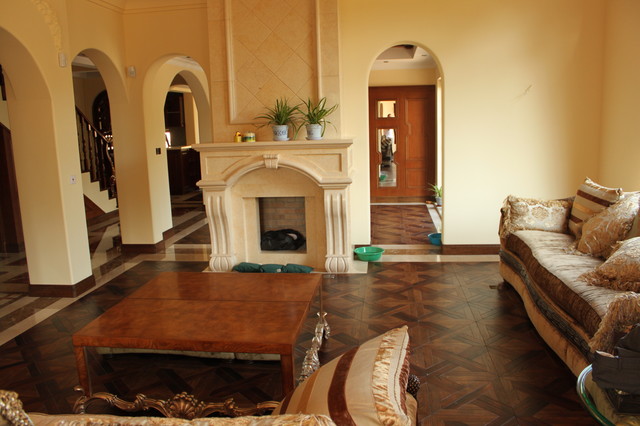
Say what? Diffrent patterns of wooden floors are for drunk carpenters? I guess this is something we aren't going to find in your house =p:
The Screenshot Topic Returns

The Screenshot Topic Returns
Hmm, neat and well cleaned. You could add variation to the map by making a little utility room that is in fact clutered :p.
However you want to work with diffrent carpets to "fill" interiour desgins.
About this map: I like it, but maybe you could change some curtain for other tiles and I don't really like the roof tile. Al in all it's a good map with resources you have =).
Anyway Xenomic: I've made a simpler map for you this time, which this time only took 15 minutes to complete. It's ment to show you how I cheated my way in adding minor details, that look "good" but cut time seriously =). Since you are making a cave I just edited the chipset for this =D.
I'll fill you in step by step about he mapping progress of this one:

1. I filled up the map with ground tiles.
2. After that I used the "cirle brush" instead of the "square brush" to add the black roof tiles.
3. Weird looking ground spaces were made bigger using the ground tile with a "circle brush".
4. Added black tile to places which were still ground tiles (mainly corners) that shouldn't be ground tiles.
5. Added all the walls and fixed some places where it just looked weird (in my case I had a straight line of black in the lower richt corner which I wanted to break up.
6. This gave me round organic shapes.
7. I decided to have a elevated part in this dungeon in the middle. I places 1 tile high walls to achieve this illusion.
8. All the main walling I had, which were on the elevated spot were reduced by 1 tile.
9. Added the lavapool which sprung from a center. In this case about where the chest was placed.
10. Placed groups of staligmites. They were placed in empty corners, not in the patch of the player.
11. Added some stones, sometimes alone, sometimes in groups to mark out the path the player should walk in this map.
12. Added some skeletons to the lavapool. In case of the dead animal. Sometimes only a ribcase, sometimes only a skull.
13. Looked at the clock, took me 15 minutes.
As you can see I skipped the whole elevation part of the wall tiles. I left them away on purpose to show you what purely organic forms would do to the map using the circle tool. The use of the circle tool is obviously faster than going retangle and add the organic "smoothing" later.
I used a rooftile so nobody will bother commenting on how the whole thing looks flat. It's just cut off by the chipset so nobody expects something at the dark areas. I did however add ground elevation to break up the map a bit. As you see I used some cleverly placed wall tiles to give the illusion of groundtiles that go up instead of using stairs (it's weird in an organic envirronment to have stairs XD. If you do use them there should be more evidence of human interference (like some mining tools, a little bit of rail or random wooden studs etc).
Hope you like it. As said it's pretty simple in design, but 1 piece of ground elevation and "clever" use of the circle tool made it more dynamic. It shouldn't take up more time than using the square tool.
And yes I just noticed two mapping errors xD (forgot one black side tile at the middle piece of rock and I forgot to add some wall tile in the lower right corner).
The map (if you want it):
http://rpgmaker.net/users/Trujin/locker/Map0004.lmu
The chipset:

However you want to work with diffrent carpets to "fill" interiour desgins.
About this map: I like it, but maybe you could change some curtain for other tiles and I don't really like the roof tile. Al in all it's a good map with resources you have =).
Anyway Xenomic: I've made a simpler map for you this time, which this time only took 15 minutes to complete. It's ment to show you how I cheated my way in adding minor details, that look "good" but cut time seriously =). Since you are making a cave I just edited the chipset for this =D.
I'll fill you in step by step about he mapping progress of this one:
1. I filled up the map with ground tiles.
2. After that I used the "cirle brush" instead of the "square brush" to add the black roof tiles.
3. Weird looking ground spaces were made bigger using the ground tile with a "circle brush".
4. Added black tile to places which were still ground tiles (mainly corners) that shouldn't be ground tiles.
5. Added all the walls and fixed some places where it just looked weird (in my case I had a straight line of black in the lower richt corner which I wanted to break up.
6. This gave me round organic shapes.
7. I decided to have a elevated part in this dungeon in the middle. I places 1 tile high walls to achieve this illusion.
8. All the main walling I had, which were on the elevated spot were reduced by 1 tile.
9. Added the lavapool which sprung from a center. In this case about where the chest was placed.
10. Placed groups of staligmites. They were placed in empty corners, not in the patch of the player.
11. Added some stones, sometimes alone, sometimes in groups to mark out the path the player should walk in this map.
12. Added some skeletons to the lavapool. In case of the dead animal. Sometimes only a ribcase, sometimes only a skull.
13. Looked at the clock, took me 15 minutes.
As you can see I skipped the whole elevation part of the wall tiles. I left them away on purpose to show you what purely organic forms would do to the map using the circle tool. The use of the circle tool is obviously faster than going retangle and add the organic "smoothing" later.
I used a rooftile so nobody will bother commenting on how the whole thing looks flat. It's just cut off by the chipset so nobody expects something at the dark areas. I did however add ground elevation to break up the map a bit. As you see I used some cleverly placed wall tiles to give the illusion of groundtiles that go up instead of using stairs (it's weird in an organic envirronment to have stairs XD. If you do use them there should be more evidence of human interference (like some mining tools, a little bit of rail or random wooden studs etc).
Hope you like it. As said it's pretty simple in design, but 1 piece of ground elevation and "clever" use of the circle tool made it more dynamic. It shouldn't take up more time than using the square tool.
And yes I just noticed two mapping errors xD (forgot one black side tile at the middle piece of rock and I forgot to add some wall tile in the lower right corner).
The map (if you want it):
http://rpgmaker.net/users/Trujin/locker/Map0004.lmu
The chipset:
The Screenshot Topic Returns
That map indeed looks way better Xenomic! Just a view pointers and my work is done.
- I really overdid the organic placement of rock and sticking to this three tile rule most of the time. However the way you mapped the basic layout surely is acceptable. It's not square enough to look like an amateur that just went into mapping. Though it doens't look detailed enough to be made by a neurotic detail idiot (which pretty much is implied by mine). However if you ever want to go as far as that I highyly recommand, as said in the pm, to use the cirle tool instead of the square tool to map out basic layouts for dungeons and forest.
- It might not be that obvious, but I did think a moment or two about placing the objects like stones and pillars. I grouped some of them so everything wouldn't look as cluttered. I can't detect this in your screen, but keep in mind that cluttering isn't something good and should be avoided. I tried to trample this problem by grouping up the staligmites for example.
- I don't know what you thoughts about the lava were, but I actually used the lava in some area's and looked at it like if it was a little map on it's own. I tried to use a cirle shape to map these little lava pits and you might notice how I only used the skeletons over there to set a more dangarous theme over there.
- Now my biggest tip ever: When I was mapping my version for the 1,5 freaking hours it lasted I wondered why I needed to do so many elevation. Then it occured to me that I had to do this because there was actually nothing to border the roof. You'll make everything way easier on your self if you are going to add this "roof" tile to the chipset and determen a maximum amount of tiles the wall will go up. This way you only have to use elevations between those borders and don't have to add rocks upon rocks to add detail in height.
I'll update this post later or post a new reply to show you what I mean. It's a really easy way of cheating, but does make it easier for you without losing "quality".
Again, Great job! You are a fast learner and as I said, mapping just takes loads of time =(.
- I really overdid the organic placement of rock and sticking to this three tile rule most of the time. However the way you mapped the basic layout surely is acceptable. It's not square enough to look like an amateur that just went into mapping. Though it doens't look detailed enough to be made by a neurotic detail idiot (which pretty much is implied by mine). However if you ever want to go as far as that I highyly recommand, as said in the pm, to use the cirle tool instead of the square tool to map out basic layouts for dungeons and forest.
- It might not be that obvious, but I did think a moment or two about placing the objects like stones and pillars. I grouped some of them so everything wouldn't look as cluttered. I can't detect this in your screen, but keep in mind that cluttering isn't something good and should be avoided. I tried to trample this problem by grouping up the staligmites for example.
- I don't know what you thoughts about the lava were, but I actually used the lava in some area's and looked at it like if it was a little map on it's own. I tried to use a cirle shape to map these little lava pits and you might notice how I only used the skeletons over there to set a more dangarous theme over there.
- Now my biggest tip ever: When I was mapping my version for the 1,5 freaking hours it lasted I wondered why I needed to do so many elevation. Then it occured to me that I had to do this because there was actually nothing to border the roof. You'll make everything way easier on your self if you are going to add this "roof" tile to the chipset and determen a maximum amount of tiles the wall will go up. This way you only have to use elevations between those borders and don't have to add rocks upon rocks to add detail in height.
I'll update this post later or post a new reply to show you what I mean. It's a really easy way of cheating, but does make it easier for you without losing "quality".
Again, Great job! You are a fast learner and as I said, mapping just takes loads of time =(.
The Screenshot Topic Returns
author=LockeZ
I didn't think there were really still people who used the phrase "three tile rule" without being ironic
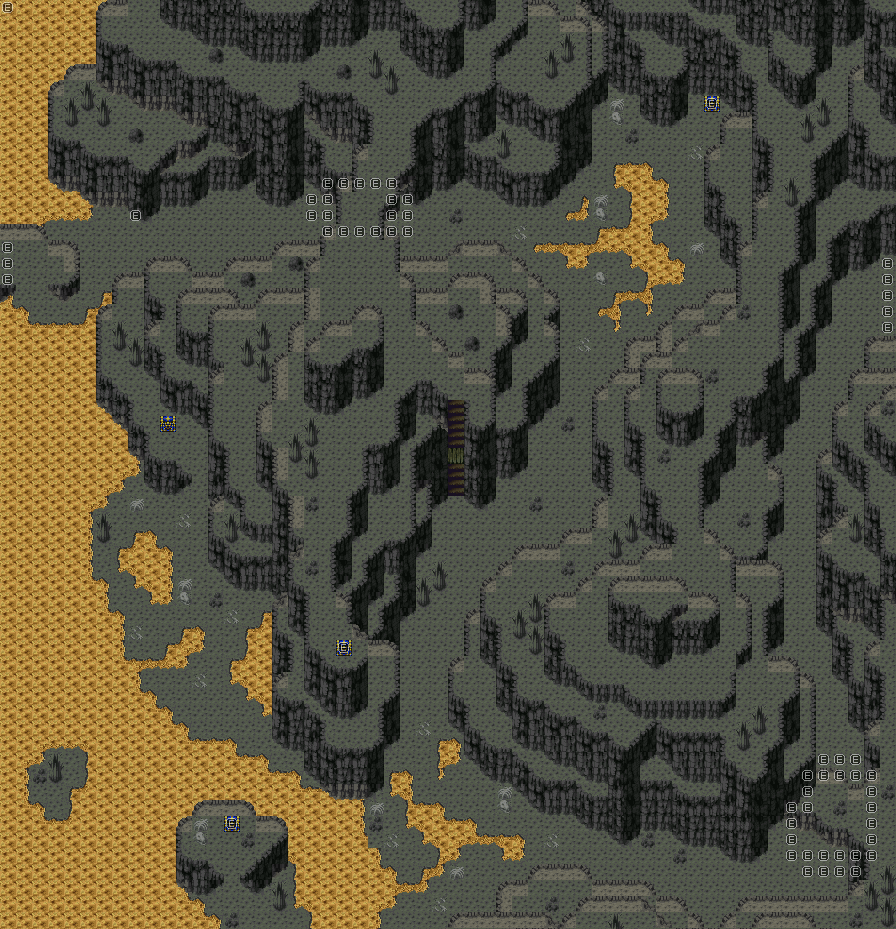
Haha, sorry about that, I'm oldschool (just missed 5 years of community evolution XD). Anyways, since according to you most people are being ironic about it I guess you will hate this:
Made this to help out Xenomic a bit, but I guess it wouldn't be bad to get some feedback on it before I gave him the idea that my mapping is the golden grail.
 Games - Tester
 Games - Other
