



 Full Games List
 Featured Games
 New Games
 Reviews
 Media
Media Images
 Blogs
Blogs Game Updates
 Images Feedback Summary
 Game Design Highlights
 Articles
 Scripts
 Utilities / Plugins
 Resources
 Engines
 Engine Bulletins
 What is Makerscore?
 Past Events
 Achievements
 Misaos
 Forums
 Post History
 Chat
Chat New to RMN?
 Full Store List
 RMN Music Pack (free)



 Profile
 Locker
 Play Lists
WIDDERUNE'S PROFILE
Widderune

30
 Close
Close
Widderune was one of the main collaborators behind the WOLF RPG Editor English Project,
an English translation of WOLF RPGエディター.
He has retired from the translation work,
but he will try answering any questions regarding WOLF RPG Editor English.
Widderune Rumble Channel:
https://rumble.com/c/c-532377
an English translation of WOLF RPGエディター.
He has retired from the translation work,
but he will try answering any questions regarding WOLF RPG Editor English.
Widderune Rumble Channel:
https://rumble.com/c/c-532377
Search
Filter
 All
All Game Pages
 User Statuses
 Lantern Tutorial (Base System not required)
author=Marrend
As the person who edited the post, it, itself, was spam. It had nothing to do with your tutorial.
Thank you.
I did not notice the edit until now.
I am sorry for bothering you.
Lantern Tutorial (Base System not required)
author=cpoexperts
*spam*
Not spam.
I am one of the main collaborators behind WOLF RPG Editor English 2.24Z
I created this tutorial based on a tutorial for RPG Maker.
It is my way of showing how WRPGE operates.
All links at the end of the tutorial are for informational and contact purposes.
So once again, not *spam*
 WOLF RPG Editor
Bhavacakra Maco
Attention! :
Fixed "Save/Load Game" glitch
of the "(Blank Data With Base System)" Data folder.
Check your "Save/Load Game" function.
If it is not working and you see the "green ribbon" error message, it's the glitch.
I only found this glitch when I was designing my own game.
It is only with the above mentioned folder, not anything else.
If anyone who is using the OLD Base System (before the fix),
please save & export your work and then slowly load & import it into the FIXED Base System.
I am sorry for the mess, but it cannot be overlooked.
Thank you.
Fixed "Save/Load Game" glitch
of the "(Blank Data With Base System)" Data folder.
Check your "Save/Load Game" function.
If it is not working and you see the "green ribbon" error message, it's the glitch.
I only found this glitch when I was designing my own game.
It is only with the above mentioned folder, not anything else.
If anyone who is using the OLD Base System (before the fix),
please save & export your work and then slowly load & import it into the FIXED Base System.
I am sorry for the mess, but it cannot be overlooked.
Thank you.
WOLF RPG Editor
Attention! :
Fixed "Save/Load Game" glitch
of the "(Blank Data )" Data folder.
I only found this glitch when I was designing my own game.
It is only with the above mentioned folder, not anything else.
If anyone who is using the OLD Base System (before the fix), please save & export your work and then slowly load & import it into the FIXED Base System.
I am sorry for the mess, but it cannot be overlooked.
Thank you.
Fixed "Save/Load Game" glitch
of the "(Blank Data )" Data folder.
I only found this glitch when I was designing my own game.
It is only with the above mentioned folder, not anything else.
If anyone who is using the OLD Base System (before the fix), please save & export your work and then slowly load & import it into the FIXED Base System.
I am sorry for the mess, but it cannot be overlooked.
Thank you.
 Version 0.0.3 Wolf
I disagree.
Realism or fantasy, there is always guidelines. And even with rooms, they apply.
All I can understand from you is that you do not take advice or constructive criticism well.
And on that note, I do not see why I should even bother explaining myself further to you.
So, farewell and good luck with your project.
End of message from Widderune
Realism or fantasy, there is always guidelines. And even with rooms, they apply.
All I can understand from you is that you do not take advice or constructive criticism well.
And on that note, I do not see why I should even bother explaining myself further to you.
So, farewell and good luck with your project.
End of message from Widderune
Version 0.0.3 Wolf
I'm not complaining about your choice of resolution (which is great) or your tile size (I am using 40x40 on my own game creation), I'm not even complaining about your character and environment design (which look amazing by the way), I'm just saying that your inside rooms exaggerate their size compared with the outside shape and appearance of your buildings.
You did Maco's house fine.
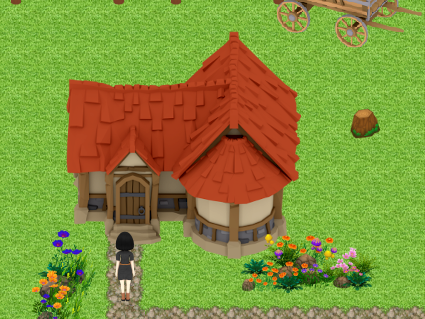
But your outside shape compared with your inside floor plan, it doesn't seem quite right. Your stretching the space a bit and you have to think of it as a home your designing, not merely an area for players to move around in.
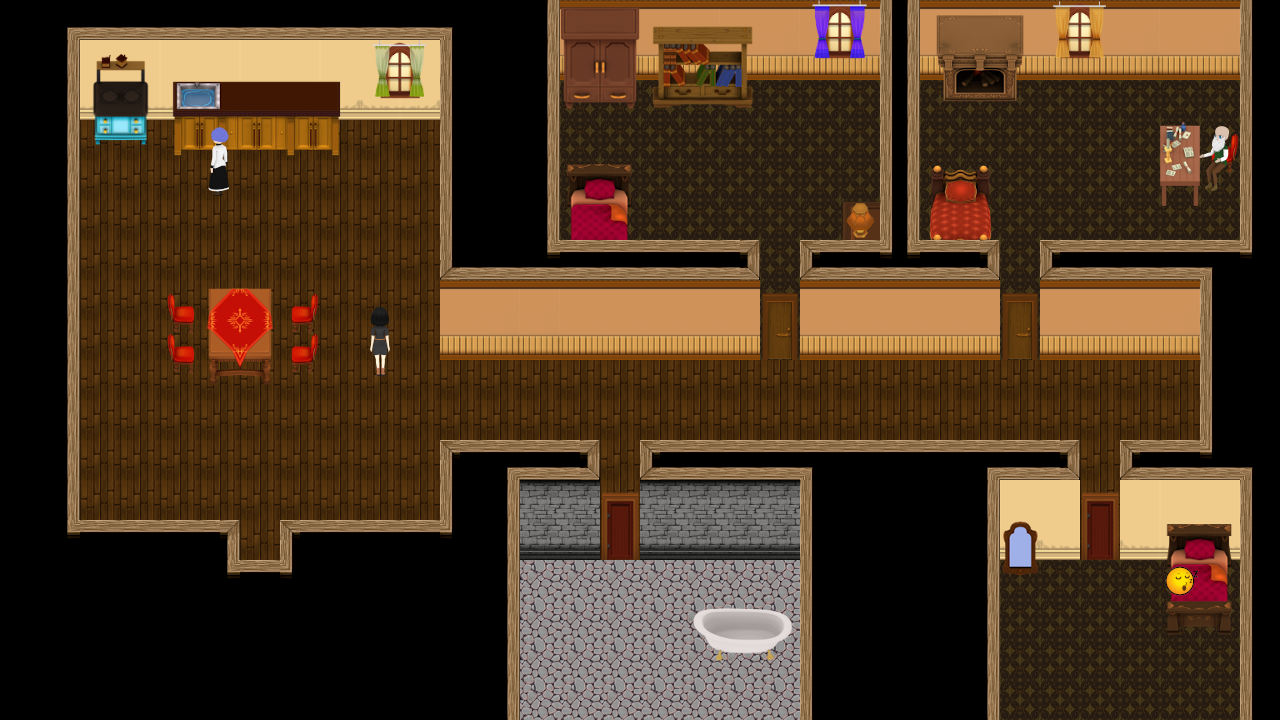
I think you should go with more of a floor plan like this.
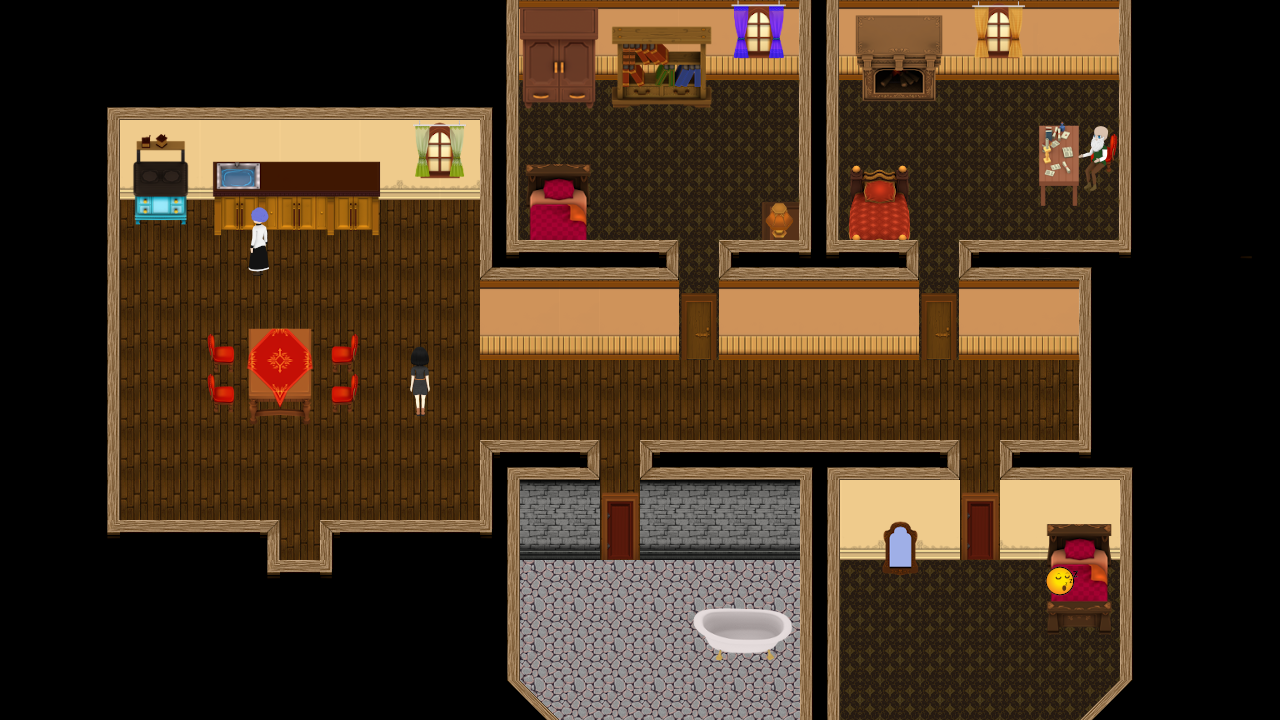
It works more with the shape of Maco's house, and you have to keep in mind that you have a "T" shaped roof that tells the player it should be a "T" shaped house. And since Maco's house has a tower in front, the rooms in that area should have rounded corners (more convincing than square rooms in a round tower).
You may be a game developer, but you have to have a home-design mind for how a house's floor plan structure should appear inside compared with its outside shape.
You just need to keep the inside shape and size proportional to the outside of the building.
I'm sorry if I sound like an instructor with a tutorial, it just tends to come out that way.
You did Maco's house fine.
But your outside shape compared with your inside floor plan, it doesn't seem quite right. Your stretching the space a bit and you have to think of it as a home your designing, not merely an area for players to move around in.
I think you should go with more of a floor plan like this.
It works more with the shape of Maco's house, and you have to keep in mind that you have a "T" shaped roof that tells the player it should be a "T" shaped house. And since Maco's house has a tower in front, the rooms in that area should have rounded corners (more convincing than square rooms in a round tower).
You may be a game developer, but you have to have a home-design mind for how a house's floor plan structure should appear inside compared with its outside shape.
You just need to keep the inside shape and size proportional to the outside of the building.
I'm sorry if I sound like an instructor with a tutorial, it just tends to come out that way.
Version 0.0.3 Wolf
Okay, I understand that you do not want to use the arrow.
But you should definitely consider the insides of your buildings.
I still feel that Maco's House and the Shop are too big. They both feel like there is too much open space, especially in the lower-half region of every room.
If you just trim off some of the height and width of the rooms, keeping the general shape of how the buildings appear outside, you will find the rooms still have all the open space that you need.
I'm not telling you to make a Pokemon house (which are good to use as an example on size and shape), but even Pokemon houses have plenty of open space for small buildings.
I'm just going with my gamer's gut, I feel your inside room is too big.
I am mainly suggesting this, so you can get used to building your inside rooms consistently but without the need of others telling you "the room is too big".
But you should definitely consider the insides of your buildings.
I still feel that Maco's House and the Shop are too big. They both feel like there is too much open space, especially in the lower-half region of every room.
If you just trim off some of the height and width of the rooms, keeping the general shape of how the buildings appear outside, you will find the rooms still have all the open space that you need.
I'm not telling you to make a Pokemon house (which are good to use as an example on size and shape), but even Pokemon houses have plenty of open space for small buildings.
I'm just going with my gamer's gut, I feel your inside room is too big.
I am mainly suggesting this, so you can get used to building your inside rooms consistently but without the need of others telling you "the room is too big".
Version 0.0.3 Wolf
I simply inspected your first area.
You should test your Tiles as you go along, that way you can find the errors in the early stages of development.
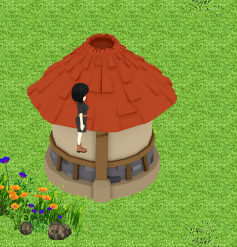
I still think you should consider how big the inside of a house should be based on its outside appearance.
For example, here is a house you did in the first area. Looks like a small one-room house.
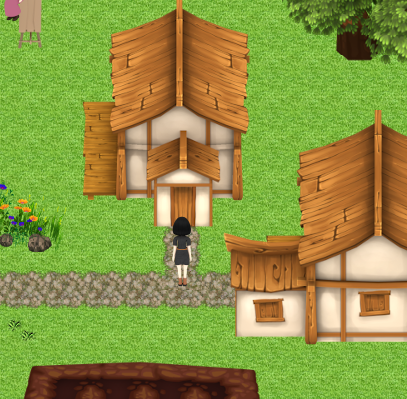
But yet you gave it an excessive amount of space. For a small house, I think you made a shack into a mansion.
I know it is supposed to be a house in a dying town, but the open space is too much.
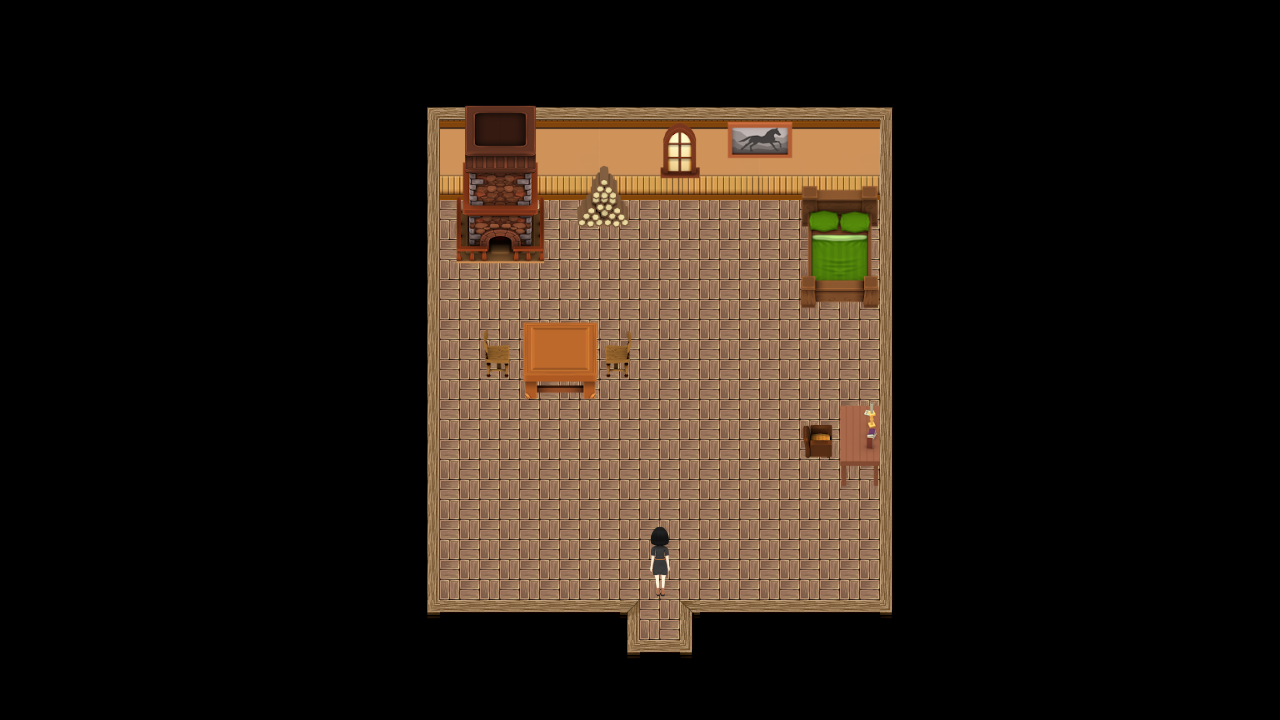
Here is the same house but adjusted to be more proportional to its outside appearance and shape.
(It is a photo-edited image, I did not enter or alter any of your game files.)
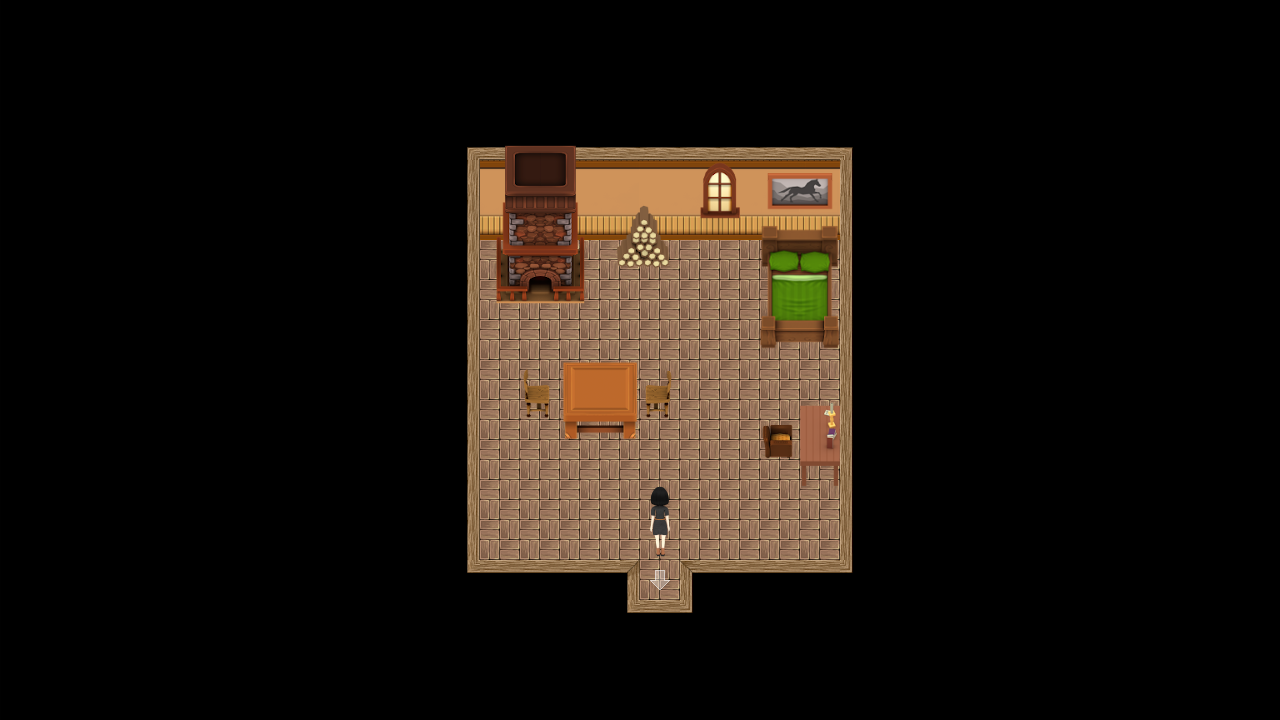
I simply made your house 2x2 Tiles smaller.
And I also moved the painting down some pixels because it was touching the ceiling, which is rather high for a hanging picture.
All your furniture and decorations are still in the room, the room still keeps the general shape of the house, and you still have plenty of open space for the illusion of a "dying town" house.
You have to remember that your character uses Half-Tile movement, so the space feels bigger than it is.
I edited your room border at the bottom in the image, to give you an example of visual concept. Just look between the pictures, you will see what I mean.
And for any door hidden from view in the top-down perspective, you can do two things.
1. Use a small carpet/rug to show where a door is.
Or
2. Use a transparent arrow.
If you plan to use a transparent arrow (like in the picture) but you want to have it animated, you can take advantage of the Auto-Tiles. Why I say Auto-Tiles and NOT Character Graphics, it's because Auto-Tiles would be under the character's feet while Character Graphics would appear in front or above the character.
These are all merely suggestions, you do not need to listen to all of my advice.
Just providing constructive criticism.
Sorry if I seem to be an annoyance.
You should test your Tiles as you go along, that way you can find the errors in the early stages of development.
I still think you should consider how big the inside of a house should be based on its outside appearance.
For example, here is a house you did in the first area. Looks like a small one-room house.
But yet you gave it an excessive amount of space. For a small house, I think you made a shack into a mansion.
I know it is supposed to be a house in a dying town, but the open space is too much.
Here is the same house but adjusted to be more proportional to its outside appearance and shape.
(It is a photo-edited image, I did not enter or alter any of your game files.)
I simply made your house 2x2 Tiles smaller.
And I also moved the painting down some pixels because it was touching the ceiling, which is rather high for a hanging picture.
All your furniture and decorations are still in the room, the room still keeps the general shape of the house, and you still have plenty of open space for the illusion of a "dying town" house.
You have to remember that your character uses Half-Tile movement, so the space feels bigger than it is.
I edited your room border at the bottom in the image, to give you an example of visual concept. Just look between the pictures, you will see what I mean.
And for any door hidden from view in the top-down perspective, you can do two things.
1. Use a small carpet/rug to show where a door is.
Or
2. Use a transparent arrow.
If you plan to use a transparent arrow (like in the picture) but you want to have it animated, you can take advantage of the Auto-Tiles. Why I say Auto-Tiles and NOT Character Graphics, it's because Auto-Tiles would be under the character's feet while Character Graphics would appear in front or above the character.
These are all merely suggestions, you do not need to listen to all of my advice.
Just providing constructive criticism.
Sorry if I seem to be an annoyance.
 Games - Tester
 Games - Other
