



 Full Games List
 Featured Games
 New Games
 Reviews
 Media
Media Images
 Blogs
Blogs Game Updates
 Images Feedback Summary
 Game Design Highlights
 Tutorials
 Articles
 Scripts
 Utilities / Plugins
 Resources
 Engines
 Engine Bulletins
 What is Makerscore?
 Past Events
 Achievements
 Misaos
 Forums
 Post History
 Chat
Chat New to RMN?
 Full Store List
 RMN Music Pack (free)



THE SCREENSHOT TOPIC RETURNS
Posts

 Darken
 View playlists
 Close
Closeauthor=bulmabriefs144
Generally, understanding the engineering rationale of art (or, why a bridge is usually centered rather than on the top or bottom of a ledge) is helpful. But I'll put it bluntly, if you have a bridge on the side of a slope, too much weight would make it slide off and tilt.
Even without being centered, a right angle bridge in midair is very, very dangerous, and needs a special joining platform (look closely at the picture below) to be stable. It'd be better to create mini ledges, than expect the public to believe right angle bridges work perfectly enough to have a screen covered with them.
Megaman has metal ledges, probably welded to the platform (I saw the video). This is different than a free-standing wooden bridge.

I don't think anyone would make that assessment, ever. I mean it's thoughtful but no player is going to think about this.

I, the theoretical player, just did.
Which is why right angle bridges are evil.
Been working on a couple of dream chipsets (because my real chipsets aren't trippy enough).

This one is mostly normal except for the sense of scale (signs are as big around as your character, houses are small enough that you need to squat to enter), the purple grass, and rainbow leaf tree.

This one has crystal architecture melded with grass and huts, and the water flows against gravity.

Haven't tried the other yet.
Which is why right angle bridges are evil.
Been working on a couple of dream chipsets (because my real chipsets aren't trippy enough).

This one is mostly normal except for the sense of scale (signs are as big around as your character, houses are small enough that you need to squat to enter), the purple grass, and rainbow leaf tree.

This one has crystal architecture melded with grass and huts, and the water flows against gravity.

Haven't tried the other yet.

I can't believe you found a rip of those green (Rudra?) tiles. Back when I still used ripped graphics I was looking for those everywhere, since they were paired with a really nice battle backdrop.
Nothing in that first chipset fits together, and don't say that it's okay just because it's a dream world. Even dreams are coherent if they're strange. There's just too many different styles going on in one place.
Nothing in that first chipset fits together, and don't say that it's okay just because it's a dream world. Even dreams are coherent if they're strange. There's just too many different styles going on in one place.
Fair enough.
Specifically, what's the worst offenders (feel free to doodle all over the screenshot)? If I had to guess, I'd say that blue roof is a bit weird, and the white pane esp has to go. Dunno what to replace it with. But I'm certain there's others.
Also, I'm gonna try to fix that middle walling on the chipset. The wood part of the house and the one right next to it.
Specifically, what's the worst offenders (feel free to doodle all over the screenshot)? If I had to guess, I'd say that blue roof is a bit weird, and the white pane esp has to go. Dunno what to replace it with. But I'm certain there's others.
Also, I'm gonna try to fix that middle walling on the chipset. The wood part of the house and the one right next to it.

Sigh... I don't have anything else better, so I don't what else I could do. I have two other wooden bridge tiles, but if I want to use them, I'll have to simplify the map a bit more boring. :O

I tried to make it looks more stable, but I guess it isn't much different. :P
I tried to make it looks more stable, but I guess it isn't much different. :P
^
Dude, don't worry about it looking stable. That is the most nit-pickiest thing I've seen in a while. Darken was right, (next to)nobody will think about that. Buuut, if it needed to be stable think of a roller coaster. Long "legs" that would extend into the darkness below. But seriously, forget about that and worry about something important. Or just, ya know, position the cliffs so there is no need for corners. *last edit*

Thoughts?
I'm learning that things have a different size when put at an angle, so I have make adjustments so that it looks right. It's like an optical illusion. Take the road, for instance. Doesn't it look like the horizontal road is wider than the diagonal road? Well, the top half of the horizontal road is smaller than the bottom half of it. The top half is 26 pixels high, because I adjusted it to match the diagonal road better. The bottom half is 31 pixels high, the original size when I drew it. The diagonal road is the same width on both sides and it's 36 pixels. The bottom half of the horizontal looks huge compared to the diagonal road. But the top half of the horizontal road, looks about even with the diagonal road, even though the difference is 10 pixels.
I don't know if I should be adjusting to make it look right, or use the same measurements and let it look wrong. Does it even look wrong to you guys? or am I being too picky? Is that just how the perspective is supposed to work?
You can see my process, for the car. But it's having the opposite effect; the side view looks small and the diagonal view looks fricken' huge! I drew the 2D side view first, then made a copy on top of it. Connected it with some lines, and voila, I have a full 3D car. It looks decent, I think. Then to make the diagonal view of the car I took the 2D side view and rotated it 45 degrees, skewed it up a little, copied it, connected it with lines, and fuck it looked huge. It looks like a station wagon, when it's supposed to be a coupe. The diagonal view one on the right is trimmed down a few pixels in the front, back, and middle. It looks better, but I'm not entirely satisfied with it.
How do you feel about the size comparison?
If someone could point out an error I'm making, I would be so glad that's it's me and not the nature of the graphic style. Looking at it now, I think maybe I skewed it a little too high, but it still looks longer in the diagonal. Maybe it's because I'm a newb at this whole custom art thing, but it's not as easy as I hoped it would be!
Dude, don't worry about it looking stable. That is the most nit-pickiest thing I've seen in a while. Darken was right, (next to)nobody will think about that. Buuut, if it needed to be stable think of a roller coaster. Long "legs" that would extend into the darkness below. But seriously, forget about that and worry about something important. Or just, ya know, position the cliffs so there is no need for corners. *last edit*
Thoughts?
I'm learning that things have a different size when put at an angle, so I have make adjustments so that it looks right. It's like an optical illusion. Take the road, for instance. Doesn't it look like the horizontal road is wider than the diagonal road? Well, the top half of the horizontal road is smaller than the bottom half of it. The top half is 26 pixels high, because I adjusted it to match the diagonal road better. The bottom half is 31 pixels high, the original size when I drew it. The diagonal road is the same width on both sides and it's 36 pixels. The bottom half of the horizontal looks huge compared to the diagonal road. But the top half of the horizontal road, looks about even with the diagonal road, even though the difference is 10 pixels.
I don't know if I should be adjusting to make it look right, or use the same measurements and let it look wrong. Does it even look wrong to you guys? or am I being too picky? Is that just how the perspective is supposed to work?
You can see my process, for the car. But it's having the opposite effect; the side view looks small and the diagonal view looks fricken' huge! I drew the 2D side view first, then made a copy on top of it. Connected it with some lines, and voila, I have a full 3D car. It looks decent, I think. Then to make the diagonal view of the car I took the 2D side view and rotated it 45 degrees, skewed it up a little, copied it, connected it with lines, and fuck it looked huge. It looks like a station wagon, when it's supposed to be a coupe. The diagonal view one on the right is trimmed down a few pixels in the front, back, and middle. It looks better, but I'm not entirely satisfied with it.
How do you feel about the size comparison?
If someone could point out an error I'm making, I would be so glad that's it's me and not the nature of the graphic style. Looking at it now, I think maybe I skewed it a little too high, but it still looks longer in the diagonal. Maybe it's because I'm a newb at this whole custom art thing, but it's not as easy as I hoped it would be!
Make little pillars then at the area where the bridge switches angle. Or break the bridge int two parts.
The issue is that it's sorta hanging in midair over a gorge with nothing to rest upon.
The issue is that it's sorta hanging in midair over a gorge with nothing to rest upon.

Speaking of diagonals (I know Snowy is there, but I eventually blocked him, after one of his earlier comments annoyed me, though I can still see him offline, so now it's like I'm double-posting), if you have space on your chipset and any kind of editing program, you could possibly make diagonal bridges. It'd look cleaner, though you'd have to set up a diagonal movement facing event. Well, unless Ace seamlessly handles diagonals.
I'm not real certain that would look better though. Wait, what am I talking about, of course it would. I visibly cringe whenever I see rpgs do this, as I have the whole Temple Grandin visualization thing. Okay, look, here's what I'm seeing, and this is why right angle bridges without anything to hold them up are pretty much always bad planning.

It's like a catapult effect, unless it's tied to walls or held by a ledge, weight on the bridge makes stuff fly off as the bridge sinks suddenly and drastically. Added suspension rope on top wouldn't help, I'm pretty sure the pressure of such a sharp angle would snap the rope given any sort of weight.
I'm not real certain that would look better though. Wait, what am I talking about, of course it would. I visibly cringe whenever I see rpgs do this, as I have the whole Temple Grandin visualization thing. Okay, look, here's what I'm seeing, and this is why right angle bridges without anything to hold them up are pretty much always bad planning.

It's like a catapult effect, unless it's tied to walls or held by a ledge, weight on the bridge makes stuff fly off as the bridge sinks suddenly and drastically. Added suspension rope on top wouldn't help, I'm pretty sure the pressure of such a sharp angle would snap the rope given any sort of weight.
author=bulmabriefs144
Fair enough.
Specifically, what's the worst offenders (feel free to doodle all over the screenshot)? If I had to guess, I'd say that blue roof is a bit weird, and the white pane esp has to go. Dunno what to replace it with. But I'm certain there's others.
Also, I'm gonna try to fix that middle walling on the chipset. The wood part of the house and the one right next to it.
The house in the top left looks photoshopped in. The rainbow tree is flat and pretty ugly, so it would benefit from some shading, and perhaps a more vibrant and real rainbow colouring to get the point across. The walls of the house with the blue roof are flat as well, and don't work with the shading of the area. The other two houses could use some cleaning up, especially with how their shaded (the red roof and the stone wall look wrong). You might also want to clean up the harsh black edges near the cliffs.
Harsh black edges...? Oh. Yea, it came like that. Because it's a lower chipset, I can't match it to everything. But there I have an upper chipset I can use instead.
The house on the left, I'm keeping. It's the only thing that actually looks good here, since the rest has roof-wall mismatch.
The blue roof tiling, I'd probably not use in the future (RTP), but I haven't a better one. So, for the time being, I'll just not use it.
The stone wall came from a town chipset, but in the process of importing, the color became muddy.
The blue roof walls are basically a quick tileset (like the red roof). I probably should have paired it with that, as these two have similar detail.
Just so you know, most of my art is using programs to fix stuff for me. I dunno how to shade effectively, and I can't add match stuff to the art of other stuff. The best I can do is wing it, using shading that already exists (the grey stone wall in the chipset is an example of that, and there are clear copypaste lines). Note the above picture. That's about the limit of my art.

Latest chipset. I can't fix it, and it is mismatched, but if someone can do the shading I'd be really grateful.
The house on the left, I'm keeping. It's the only thing that actually looks good here, since the rest has roof-wall mismatch.
The blue roof tiling, I'd probably not use in the future (RTP), but I haven't a better one. So, for the time being, I'll just not use it.
The stone wall came from a town chipset, but in the process of importing, the color became muddy.
The blue roof walls are basically a quick tileset (like the red roof). I probably should have paired it with that, as these two have similar detail.
Just so you know, most of my art is using programs to fix stuff for me. I dunno how to shade effectively, and I can't add match stuff to the art of other stuff. The best I can do is wing it, using shading that already exists (the grey stone wall in the chipset is an example of that, and there are clear copypaste lines). Note the above picture. That's about the limit of my art.

Latest chipset. I can't fix it, and it is mismatched, but if someone can do the shading I'd be really grateful.
The harsh black edges beneath the cliff tiles are there because the tiles have been used improperly. The "fade to black" cliff bottoms are supposed to denote a large drop off, and should be paired with a top cliff tiles below them to make it look like there's a chasm there.
What you want to do with it is your business. If you want to keep stuff like that in there then it honestly doesn't bother me. It's all a really simple job to fix up.
What you want to do with it is your business. If you want to keep stuff like that in there then it honestly doesn't bother me. It's all a really simple job to fix up.
author=SnowOwlThat's the dilemma; it's not longer. It just looks that way.
The cars facing diagonally is longer than the other ones.

If you take a ruler to your screen, and measure the space between the lines I drew, they are nearly identical. But the diagonal view has a bottom left corner that makes it appear longer. If you measure from that bottom left corner to the top right, it is longer. But that seems to be inherit to the perspective.
author=Pizza
The harsh black edges beneath the cliff tiles are there because the tiles have been used improperly. The "fade to black" cliff bottoms are supposed to denote a large drop off, and should be paired with a top cliff tiles below them to make it look like there's a chasm there.
Ohhh. That's right. I always make goofy errors like that.
What you want to do with it is your business. If you want to keep stuff like that in there then it honestly doesn't bother me. It's all a really simple job to fix up.
Maybe for you. My highest level of art was a teaching class called Art For Children, where we made stuff like this. (It's bad)

I have serious misgivings about my ability to shade, which is why I asked for help. But yea, it doesn't really matter in the broad scheme of things if stuff looks a bit flat. On the other hand, the picture I just posted, in the broad scheme of things is disgraceful. Thankfully, I know enough of computer editing that I usually don't have to draw freehand.


author=Link_2112
If you take a ruler to your screen, and measure the space between the lines I drew, they are nearly identical. But the diagonal view has a bottom left corner that makes it appear longer. If you measure from that bottom left corner to the top right, it is longer. But that seems to be inherit to the perspective.
Whether it actually is longer or not doesn't really matter. What matters is whether or not it looks longer. Do some fudging and see if you can't bring them more into line!

author=LouisCyphre
Whether it actually is longer or not doesn't really matter. What matters is whether or not it looks longer. Do some fudging and see if you can't bring them more into line!
It doesn't just look longer--it is longer. His geometry isn't equal in all directions so he shouldn't be drawing them with the assumption that they are. Based on the front of the car, his diagonals should run about 1/2, not 1/sqrt(2), so his car diagonal car should be about 26 pixels instead of the 35 he's got.
author=JudeI didn't assume anything. I didn't think about it, I just drew based on nothing and saw the flaw in my result. Google suggests you are referring to oblique projection. Is that right?
It doesn't just look longer--it is longer. His geometry isn't equal in all directions so he shouldn't be drawing them with the assumption that they are. Based on the front of the car, his diagonals should run about 1/2, not 1/sqrt(2), so his car diagonal car should be about 26 pixels instead of the 35 he's got.
Do you have any suggestions on possible better methods?
*edit: Made it a little smaller.

Any smaller and I think I'd have to alter the tires, which I don't want to do. It looks closer now.
*Ok, maybe I can take 2 more pixels off it. But now it's starting to make the windows look way too small. But it does look about the right size...


LockeZ

I'd really like to get rid of LockeZ. His play style is way too unpredictable. He's always like this too. If he ran a country, he'd just kill and imprison people at random until crime stopped.
5958
I think I saw a gator wrangler living in a house like that on the discovery channel.
@Link: I like it, I think the windows are fine like that, but if it bothers you, get rid of some of the light red parts in between the dark red borders in there between the windows.
Also this might be useful inspiration? S'from Earthbound, one of the only games I know of that uses the same perspective you're using.
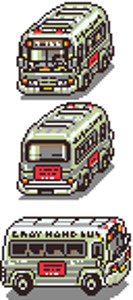
@Link: I like it, I think the windows are fine like that, but if it bothers you, get rid of some of the light red parts in between the dark red borders in there between the windows.
Also this might be useful inspiration? S'from Earthbound, one of the only games I know of that uses the same perspective you're using.

