Full Games List
 Featured Games
 New Games
 Reviews
 Media
Media Images
 Blogs
Blogs Game Updates
 Images Feedback Summary
 Game Design Highlights
 Tutorials
 Articles
 Scripts
 Utilities / Plugins
 Resources
 Engines
 Engine Bulletins
 What is Makerscore?
 Past Events
 Achievements
 Misaos
 Forums
 Chat
Chat New to RMN?
 Full Store List
 RMN Music Pack (free)



 Profile
 Locker
 Play Lists
LARGE'S PROFILE
Large
332
 Close
CloseSearch
Filter
 All
All Game Pages
 User Statuses
 Video recording/editing software?
author=murrayauthor=Darkflamewolf
camstudio.author=LockeZ
Debut Video Captureauthor=Felipe_9595
Wmcaptureauthor=Archeia_Nessiah
Frapsauthor=CharlesGabrielWow.
http://www.hyperionics.com/hc/
Just use Camstudio dude. Thread should have ended there.
Untrue. Camstudio, for instance, won't work for me; Fraps does the trick.
rm2k3 programming help
rm2k3 programming help
Here's another idea-in-a-second:
Don't link any animation, just the disappearing battle character. Then, on each monster group, you put as trigger:
Then a conditional branch:
And then rinse and repeat for each monster in the group.
Now, I just checked the battle system, and it won't offer the "If Item equipped" conditional branch, but you can have a common event as a parallel process, checking if the Armor is equipped, and if so, turning ON Switch "Armor 1 Equipped".
Then check for the Switch and proceed as explained above.
Would that work?
Don't link any animation, just the disappearing battle character. Then, on each monster group, you put as trigger:
If Hero uses [Fight] command
Then a conditional branch:
If [Monster 1]
  If [Armor 1] equipped
    Show battle animation [Animation 1] Target [Monster 1]
  If [Armor 2] equipped
    Show battle animation [Animation 1] Target [Monster 1]
And then rinse and repeat for each monster in the group.
Now, I just checked the battle system, and it won't offer the "If Item equipped" conditional branch, but you can have a common event as a parallel process, checking if the Armor is equipped, and if so, turning ON Switch "Armor 1 Equipped".
Then check for the Switch and proceed as explained above.
Would that work?
 The Screenshot Topic Returns
I like the first screenshot, but the grass is off. Perhaps is the lack of defining features on the light green type of grass, or the big difference between both colors.
Lava seems repetitive..
Lava seems repetitive..
rm2k3 programming help
I can tell you from the start that an item cannot have 2 animations at the same time.
So, let me see if I got it right:
You have a guy with two different armors, but same stats. The 2 armors have different appearances, but he only has one sword, right?
Basically, you want to have an animation for each suit of armor, applied to the same weapon. Correct?
If that's what you want, my suggestion would be:
- I'll assume you already have the 2 armor sets, and the 2 different attack animations.
- Copy your sword, and paste it as a new item. It is an exact clone (Name, stats, cost, etc), except for one thing: the battle animation. Link the second animation to this second sword.
- Whenever the character switches armor, make it so he/she switches sword as well...
So, let me see if I got it right:
You have a guy with two different armors, but same stats. The 2 armors have different appearances, but he only has one sword, right?
Basically, you want to have an animation for each suit of armor, applied to the same weapon. Correct?
If that's what you want, my suggestion would be:
- I'll assume you already have the 2 armor sets, and the 2 different attack animations.
- Copy your sword, and paste it as a new item. It is an exact clone (Name, stats, cost, etc), except for one thing: the battle animation. Link the second animation to this second sword.
- Whenever the character switches armor, make it so he/she switches sword as well...
The Screenshot Topic Returns
Oh yeah. Improvement indeed.
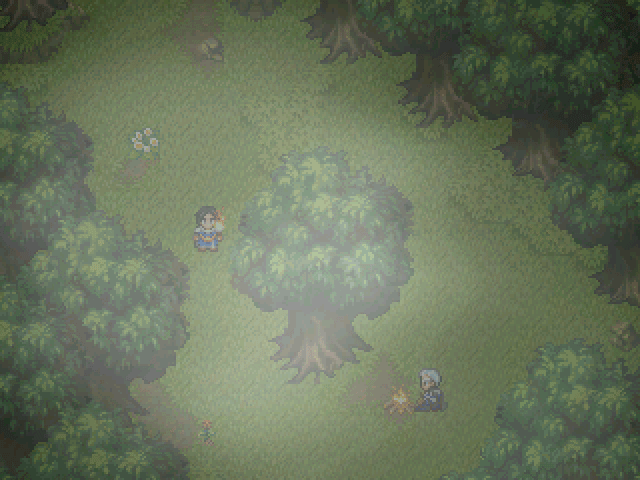
There were two sources of light. I changed that, because it wasn't playing properly, the way I wanted it (Engine limitations). However, in the screenshot, I had placed the 2 light sources; they were there, but kind of absorbed each other somehow. I couldn't get them to work. I removed the torch, so the hero is no longer generating light. BTW, it was not moonlight; it's the light generated by the fire the other NPC has going on, but you can't see it properly because of the static screenshot. (Animated in-game).
Thanks. I tweaked the speed and flow of the text a bit; it is important after all, as well as the actions happening at the same time. Don't worry, you'll see the consecuences and a few of the characters will pop up again. The long "........" was changed to the standard "...", but, and help me here a minute, while I do have the "..." emoticon in a bubble animation over a character's head, I don't want to place it on this guy's head. I feel it would subtract "gravity" from the scene. What do you think?
And yes, :P, I forgot to translate the last part, but that's been fixed.
author=alterego
@Large: http://i88.photobucket.com/albums/k192/Large114/SS2.png
This screen looks kinda odd to me, there are two visible sources of light, but there is only one washed out point of light in the center of the screen. Is that supposed to be moonlight or something? If it is I suggest you to use shade of blue instead of grey for the overlay picture. And maybe a halo of light above the torch and fireplace as well to aid the atmosphere?
There were two sources of light. I changed that, because it wasn't playing properly, the way I wanted it (Engine limitations). However, in the screenshot, I had placed the 2 light sources; they were there, but kind of absorbed each other somehow. I couldn't get them to work. I removed the torch, so the hero is no longer generating light. BTW, it was not moonlight; it's the light generated by the fire the other NPC has going on, but you can't see it properly because of the static screenshot. (Animated in-game).
author=alterego
I also watched your video and I liked it a lot. I'm agree with Darken about the text speed, though. What's happening in the background is kinda more interesting that the cryptic monologue, so I'd like to read it fast and just keep watching. Versalia is also right about that long "...." is kinda too much of a waste of time and space for so little. ...Oh, and did you forget to translate that last "Hombre encapuchado" by any chance?
Thanks. I tweaked the speed and flow of the text a bit; it is important after all, as well as the actions happening at the same time. Don't worry, you'll see the consecuences and a few of the characters will pop up again. The long "........" was changed to the standard "...", but, and help me here a minute, while I do have the "..." emoticon in a bubble animation over a character's head, I don't want to place it on this guy's head. I feel it would subtract "gravity" from the scene. What do you think?
And yes, :P, I forgot to translate the last part, but that's been fixed.
The Screenshot Topic Returns
author=Large
I'm not sure what to say, all the fonts are the same type and size in that screen. You may be referring to the difference in size between the Upper Case and Lower Case letters and if so that was done on purpose...
The check the "o", "p" and "q" in lower case, for example. They're aligned to the bottom line; that looks awkward, as regularly, they're aligned to the top line.
The Screenshot Topic Returns
@Felipe: I like the screenshot, but some of the comments already posted convey my feelings. Sprites my stand out too much.
@Lotus: I like it... but some of the letters have different sizes and that looks inconsistent.
@Lotus: I like it... but some of the letters have different sizes and that looks inconsistent.
The Screenshot Topic Returns
Yes, I have a similar code for RM 2k3. There is a tutorial here on the site; if you're close to the enemy, then, bam, aggro'ed.
As to your screenshot, I feel the cliff is too unnatural, too square. Nature is a bit more random.
@Ashley: It seems you map tile is an edit from one of the RTP mapsets. While I think taking the time and effort to customize graphics is time and effort well spent, these still feel to RTPish, and in my book, not good enough. However, the mapping itself, with different levels and elevations is good!
 Games - Tester
 Games - Other