



 Full Games List
 Featured Games
 New Games
 Reviews
 Media
Media Images
 Blogs
Blogs Game Updates
 Images Feedback Summary
 Game Design Highlights
 Tutorials
 Articles
 Scripts
 Utilities / Plugins
 Resources
 Engines
 Engine Bulletins
 What is Makerscore?
 Past Events
 Achievements
 Misaos
 Forums
 Chat
Chat New to RMN?
 Full Store List
 RMN Music Pack (free)



 Profile
 Locker
 Play Lists
PHANTASMAX'S PROFILE

 Close
Close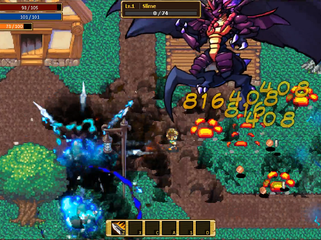

Search
Filter
 All
All Game Pages
 User Statuses
 Screenshot Survival 20XX

Screenshot Survival 20XX
@Kaempfer
Thanks for the suggestion! Now I cant unsee the bezels. Did a quick trim of the sprite and it does look a lot better:

Also working on an inventory system at the moment:

Thanks for the suggestion! Now I cant unsee the bezels. Did a quick trim of the sprite and it does look a lot better:
Also working on an inventory system at the moment:
Screenshot Survival 20XX
@Bulma
Up and down to select the classes, left and right to select unique bonuses. Not sure what to call it exactly, so I called it "blessings" for now.
Up and down to select the classes, left and right to select unique bonuses. Not sure what to call it exactly, so I called it "blessings" for now.
Screenshot Survival 20XX
@EtherPenguin
Thanks for the suggestion! I changed out the font. I think it looked really bad before because I resized the game window so everything got squished. Also, love the simple design of your menu, it's like all the pieces snap together perfectly!

Here is what it looks like normally, after I made some changes.
@Darken
Used the site and got me some real colors for the health and mana. Before, it was generic blue/red. Thanks!
@Bulma
The font was pixel font before, it's a normal font now, made it bigger now, but hopefully it is still not too small. I resized the stamina / exp bars to increase their height a bit to fit in the font. The number under the level is the %exp to level up, I removed the 100, now its just the %. Thanks for the suggestions. Nothing is automated, and I can make changes anywhere (using GMS2).
Suuppper nice suggestions, thank you all again. Been about 2 weeks since I started coding this project, hoping to finish this within 2 weeks, there are still a couple big systems I need to code, which I am fine with, but things like art, UI are where I'll run into trouble.
As for the game itself, action RPG / dungeon crawler? I haven't really decided on any plot or anything yet either.
Character selection screen, if anyone has any suggestions, that would be nice.

Combat?:

Thanks for the suggestion! I changed out the font. I think it looked really bad before because I resized the game window so everything got squished. Also, love the simple design of your menu, it's like all the pieces snap together perfectly!
Here is what it looks like normally, after I made some changes.
@Darken
Used the site and got me some real colors for the health and mana. Before, it was generic blue/red. Thanks!
@Bulma
The font was pixel font before, it's a normal font now, made it bigger now, but hopefully it is still not too small. I resized the stamina / exp bars to increase their height a bit to fit in the font. The number under the level is the %exp to level up, I removed the 100, now its just the %. Thanks for the suggestions. Nothing is automated, and I can make changes anywhere (using GMS2).
Suuppper nice suggestions, thank you all again. Been about 2 weeks since I started coding this project, hoping to finish this within 2 weeks, there are still a couple big systems I need to code, which I am fine with, but things like art, UI are where I'll run into trouble.
As for the game itself, action RPG / dungeon crawler? I haven't really decided on any plot or anything yet either.
Character selection screen, if anyone has any suggestions, that would be nice.
Combat?:
Screenshot Survival 20XX
Trying to make a UI for action rpg:

Got LVL, HP, MP, SP (stamina), EXP, and a skill bar. Am I missing anything else? What else can be improved? Ignore the thing at the top right, that's just stats display for testing purposes.
Got LVL, HP, MP, SP (stamina), EXP, and a skill bar. Am I missing anything else? What else can be improved? Ignore the thing at the top right, that's just stats display for testing purposes.
Screenshot Survival 20XX
@EtherPenguin
Hey no worries, and thanks a lot for the nice feedback! To be honest, I didn't notice a big difference either since I was always zipping around town on my game characters, but then I had to record a GIF of my game for an animation and stood in front of the buildings for long, that's when I noticed the fanciness. You did give me an idea though. I feel like I might go back into the sprite and erase some of the fine details on the fancy buildings, make it look more "poor" like all the other builds. The town's citizens support equality!
Biggest limitation for me this time around are going to be art, I gotta use cheap/free resources and see if I can make a game from it, and I'll use workarounds whenever possible. I will probably be posting a lot of UI related screenshots with questions too.
Hey no worries, and thanks a lot for the nice feedback! To be honest, I didn't notice a big difference either since I was always zipping around town on my game characters, but then I had to record a GIF of my game for an animation and stood in front of the buildings for long, that's when I noticed the fanciness. You did give me an idea though. I feel like I might go back into the sprite and erase some of the fine details on the fancy buildings, make it look more "poor" like all the other builds. The town's citizens support equality!
Biggest limitation for me this time around are going to be art, I gotta use cheap/free resources and see if I can make a game from it, and I'll use workarounds whenever possible. I will probably be posting a lot of UI related screenshots with questions too.
Screenshot Survival 20XX
Took a 2 year break from game dev, coming back to it now because I have more time. Bought a buncha cheap RPG assets on humble bundle too, so I got some of of the art covered, hopefully. Question, is it weird to use art assets from different style tilesets? I made a town, got some fancy looking buildings mixed in with some really plain ones. Should I keep it like this, or try to get everything matching by sticking to one tileset?

Whatchu Workin' On? Tell us!
Been about 2 years since I last did any game development. I did buy a humble bundle pack back in November with a bunch of RPG game assets, so I started trying to make a game again 2 weeks ago. Looks like it's gonna be some kinda action RPG atm. The art stuff is such a pain!
Looking to buy Gamemaker as cheap as possible
author=Link_2112
I do remember the older version being a bit clunky to work with. So far I've been only using it a day and can see how versatile it is. The small test project I've made is already better than any action game I've ever made in 2k3 heh For whatever that's worth. Makes me want to port all my games over, since action games are all I make x.x
One problem I seem to have already is finding good tutorials for the Drag and Drop interface. It's mostly the code interface I find. Some of the drag and drop commands are hard to figure out.
How big or complex is your game going to be? For smaller, less complex projects, Drag and Drop is probably fine, but once you increase the complexity of your game, you would probably want to switch to using code instead because you will be able to do more things and it will be much more efficient using code vs dragging and dropping commands/events everywhere. The good news is the scripting language for Gamemaker (GML) is very easy to learn and there are a ton of beginner tutorials on how to use it.
Still, if you're new to Gamemaker and coding, I would probably recommend you try to Drag and Drop tutorial first to see how some of the logic works, then as soon as possible, try to do the same in code. You'll see that it isn't that much harder to use code at all, and soon you will forget why you ever wanted to use Drag and Drop. Code fear is real, because looking at it at first, it looks like a foreign language. If you take some time and learn things step by step though, you'll be fine. It does take practice to get good at something. There are a ton of resources you can use, from the documentation, youtube tutorials, to asking the Gamemaker community for help if you have any coding related questions.
If you insist on using only the Drag and Drop (DnD) interface, then the documentation + Gamemaker community would probably be your best resources. I don't think there are too much video or written tutorials on using DnD, due to the reasons I listed above when you compare coding vs DnD. There may be better engines to use if you solely want to use drag and drop type interface (maybe clickteam fusion?). Anyway, whatever you choose, good luck on making your game!
 Games - Tester
 Games - Other
