



 Full Games List
 Featured Games
 New Games
 Reviews
 Media
Media Images
 Blogs
Blogs Game Updates
 Images Feedback Summary
 Game Design Highlights
 Tutorials
 Articles
 Scripts
 Utilities / Plugins
 Resources
 Engines
 Engine Bulletins
 What is Makerscore?
 Past Events
 Achievements
 Misaos
 Forums
 Chat
Chat New to RMN?
 Full Store List
 RMN Music Pack (free)



 Profile
 Locker
 Play Lists
THENECROMANCER'S PROFILE
TheNecromancer
3160
 Close
Close
RMN sucks
Search
Filter
 All
All Game Pages
 [Poll] Moogles vs Chocobos
 RMN v4.3 Bugs
author=Soozhaha I wanted to repeat your suggested steps and throw it in your face, because that's what I've been doing this whole time. But I figured I better repeat the steps to be sure. This time I got the right url at the top. Which made me do a double take, and realize what the issue is.
1) click on video
2) grab URL from address bar
When looking at your dashboard, and you click the words of the video, it goes to edit mode. Which is normally what I do when I pick something from a list on the internet. However if you click the thumbnail image instead, it goes to the watch page. I never would have thought they were different.
So, Thanks.
 My game is one of the top sold games with RPG Maker tag on Steam.
author=Yellow Magicauthor=Gourd_ClaeOkay, I get the context now. My bad..author=Yellow Magic
Are you guys seriously complaining about a single self-congratulatory status? Have you been on Facebook recently?
This isn't *exactly* the truth. Unity's earlier post gets a lot closer to the reason people aren't reacting favorably to the status.
Did you seriously just post without reading and understanding the whole conversation to stay within it's context? Isn't that what is plaguing facebook?
xD I kid, couldn't help myself.
RMN v4.3 Bugs
Not sure if this is a bug or maybe I'm using Youtube wrong, but whenever I want to share a video and get a url from youtube it looks like this:
https://youtu.be/luzpLgCUl9g or
https://www.youtube.com/edit?o=U&video_id=luzpLgCUl9g
However that doesn't work with RMN's youtube tag. For that tag to work, the url needs to look like this:
https://www.youtube.com/watch?v=luzpLgCUl9g
Can the site be made to work with the youtu.be links, if not, where exactly am I supposed to get the watch link when I'm looking at my youtube dashboard?
https://youtu.be/luzpLgCUl9g or
https://www.youtube.com/edit?o=U&video_id=luzpLgCUl9g
However that doesn't work with RMN's youtube tag. For that tag to work, the url needs to look like this:
https://www.youtube.com/watch?v=luzpLgCUl9g
Can the site be made to work with the youtu.be links, if not, where exactly am I supposed to get the watch link when I'm looking at my youtube dashboard?
Who's That Nicknamed RMN Member?!
I can see us 20 years down the line, not answering questions anymore, just posting a link to the last time the question was answered.
[RMVX ACE] Pushing and pulling objects
Great. You're welcome. Ah, I might have messed something up. I made a bunch of hasty last minute changes to it. I'll double check it, or you might have gotten the old version or something. (If your version of the event has anything with X,Y coordinates and Region ID, it's the old version. Download it again)
[RMVX ACE] Resolutions and full screen
I see. At least it's possible.
I've come to accept the 640x480 resolution, but I am still looking for better fullscreen. That fullscreen script works better however there is a major flaw that probably affects me alone. When you press F5 for fullscreen, then F6 to upscale it, then play a movie file in the game, the movie file is not scaled and only appears on 1/4 of the screen. Normal fullscreen shows it normally.
For now I'll deal with the blurry, or windowed mode.
I've come to accept the 640x480 resolution, but I am still looking for better fullscreen. That fullscreen script works better however there is a major flaw that probably affects me alone. When you press F5 for fullscreen, then F6 to upscale it, then play a movie file in the game, the movie file is not scaled and only appears on 1/4 of the screen. Normal fullscreen shows it normally.
For now I'll deal with the blurry, or windowed mode.
My game is one of the top sold games with RPG Maker tag on Steam.
I bet the response of this status would have been completely different if it was posted by someone else. A more established member perhaps. Instead we get success shaming haha
[RMVX ACE] Pushing and pulling objects
Wow, it was such a simple thing that I hadn't noticed. Ace no longer lets you set a page condition to be equal to a variable, it's always equal or greater. So all the events kept activating. Found a simple fix and it works now.
https://rpgmaker.net/media/content/users/9179/locker/PushPull.zip
Open this project.
I recommend reading the comments, so open the event on the first map. It's clearly marked ha
When you are done go to the second map. Copy any of the 3 events, they are all the same.
Open your project, and paste it. Change switch 1121 if you are already using it. Or name it, if it was unused. As it will have no name. Do the same for variables 1121.
Sw 1121 ALLOW push/pull
Var 1121 Object ID
You will want to make changes to it. To the graphic, sound. If you want to change hero graphic to a pushing sprite, add that to the spot where the hero's direction is locked. Don't forget to change it back in the right spot.
Other than that you copy and paste as many as you want and change 3 variable spots. It's listed in the comments of the first map event which ones to change.
Let me know how it goes.
edit: *It should work, but I discovered a bug with the region ID system I included. I'm going to try and fix that and I will reupload*
*Nevermind, turns out it's too complicated to work in the region ID detection system. I'll just keep it simple.*
https://rpgmaker.net/media/content/users/9179/locker/PushPull.zip
Open this project.
I recommend reading the comments, so open the event on the first map. It's clearly marked ha
When you are done go to the second map. Copy any of the 3 events, they are all the same.
Open your project, and paste it. Change switch 1121 if you are already using it. Or name it, if it was unused. As it will have no name. Do the same for variables 1121.
Sw 1121 ALLOW push/pull
Var 1121 Object ID
You will want to make changes to it. To the graphic, sound. If you want to change hero graphic to a pushing sprite, add that to the spot where the hero's direction is locked. Don't forget to change it back in the right spot.
Other than that you copy and paste as many as you want and change 3 variable spots. It's listed in the comments of the first map event which ones to change.
Let me know how it goes.
edit: *It should work, but I discovered a bug with the region ID system I included. I'm going to try and fix that and I will reupload*
*Nevermind, turns out it's too complicated to work in the region ID detection system. I'll just keep it simple.*
[RMVX ACE] Pushing and pulling objects
author=ClavisAnimaauthor=Link_2112Just a quick question. Since toggling is easier, would having a little animation or graphic appear be best for showing the player that pushing has been toggled on?
I can trying making something with events later today if this is not solved by then. I would be easier if instead of holding a key, you press it to toggle pushing on/off.
Yes, you could have the sprite do a push pose, like in Link to the Past.
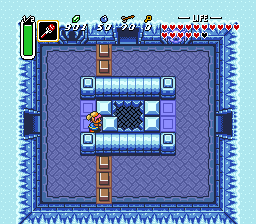
I ended up going out all day yesterday, and there's a big storm happening, so I'll have plenty of time to finish this up today.
 Games - Tester
 Games - Other
