



 Full Games List
 Featured Games
 New Games
 Reviews
 Media
Media Images
 Blogs
Blogs Game Updates
 Images Feedback Summary
 Game Design Highlights
 Scripts
 Utilities / Plugins
 Resources
 Engines
 Engine Bulletins
 What is Makerscore?
 Past Events
 Achievements
 Misaos
 Forums
 Post History
 Chat
Chat New to RMN?
 Full Store List
 RMN Music Pack (free)



 Profile
 Locker
 Play Lists
BULMABRIEFS144'S PROFILE

 Close
Close



Search
Filter
 All
All Game Pages
 User Statuses
 Windows 8 and RM2K3
Huh. I didn't have that problem, but yea, I had extreme resolution lag (it's noticeable on bigger screens or those with lots of events. And no, you ask, it's not parallel events. It ran fine on XP, it ran (well windows 7 sucks) ok on Windows 7 except for practically stalling on a snow screen, and it ran great on Vista. If you simply advance the map of a screen, animation is choppy and skips.
The second (AFM game starter fails because I have some sort of glitch with "subscript out of range (-1)" if I start minimized. So I have to basically start, then load the AFM.
The second (AFM game starter fails because I have some sort of glitch with "subscript out of range (-1)" if I start minimized. So I have to basically start, then load the AFM.
Windows 8 and RM2K3
Is there a way to turn this into an IPS instead? It's kinda weird to have to open this after starting, versus having it open automatically.
 Protect, shell, and more in RM2K3
One error here, only four of the nonelement should be 100%. The last should be 0%, so you can make puzzle enemies that are only weak to a certain element. Also, deprotect is a horrible idea. There is no way to have some enemies resist it, so EVERY enemy is vulnerable (game breaking). The only ones that should be able to use this stuff is enemies.
Forever's End had a number of armor break enemies, which used switches or something. After fiddling around with it awhile, I arrived on this thing.
Make an enemy that is immune to all but like one element (or make a Armor Break status, as you say, but don't lower immunity). Next make a condition Monster HP is 1-99 (in other words, when you get damaged). You can do this in the battle events or the monsters itself. Anyway, you Transform Monster to one with weakened resistance. This helps a bit for monster customization.
Forever's End had a number of armor break enemies, which used switches or something. After fiddling around with it awhile, I arrived on this thing.
Make an enemy that is immune to all but like one element (or make a Armor Break status, as you say, but don't lower immunity). Next make a condition Monster HP is 1-99 (in other words, when you get damaged). You can do this in the battle events or the monsters itself. Anyway, you Transform Monster to one with weakened resistance. This helps a bit for monster customization.
KazString: Working WIth Special Variables
Just as an update, there now is a simpler and more direct way to handle treasure chests. I made a compare_array comment, which checks whether the number is equal to the value in question, and turns on a switch if so.
The get_array is still there, but I'd recommend that for battle stuff, like assigning damage for attacks or something.
There's a ton of new comment effects, mainly dealing with shifting around temporary numbers into/from variables/switches.
The get_array is still there, but I'd recommend that for battle stuff, like assigning damage for attacks or something.
There's a ton of new comment effects, mainly dealing with shifting around temporary numbers into/from variables/switches.
KazString: Working WIth Special Variables
You can also make an entirely internal treasure-chest common event.
Just pull the Facing Up and ThisEvent movement outside the common event.
It should look like this
Array Row, Set (whatever)
Array Column, Set (whatever)
TreasureID, Set (whatever)
Condition Hero Facing Up
ThisEvent Face Left, Face Up
Proceed
Call Common Event: Treasure
ThisEvent Face Down
Proceed
End Event Processing
Inside the common event you have basically the code above, and then another common event something to handle the treasure ID (you can also work with quantities). Here, you use the @store_item to draw the item name, and then it displays what's inside by common event and variable. If you have multiple items possible in a treasure chest, you'll need a third common event, which clears all the numbers so you don't have carryover variables if one chest has only one after one with six items inside.
Just pull the Facing Up and ThisEvent movement outside the common event.
It should look like this
Array Row, Set (whatever)
Array Column, Set (whatever)
TreasureID, Set (whatever)
Condition Hero Facing Up
ThisEvent Face Left, Face Up
Proceed
Call Common Event: Treasure
ThisEvent Face Down
Proceed
End Event Processing
Inside the common event you have basically the code above, and then another common event something to handle the treasure ID (you can also work with quantities). Here, you use the @store_item to draw the item name, and then it displays what's inside by common event and variable. If you have multiple items possible in a treasure chest, you'll need a third common event, which clears all the numbers so you don't have carryover variables if one chest has only one after one with six items inside.
"Good" rm2k3 event coding
author=Kazesui
...What point are you trying to make here, because you're not really making a lot of sense.
Are you trying to claim that loops are bad and that you should rather rely on copy pasting, or are you trying to argue that there's any particular good reason for being insanely sparse with memory, considering each variable only cost couple of bytes anyway?
Exactly what I said. Good code saves variables, because sooner or later you'll run into something that requires alot of them, and having loops in the first place, yes, is very much to be avoided.
Why does it matter? Because somewhere, someone will have a 5-10 year old computer, because they either were poor or uncertain whether they could still program 2k3 on Windows 8. So, yes, it does matter to a certain extent.
- Don't use Loops, if you can help it. They have a nasty habit of stalling character motion, and certain things get lagged out by using them. A parallel process with no erase, will do the same without the tendency to clog actions.
- Don't use labels, they're even worse. C++ manuals warn against spaghetti code, and I'm not even a great C programmer. Tutorials are really the only decent place for labels, that and things for skipping processes, and even then, it's better to skip with an if-else branch than to murk up the code with labels. I have a few of them in common events, and one day I'm going to need to rewrite massive lines.
- Do use common events, as much as possible. They allow you to outsource events, speeding processes up (I tried the same code written into a local variable parallel process, and written in a parallel process with just a common event. There was a noticeable lag difference, in favor of the common events. Also, it makes the code far easier to edit. This is the problem that often plagues battle events, having to copy paste the same damn code 300+ times.
- Some common events should be switch activated, some should work as a by-screen parallel/auto event. Understand what goes where, and don't decide it's a great thing to have all common events by switch. This means until you turn them off, a whole bunch of events are constantly active.
Looping is bad, because it slows movement down. I even had just a loop using for music to end after play (it doesn't seem to work outside a loop), and I couldn't press buttons or move until the song was actually over.
Then this Common Event on another parallel local event
<> Branch if (msgptr) is 5 Greater/Equal
<> End Event Processing
<> Else
(Instead of doing +/- the x y, set the variables to a specific amount, since it prevents stuff from going weird places or off the screen, possibly nest an If msgptr = for each number with no else inside here if you want a different text for each)
<> Var msgptr, +1
<> End Event Processing
Okay, this will run through in a fraction of the time (and you can slow it down with wait if need be), it counts up to five, and then it blanks. The cycle is still technically going, but it's not doing anything but quitting out. No lag, no waiting for all of this to finish, you can walk off if you want rather than waiting around for all the text to show (meaning monsters on the screen can do the same).
"Good" rm2k3 event coding
This is good code.

No loops, no else, no fluff whatsoever. It lets you access any variable or switch and changes it. If something shouldn't be done (protected or invalid numbers), it just exits out.
*Sigh* If only my earlier code could be this clean.

No loops, no else, no fluff whatsoever. It lets you access any variable or switch and changes it. If something shouldn't be done (protected or invalid numbers), it just exits out.
*Sigh* If only my earlier code could be this clean.
"Good" rm2k3 event coding
I agree with you on the else thing, because from personal experience, I've known
If
Else
If
Else
chains to get very, very bad. The same can be done done with a number of simple If conditions.
Think of it this way:
1. A blank else is almost identical to not checking the else
2. A blank else can in come conditions allow for ANYTHING other than the condition, meaning strange errors have the potential to pop up.
3. When two nested If statements you can quickly create a mess where before something like
If Var is < 8
If Var is > 1
would have simply activated between those numbers.
THEREFORE
The ONLY time you should be using else is when you have a few conditions based on something not happening, or if you want to clearly separate two instances (if you don't have enough berries the monster eats you, versus a simple situation of something only happening when you have enough berries.
The rule of thumb is, only use else boxes if you have a series of conditions dependent on things not happening.
Common Events should be used far more often than Goto. You can edit things remotely, rather than going back and finding every instance of a local event. The non-character/door/chest local event should ideal just be a parallel process/auto calling the common event, then either End Event Process or Erase Event. Goto is for two major uses:
Back skipping.
Label
"Choose Whatever..."
"Are you Sure"
Y (Go Ahead)
N (Goto Label)
And skipping over code that would activate otherwise.
"Skip the Intro?"
Y (Goto Label)
Label
(The event/character setup, and the teleport event)
Event still, this is to be used sparingly. I have only about 10 instances of using goto, and it was frequently in tutorial-type things where I wanted to go to a certain point on the page (and almost always triggered by choices, to keep infinite triggering glitches).
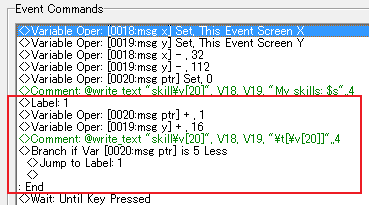
This is not particularly good code (good code, should as much as possible, save variables). I'll try to dig up an example of good code.
If
Else
If
Else
chains to get very, very bad. The same can be done done with a number of simple If conditions.
Think of it this way:
1. A blank else is almost identical to not checking the else
2. A blank else can in come conditions allow for ANYTHING other than the condition, meaning strange errors have the potential to pop up.
3. When two nested If statements you can quickly create a mess where before something like
If Var is < 8
If Var is > 1
would have simply activated between those numbers.
THEREFORE
The ONLY time you should be using else is when you have a few conditions based on something not happening, or if you want to clearly separate two instances (if you don't have enough berries the monster eats you, versus a simple situation of something only happening when you have enough berries.
The rule of thumb is, only use else boxes if you have a series of conditions dependent on things not happening.
Common Events should be used far more often than Goto. You can edit things remotely, rather than going back and finding every instance of a local event. The non-character/door/chest local event should ideal just be a parallel process/auto calling the common event, then either End Event Process or Erase Event. Goto is for two major uses:
Back skipping.
Label
"Choose Whatever..."
"Are you Sure"
Y (Go Ahead)
N (Goto Label)
And skipping over code that would activate otherwise.
"Skip the Intro?"
Y (Goto Label)
Label
(The event/character setup, and the teleport event)
Event still, this is to be used sparingly. I have only about 10 instances of using goto, and it was frequently in tutorial-type things where I wanted to go to a certain point on the page (and almost always triggered by choices, to keep infinite triggering glitches).
This is not particularly good code (good code, should as much as possible, save variables). I'll try to dig up an example of good code.
Performance Scripting in 2k3
For the 50 events on one map, here's something you can try. Make these events common events, and put them all in one event (Worldmap). Doing this in most cases removes the lag, as it checks them separately from each map.
Sometimes this won't work but try this anyway (labels help to make sure it skips to the next). Also, remember End Event exits the common event, so if a Common Event is way too long, nest common events within each other, to speed certain slow sections up.
He means overhead. Imagine having the same event on every map. Parallel process a common event, or outright make it switch activated. Not only did this just reduce thousands of hours of code edit if something goes wrong (you just edit the common event), but it actually does speed the execution up. I've got hundreds of common events.
Sometimes this won't work but try this anyway (labels help to make sure it skips to the next). Also, remember End Event exits the common event, so if a Common Event is way too long, nest common events within each other, to speed certain slow sections up.
2) Reduce overhead with common events
I think what you mean is reduce code redundancy, which is definitely good practice, but it is not always the best solution when it comes to executing calculation-intensive events. Ironically what you have suggested, while reducing the size of the code, has increased the execution overhead of the event thats calling your common event.
He means overhead. Imagine having the same event on every map. Parallel process a common event, or outright make it switch activated. Not only did this just reduce thousands of hours of code edit if something goes wrong (you just edit the common event), but it actually does speed the execution up. I've got hundreds of common events.
 Games - Tester
 Games - Other
