Full Games List
 Featured Games
 New Games
 Reviews
 Media
Media Images
 Blogs
Blogs Game Updates
 Images Feedback Summary
 Game Design Highlights
 Tutorials
 Articles
 Scripts
 Utilities / Plugins
 Resources
 Engines
 Engine Bulletins
 What is Makerscore?
 Past Events
 Achievements
 Misaos
 Forums
 Chat
Chat New to RMN?
 Full Store List
 RMN Music Pack (free)



 Profile
 Locker
 Play Lists
CLEST'S PROFILE
Clest

0
 Close
CloseSearch
Filter
 All
All Game Pages
 User Statuses
 Design a MegaMan Robot Master!
 My Screenshot is Bigger Than Yours!
VX scripter needed, I offer art and sprites in exchange
Yep, this should be done just above RMVX default battle system :)
And the black boarder appears when I go fullscreen, I should have removed it though, but it was late and I was sleepy :P
And the black boarder appears when I go fullscreen, I should have removed it though, but it was late and I was sleepy :P
Voice actors for RPG Maker VX project
Can´t, but it is a topic here in the foruns, search second page on this help forum and you will find a topic like "we do voice acting!" or something like that, topic by Asalieri.
Someone please, please, please explain liteing fx to me.
Well the X/Y for pictures in 2k3 goes for screen pixel position, so you got to calculate 2k3 screen resolution (320x240 if I remember) and see where you want the center of your picture to be.
Keep the size of your pictures in mind too.
If your map is bigger than a screen (and probably your picture as well) you will have to calculate the screen position based on where the hero will be when the event shows the picture. A good game for you to mess around would be Sunset over Imdalh.
As for software: http://www.rpgmaker.net/forums/index.php?topic=1655.0
This topic has some hints on software, I only use paint and photoshop. However if you are working in 2k3, which doesn´t support those cool gradient transparency, paint+Idraw/irfanview will do wonders.
You may only need some software which has layers if you want to do the contour light shadow thing... I think Ocean uses Graphics gale instead of Photoshop and he is a pro spriter.
However before trying to make your own stuff, play with those overlays like the ones in Arafell and open then on paint just to see how they were made :)
As for how artistic: well, in RM2k3 it is just as hard as editing RTP.
Keep the size of your pictures in mind too.
If your map is bigger than a screen (and probably your picture as well) you will have to calculate the screen position based on where the hero will be when the event shows the picture. A good game for you to mess around would be Sunset over Imdalh.
As for software: http://www.rpgmaker.net/forums/index.php?topic=1655.0
This topic has some hints on software, I only use paint and photoshop. However if you are working in 2k3, which doesn´t support those cool gradient transparency, paint+Idraw/irfanview will do wonders.
You may only need some software which has layers if you want to do the contour light shadow thing... I think Ocean uses Graphics gale instead of Photoshop and he is a pro spriter.
However before trying to make your own stuff, play with those overlays like the ones in Arafell and open then on paint just to see how they were made :)
As for how artistic: well, in RM2k3 it is just as hard as editing RTP.
Voice actors for RPG Maker VX project
Someone please, please, please explain liteing fx to me.
Well to make the pictures (or even charsets since you use VX you can have charsets as lights comming from lightbulbs or windows for example, or even fire (easily animated).
But the first step, I know how to do with Paint+Phortoshop etc, which involves creating the picture/sprite with various degress of transparency. But you know you can find a lot of files like that online or depending on what you need I can do some for you :)
Now on implementing: Simple show picture with a desired transparency, there is no secret, just try and see until you are happy.
Now for lights and shadows based directly on maps you would have to:
1-Take a screenshot of your map
2-Open it on photoshop/similar software
3-create a new layer above the map layer
4-sprite/draw the shadows and lights in this layer over the map.
5-Erase the map layer leave the bg transparent
6-save as PNG
7-Go in RM and show picture, adjust the position and transparency until you are happy with it.
Hope this helps anyway :)
But the first step, I know how to do with Paint+Phortoshop etc, which involves creating the picture/sprite with various degress of transparency. But you know you can find a lot of files like that online or depending on what you need I can do some for you :)
Now on implementing: Simple show picture with a desired transparency, there is no secret, just try and see until you are happy.
Now for lights and shadows based directly on maps you would have to:
1-Take a screenshot of your map
2-Open it on photoshop/similar software
3-create a new layer above the map layer
4-sprite/draw the shadows and lights in this layer over the map.
5-Erase the map layer leave the bg transparent
6-save as PNG
7-Go in RM and show picture, adjust the position and transparency until you are happy with it.
Hope this helps anyway :)
A New Challenger Comes
:The Game Making Drive/Blog Topic
Ported my charsets to RMVX:
http://img.photobucket.com/albums/v67/Clest/Resources/charsets/charminiVXF.png
http://img.photobucket.com/albums/v67/Clest/Resources/charsets/charminiVXM.png
http://img.photobucket.com/albums/v67/Clest/Resources/charsets/mechcharsetVX.png
And made graphics for my battle system HUD:
http://img.photobucket.com/albums/v67/Clest/Resources/charsets/charminiVXF.png
http://img.photobucket.com/albums/v67/Clest/Resources/charsets/charminiVXM.png
http://img.photobucket.com/albums/v67/Clest/Resources/charsets/mechcharsetVX.png
And made graphics for my battle system HUD:
VX scripter needed, I offer art and sprites in exchange
Well essentially it is as the tittle says.
I don´t feel like scripting, tried and it is not too hard, just not my thing, so I am willing to do art/sprites for someone who can help me with some VX moddings.
Also no, it is not like "hey I want you to be part of my team LOLZ!", nops, I just ask for those scripts, offer to my art/sprites in exchange and if I need some other script I will make a new topic. So I won´t be bugging you every time I need something extra.
Two notes about my request though:
-I will make it standard for my projects and would want to use then in commercial projects in the future. You will be credited in any project I use it though.
-It would be nice to leave this as an open script for anyone else who find an use for it. I could even make other Hud graphics or something.
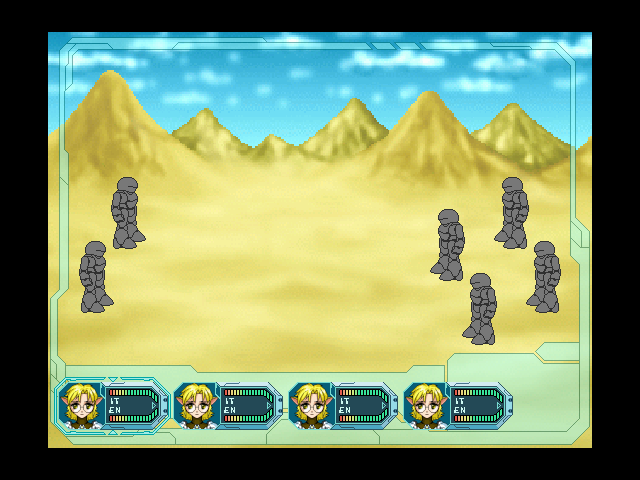
Now what do I want? well first I want a revamp of RMVX battle system so here goes a mock up of the system:
Details:
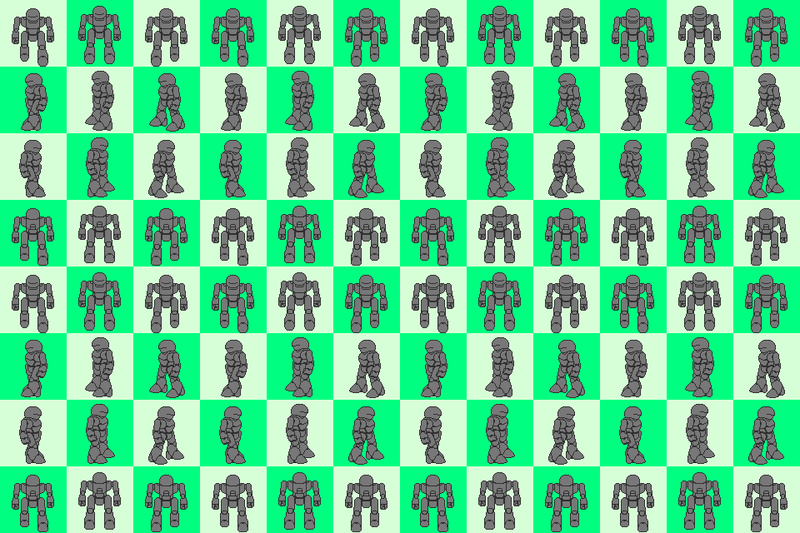
Battlers
-The 4 guys in the right are the battlers, and the 2 on the left are the enemies (just to clarify)
-The battlers should be static pictures and should be positioned more or less like in the mock up
-Battlers should be positioned by their base (vertically the bottom-most pixels) and by their center (horizontally by the center). This is so I can use any size for battlers.
-Skill animations shall appear over the battlers just like they do from enemies
-I´d like to just have to name the files "battlerAlex" (Alex example of hero name) and save then in any of the folders for it to work, if possible, rather than edit script entries per character.
HUD
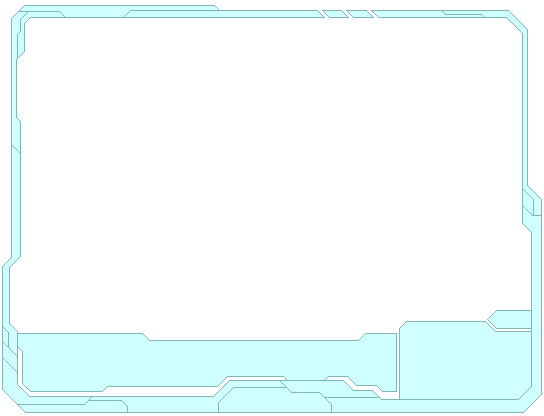
-The outer frame may be changed, but it should be there and appear abone all battle animations and bellow the HUD layer
-Each character HUD shall be more or less in the same position as in the mock up
-The frame around the first hud is the character selection turn cursor indicating who are you chosing commands for.
-IT is the HP, it should show the numbers in front of the IT sign, preferably in plain white, IT bar is the one above it and should becrease from right to left as IT lowers
-EN should be same as IT, just referring to MP and that the bar is the one bellow
-I´d also like to just name the HUD character files as "hudAlex" (Alex being hero name example).
Commands
-I´d like the attack/Fight command to be erased and just stay with Skill, Guard and Iten
-If possible, bellow guard, add an "Evade" command which just passes the turn but doubles the character evasion rate for that turn
Background
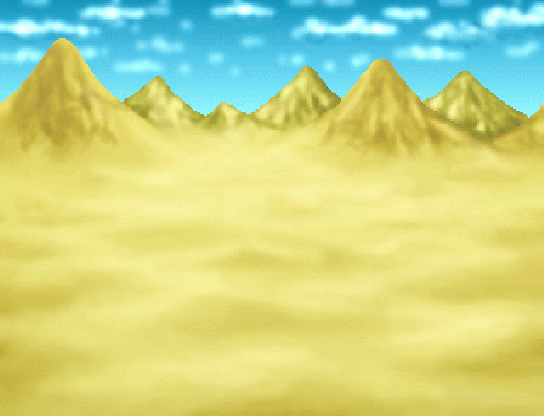
-I´d like to be able to have a background image rather than the odd wirl from VX.
-I´d like a way to change the battle background via events, like those short script lines which you can add to events.
Here are the files needed for it:
Outer frame:
http://img.photobucket.com/albums/v67/Clest/Resources/HUD%20VX/Frameb.png
Background:
http://img.photobucket.com/albums/v67/Clest/Resources/HUD%20VX/DesertVX.png
Battler:
http://img.photobucket.com/albums/v67/Clest/Resources/HUD%20VX/Battler.png
Character HUD:
http://img.photobucket.com/albums/v67/Clest/Resources/HUD%20VX/CharacterHUD.png
IT empty bar:
http://img.photobucket.com/albums/v67/Clest/Resources/HUD%20VX/ITbar.png
EN empty bar:
http://img.photobucket.com/albums/v67/Clest/Resources/HUD%20VX/ENbar.png
So, hope anyone is interested, thanks!
I don´t feel like scripting, tried and it is not too hard, just not my thing, so I am willing to do art/sprites for someone who can help me with some VX moddings.
Also no, it is not like "hey I want you to be part of my team LOLZ!", nops, I just ask for those scripts, offer to my art/sprites in exchange and if I need some other script I will make a new topic. So I won´t be bugging you every time I need something extra.
Two notes about my request though:
-I will make it standard for my projects and would want to use then in commercial projects in the future. You will be credited in any project I use it though.
-It would be nice to leave this as an open script for anyone else who find an use for it. I could even make other Hud graphics or something.
Now what do I want? well first I want a revamp of RMVX battle system so here goes a mock up of the system:
Details:
Battlers
-The 4 guys in the right are the battlers, and the 2 on the left are the enemies (just to clarify)
-The battlers should be static pictures and should be positioned more or less like in the mock up
-Battlers should be positioned by their base (vertically the bottom-most pixels) and by their center (horizontally by the center). This is so I can use any size for battlers.
-Skill animations shall appear over the battlers just like they do from enemies
-I´d like to just have to name the files "battlerAlex" (Alex example of hero name) and save then in any of the folders for it to work, if possible, rather than edit script entries per character.
HUD
-The outer frame may be changed, but it should be there and appear abone all battle animations and bellow the HUD layer
-Each character HUD shall be more or less in the same position as in the mock up
-The frame around the first hud is the character selection turn cursor indicating who are you chosing commands for.
-IT is the HP, it should show the numbers in front of the IT sign, preferably in plain white, IT bar is the one above it and should becrease from right to left as IT lowers
-EN should be same as IT, just referring to MP and that the bar is the one bellow
-I´d also like to just name the HUD character files as "hudAlex" (Alex being hero name example).
Commands
-I´d like the attack/Fight command to be erased and just stay with Skill, Guard and Iten
-If possible, bellow guard, add an "Evade" command which just passes the turn but doubles the character evasion rate for that turn
Background
-I´d like to be able to have a background image rather than the odd wirl from VX.
-I´d like a way to change the battle background via events, like those short script lines which you can add to events.
Here are the files needed for it:
Outer frame:
http://img.photobucket.com/albums/v67/Clest/Resources/HUD%20VX/Frameb.png
Background:
http://img.photobucket.com/albums/v67/Clest/Resources/HUD%20VX/DesertVX.png
Battler:
http://img.photobucket.com/albums/v67/Clest/Resources/HUD%20VX/Battler.png
Character HUD:
http://img.photobucket.com/albums/v67/Clest/Resources/HUD%20VX/CharacterHUD.png
IT empty bar:
http://img.photobucket.com/albums/v67/Clest/Resources/HUD%20VX/ITbar.png
EN empty bar:
http://img.photobucket.com/albums/v67/Clest/Resources/HUD%20VX/ENbar.png
So, hope anyone is interested, thanks!
 Games - Tester
 Games - Other