



 Full Games List
 Featured Games
 New Games
 Reviews
 Media
Media Blogs
Blogs Game Updates
 Images Feedback Summary
 Game Design Highlights
 Tutorials
 Articles
 Scripts
 Utilities / Plugins
 Resources
 Engines
 Engine Bulletins
 What is Makerscore?
 Past Events
 Achievements
 Misaos
 Forums
 Chat
Chat New to RMN?
 Full Store List
 RMN Music Pack (free)



 Profile
 Locker
 Play Lists
PHANTASMAX'S PROFILE

 Close
Close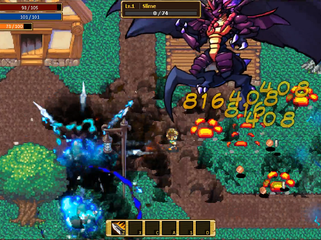

Search
Filter
 All
All Game Pages
 User Statuses
 Alternative to RPG Maker
GMS2 was what got me into programming, I think it should fit your needs pretty well based on what you said you were looking for. If you went through the javascript tutorials, you should have no issue learning scripting in GMS2, it's pretty similar. You basically just need to practice and get good at some of the coding fundamentals (conditionals, loops, arrays, functions) and I think you can code just about anything 2D in the engine.
If you find that the hard part is getting started on how to code something, I recommend doing the design first in a format that you can see (maybe drawing your idea out on a whiteboard). You can then break things down to smaller, specific pieces. After that, just focus on coding that one small part first. It will take constant practice to get better, but just imagine a year from now, you'll be coding whatever you want with few limitations.
Another thing I would advise, once you learn the fundamentals, might be a good idea to practice writing clean and manageable code. GMS2 is great for beginners and smaller projects, but if the project gets to be large/complex, you will need to code in a way to handle the complexity. As an example, when I was first starting out, I did a ton of tutorials on a single platformer/rpg project. Since a lot of tutorials you will find use different conventions and styles, my project became super mixed up. Lots of different naming conventions, too much object coupling, codebase that was barely readable. The project ended up being abandoned, but I learned how important maintainability is. And finally, two essential non-coding skills I would recommend getting good at is documentation, and learning how to use a workflow management board.
If you find that the hard part is getting started on how to code something, I recommend doing the design first in a format that you can see (maybe drawing your idea out on a whiteboard). You can then break things down to smaller, specific pieces. After that, just focus on coding that one small part first. It will take constant practice to get better, but just imagine a year from now, you'll be coding whatever you want with few limitations.
Another thing I would advise, once you learn the fundamentals, might be a good idea to practice writing clean and manageable code. GMS2 is great for beginners and smaller projects, but if the project gets to be large/complex, you will need to code in a way to handle the complexity. As an example, when I was first starting out, I did a ton of tutorials on a single platformer/rpg project. Since a lot of tutorials you will find use different conventions and styles, my project became super mixed up. Lots of different naming conventions, too much object coupling, codebase that was barely readable. The project ended up being abandoned, but I learned how important maintainability is. And finally, two essential non-coding skills I would recommend getting good at is documentation, and learning how to use a workflow management board.
 monsterhouse2.gif
author=KoopaKush
That flame effect from Fireball looks dope! I like it :D great work on the combat so far dude
Thanks! Glad you like it. What you don't see is that all the skills have different stages depending on the skill level. Fireball stage 1 just explodes, stage 2 causes burn debuff on any enemies hit for 4 seconds, and stage 3 has burn, plus that fire effect on the ground that does damage to whatever walks over it. :)
Screenshot Survival 20XX


What are you thinking about? (game development edition)
@Marrend
I also have some thoughts about going commercial with my game. I wen't the cheap route and bought licensed art to use (got lucky with a humble bundle too), so I'm no too worried about art costs if I go commercial, just using whatever I have from my asset folder and free stuff on opengameart. For me a bigger worry about going commercial is that the development time on my project is relatively short, so I don't want to commit yet in case something comes up. At the same time, if I have the mindset that I am coding my game as a hobby, I can code it however I want and have fun while doing it, vs thinking of it like a product where you may need to appeal to others, in which case it may feel more like "work".
@StormCrow
When looking at the image, some of the font is hard to read, like the box on the bottom left with all the equipment.
I also have some thoughts about going commercial with my game. I wen't the cheap route and bought licensed art to use (got lucky with a humble bundle too), so I'm no too worried about art costs if I go commercial, just using whatever I have from my asset folder and free stuff on opengameart. For me a bigger worry about going commercial is that the development time on my project is relatively short, so I don't want to commit yet in case something comes up. At the same time, if I have the mindset that I am coding my game as a hobby, I can code it however I want and have fun while doing it, vs thinking of it like a product where you may need to appeal to others, in which case it may feel more like "work".
@StormCrow
When looking at the image, some of the font is hard to read, like the box on the bottom left with all the equipment.
Side Projects:
I'm still working on my first game (that is not a bunch of tutorials mashed together), been at it for about 4.5 months now. Only doing one project for now, but in the back of my mind, I really want to jump to some other side projects, including doing something to learn about art/spriting, or make a few small games in Unity to learn it. I'm actually having a lot of fun at the moment coding new skills for my character classes in my current project, but I know this momentum won't last. Once I get to adding maps and other boring work, I might take a few hours here and there to start up some side projects.
To stay on track, I use a workflow management board like Trello. Any ideas, bugs, whatever comes up, I just make a card for it there and move it into the correct column and save it for later. I've got an insane amount of work done over the past few months thanks to this, since it helps me focus on one thing little thing at a time. Just seeing things get done motivates me, even if it is a small thing. Also, I don't want to drag out my project to be like 5 years+, which is why I gave myself deadlines and then try to hit them.
To stay on track, I use a workflow management board like Trello. Any ideas, bugs, whatever comes up, I just make a card for it there and move it into the correct column and save it for later. I've got an insane amount of work done over the past few months thanks to this, since it helps me focus on one thing little thing at a time. Just seeing things get done motivates me, even if it is a small thing. Also, I don't want to drag out my project to be like 5 years+, which is why I gave myself deadlines and then try to hit them.
Whatchu Workin' On? Tell us!
Been working on adding/updating the skills for the 4 character classes I have in my game. Started yesterday after finished updating like 20 pages of documentation. Basically, I'm just trying a bunch of different things until something works, since I have no idea how a skill is going to look like and function until I actually make it.
How to manage development?
Here are some tips that I use for design and workflow management.
1. Make some design documentation. Start with a high level overview of what you want, the gameplay, story, combat system, other core systems, stuff you want in your game, even if you're not 100% sure, etc. Then, here is the tricky part: you'll need to break everything into smaller pieces. It can be harder than it sounds, but break it down to smaller pieces, and then organize it into phases. Add as much detail to it as you can afterwards. Document technical design of the more complex systems, etc (it is easy to forget stuff if you don't work on it for a while). The more details you have, the better. Update the documentation as things change along the development process. For me, I use OneNote to get this done.
2. Use some kind of workflow management board. For me, I use Trello. How it works is that you can put details into cards on different columns (based off stuff you want to get done from your design documentation and what phase you're on), and the workflow moves from left to right (you can easily move cards around by dragging and dropping). Anything you are currently working on would go into a "In Progress" column or something like that. You update the card as you go, and you just work on it until you finish, then move to card to a "Completed" column, rinse and repeat. It's a good way to keep on track with your work when you do this.. There are other types of kanban boards you can use, and Trello is a decent free one.
1. Make some design documentation. Start with a high level overview of what you want, the gameplay, story, combat system, other core systems, stuff you want in your game, even if you're not 100% sure, etc. Then, here is the tricky part: you'll need to break everything into smaller pieces. It can be harder than it sounds, but break it down to smaller pieces, and then organize it into phases. Add as much detail to it as you can afterwards. Document technical design of the more complex systems, etc (it is easy to forget stuff if you don't work on it for a while). The more details you have, the better. Update the documentation as things change along the development process. For me, I use OneNote to get this done.
2. Use some kind of workflow management board. For me, I use Trello. How it works is that you can put details into cards on different columns (based off stuff you want to get done from your design documentation and what phase you're on), and the workflow moves from left to right (you can easily move cards around by dragging and dropping). Anything you are currently working on would go into a "In Progress" column or something like that. You update the card as you go, and you just work on it until you finish, then move to card to a "Completed" column, rinse and repeat. It's a good way to keep on track with your work when you do this.. There are other types of kanban boards you can use, and Trello is a decent free one.
Screenshot Survival 20XX
@orange Thanks! For boss fights, the idea is that they are intense and somewhat challenging, but if you're skilled enough to read and evade the attacks, you wont even take damage at all. Also, that teaser looks amazing! Did you do all the art yourself?
Screenshot Survival 20XX
Made a mini boss! With this, the first phase of my game (the engine)is done, so now I am finally able to start polishing and refactoring some stuff, while I get ready to add in the rest of the content to the game.
[GM] Have you ever wanted to switch from RPG Maker to Gamemaker?
I think there are a lot of people who thought of it, but may be turned off by the fact that there might be coding involved. With GameMaker, you can make simple games using Drag and Drop, and if you can code, you can make very complex games. GameMaker Language (GML) is actually very easy to learn.
Regarding RPG games on GameMaker: I assume most people on RMN want to make RPGs. If you are trying to make a RPG in ANY OTHER engine other than RPGMaker, then yeah it is probably going to be complex. There are a ton of systems that tie together. With Gamemaker, making an RPG with DnD is gonna kill ya, however, making it using code is entirely possible and not too bad. But even if you know what you're doing, it can take a while just to make an RPG engine you can use depending on complexity.
In the end though, if you don't try it, you will never know if it is right for you. Things are always a lot easier to learn when you have someone holding your hand through it.
Regarding RPG games on GameMaker: I assume most people on RMN want to make RPGs. If you are trying to make a RPG in ANY OTHER engine other than RPGMaker, then yeah it is probably going to be complex. There are a ton of systems that tie together. With Gamemaker, making an RPG with DnD is gonna kill ya, however, making it using code is entirely possible and not too bad. But even if you know what you're doing, it can take a while just to make an RPG engine you can use depending on complexity.
In the end though, if you don't try it, you will never know if it is right for you. Things are always a lot easier to learn when you have someone holding your hand through it.
 Games - Tester
 Games - Other
