



 Full Games List
 Featured Games
 New Games
 Reviews
 Media
Media Blogs
Blogs Game Updates
 Images Feedback Summary
 Game Design Highlights
 Tutorials
 Articles
 Utilities / Plugins
 Resources
 Engines
 Engine Bulletins
 What is Makerscore?
 Past Events
 Achievements
 Misaos
 Forums
 Chat
Chat New to RMN?
 Full Store List
 RMN Music Pack (free)



 Profile
 Locker
 Play Lists
SINCHROSS'S PROFILE
sinchross

376
 Close
Close
I'm working with Rpgmaker in the most 10 last years.
I'm not so much good with english, that's because I beg you to search this videos to see some later works that I maked in the past...
Aurya: Evil Seeds (Aurya: As Sementes do Mal)
Aurya: Hope's Eyes ( Eyes of Hope)
The Songs of Aellir: Clash of the Lions
And my newest and most antecipated work:
Rise of Dragon Souls
http://rpgmaker.net/games/3082/
http://riseofdragonsouls.blogspot.com.br/
https://www.facebook.com/riseofdragonsouls
http://www.youtube.com/user/thesongofdragons
I'm not so much good with english, that's because I beg you to search this videos to see some later works that I maked in the past...
Aurya: Evil Seeds (Aurya: As Sementes do Mal)
Aurya: Hope's Eyes ( Eyes of Hope)
The Songs of Aellir: Clash of the Lions
And my newest and most antecipated work:
Rise of Dragon Souls
http://rpgmaker.net/games/3082/
http://riseofdragonsouls.blogspot.com.br/
https://www.facebook.com/riseofdragonsouls
http://www.youtube.com/user/thesongofdragons
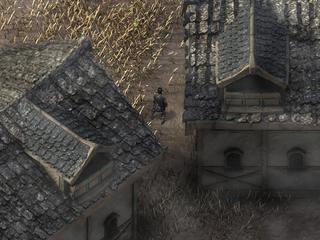
Rise of Dragon Souls
"Dark times like this are an opportunity for great souls arise. Stand up and change your destiny, show your light to the world or else all your darkness."
"Dark times like this are an opportunity for great souls arise. Stand up and change your destiny, show your light to the world or else all your darkness."

Search
Filter
 All
All Game Pages
 User Statuses
 Diagonal movement
author=Jaguer91
Hi!
You should try modifying the script numbers and test every time you do.
Uses odd number for example.
Greetings!
I'm trying it... but don't get any good results hahaha
 fmug1.png
Thanks! = D
I'm just with some troubles to the chracter make the isometric move, because the isometric movement need to happens on a 30º angle (considering that the horizontal line is a 0º angle), but in the rpgmaker, the diagonal movement is a 45º angle move.
Maybe some script edit can make it, but I don't find in wich line to do such change and neither how to change it xD.
I'm just with some troubles to the chracter make the isometric move, because the isometric movement need to happens on a 30º angle (considering that the horizontal line is a 0º angle), but in the rpgmaker, the diagonal movement is a 45º angle move.
Maybe some script edit can make it, but I don't find in wich line to do such change and neither how to change it xD.
 Diagonal Movement at 60º (Isometric) and not 45º (The pattern of Rpgmaker)
I'm needing a script that, when walkin on the diagonal, the character move on a 60º and not 45º how it is on the rpgmaker. What I think is called Isometric Angle. Someone can do that? ( But for that, is necessary unite force with a pixel movement and I using Khass Pixel Movement for that...)
If someone could help me, I'l be glad ^^.
If someone could help me, I'l be glad ^^.
Diagonal movement
Great script! But i'm needing a script that, when walkin on the diagonal, the character move on a 60º and not 45º how it is on the rpgmaker. What I think is called Isometric Angle. Someone can do that? ( But for that, is necessary unite force with a pixel movement and I using Khass Pixel Movement for that...)
If someone could help me, I'l be glad ^^.
If someone could help me, I'l be glad ^^.
Imagens_08102012_4.png
I believe that to create the graphics for the map take more than 10 hours... = /
And Everything has it own particular way to be done and drawn...
But besides the time and the work, the results is well satisfactory ^^
And Everything has it own particular way to be done and drawn...
But besides the time and the work, the results is well satisfactory ^^
Game_20120924_17113658.png
@Ashes of Emerald -> Hmmm I can see, you're right... because the branches little space, I can't make some light tha make it pop up from the ground, looking a little flat.
For now I don't will use these trees models... I will try to do another ones later of this type of tree.
@Dezz -> Thanks for your feedback Dezz. Be sure that your opinion help me to think a lot about this map.
For now I don't will use these trees models... I will try to do another ones later of this type of tree.
@Dezz -> Thanks for your feedback Dezz. Be sure that your opinion help me to think a lot about this map.
Game_20120920_23044388.png
Thanks for your comments. This map is yet in construction, I'm glad that I can receive some feedbacks of the map and I will see what I can do to make it better.
Shillishous: Yes the sprite will change depending on what armour the character are wearing xD.
And I will try to do every characters and Npc persons of the game with this way too.
Shillishous: Yes the sprite will change depending on what armour the character are wearing xD.
And I will try to do every characters and Npc persons of the game with this way too.
Game_20120924_17113658.png
author=Clareain_Christopher
How lovely :)
Thanks Clareain ^^
author=CastorOnline
Awesome! How do I know where is the exit of the map? Is just in any place at the bottom or there are marks/ points to guide the exits?
This is just a test map, I will remake it soon, but the tiles in the screen will be used for it. I decided in the moment make a open world rpg. And I'm making plannings for all the world's area (that's around 30 miles²...) That plan can change only if I note that the maps occupies too much memory... ( each map of 200x200 occupies 50mb - 120mb, very sad... 20 maps of 200x200 tiles = almost 2 Gb. That's happens because I need to use the png format because of the alpha that is necessary on the parallax over layer, and this format is very heavy)
But for now, my planning is: "You can go to where you can see, in the time that you like to go."
The system of zoom in and zoom out will help in this. ( I already finished the implantation of a zoom system (using a script by MGC), but I'm encountering an error on the DLL that comes with the script... and the error makes the game crash randomly...)

A exemple of the "Zoom System" controlled in game by the player.
Game_20120920_23044388.png
author=spirit_young
Looks like that took awhile to put together!
It not take so much time to do ^^. I made the entire house tile yesterday and prepare the scenary for it ^^.
author=Ashes of Emerald
It's so weird to see everythin done to scale. Looks great though.
I don't understand what you mean = /. It is something weird in the picture?
Thanks for the comments ^^
 Games - Tester
 Games - Other
