



 Full Games List
 Featured Games
 New Games
 Reviews
 Media
Media Images
 Blogs
Blogs Game Updates
 Images Feedback Summary
 Game Design Highlights
 Articles
 Scripts
 Resources
 Engines
 Engine Bulletins
 What is Makerscore?
 Past Events
 Achievements
 Misaos
 Forums
 Chat
Chat New to RMN?
 Full Store List
 RMN Music Pack (free)



 Profile
 Locker
 Play Lists
KAZESUI'S PROFILE

 Close
Close





Search
Filter
 All
All Game Pages
 And God said, "let there be internet"
 +++ DynRPG - The RM2k3 Plugin SDK +++
 "Good" rm2k3 event coding
author=bulmabriefs144
This is not particularly good code (good code, should as much as possible, save variables). I'll try to dig up an example of good code.
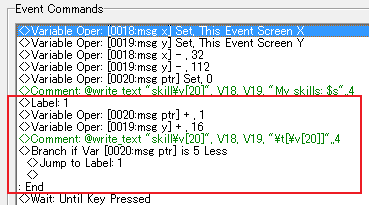
...What point are you trying to make here, because you're not really making a lot of sense.
Are you trying to claim that loops are bad and that you should rather rely on copy pasting, or are you trying to argue that there's any particular good reason for being insanely sparse with memory, considering each variable only cost couple of bytes anyway?
Gone 69 days without proper internet... going crazy
author=kentona
You missed BQ6.
Yes, Yes unfortunatly that I did.
Had gotten a good start and stuff, then I moved and things came more or less to a complete halt. A shame.
 UPRC Plays... "Zero Base"
Cool, a let's play (or whatever one typically call these) :D
Yeah, this game has a couple of glaring flaws, the speed being on of them, as you can stack speed powerups, making it go kind of too fast even.
The reason here is due to how the system was built, using only half and whole numbers rather than decimal numbers to deal with the speed... which I should have done, but didn't think of at the time (and I only had 1 month for making the game, so by the time I noticed the problem, I didn't really have time to fix it)
The sprites comes pretty much exclusively from Gradius as it had very convenient amount of 16x16 pixel sprites making my job a lot easier (Zero Wing sprites are generally bigger), but the power up system is more akin to some other games. You shoot the power up itself to change the upgrade, and the colour of the item determines the power up, purple being the speed up you so sorely wanted.
also, the power ups are stackable by collecting more from the same colour, akin to that of Zero Wing.
Also, yes, all of this is merely event scripting, almost patch free even (I don't recall if I got a patch for extension of picture Id's at the moment or not, but I might have done that).
Ah yeah, and the savefile is actually intentional. It's there for skipping the intro. The stage is exactly the same, no hard mode or anything as it's hard enough as it is, potentially a bit too frustrating (in good gradius style, there are some cheats though).
But yeah, thank you for taking the time to play this, and rather than thinking about playing this again, you might want to consider the Cure of Cpt. Loveless instead (though just a demo at the moment), which is somewhat of the same, but with less of the issues found here.
Yeah, this game has a couple of glaring flaws, the speed being on of them, as you can stack speed powerups, making it go kind of too fast even.
The reason here is due to how the system was built, using only half and whole numbers rather than decimal numbers to deal with the speed... which I should have done, but didn't think of at the time (and I only had 1 month for making the game, so by the time I noticed the problem, I didn't really have time to fix it)
The sprites comes pretty much exclusively from Gradius as it had very convenient amount of 16x16 pixel sprites making my job a lot easier (Zero Wing sprites are generally bigger), but the power up system is more akin to some other games. You shoot the power up itself to change the upgrade, and the colour of the item determines the power up, purple being the speed up you so sorely wanted.
also, the power ups are stackable by collecting more from the same colour, akin to that of Zero Wing.
Also, yes, all of this is merely event scripting, almost patch free even (I don't recall if I got a patch for extension of picture Id's at the moment or not, but I might have done that).
Ah yeah, and the savefile is actually intentional. It's there for skipping the intro. The stage is exactly the same, no hard mode or anything as it's hard enough as it is, potentially a bit too frustrating (in good gradius style, there are some cheats though).
But yeah, thank you for taking the time to play this, and rather than thinking about playing this again, you might want to consider the Cure of Cpt. Loveless instead (though just a demo at the moment), which is somewhat of the same, but with less of the issues found here.
 [DynRPG]Blending Modes
I don't remember in detail the conclusions from when the bug was first brought up (by gadex I think), but I think it could prove tricky to maneuver around. MIGHT be possible with some pic pointing, but I'd have to take a look at the code again and refresh some thoughts about it before suggesting a potential work around. So for now... its kind of too broken probably.. I'm afraid
[DynRPG]Blending Modes
If I understood you correctly, you're having trouble removing the "transparent colour" you typically choose in the editor. The blend modes don't work like that.
Too make something transparent using .add, you make it entirely black.
Additive adds colour and black is lack of colour, hence nothing gets added.
This means you might need to adjust the palette of your png if it doesn't have a pure black colour.
Transparent stuff using multiplicative blends are done by using gray (that is rgb = 128,128,128... or 127, dont recall right now).
As for the error message which keeps popping up... I suspect its a timing issue of sorts, but I just don't have time to sort it out at the moment. From the looks of it, the bug will stay for a while =/
Too make something transparent using .add, you make it entirely black.
Additive adds colour and black is lack of colour, hence nothing gets added.
This means you might need to adjust the palette of your png if it doesn't have a pure black colour.
Transparent stuff using multiplicative blends are done by using gray (that is rgb = 128,128,128... or 127, dont recall right now).
As for the error message which keeps popping up... I suspect its a timing issue of sorts, but I just don't have time to sort it out at the moment. From the looks of it, the bug will stay for a while =/
[DynRPG Plugin]Text Plugin
This is known, and also why it's stated that you should add "end" after the last parameter if you're not using all.
Basically, when a text string is the last parameter, there's a chance that random symbols will appear due to a bug within DynRPG itself.
change your command to
and you should be fine.
Basically, when a text string is the last parameter, there's a chance that random symbols will appear due to a bug within DynRPG itself.
change your command to
@write_text "char1name", 93, v0455, "\n[\v[450]]", end
and you should be fine.
[DynRPG Plugin]Text Plugin
As said, the association alone isn't enough.
If you did a direct copy paste, the most likely reason for it not working is that you forgot to use "show picture" for that ID. If you associate a text with picture ID 1, you need to have used "show picture 1:" for the text to actually show.
If however a direct 1 to 1 copy paste works, but changing a single parameter doesnt, then it would be helpful if you could post the comment command itself.
If you did a direct copy paste, the most likely reason for it not working is that you forgot to use "show picture" for that ID. If you associate a text with picture ID 1, you need to have used "show picture 1:" for the text to actually show.
If however a direct 1 to 1 copy paste works, but changing a single parameter doesnt, then it would be helpful if you could post the comment command itself.
+++ DynRPG - The RM2k3 Plugin SDK +++
If you followed the instructions in great detail, given on the DynRPG site and still can't get it to work, it could be that you're using the wrong compiler. If you recently downloaded Code::Blocks, compiler included, you probably got the new gcc compiler, which doesn't work with this patch.
You'll have to use a sufficently old version of gcc for it to work.
I'm not entirely sure how old is old enough, but I THINK version 3.8.5 will work (I'm not entirely sure about this though)
You'll have to use a sufficently old version of gcc for it to work.
I'm not entirely sure how old is old enough, but I THINK version 3.8.5 will work (I'm not entirely sure about this though)
 Games - Tester
 Games - Other
