



 Full Games List
 Featured Games
 New Games
 Reviews
 Media
Media Game Updates
 Images Feedback Summary
 Game Design Highlights
 Tutorials
 Articles
 Scripts
 Utilities / Plugins
 Resources
 Engines
 Engine Bulletins
 What is Makerscore?
 Past Events
 Achievements
 Misaos
 Forums
 Chat
Chat New to RMN?
 Full Store List
 RMN Music Pack (free)



 Profile
 Locker
 Play Lists
TDS'S PROFILE
TDS

1453
 Close
Close
Ofblowman telefagus pentaculus benterpinize farntormian criscodophin nectoglabbit frontonian smectarufus foninax trickendance trinnoctor pontalifanarian trudinox nolicanisis.



Search
Filter
 All
All Game Pages
 User Statuses
 Youtube Copyright Problems
post=141448
Who the hell are GoDigital? And what have they got to do with game design? I assume you weren't using any licensed music or art.
http://www.godigital.com/about/
If the company above is the right one they seem to sell ADSL related stuff.
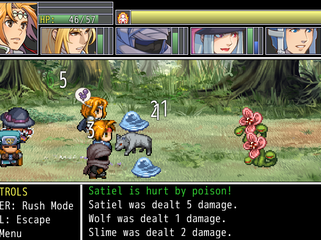
 Why can't I just poison him a little bit!?
I like states so I decided to modify the way enemies are affected by them.
I did this by creating state tiers and switching the normal state resistance into state duration.
Example:
Poison Tier I (0 to 20 Intelligence) 3 turns 10% HP reduction
Poison Tier II (21 to 40 Intelligence) 4 turns 20% HP reduction
Poison Tier III (41 and up Intelligence) 5 turns 30% HP reduction
The power of poison and it's duration it's completely based off the stats of the player. It will always land so it had to be balanced by modifying state resistance into state duration modifiers.
0% resistance to poison means that the state will last the full duration.
50% Resistance means it will last half the turns of it's tier.
-50% Resistance means it will last twice as long as the turns of it's tier.
100% State will wear off very quickly, usually on the next turn.
So even if a boss has a resistance to a state you can at least inflict a state for a few turns.
Other states are affected by other stats as well and have different effects on their tiers.
I did this by creating state tiers and switching the normal state resistance into state duration.
Example:
Poison Tier I (0 to 20 Intelligence) 3 turns 10% HP reduction
Poison Tier II (21 to 40 Intelligence) 4 turns 20% HP reduction
Poison Tier III (41 and up Intelligence) 5 turns 30% HP reduction
The power of poison and it's duration it's completely based off the stats of the player. It will always land so it had to be balanced by modifying state resistance into state duration modifiers.
0% resistance to poison means that the state will last the full duration.
50% Resistance means it will last half the turns of it's tier.
-50% Resistance means it will last twice as long as the turns of it's tier.
100% State will wear off very quickly, usually on the next turn.
So even if a boss has a resistance to a state you can at least inflict a state for a few turns.
Other states are affected by other stats as well and have different effects on their tiers.
DOING IT! - WEEK FOUR
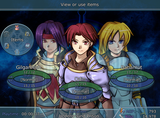
Well I made a simple menu for my game as well as a battle system.

In terms of code this menu was made using the simplest syntax (Except for the HP/AP Bars) and it's mostly meant to be eye candy.

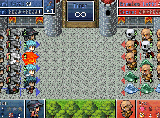
The battle system on the other hand is far more complex yet simple looking.
Inspired by a chess variant and card games, It works as a frontal battle system with an extra array of options for those who wants to use them. Not using them usually results in longer battles, but you can still survive using old RPG tactics.
Some of the options are position and defense. Positioning yourself in the right way will give you a better chance to deal a critical hit and also allow you to move farther away from your enemy so it will have a lesser chance of hitting you. Defense will allow you to place yourself in front of an ally to lower the physical damage it takes.
The enemy AI is split into 3 parts (Movement, Attention, Action ) which help it reach a decision by first checking what kind of movement it's AI allows such as defending weaker allies or focusing on attack. After it checks it's movement it will then see who is it's biggest threat(Character dealing the most damage to it). This is done by checking what kind of attention it's AI is programmed to follow, such as "kin" which checks for same enemies on the field and see who their biggest threat is, then it's combined to make a final target.
After that it will check what kind of actions it can take like healing allies or enfeebling targets (In this phase it also checks the state of it's target to prevent it from using enfeebling skills on a target on which it will have no effect).
There are many other factors that affect battle as well such as food, abilities and items, but I says to only leave a small explanation about the work.
In terms of code this menu was made using the simplest syntax (Except for the HP/AP Bars) and it's mostly meant to be eye candy.
The battle system on the other hand is far more complex yet simple looking.
Inspired by a chess variant and card games, It works as a frontal battle system with an extra array of options for those who wants to use them. Not using them usually results in longer battles, but you can still survive using old RPG tactics.
Some of the options are position and defense. Positioning yourself in the right way will give you a better chance to deal a critical hit and also allow you to move farther away from your enemy so it will have a lesser chance of hitting you. Defense will allow you to place yourself in front of an ally to lower the physical damage it takes.
The enemy AI is split into 3 parts (Movement, Attention, Action ) which help it reach a decision by first checking what kind of movement it's AI allows such as defending weaker allies or focusing on attack. After it checks it's movement it will then see who is it's biggest threat(Character dealing the most damage to it). This is done by checking what kind of attention it's AI is programmed to follow, such as "kin" which checks for same enemies on the field and see who their biggest threat is, then it's combined to make a final target.
After that it will check what kind of actions it can take like healing allies or enfeebling targets (In this phase it also checks the state of it's target to prevent it from using enfeebling skills on a target on which it will have no effect).
There are many other factors that affect battle as well such as food, abilities and items, but I says to only leave a small explanation about the work.
Hi
I've been playing the games from this site for a while now, so I wanted to introduce myself and be
more social around here and maybe be of some use.
I'm a programmer and also learning to work with pixel art. I like art and anything related to artists, drawing,
coloring, red heads, etc. I cant draw anything myself though.
Overall I'm a very boring person.
My goal around here is to find someone nice to work with that needs a scripter and make some friends.
So, nice to meet you all and have a nice day.
more social around here and maybe be of some use.
I'm a programmer and also learning to work with pixel art. I like art and anything related to artists, drawing,
coloring, red heads, etc. I cant draw anything myself though.
Overall I'm a very boring person.
My goal around here is to find someone nice to work with that needs a scripter and make some friends.
So, nice to meet you all and have a nice day.
 SoDMainmenunew.PNG
comment=32409
The art in this game is by Archeia_Nessiah :)
Not all the art in this game is by Archeia. Just these characters and I'm not all that comfortable using them anymore, so they might be replaced in the future.
 CSS, Concerns and 80% done.
I know the beard thing is a joke.
But still enjoy.
http://rpgmaker.net/users/TDS/locker/yesiambored.png
It's not a beard but, it should hold you over Darken.
And thanks for the comments
But still enjoy.
http://rpgmaker.net/users/TDS/locker/yesiambored.png
It's not a beard but, it should hold you over Darken.
And thanks for the comments
StatusMenuElementalResistance.PNG
comment=30673
I've seen less complicated diagrams in my Algorithms II class. This is really hard to read. Just because you can make a poly graph doesn't mean this is the graph you should be using.
There are icons and % next to them. If you can't understand what the number next to the icon means, I doubt I can make it simpler.
Quick VX Scripting Question
It's very rare to need to modify "update_message" method in the Window_BattleMessage class but, it's still worth mentioning just in case.
Quick VX Scripting Question
Well it doesn't really go anywhere, it's just what you would have mainly used to edit the script towards what you wanted.
Like this:
It can be put above main and below Window_BattleMessage as is and it would make all text shown during battle be displayed instantly.
I only tested this using the default Battle system so it might not work if your own battle system has modified the Window_BattleMessage class or Window_Message class.
Like this:
#==============================================================================

# ** Window_BattleMessage

#------------------------------------------------------------------------------

#  Message window displayed during battle. In addition to the normal message

# window functions, it also has a battle progress narration function.

#==============================================================================


class Window_BattleMessage < Window_Message

  #--------------------------------------------------------------------------

  # * Update Message

  #--------------------------------------------------------------------------

  def update_message

    # Show Line Fast

    @line_show_fast = true

    super

  end

end
It can be put above main and below Window_BattleMessage as is and it would make all text shown during battle be displayed instantly.
I only tested this using the default Battle system so it might not work if your own battle system has modified the Window_BattleMessage class or Window_Message class.
Quick VX Scripting Question
I'm not a fan of message systems, but the scripts to edit the process of writing in the window would be:
Class
Window_Message
Methods
def update_message
def update_show_fast
Variables
@wait_count (Wait count for message to continue after a pause)
@show_fast (Fast forward message used when pressing a key to fast forward message )
@line_show_fast (Fast Forward line/Show full line)
Global variables related to being in battle
$game_temp.in_battle
Notes
Window_BattleMessage is the one used in battlex and it inherits from window_message. It uses a different method to draw text which is "draw_line(index)".
Class
Window_Message
Methods
def update_message
def update_show_fast
Variables
@wait_count (Wait count for message to continue after a pause)
@show_fast (Fast forward message used when pressing a key to fast forward message )
@line_show_fast (Fast Forward line/Show full line)
Global variables related to being in battle
$game_temp.in_battle
Notes
Window_BattleMessage is the one used in battlex and it inherits from window_message. It uses a different method to draw text which is "draw_line(index)".
 Games - Tester
 Games - Other

