



 Full Games List
 Featured Games
 New Games
 Reviews
 Media
Media Images
 Blogs
Blogs Game Updates
 Images Feedback Summary
 Game Design Highlights
 Articles
 Scripts
 Utilities / Plugins
 Resources
 Engines
 Engine Bulletins
 What is Makerscore?
 Past Events
 Achievements
 Misaos
 Forums
 Chat
Chat New to RMN?
 Full Store List
 RMN Music Pack (free)



 Profile
 Locker
 Play Lists
GADESX'S PROFILE

 Close
Close


Search
Filter
 All
All Game Pages
 User Statuses
 [RM2K3] Rpg Maker Maniacs Patch (for official version)
I remember made my own no-row rpg_rt.exe for steam version.
Basically,
you have standard rpg_rt and rpg_rt with no row.
With Windhex use compare files to know the changes.
Copy some bytes of the file before on a txt
With Windhex use search hex (bytes from txt) and make the changes like the old no-row rpg_rt.
Sounds weird but it's only know the values that changed.
Basically,
you have standard rpg_rt and rpg_rt with no row.
With Windhex use compare files to know the changes.
Copy some bytes of the file before on a txt
With Windhex use search hex (bytes from txt) and make the changes like the old no-row rpg_rt.
Sounds weird but it's only know the values that changed.
[RM2K3] Rpg Maker Maniacs Patch (for official version)
Not really,
only the first version had issues
making the events runs without process something exactly at time.
The last version even can make auto backups of projects.
The editor of steam isn't modified. Utility.exe makes a copy
that it's the maniac editor, leaving the steam version untouched.
Make a backup of your game, needs to be changed too.
Btw I think that only need rpg_rt
from the maniacs sample project it's requiref, I'm not sure.
I still use the first version that had blending pictures. (I don't wanna make use of features unsupported by easyrpg)
Now it's better use the last maniacs with more features, if you don't go to use the easyrpg player later.
only the first version had issues
making the events runs without process something exactly at time.
The last version even can make auto backups of projects.
The editor of steam isn't modified. Utility.exe makes a copy
that it's the maniac editor, leaving the steam version untouched.
Make a backup of your game, needs to be changed too.
Btw I think that only need rpg_rt
from the maniacs sample project it's requiref, I'm not sure.
I still use the first version that had blending pictures. (I don't wanna make use of features unsupported by easyrpg)
Now it's better use the last maniacs with more features, if you don't go to use the easyrpg player later.
[RM2K3] Rpg Maker Maniacs Patch (for official version)
New update, he made a website,
btw know the new features it's difficult, maybe using google translator.
https://bingshan1024.github.io/steam2003_maniacs/
btw know the new features it's difficult, maybe using google translator.
https://bingshan1024.github.io/steam2003_maniacs/
[RM2K3] Is there a plugin that will make alpha masking possible?
Only know that,
wth maniacs patch you can use 2 pictures and one of them can have
sustractive blending.
Support add, sus, mul. for blending modes.
There's many ways to make effects.
If the map it's bright, the
additive picture only make
the mix with pixels with more rgb values.
Similar to Gimp/Phoptoshop brushes with
alpha blending.
wth maniacs patch you can use 2 pictures and one of them can have
sustractive blending.
Support add, sus, mul. for blending modes.
There's many ways to make effects.
If the map it's bright, the
additive picture only make
the mix with pixels with more rgb values.
Similar to Gimp/Phoptoshop brushes with
alpha blending.
[RM2K3] Rpg Maker Maniacs Patch (for official version)
Maniacs patch expect find steam last version with a CRC exactly. I had problems when I tried to use maniacs for first time, after open steam, the program was updated and I could patch or generate the maniacs version (The old with blend)
 Before Crisis Remake
Hi, can I make changes
for an updated-custom version?
I want to ask you before,
I tried put bigger facesets with custom messages, charset edited to make the walk animation complete (for npc)
Obviously it's your project, with your credit.
If I change something I will share the work.
for an updated-custom version?
I want to ask you before,
I tried put bigger facesets with custom messages, charset edited to make the walk animation complete (for npc)
Obviously it's your project, with your credit.
If I change something I will share the work.
[RM2K3] Rpg Maker Maniacs Patch (for official version)
There's a new version.
Threre's a lot of changes since the last post.
More Battle control atb
Save & Load with more methods
A lot of Picture variable control with high-calc methods
Pictures for titles like Town names,
with preview, font type, size configuration
The last thing that I have to try, 32bit png! Appear black inside maker
Threre's a lot of changes since the last post.
More Battle control atb
Save & Load with more methods
A lot of Picture variable control with high-calc methods
Pictures for titles like Town names,
with preview, font type, size configuration
The last thing that I have to try, 32bit png! Appear black inside maker
[RM2K3] how to prevent an npc's location from resetting
Out of the house enable a switch.
Inside the house,
if the event is on
Put a event like:
Parallel process start
Change the position of a event,
X, Y, Direction (Position that you want)
Erase event
--------
There is many ways, like saving variables
of the npc position, and change position related to the values saved, etc
Inside the house,
if the event is on
Put a event like:
Parallel process start
Change the position of a event,
X, Y, Direction (Position that you want)
Erase event
--------
There is many ways, like saving variables
of the npc position, and change position related to the values saved, etc
[RM2K3] Xenomic's Help Topic
This thread contains a lot of expert stuff about the battle system. I help with Easyrpg, they have a lot of documentation, and issues to be fixed,
maybe something that go wrong with rpg rt, go fine using easy rpg player or not.
Good luck
PD: I also play tohou (bullet hell) games, I have to try your game.
maybe something that go wrong with rpg rt, go fine using easy rpg player or not.
Good luck
PD: I also play tohou (bullet hell) games, I have to try your game.
 Always display “Scroll Picture With Map“ Pictures at the correct coordinates
Cesarp and more people found a way to fix pictures and it's very easy.
1 Put event in upper-left corner.
2 Check the x y resolution of picture, use this value each and multiply by 8.
3 The event make all and the picture is fixed for make shadows or anything
Sample:
https://app.box.com/s/blh3sngqzsgytrmd1tcxdpugyen33jpt
Its in spanish but only change after 3 info, variable x and y values. X8 of the px image
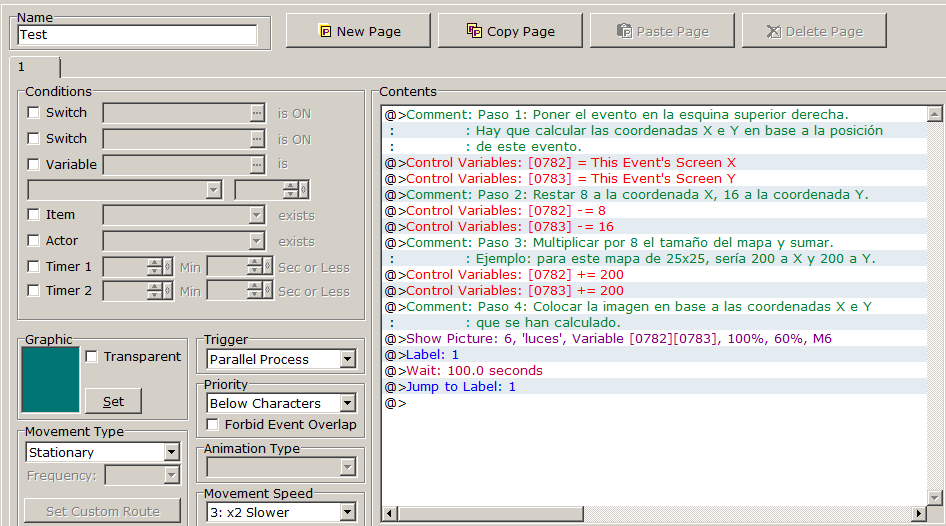
1 Put event in upper-left corner.
2 Check the x y resolution of picture, use this value each and multiply by 8.
3 The event make all and the picture is fixed for make shadows or anything
Sample:
https://app.box.com/s/blh3sngqzsgytrmd1tcxdpugyen33jpt
Its in spanish but only change after 3 info, variable x and y values. X8 of the px image
 Games - Tester
 Games - Other
