



 Full Games List
 Featured Games
 New Games
 Reviews
 Media
Media Images
 Blogs
Blogs Game Updates
 Images Feedback Summary
 Game Design Highlights
 Tutorials
 Articles
 Scripts
 Utilities / Plugins
 Resources
 Engines
 Engine Bulletins
 What is Makerscore?
 Past Events
 Achievements
 Misaos
 Forums
 Chat
Chat New to RMN?
 Full Store List
 RMN Music Pack (free)



 Profile
 Locker
 Play Lists
COELOCANTH'S PROFILE
coelocanth

5448
 Close
CloseSearch
Filter
 All
All Game Pages
 User Statuses
 Theme Roulette
Theme Roulette
> Done! My game's in the old rpgmaker2003, so if you have trouble running it, talk to me.
Does this need a special font? The text is overlapping letters some places and has big gaps between letters in others (on Windows 10)
Does this need a special font? The text is overlapping letters some places and has big gaps between letters in others (on Windows 10)
 [RMMV] Fun with tall sprites
I prefer the look of "tall" sprites over the square chibi sprites that are default.
However I'm not a very good artist, therefore slow.
So, searching around, I found somebody by the name of hiddenone has made base sprites that work quite well over on RMW.
As I said, I'm lazy, so I like to use character generators.
The heads on those base sprites are smaller than the chibi sprites, and also in
different positions (especially in the side view).
Scaling and repositioning the hair pieces onto the tall sprites works quite well, but is a reasonable amount of work.
Enough work for a lazy programmer to script it with ImageMagick (warning, it's a Swiss army knife, and expects you to know the difference between the bottle opener and the tool for removing stones from horses hooves)
I ended up using:
crop - to slice up the sprite sheets
resize - to scale the sprites
extent - to reposition the sprites
montage - to put the sprites back together in a sheet
Yay, I now have working hair on the TV and SV sprites.
The clothing on the other hand does not scale well.
If you stretch it, it looks a total mess. If you slice it and fill in, you still need to fix up the sleeves (and the fill in is 75% of the area, even if you are converting a long dress to a short dress).
Have a layering image editor (like GIMP or photoshop), it's tractable.
Here's an RTP edit of the green dress (female clothing 1)

(I didn't make a side view for this)
The original dress is ankle / floor length, while this is knee length to reduce the amount of guesswork.
While this is a "from scratch" black dress to go with those tall sprites:


Once more as a complete character:

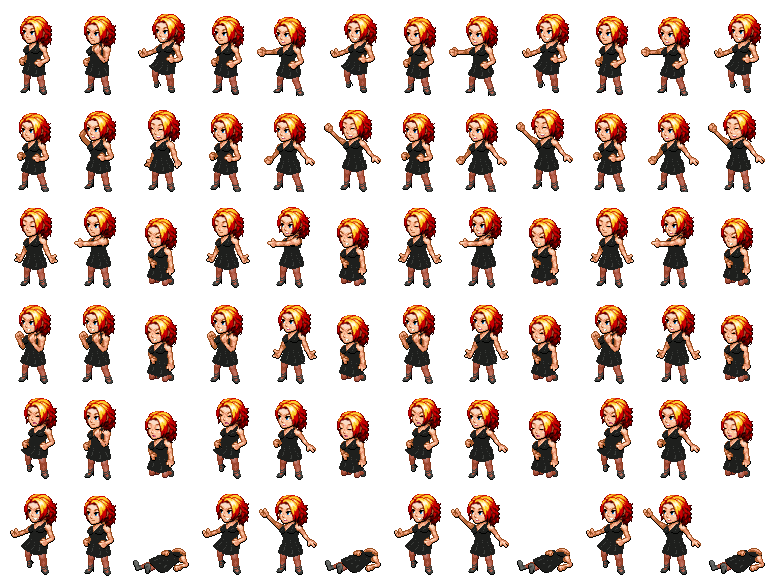
(The hair is "A wavy design" by SythianBard & SaltyArrow)
Formalwear for the guys:


I made this as seperate layers so he can take off the jacket, or use the same shirt in a different outfit.


However I'm not a very good artist, therefore slow.
So, searching around, I found somebody by the name of hiddenone has made base sprites that work quite well over on RMW.
As I said, I'm lazy, so I like to use character generators.
The heads on those base sprites are smaller than the chibi sprites, and also in
different positions (especially in the side view).
Scaling and repositioning the hair pieces onto the tall sprites works quite well, but is a reasonable amount of work.
Enough work for a lazy programmer to script it with ImageMagick (warning, it's a Swiss army knife, and expects you to know the difference between the bottle opener and the tool for removing stones from horses hooves)
I ended up using:
crop - to slice up the sprite sheets
resize - to scale the sprites
extent - to reposition the sprites
montage - to put the sprites back together in a sheet
Yay, I now have working hair on the TV and SV sprites.
The clothing on the other hand does not scale well.
If you stretch it, it looks a total mess. If you slice it and fill in, you still need to fix up the sleeves (and the fill in is 75% of the area, even if you are converting a long dress to a short dress).
Have a layering image editor (like GIMP or photoshop), it's tractable.
Here's an RTP edit of the green dress (female clothing 1)
(I didn't make a side view for this)
The original dress is ankle / floor length, while this is knee length to reduce the amount of guesswork.
While this is a "from scratch" black dress to go with those tall sprites:
Once more as a complete character:
(The hair is "A wavy design" by SythianBard & SaltyArrow)
Formalwear for the guys:
I made this as seperate layers so he can take off the jacket, or use the same shirt in a different outfit.
Theme Roulette
author=Mirakauthor=coelocanthI'd personally wait until the event was over to pick up the games, since until then, people like me are going to constantly reupload the games with bug fixes and the like.
Going to look at some of the other games now.
And on that note, version 1.4 of Rock Hard is up.
Ah, I believed the notice that said submissions are final and can't be changed.
Theme Roulette
Theme Roulette
Thanks - I found Yanfly has made "utility common events" which usefully lets you run a common event whenever a player wins a battle.
So at least in this game I can just unsummon the summonable members that way.
save/restore would definitely help for a game where the summon replaces your party instead of adding to it.
So at least in this game I can just unsummon the summonable members that way.
save/restore would definitely help for a game where the summon replaces your party instead of adding to it.
Theme Roulette
9 endings written, still need to polish some things but have a playable game :)
One issue I need to figure out or find an MV plugin for, is to clean up summoned party members at the end of battle.
Related: trigger something to happen during battle when only summoned party members are left alive, which could be done with a battle event page copied to every troop, if there's not a better way.
One issue I need to figure out or find an MV plugin for, is to clean up summoned party members at the end of battle.
Related: trigger something to happen during battle when only summoned party members are left alive, which could be done with a battle event page copied to every troop, if there's not a better way.
[RMVX ACE] Character Levels
Initial thought:
Just set the EXP for each enemy in your starting area to 0, then EXP is only earned when you give it in an event.
Alternative thought:
The SP parameter EXR = exp rate multiplier?
You can change class from an event, so you could just clone classes instead of the whole character.
Just set the EXP for each enemy in your starting area to 0, then EXP is only earned when you give it in an event.
Alternative thought:
The SP parameter EXR = exp rate multiplier?
You can change class from an event, so you could just clone classes instead of the whole character.
[SCRIPTING] [RMMV] Trouble using 'Show Picture' based on battler
Looking at the code, it's set to item (even though it could be an item or a skill)
So use item.itemId() to get the id, and DataMamager.isSkill(item) or DataManager.isItem(item) to get the type.
So you probably want:
If you have any skills that are used by both players and enemies, e.g. Attack, Guard, then you'll have to cope with those somehow.
How to work this out:
open the plugin in a text editor, e.g. notepad++
search for "before eval" will lead you to this function where it's applied:
All those "var x = whatever" lines are setting up short names for each thing that will be commonly used.
You'd then look at the original rpg_objects.js to figure out what a Game_Action is and how it works.
In general the rpg_*.js javascripts are the bits plugins interact with / override
So use item.itemId() to get the id, and DataMamager.isSkill(item) or DataManager.isItem(item) to get the type.
So you probably want:
<before eval>
if( user.isActor() ) {
  $gameVariables.setValue(10, user.actorId());
} else {
  $gameVariables.setValue(10, 0);
}
if( DataManager.isSkill(item) ) {
  $gameVariables.setValue(11, item.id);
} else {
  $gameVariables.setValue(11, 0);
}
if( target.isEnemy() ) {
  $gameVariables.setValue(12, target.enemyId());
} else {
  $gameVariables.setValue(12, 0);
}
</before eval>
If you have any skills that are used by both players and enemies, e.g. Attack, Guard, then you'll have to cope with those somehow.
How to work this out:
open the plugin in a text editor, e.g. notepad++
search for "before eval" will lead you to this function where it's applied:
Game_Action.prototype.applyBeforeEval = function(target) {
    var item = this.item();
    var a = this.subject();
    var b = target;
    var user = this.subject();
    var subject = this.subject();
    var s = $gameSwitches._data;
    var v = $gameVariables._data;
    var code = item.customBeforeEval;
    try {
      eval(code);
    } catch (e) {
      Yanfly.Util.displayError(e, code, 'BEFORE EVAL ERROR');
    }
};
All those "var x = whatever" lines are setting up short names for each thing that will be commonly used.
You'd then look at the original rpg_objects.js to figure out what a Game_Action is and how it works.
In general the rpg_*.js javascripts are the bits plugins interact with / override
 Games - Tester
 Games - Other
