



 Full Games List
 Featured Games
 New Games
 Reviews
 Media
Media Images
 Blogs
Blogs Game Updates
 Images Feedback Summary
 Game Design Highlights
 Tutorials
 Articles
 Scripts
 Utilities / Plugins
 Resources
 Engines
 Engine Bulletins
 What is Makerscore?
 Past Events
 Achievements
 Misaos
 Forums
 Chat
Chat New to RMN?
 Full Store List
 RMN Music Pack (free)



 Profile
 Locker
 Play Lists
CHERRY'S PROFILE

 Close
CloseSearch
Filter
 All
All Game Pages
 User Statuses
 RM2k(3) Bugfix Patch/IPS: Consistent z-order of events which are on the same tile, finally!
@Zachary_Braun: but the comparison function still has Y position before X and now ID... So an event can never have its feet on the head of another event...
[RM2K3] Event Layer Priority
OK I got it, check out https://rpgmaker.net/forums/topics/21604/?post=775662#post775662
RM2k(3) Bugfix Patch/IPS: Consistent z-order of events which are on the same tile, finally!
Hello guys! I came across a problem user Tor_Heyerdal had, about events which are on the same tile and "randomly" switched their priority/z-order when panning the screen.
It looks like this problem always existed in RM! In particular, it works like this: When you move events (which are on the same layer, e.g. same-layer-as-hero) onto the same tile, weird things happen. The RM will use a comparison method based on Y position, whether it is the hero or not, and X position, in that order, to determine the order in which the events are drawn. However, if all of these are the same, the actual order depends partly on the event ID, but partly on the other events in the visible area and maybe the moon phase and the size of your shoes, because it is actually undefined behavior.
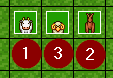
For example, I have these events (below you can see the event IDs):
Now, I move the outer two events onto the middle one. What happens is this mess:
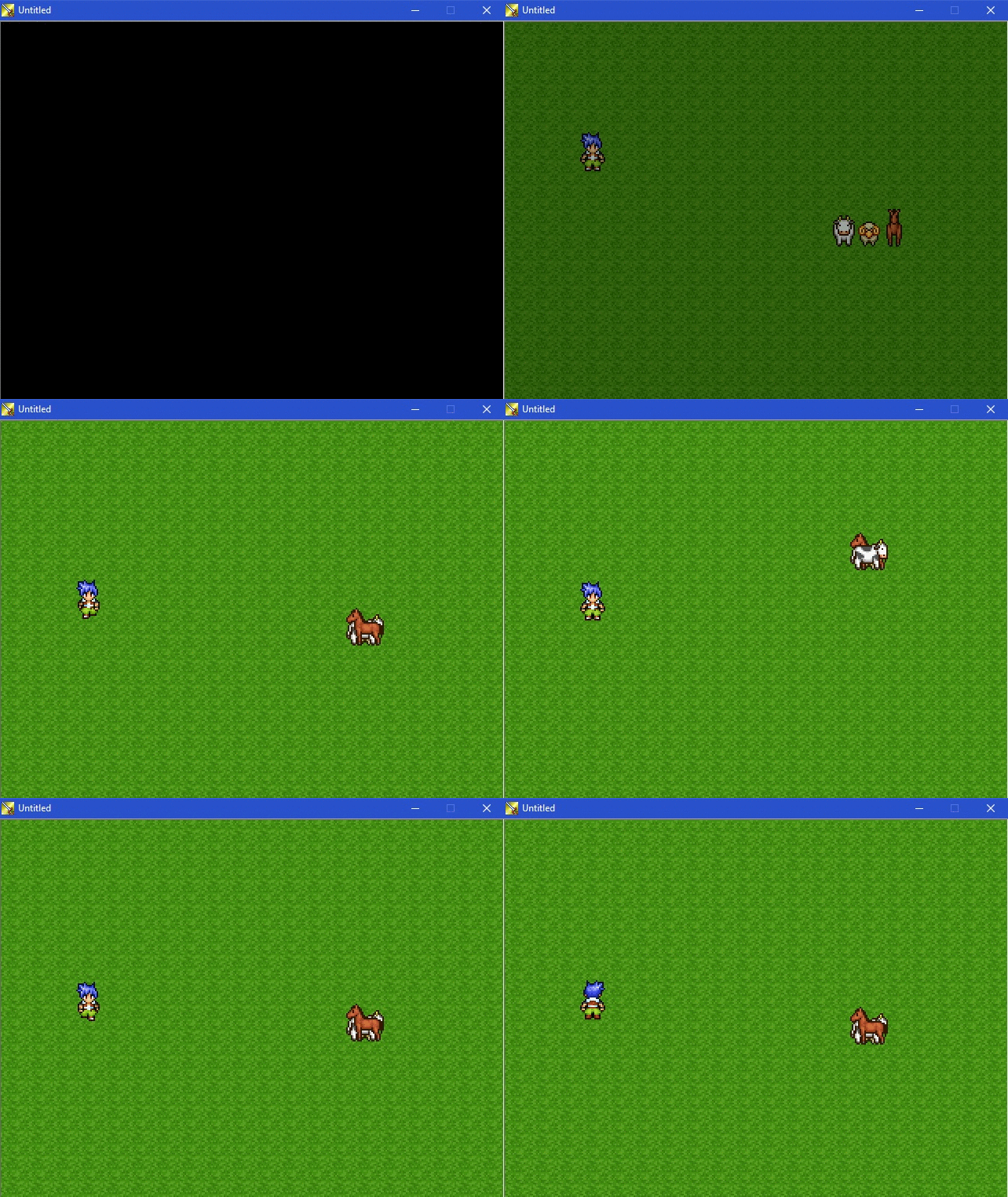
Note how the order changes when the hero walks past them! >_<
(In this simple example, only the vertical position caused the events to switch their priority, but in more complicated scenarios like the one Tor_Heyerdal had, also the horizontal position caused weird changes like that.)
My solution to bring order into this mess is to add another step in the comparison of events to determine their order: The event ID. Higher IDs are drawn on top of lower IDs (as you would expect, e.g. from pictures). So, the comparison is now Y, hero-or-not, X, event ID.
The result looks like this, and stays this way regardless of where the hero or the map are positioned:
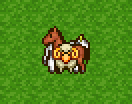
That's much nicer, I think!
I built a patch for RM2k3 v1.08 to achieve this (works also with DynRPG). To apply the patch, download this IPS file and patch your RPG_RT.exe with it (or put it into the DynPatches folder if you use DynRPG version 0.20+): http://share.cherrytree.at/showfile-25860/rpg_rt_with_event_id_fix.ips
EDIT: Here also for RM2k v1.07: http://share.cherrytree.at/showfile-25862/rpg_rt_2k_with_event_id_fix.ips
EDIT2: On second thought, though, I'm not sure if the solution is ideal. Maybe it should use the event ID in the check instead of the X position check? Because now, with the current solution, the order will change when the event is walking around horizontally, in an unexpected way (e.g. when an event walks behind a box). However, some people may depends on the X position order in some way, when events are wider than 16 pixels... What do you think? This is what I mean:
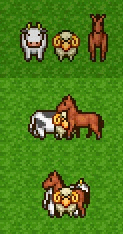
EDIT3: Since Tor_Heyerdal actually needed it without the X check as it turns out, here is the version with only Y, hero-or-not and event ID in the comparison (no X), for RM2k3 v1.08 only: http://share.cherrytree.at/showfile-25872/rpg_rt_108_fixed_without_x.ips
(I will also add this in the next official update of RM2k3.)
Enjoy your new nice and tidy event order!
Cherry
It looks like this problem always existed in RM! In particular, it works like this: When you move events (which are on the same layer, e.g. same-layer-as-hero) onto the same tile, weird things happen. The RM will use a comparison method based on Y position, whether it is the hero or not, and X position, in that order, to determine the order in which the events are drawn. However, if all of these are the same, the actual order depends partly on the event ID, but partly on the other events in the visible area and maybe the moon phase and the size of your shoes, because it is actually undefined behavior.
For example, I have these events (below you can see the event IDs):
Now, I move the outer two events onto the middle one. What happens is this mess:
Note how the order changes when the hero walks past them! >_<
(In this simple example, only the vertical position caused the events to switch their priority, but in more complicated scenarios like the one Tor_Heyerdal had, also the horizontal position caused weird changes like that.)
My solution to bring order into this mess is to add another step in the comparison of events to determine their order: The event ID. Higher IDs are drawn on top of lower IDs (as you would expect, e.g. from pictures). So, the comparison is now Y, hero-or-not, X, event ID.
The result looks like this, and stays this way regardless of where the hero or the map are positioned:
That's much nicer, I think!
I built a patch for RM2k3 v1.08 to achieve this (works also with DynRPG). To apply the patch, download this IPS file and patch your RPG_RT.exe with it (or put it into the DynPatches folder if you use DynRPG version 0.20+): http://share.cherrytree.at/showfile-25860/rpg_rt_with_event_id_fix.ips
EDIT: Here also for RM2k v1.07: http://share.cherrytree.at/showfile-25862/rpg_rt_2k_with_event_id_fix.ips
EDIT2: On second thought, though, I'm not sure if the solution is ideal. Maybe it should use the event ID in the check instead of the X position check? Because now, with the current solution, the order will change when the event is walking around horizontally, in an unexpected way (e.g. when an event walks behind a box). However, some people may depends on the X position order in some way, when events are wider than 16 pixels... What do you think? This is what I mean:
EDIT3: Since Tor_Heyerdal actually needed it without the X check as it turns out, here is the version with only Y, hero-or-not and event ID in the comparison (no X), for RM2k3 v1.08 only: http://share.cherrytree.at/showfile-25872/rpg_rt_108_fixed_without_x.ips
(I will also add this in the next official update of RM2k3.)
Enjoy your new nice and tidy event order!
Cherry
[RM2K3] Event Layer Priority
The official English 2k3 version is out!
The official English 2k3 version is out!
Tease tease http://recordit.co/uTr2j8YOHa
[RM2K3 PATCH] PicsInBattle/PicPointers (for v1.11)
Animated monsters would be an idea too but I didn't plan this right now at least.
However, about the picture stuff, here is a teaser :D http://recordit.co/uTr2j8YOHa
However, about the picture stuff, here is a teaser :D http://recordit.co/uTr2j8YOHa
[DYNRPG] Bug: missing/wrong image
loadFromFile is a very thin wrapper around the corresponding rpg maker function, in fact its source is:
	void Image::loadFromFile(std::string filename, bool throwErrors, bool autoResize) {

		this->autoResize = autoResize;

		DStringPtr s(filename);

		asm volatile("call *%%esi" : "=a" (_eax), "=d" (_edx), "=c" (_ecx) : "S" (0x467ABC), "a" (this), "d" (s.str), "c" (throwErrors) : "cc", "memory");

	}
I need your help to test a bugfix for the new official RM2k(3) (keyboard input issues when key is pressed continuously)
The key stuck glitch is something very mysterious to me too, especially since it persists when the game was closed, restarted, other games played, etc.
The only remedy I found (also just by trial and error) is my kbdreset.exe tool, and I thought I "fixed" it in the official version by basically adding kbdreset's functionality to the RM engine itself (it's run by the game when it's started)... but for some even more mysterious reason it does not work this way, it appears. :(
The only remedy I found (also just by trial and error) is my kbdreset.exe tool, and I thought I "fixed" it in the official version by basically adding kbdreset's functionality to the RM engine itself (it's run by the game when it's started)... but for some even more mysterious reason it does not work this way, it appears. :(
[RM2K3] Battle test cannot be initiated.
Interestingly, I saw a few reports about this now, but it appears it popped up only recently... It is a very weird problem though.
The direct cause of this error is that the RM failed to copy your game's RPG_RT.ldb file into the temporary folder which is located at c:\Users\<username>\AppData\KADOKAWA\RPG Maker 2003\WorkingDirectory\<random ID>
Since obviously the LDB file exists (otherwise your game wouldn't load), and the temporary folder exists too because it is created when RM starts and editing maps wouldn't work without it, it is a miracle to me how this copy operation can fail...
Can you please follow the following steps to help me identify the problem?
1) Download the tool "WinAPIOverride" from here and unpack it somewhere: http://jacquelin.potier.free.fr/exe/winapioverride32_bin.zip
2) Run the unpacked file "WinAPIOverride32.exe". There might be a warning about 64 and 32 bit which you can ignore.
3) Make sure RM2k3 is running.
4) Drag the "target" icon ("◎") onto RM2k3's window. A number should have been filled into the field "Process ID" now.
5) Click the green arrow in the top left corner. You should see a message that "the application is ready to be hooked".
6) Click the icon with the 3 books above the button "Load" in the "API Monitoring Configuration" area (near the middle of the window). A list will open.
7) On the left side, click (select) *and* tick "kernel32".
8) On the right side, click "Uncheck all".
9) Enter "CopyFileA" into the search function name field below the right list, then click the filter icon to the right.
10) You should now see only one entry in the right list. Tick it.
11) Click OK.
12) Now try starting the battle test in RM2k3.
13) In the WinAPIOverride window, new entries should have been added to the bottom list by now. Right-click any of them and select "Copy All".
14) Paste it here into a message!
Thanks!
Cherry
The direct cause of this error is that the RM failed to copy your game's RPG_RT.ldb file into the temporary folder which is located at c:\Users\<username>\AppData\KADOKAWA\RPG Maker 2003\WorkingDirectory\<random ID>
Since obviously the LDB file exists (otherwise your game wouldn't load), and the temporary folder exists too because it is created when RM starts and editing maps wouldn't work without it, it is a miracle to me how this copy operation can fail...
Can you please follow the following steps to help me identify the problem?
1) Download the tool "WinAPIOverride" from here and unpack it somewhere: http://jacquelin.potier.free.fr/exe/winapioverride32_bin.zip
2) Run the unpacked file "WinAPIOverride32.exe". There might be a warning about 64 and 32 bit which you can ignore.
3) Make sure RM2k3 is running.
4) Drag the "target" icon ("◎") onto RM2k3's window. A number should have been filled into the field "Process ID" now.
5) Click the green arrow in the top left corner. You should see a message that "the application is ready to be hooked".
6) Click the icon with the 3 books above the button "Load" in the "API Monitoring Configuration" area (near the middle of the window). A list will open.
7) On the left side, click (select) *and* tick "kernel32".
8) On the right side, click "Uncheck all".
9) Enter "CopyFileA" into the search function name field below the right list, then click the filter icon to the right.
10) You should now see only one entry in the right list. Tick it.
11) Click OK.
12) Now try starting the battle test in RM2k3.
13) In the WinAPIOverride window, new entries should have been added to the bottom list by now. Right-click any of them and select "Copy All".
14) Paste it here into a message!
Thanks!
Cherry
 Games - Tester
 Games - Other
