



 Full Games List
 Featured Games
 New Games
 Reviews
 Media
Media Images
 Blogs
Blogs Game Updates
 Images Feedback Summary
 Game Design Highlights
 Tutorials
 Articles
 Scripts
 Utilities / Plugins
 Resources
 Engines
 Engine Bulletins
 What is Makerscore?
 Past Events
 Achievements
 Misaos
 Forums
 Chat
Chat New to RMN?
 Full Store List
 RMN Music Pack (free)



 Profile
 Locker
 Play Lists
CHERRY'S PROFILE

 Close
CloseSearch
Filter
 All
All Game Pages
 User Statuses
 5 new patches
Hello! As I saw, the german RM community (my home) knows much more patches for the RM2k(3) than the english does. So now I'll bring to you five great patches, made by myself, Cherry.
1. 100-Pics-Patch for RM2k3
DOWNLOAD for RM2k3 version 1.04
DOWNLOAD for RM2k3 version 1.08
2. Better Auto Enter Patch for RM2k and RM2k3
Download Patch (625 KB): http://cherrytree.at/downloads/betteraep.rar
Download Demo Project (321 KB): http://cherrytree.at/downloads/betteraep_demo.rar
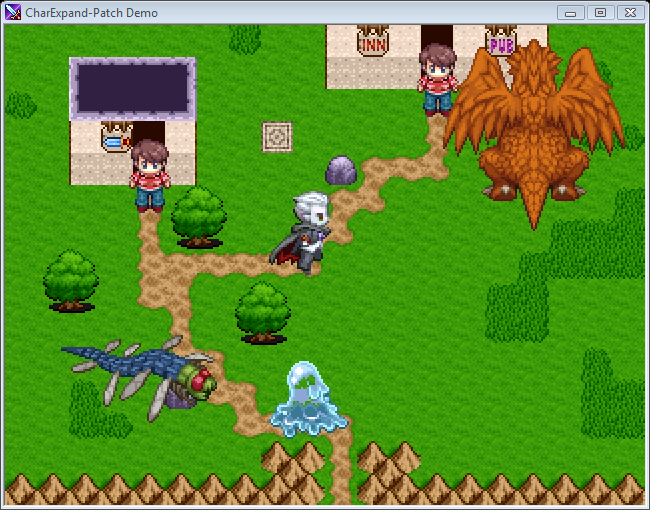
3. CharExpand Patch for RM2k
Download: http://cherrytree.at/downloads/cep.rar
Screen:
4. PicPointerPatch for RM2k and RM2k3
Download: http://cherrytree.at/downloads/ppp.rar
5. UnlockPics-Patch for the RM2k and RM2k3
Download: http://cherry1.ch.funpic.de/download/unlockpics.rar
Please respond in english or german.
greetings, Cherry
1. 100-Pics-Patch for RM2k3
DOWNLOAD for RM2k3 version 1.04
DOWNLOAD for RM2k3 version 1.08
How to use the patch
Just replace your RPG_RT.EXE with this one.
You have to patch the RPG2003.EXE too:
Open it in Resource Hacker (http://www.snapfiles.com/get/resourcehacker.html), then go to RCDATA --> TFORMEVCMD11110 --> 0. Then scroll downwards to "MaxValue = 50" (version 1.08) or "MaxValue = 40" (version 1.04) and change it to "MaxValue = 100". Then click "Compile Script". Do the same with RCDATA --> TFORMEVCMD11120 --> 0 and RCDATA --> TFORMEVCMD11130 --> 0 and then click File --> Save.
2. Better Auto Enter Patch for RM2k and RM2k3
Download Patch (625 KB): http://cherrytree.at/downloads/betteraep.rar
Download Demo Project (321 KB): http://cherrytree.at/downloads/betteraep_demo.rar
How to use the patch
This patch includes everything you need for creating your own title screen
> The standard title screen will be skipped, the game starts directly at the start map.
> You can call the load menu from an event script.
> You can exit the game from an event script.
> BetterAEP is a stand-alone patch. You don't need any other patch to get it working. If you want to combinate it with another patch, apply BetterAEP at first.
To call the loading menu or exit the game, the event command "Stop Parallel Events" (or "Stop Event" in some versions) and the variable no. 3350 is used. This variable has been chosen, because most of the games don't use it.
If variable no. 3350 contains the value 1 when "Stop Parallel Events" is called, the load menu will pop up. If it contains the value 2, the game will quit. If it contains any other value, the standard "Stop Parallel Events" command will be executed.
3. CharExpand Patch for RM2k
Download: http://cherrytree.at/downloads/cep.rar
Screen:
How to use the patch
The CharExpand Patch lets you use bigger charsets in RPG Maker 2000. A charsets now may be up to 1024x768 pixels. It may contain a standard charset (8 chars, with all face directions and all steps, total size: 288x256), 1 bigger char with all face directions (up to 256x256 per sprite) and steps or 1 sprite (up to 1024x768; so you can use charsets like pictures). For exapmles, look in the charset folder of the demo game.
To install the patch, execute the file "Patcher.exe", open a RPG_RT.EXE (version 1.07) and click "Patch".
To tell the patch, how big a sprite actually is, a filename prefix is used.
%XXYYMy_Char.png
XX and YY are width and height of one sprite, divided by 4.
%0812People.png -> One sprite has a size of (8*4)x(12*4) = 32x48 pixels, if the file contains one full char, the total size is 96x192 pixels.
Other chars than numbers are treated like "0". So "%A41B" will be treated like "%0410": 16x40.
In RPG Maker you should always use the first char of the charset if you use expanded chars. If you want to use a charset containing only one sprite like a picture, use "Fixed Graphic" mode with face direction "up" and step status "left" (see also the demon event in the demo).
I'm sorry, but the patch has some restrictions too.
1. Unfortunately (I haven't found the mistake yet :'-( ), if you use the patch, all three vehicles (skiff, ship and airship) will appear at all maps at tile 0/0. Use a blank charset for vehicles to avoid this.
2. Half-transparent terrains don't work with expanded chars. Graphical waste will be displayed (standard chars can step through as usual).
3. Because of the bigger charsets, some problems with priorities (espicially with the upper layer tiles) arise. You can avoid this either by tricky mapping or by using standard chars for uncontrolled moving events (like the hero or events with random movement).
4. You can (as usual) "speak" with the tile, where the event stands on, only (for example: if you have a big monster, the hero will not be able to interact with its feet by pressing ENTER.)
5. If you use my patch, your game will need a bit more power.
6. Please do NEVER use charsets with a "%" as first char in filename, but a filename lenght less than 5 (like "%OPA")!! This will let your game crash!
I hope, I have helped some people with this (I think, espicially the possibility of using charsets like pictures is interesting)!
4. PicPointerPatch for RM2k and RM2k3
Download: http://cherrytree.at/downloads/ppp.rar
How to use the patch
The PicPointerPatch, as the name says, lets you use pointers at picture IDs (this means, the destination ID of a Show, Move or Erase Picture command can be choosen at runtime, using a variable). It's very easy to use, if you want to use a fix ID, enter it normally (e.g. Show Picture , cloud.png), if you want to get the ID from a variable, use 10000+VarID als picture ID (e.g. Change Variable , 7; Show Picture , cloud.png <<< same effect as Show Picture , cloud.png). If the variable contains an illegal value, you will get an error.
This also works with transparecy and magnification of pictures at Show and Move Picture commands!
The second important feature (new in version 2) is - you can also make the FILENAME of the picture be choosen through a variable.
If you use 50000+VarID as picture ID...
a) as explained above, the real picture ID will be read out of variable
B) a file number will be read out of variable - the last 4 chars of the picture filename will be replaced with that number
Some useful examples:
<> Show Picture 2, (160, 120), Item_0000
This command shows, as usual, the image "Item_0000" as picture no. 2.
<> Change Variable , 9 set
<> Show Picture 10208, (160, 120), Item_0000
This will show the image "Item_0000" as picture no. 9.
Now look:
<> Change Variable , 14 set
<> Change Variable , 83 set
<> Show Picture 50208, (160, 120), Item_0000
This will show the image "Item_0083" (!) as picture no. 14!
IMPORTANT: The filename should have space for this number! A example how it should NOT be: If you would the example above using a picture "Blue Dragon", the RPG Maker would try to load a file called "Blue Dr0083"! You would get a "File not found" error then.
Another thing: Everything, the patch can not process, it will hand over to the RPG Maker. So - for exmaple - if you use 10500 as picture ID though this variable is unused, the patch hands this over to the RPG Maker, which would try to show a picture with ID 10500 - this would result in an error.
A practical expamle is attached as demo game (just look into the folder "Demospiel"). It's a number display with 6 digits - this only needs 15 event commands! Just open it in your RPG Maker and look at the event (the comments are in german, just ignore them).
The use of this patch? If you didn't understand it until now, I feel sorry for you. But I'll help you: number displays, item/skill/equip menus, etc. - with PicPointerPatch Version 2 you can do all these things in very short time!
At all, who are angry now, because their item menu took them months: SORRY! ;-)
>>>>> HOW TO INSTALL THE PATCH <<<<<<
1. open Lips.exe
2. click at "Apply IPS Patch"
3. choose version (RM2k or RM2k3)
4. choose the target RPG_RT.EXE (choose "All files" at the bottom right to see it)
But - the RPG Maker doesn't allow you to use that high picture IDs! So we have to patch the RPG2000.EXE/RPG2003.EXE too.
1. create a backup of your RPG Maker, so you can restore it, if you destroy it.
2. start Resource Hacker (available here: http://www.angusj.com/resourcehacker/) and open your RPG2000.EXE/RPG2003.EXE file.
3. go to RCDATA\TFORMEVCMD11110\0.
4. look for the line "MaxValue = 20" (RM2k) or "MaxValue = 50" (RM2k3) and replace the 20/50 with 100000. Do the same with the two lines "MaxValue = 100" below. Then click at "Compile Script" and save the file (File>Save).
5. Do the same with RCDATA\TFORMEVCMD11120\0.
6. Do the same with RCDATA\TFORMEVCMD11130\0 too, but here you have to change the line "MaxValue = 20"/"MaxValue = 50" only.
7. Save and close.
At the end a little tip:
Transparency values above 100% can cause very interesting effects. For example - with 400% transparency the image will be displayed with inverted colors (as I could see)!
5. UnlockPics-Patch for the RM2k and RM2k3
Download: http://cherry1.ch.funpic.de/download/unlockpics.rar
How to use the patch
Normally, RPG Maker halts event processing at a show/move/erase picture command when a message box is active. This patch deactivates this behavior. So you are able to create animated faces and much more. Just run the patcher and patch your RPG_RT.EXE file.
Please respond in english or german.
greetings, Cherry
List of great patches for RM2000/2003
Power Patch v0.43b is out now! It contains new features, some bugfixes and no more loading time (only the first time you start it)!
http://cherry1.ch.funpic.de/pp043.rar
http://cherry1.ch.funpic.de/pp043.rar
List of great patches for RM2000/2003
Hello, english RPG Maker community!
In the german RM community we have a lot of patches and tools i've never seen on english RPG Maker boards, so i'll show it to you now!
If someone has a question - ask! I'll try to answer it ;)
Some of the tools are english, some german. Try it out.
IMPORTANT: Copy the links and paste it into the adress of your browser!!
Number. Name - Author (supported RPG Maker versions)
Description
Download link
1. Key Patch - Ineluki (RM 2000, RM 2003 up to version 1.04, Value! version NOT supported)
Allows you to use all keys as well as the mouse in your games. You may also call EXE-Files and play MP3 files. It's the most famous tool I know. But it has a big drawback: RPG Maker 2003 version 1.05 or higher are not supported. But exactly THIS versions have great features like 50 pictures and such stuff.
Download: http://www.rpg2000.4players.de:1061/sonstiges/utils/InelukiKeyPatchv1-2.zip
2. Screenshot Extension - Miroku (needs Key Patch)
A little tool, which, can, called using the Key Patch, make a screenshot of the game and save it in the "Picture" folder. See sample game for details.
Download: http://dl1.rpg-atelier.net/ressourcen2/programme/Effect.exe
3. RPG Maker V2 Patch - PheonixX_2 (RM2000 - any version except Value!)
After applying this little patch, you can more easily see where the message box in the game ends, while typing a message.
Download: http://dl1.rpg-atelier.net/ressourcen2/programme/RPG_Maker_2000_1.07b_Patch_V2.zip
4. Save-/Load-Script - Vampire of Eternal Chaos (only RM2000 v1.05, but I'm not sure)
This great tool let you make you own save- and loadmenu in your game! It has a lot of features like quicksave-/loading or thumbnails in load-screen.
Download: http://www.dedo-entertainment.de/Downloads/SaveLoad-Script/SaveLoad-Script.exe
5. Enter Hero Name Patch - Deejee (only RM2000 v1.05, but I'm not sure)
This is a correction of the bug in the Enter Hero Name menu in early translations.
Download: http://dl1.rpg-atelier.net/ressourcen2/programme/enterheroname_rpg_rt_exe.zip
6. Auto Enter Patch - Miroku (RM2003)
This simple patch skips the original title screen of the RPG Maker.
Download: http://dl1.rpg-atelier.net/ressourcen2/programme/AutoEnterPatch.exe
7. Font Changer - Me (all versions)
With the Font Changer you are able to change the fonts used in your games to anyones you want!
Download: http://dl1.rpg-atelier.net/ressourcen2/programme/chgfont.exe
8. Hyper Patcher - Me (RM2000, RM2003 v1.03, RM2003 v1.08)
This tool allowes you to change a lot of things, like to position of the menu at the title screen, skip the ASCII/Enterbrain-Logos, hide the HP/Level-Numbers in save screen, change the game menu items (e.g. drop the "Save" and "Exit" items) and much more.
Download: http://dl1.rpg-atelier.net/ressourcen2/programme/hyperp.exe
9. Power Patch - Me (all versions)
A patch, which adds a scripting language to the RPG Maker. You can change the game variables using the scripting language (e.g. SetVar(14, (GetVar(15)*GetVar(14)+3)^2)), copy files, use all keys as well as the mouse, change the resolution and much more. And - you can extend it with self-made plugins (so you'll be able to make an Online-Gaming-Plug-In and use it with the Power Patch)
Download: http://cherry1.ch.ohost.de/powerp/Power_Patch_v0.3_Alpha.zip
10. Destiny Patch - Bananen-Joe (RM2000 - versions 1.05 and 1.07 only - NO RM2003!)
It does mainly the same as the Power Patch, but it has a lot of more great features, like changing map tiles, manipulating pictures, playing online, and so on. One of the best things it's able to do is ALLOWING YOU TO USE 100 PICTURES instead of 20/50. But the big drawback is - it doesn't support the RPG Maker 2003.
Download: http://www.rpga.info/forum/showthread.php?p=422053#post422053
11. RM2k(3) Debugger - sue445 (all versions)
A great tool which includes a searching function with a lot of features, like searching for a filename in events or such stuff.
Download: http://cherry1.ch.ohost.de/debug_en.rar
12. Savegame Editor - sue445 (all versions)
As the title says, this is a universal savegame editor for RM2k(3) savefiles with a lot of features.
Download: http://cherry1.ch.ohost.de/rpg2ksav_en.rar
13. XYZ-Converter - sue445 ( --- )
A batch BMP/PNG/XYZ-Converter.
Download: http://cherry1.ch.ohost.de/rpgimgcnv_en.exe
14. LMU2BMP - sue445 ( --- )
This tool saves the content of a RPG Maker map as BMP file. Simply copy the tool in your project folder and run it. Then enter the ID of the map you want to save as BMP and hit enter. Then it will be saved as "Map####.bmp".
Download: http://cherry1.ch.ohost.de/rpg2kdev.exe
I'm sure, I've forgotten something, but I think, it's enough now ;)
greetings, Cherry
In the german RM community we have a lot of patches and tools i've never seen on english RPG Maker boards, so i'll show it to you now!
If someone has a question - ask! I'll try to answer it ;)
Some of the tools are english, some german. Try it out.
IMPORTANT: Copy the links and paste it into the adress of your browser!!
Number. Name - Author (supported RPG Maker versions)
Description
Download link
1. Key Patch - Ineluki (RM 2000, RM 2003 up to version 1.04, Value! version NOT supported)
Allows you to use all keys as well as the mouse in your games. You may also call EXE-Files and play MP3 files. It's the most famous tool I know. But it has a big drawback: RPG Maker 2003 version 1.05 or higher are not supported. But exactly THIS versions have great features like 50 pictures and such stuff.
Download: http://www.rpg2000.4players.de:1061/sonstiges/utils/InelukiKeyPatchv1-2.zip
2. Screenshot Extension - Miroku (needs Key Patch)
A little tool, which, can, called using the Key Patch, make a screenshot of the game and save it in the "Picture" folder. See sample game for details.
Download: http://dl1.rpg-atelier.net/ressourcen2/programme/Effect.exe
3. RPG Maker V2 Patch - PheonixX_2 (RM2000 - any version except Value!)
After applying this little patch, you can more easily see where the message box in the game ends, while typing a message.
Download: http://dl1.rpg-atelier.net/ressourcen2/programme/RPG_Maker_2000_1.07b_Patch_V2.zip
4. Save-/Load-Script - Vampire of Eternal Chaos (only RM2000 v1.05, but I'm not sure)
This great tool let you make you own save- and loadmenu in your game! It has a lot of features like quicksave-/loading or thumbnails in load-screen.
Download: http://www.dedo-entertainment.de/Downloads/SaveLoad-Script/SaveLoad-Script.exe
5. Enter Hero Name Patch - Deejee (only RM2000 v1.05, but I'm not sure)
This is a correction of the bug in the Enter Hero Name menu in early translations.
Download: http://dl1.rpg-atelier.net/ressourcen2/programme/enterheroname_rpg_rt_exe.zip
6. Auto Enter Patch - Miroku (RM2003)
This simple patch skips the original title screen of the RPG Maker.
Download: http://dl1.rpg-atelier.net/ressourcen2/programme/AutoEnterPatch.exe
7. Font Changer - Me (all versions)
With the Font Changer you are able to change the fonts used in your games to anyones you want!
Download: http://dl1.rpg-atelier.net/ressourcen2/programme/chgfont.exe
8. Hyper Patcher - Me (RM2000, RM2003 v1.03, RM2003 v1.08)
This tool allowes you to change a lot of things, like to position of the menu at the title screen, skip the ASCII/Enterbrain-Logos, hide the HP/Level-Numbers in save screen, change the game menu items (e.g. drop the "Save" and "Exit" items) and much more.
Download: http://dl1.rpg-atelier.net/ressourcen2/programme/hyperp.exe
9. Power Patch - Me (all versions)
A patch, which adds a scripting language to the RPG Maker. You can change the game variables using the scripting language (e.g. SetVar(14, (GetVar(15)*GetVar(14)+3)^2)), copy files, use all keys as well as the mouse, change the resolution and much more. And - you can extend it with self-made plugins (so you'll be able to make an Online-Gaming-Plug-In and use it with the Power Patch)
Download: http://cherry1.ch.ohost.de/powerp/Power_Patch_v0.3_Alpha.zip
10. Destiny Patch - Bananen-Joe (RM2000 - versions 1.05 and 1.07 only - NO RM2003!)
It does mainly the same as the Power Patch, but it has a lot of more great features, like changing map tiles, manipulating pictures, playing online, and so on. One of the best things it's able to do is ALLOWING YOU TO USE 100 PICTURES instead of 20/50. But the big drawback is - it doesn't support the RPG Maker 2003.
Download: http://www.rpga.info/forum/showthread.php?p=422053#post422053
11. RM2k(3) Debugger - sue445 (all versions)
A great tool which includes a searching function with a lot of features, like searching for a filename in events or such stuff.
Download: http://cherry1.ch.ohost.de/debug_en.rar
12. Savegame Editor - sue445 (all versions)
As the title says, this is a universal savegame editor for RM2k(3) savefiles with a lot of features.
Download: http://cherry1.ch.ohost.de/rpg2ksav_en.rar
13. XYZ-Converter - sue445 ( --- )
A batch BMP/PNG/XYZ-Converter.
Download: http://cherry1.ch.ohost.de/rpgimgcnv_en.exe
14. LMU2BMP - sue445 ( --- )
This tool saves the content of a RPG Maker map as BMP file. Simply copy the tool in your project folder and run it. Then enter the ID of the map you want to save as BMP and hit enter. Then it will be saved as "Map####.bmp".
Download: http://cherry1.ch.ohost.de/rpg2kdev.exe
I'm sure, I've forgotten something, but I think, it's enough now ;)
greetings, Cherry
 Games - Tester
 Games - Other
