



 Full Games List
 Featured Games
 New Games
 Reviews
 Media
Media Images
 Blogs
Blogs Game Updates
 Images Feedback Summary
 Game Design Highlights
 Tutorials
 Articles
 Scripts
 Utilities / Plugins
 Resources
 Engines
 Engine Bulletins
 What is Makerscore?
 Past Events
 Achievements
 Misaos
 Forums
 Chat
Chat New to RMN?
 Full Store List
 RMN Music Pack (free)



 Profile
 Locker
 Play Lists
CHERRY'S PROFILE

 Close
CloseSearch
Filter
 All
All Game Pages
 User Statuses
 Three Questions About RPG Maker 2000/3
I wonder why nobody knows my patches? :D
You can find CharExpand-Patch (bigger Charsets in RM2k), together with other patches, here: http://rmrk.net/index.php?topic=27905.0
A screenshot:
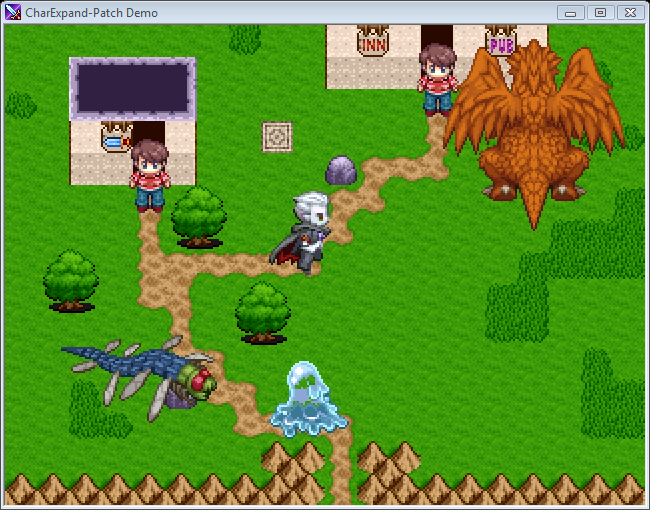
The best MP3 patch for RM2k (supports effects like reverb, etc., has a loop editor and more) is Disharmony: http://uglyhorst.de/rPG%20Maker/patches
Best regards,
Cherry
EDIT: Oops, didn't see the edit above^^
You can find CharExpand-Patch (bigger Charsets in RM2k), together with other patches, here: http://rmrk.net/index.php?topic=27905.0
A screenshot:
The best MP3 patch for RM2k (supports effects like reverb, etc., has a loop editor and more) is Disharmony: http://uglyhorst.de/rPG%20Maker/patches
Best regards,
Cherry
EDIT: Oops, didn't see the edit above^^
Rm2k3 Command Bug
I didn't know that.
I'll see if I can fix it.
If you now other RM2k3 bugs, tell me please, I am currently trying to fix all of them.
Already done:
- "Reflect skills" conditions lead to crash
- Exiting "Order" menu doesn't play the cancel sound
- Enemies don't play the "Enemy attacks" sound when they start their turn
- "Transparent window" doesn't work with "Traditional" battle style
I'll see if I can fix it.
If you now other RM2k3 bugs, tell me please, I am currently trying to fix all of them.
Already done:
- "Reflect skills" conditions lead to crash
- Exiting "Order" menu doesn't play the cancel sound
- Enemies don't play the "Enemy attacks" sound when they start their turn
- "Transparent window" doesn't work with "Traditional" battle style
Custom Title Screen (2k3)
I wonder why nobody replied here O_O
Anyway: You can easily make a custom title screen using BetterAEP:
Download Patch (625 KB): http://cherrytree.at/downloads/betteraep.rar
Download Demo Project (321 KB): http://cherrytree.at/downloads/betteraep_demo.rar
Best regards,
Cherry
Anyway: You can easily make a custom title screen using BetterAEP:
Download Patch (625 KB): http://cherrytree.at/downloads/betteraep.rar
Download Demo Project (321 KB): http://cherrytree.at/downloads/betteraep_demo.rar
How to use the patch
This patch includes everything you need for creating your own title screen
> The standard title screen will be skipped, the game starts directly at the start map.
> You can call the load menu from an event script.
> You can exit the game from an event script.
> BetterAEP is a stand-alone patch. You don't need any other patch to get it working. If you want to combinate it with another patch, apply BetterAEP at first.
To call the loading menu or exit the game, the event command "Stop Parallel Events" (or "Stop Event" in some versions) and the variable no. 3350 is used. This variable has been chosen, because most of the games don't use it.
If variable no. 3350 contains the value 1 when "Stop Parallel Events" is called, the load menu will pop up. If it contains the value 2, the game will quit. If it contains any other value, the standard "Stop Parallel Events" command will be executed.
Best regards,
Cherry
Custom rm2k3 fonts?
Use Hyper Patcher 2, it cotains that feature too and works with more versions.
Can't save database in RM2k3
Try moving the project to somewhere inside your personal folder, "Documents" for example, or start RM2k3 with administrator rights. I recommend the first way.
RMEventFactory - The batch tool for creating RM2k(3) events!
There are several examples included:
- digit.efs : creates an event with 11 pages for displaying a number (you need a charset like the one which you can see in the help file to see meaningful results)
- sinus.efs : creates an event script with 360 forks for calculating the sine of a variable
- enemies.efs : creates an event script with several "change variable" commands with enemy stats which were loaded from a table in a csv file (for a CBS, for example)
- chest.efs : creates chest events with data from 2 tables (items.csv : which items have which names (singular + plural); chests.csv : which chests exist and hold which items (and how much)), of course with different switches
- digit.efs : creates an event with 11 pages for displaying a number (you need a charset like the one which you can see in the help file to see meaningful results)
- sinus.efs : creates an event script with 360 forks for calculating the sine of a variable
- enemies.efs : creates an event script with several "change variable" commands with enemy stats which were loaded from a table in a csv file (for a CBS, for example)
- chest.efs : creates chest events with data from 2 tables (items.csv : which items have which names (singular + plural); chests.csv : which chests exist and hold which items (and how much)), of course with different switches
RMEventFactory - The batch tool for creating RM2k(3) events!
RMEventFactory is a batch tool for creating RPG Maker 2000/2003 events. You can create events by reproducing a template and replacing values. You can also read values from CSV files. RMEventFactory is targetted to advanced RPG Maker users.
RMEventFactory will scan the template for special values and replace them by the result of a formula. You can also embed formulas and commands in strings, like messages ("Show Message").
This way you can easily create a bunch of chest events (with different switches, and the right items and messages) or a list of "Change Variable" commands to set the stats of your CBS' enemies, read out of a CSV file.
Plus, you can save event data to a file and later load it back (so you can also send events over the internet to other people), export events to text (→ EasyEventExporter) or convert events to other types - map event to battle event, for example (→ Battle Event Converter).
A detailed english manual and some examples are included.

In the example, which is currently opened in the screen, the option "Produce event script" is used to reproduce a "Conditional Branch" and change its values, so that at the end you have an event which can calculate a variable's sine (multiplied by 100.000).
Download: http://cherrytree.at/download/?did=11
Update for official RM2k3: This version does in principle work with the newer RM2k3 versions (v1.10+) too, but it doesn't know about the new features and won't display them correctly in the preview (still processing them though). However, there is an issue pasting event script because it's read as text (pasting a whole event works). To fix this, replace the eventfactory.dll with this version: https://cherryshare.at/f/8d7Bbn/eventfactory.dll
RMEventFactory will scan the template for special values and replace them by the result of a formula. You can also embed formulas and commands in strings, like messages ("Show Message").
This way you can easily create a bunch of chest events (with different switches, and the right items and messages) or a list of "Change Variable" commands to set the stats of your CBS' enemies, read out of a CSV file.
Plus, you can save event data to a file and later load it back (so you can also send events over the internet to other people), export events to text (→ EasyEventExporter) or convert events to other types - map event to battle event, for example (→ Battle Event Converter).
A detailed english manual and some examples are included.
In the example, which is currently opened in the screen, the option "Produce event script" is used to reproduce a "Conditional Branch" and change its values, so that at the end you have an event which can calculate a variable's sine (multiplied by 100.000).
Download: http://cherrytree.at/download/?did=11
Update for official RM2k3: This version does in principle work with the newer RM2k3 versions (v1.10+) too, but it doesn't know about the new features and won't display them correctly in the preview (still processing them though). However, there is an issue pasting event script because it's read as text (pasting a whole event works). To fix this, replace the eventfactory.dll with this version: https://cherryshare.at/f/8d7Bbn/eventfactory.dll
RM2k3 No-Row-Patch
I'm sorry, but I'm not able to find the right place for this topic, so I'm posting it here.
This patch for RM2k3 v1.08 removes the "Row" command in battle and in the status screen in menu, respectively.
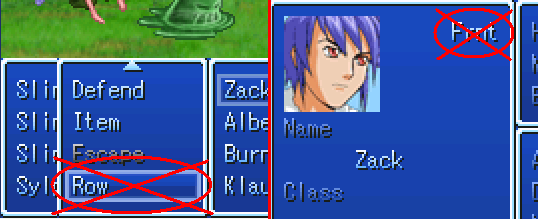
ABOUT THE HPA FILE FORMAT:
This patch is published as HPA file. HPA stands for "Hyper Patch Archive" and is my own patch format, which can currently only be read by Hyper Patcher 2. It has some advantages over other patch formats like IPS. Firstly, it can contain more than one patch per file (so that there is always an option to remove the patch), secondly, a HPA file can contain different versions of patches made for different RPG Maker versions. Hyper Patcher 2 automatically finds the right version, which prevents you from destroying your project by applying a patch on the wrong RPG Maker version or the wrong file.
You can get Hyper Patcher 2 here: http://www.multimediaxis.de/showthread.php?t=113429
To apply a HPA patch, drag your project folder onto HYPERP2.EXE or choose it in the folder tree after starting the tool. Then open the tab "Sonstiges 3" and click "Patch anwenden...". You can then choose the patch to apply. "kein Patch für Ihre Makerversion" means that there is no patch for your version of RPG_RT.EXE available.
Download: http://cherrytree.at/downloads/norow.rar (2 KB)
UPDATE 1: If you need this as IPS file for v1.08 (for example to use with DynRPG), get it here.
UPDATE 2: There is now also a version for official RM2k3, which you can get here.
greetings, Cherry
This patch for RM2k3 v1.08 removes the "Row" command in battle and in the status screen in menu, respectively.
ABOUT THE HPA FILE FORMAT:
This patch is published as HPA file. HPA stands for "Hyper Patch Archive" and is my own patch format, which can currently only be read by Hyper Patcher 2. It has some advantages over other patch formats like IPS. Firstly, it can contain more than one patch per file (so that there is always an option to remove the patch), secondly, a HPA file can contain different versions of patches made for different RPG Maker versions. Hyper Patcher 2 automatically finds the right version, which prevents you from destroying your project by applying a patch on the wrong RPG Maker version or the wrong file.
You can get Hyper Patcher 2 here: http://www.multimediaxis.de/showthread.php?t=113429
To apply a HPA patch, drag your project folder onto HYPERP2.EXE or choose it in the folder tree after starting the tool. Then open the tab "Sonstiges 3" and click "Patch anwenden...". You can then choose the patch to apply. "kein Patch für Ihre Makerversion" means that there is no patch for your version of RPG_RT.EXE available.
Download: http://cherrytree.at/downloads/norow.rar (2 KB)
UPDATE 1: If you need this as IPS file for v1.08 (for example to use with DynRPG), get it here.
UPDATE 2: There is now also a version for official RM2k3, which you can get here.
greetings, Cherry
load script
Nonsense.
You can use Power Patch Compact, the Load Patch or (maybe the best idea) BetterAEP.
http://www.rpgmaker.net/forums/index.php?topic=2866.0
You can use Power Patch Compact, the Load Patch or (maybe the best idea) BetterAEP.
http://www.rpgmaker.net/forums/index.php?topic=2866.0
5 new patches
author=Neophyte link=topic=2866.msg55324#msg55324 date=1231726063This can done very easily using Power Patch Compact, which has NOT been published at other communities than the german. But if you want to use it anyway, I can give you further instructions by ICQ/MSN (444509176/trappdavid@hotmail.com).
Hey Cherry, I'm sure you've seen the German game Alone - Cold Winter. In one of the creators youtube videos, the game has a load/save feature that is completely different from the default RM one (it is done completely with pictures). He said he had someone create and/or modify it to do this, but it reminds me of the one you did with the RM2K save/load modification. I can link you to the video if you want to see it. I'm just wondering if you could do something like that with your current version, or if any modifications would be needed.
author=Neophyte link=topic=2866.msg55324#msg55324 date=1231726063Because of this, I'm currently working on an All-In-One-Tool that includes most of the patches (the bug-free ones) and manages them. It will detect compatiblity problems and give options how to solve them.
I like to think of these add-ons/patches as a mod for a commercial game like Oblivion and Fallout 3. They don't necessarily make things any better, but it helps the creator by getting rid of some of the tedious issues with the program. The only thing I dislike is the compatibility issues and how some of the modifications only work with certain versions of the program (and they are sometimes buggy).
author=ZPE link=topic=2866.msg55337#msg55337 date=1231730601The computer has to be about 10% faster to play without lags.
For CharExpand patch, you say "5. If you use my patch, your game will need a bit more power." What do you mean more power? Do I increase Alex's attack? :/
 Games - Tester
 Games - Other
