



 Full Games List
 Featured Games
 New Games
 Reviews
 Media
Media Images
 Blogs
Blogs Game Updates
 Images Feedback Summary
 Game Design Highlights
 Tutorials
 Articles
 Scripts
 Utilities / Plugins
 Resources
 Engines
 Engine Bulletins
 What is Makerscore?
 Past Events
 Achievements
 Misaos
 Forums
 Chat
Chat New to RMN?
 Full Store List
 RMN Music Pack (free)



 Profile
 Locker
 Play Lists
CHERRY'S PROFILE

 Close
CloseSearch
Filter
 All
All Game Pages
 User Statuses
 RM2k3 Sound Glitch
author=NicoB
I'm already using Disharmony as my MP3 playing software.
Well, than it might be the reverse problem: Maybe it's a bug in Disharmony.
Try using Audieremony instead.
RM2k3 Sound Glitch
Hm...
Try the following:
1) Back up you project
2) Download Force Harmony from my homepage
3) Install it - this way you will lose MP3 support
4) To get MP3 support back (together with some other features, like MP3 loop points, effects for sounds, etc.), download Disharmony and install it
After that, the RPG Maker's sound system has been replaced with Disharmony. In most cases, this solves any sound problems.
Try the following:
1) Back up you project
2) Download Force Harmony from my homepage
3) Install it - this way you will lose MP3 support
4) To get MP3 support back (together with some other features, like MP3 loop points, effects for sounds, etc.), download Disharmony and install it
After that, the RPG Maker's sound system has been replaced with Disharmony. In most cases, this solves any sound problems.
Friend Encountering an Error
No, access violation has no specific meaning unless you know what the numbers mean. :)
As I already said at RMRK, this specific error means that the game tries to access a party member which doesn't exist (for example, the 4th hero when only 2 heroes are in the party), and it happens while the game is drawing the hero stats on the screen, during battle.
I am currently looking for the exact reason in this guy's project.
As I already said at RMRK, this specific error means that the game tries to access a party member which doesn't exist (for example, the 4th hero when only 2 heroes are in the party), and it happens while the game is drawing the hero stats on the screen, during battle.
I am currently looking for the exact reason in this guy's project.
RM2k3 Sound Glitch
What version of RM2k3 do you have?
Or, to be more exact: What version of RPG_RT.exe does your project use? (Rightclick on RPG_RT.exe, click Properties, Version)
Or, to be more exact: What version of RPG_RT.exe does your project use? (Rightclick on RPG_RT.exe, click Properties, Version)
RPG Maker 2003 Test Play Error
author=Sam
Holy shit, playing it in windowed mode solves everything! Thank you!
Because regularely people have problems with fullscreen, I created a tool called "AnotherFullscreenMode", which allows you to play any RM2k(3) game in fullscreen without changing the resolution - the image will be scaled. Additionally, you can use filters (Scale2x and hq2x) for a better quality.
First, start your game (in windowed mode!!!). Then start AnotherFullscreenMode. By pressing F6 you can switch between fullscreen and windowed mode, F7 shows or hides the FPS.
Using F8, you can set the filter: none -> Scale2x -> hq2x
Download the tool here: http://cherrytree.at/downloads/afm.rar
Question regarding menu options rm2003

MAP tree break
Did you go the hard way (creating a new project with many maps, etc.) or the easy way (using Map Tree Creator)?
In case anybody went the hard way till now, look here:
http://www.rpgrevolution.com/forums/index.php?showtopic=49088
In case anybody went the hard way till now, look here:
http://www.rpgrevolution.com/forums/index.php?showtopic=49088
The Master RPG Maker Helpful Things Topic
It's included in this version of RPG Maker 2009 Ultimate (look into the "tools" folder).
Is it impossible to play full screen if...
whoops, I somehow missed that part. Okay, forget it then. (By the way, it's no patch, and it doesn't do anything to the engine.)
Is it impossible to play full screen if...
Hello!
Because regularely people have problems with fullscreen, I created a tool called "AnotherFullscreenMode", which allows you to play any RM2k(3) game in fullscreen without changing the resolution - the image will be scaled. Additionally, you can use filters (Scale2x and hq2x) for a better quality.
First, start your game (in windowed mode, use the TestPlay ShowTitle Window thing mentioned earlier in this thread). Then start AnotherFullscreenMode. By pressing F6 you can switch between fullscreen and windowed mode, F7 shows or hides the FPS.
Using F8, you can set the filter: none -> Scale2x -> hq2x
Download the tool here: http://cherrytree.at/downloads/afm.rar
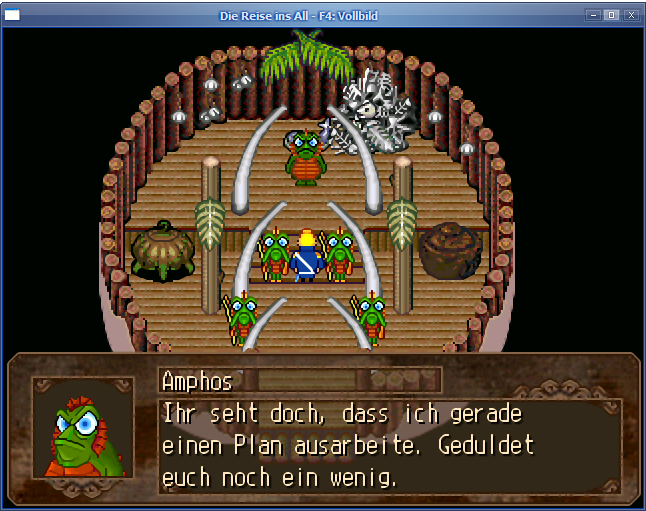
PS: Here is an example how the hq2x filter looks for a RM2k3 game:
Because regularely people have problems with fullscreen, I created a tool called "AnotherFullscreenMode", which allows you to play any RM2k(3) game in fullscreen without changing the resolution - the image will be scaled. Additionally, you can use filters (Scale2x and hq2x) for a better quality.
First, start your game (in windowed mode, use the TestPlay ShowTitle Window thing mentioned earlier in this thread). Then start AnotherFullscreenMode. By pressing F6 you can switch between fullscreen and windowed mode, F7 shows or hides the FPS.
Using F8, you can set the filter: none -> Scale2x -> hq2x
Download the tool here: http://cherrytree.at/downloads/afm.rar
PS: Here is an example how the hq2x filter looks for a RM2k3 game:
 Games - Tester
 Games - Other
