



 Full Games List
 Featured Games
 New Games
 Reviews
 Media
Media Blogs
Blogs Game Updates
 Images Feedback Summary
 Game Design Highlights
 Tutorials
 Articles
 Scripts
 Utilities / Plugins
 Resources
 Engines
 Engine Bulletins
 What is Makerscore?
 Past Events
 Achievements
 Misaos
 Forums
 Post History
 Chat
Chat New to RMN?
 Full Store List
 RMN Music Pack (free)



 Profile
 Locker
 Play Lists
DARKDESIGNGAMES'S PROFILE
darkdesigngames
364
 Close
CloseWe work on games per request and we also make visits to schools, colleges and institutions across the country to help teach all aspects of game design to those intrested, using packages such as Alice, Granny, GameStudio, FPS Creator, AGS and RPG Maker VX.
One of our most popular and successful projects to date is Mystic Quest Remastered, a re-imagined and completely re-developed edition of the 1992 SQUARE release, Final Fantasy Mystic Quest.
Dark design games is a scam artist hoping to bilk naive kids out of money.

Search
Filter
 All
All Game Pages
 User Statuses
 Development blog
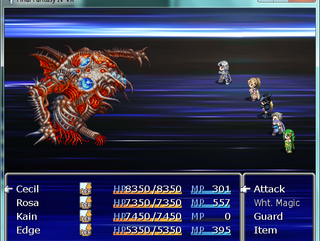
I noticed how limited Kain's abilities were so I've allowed him to learn these new dragon abilities when he reaches these levels:
-Initial
Jump (2x the damage) SKILL-NOMP
Lv.14 - Lancer - Absorbs HP/MP from enemy SKILL - NOMP
Lv.31 - Luna - Casts Beserk on the party (Lasts 5 rounds) MP15
Lv.40 - Dragon Crest - Deals damage to one enemy (Avg. 1500 damage) MP16
Lv.50 - Cherry Blossom - Absorbs HP of all enemies (Total avg. damage 1500) MP46
Lv.60 - Dragon Breath - Damages all enemies (Total avg. damage 3500) MP78
Previously Kain had no MP so I've faily raised his MP to 167 when he gets to level 99. You usually get to Zeromus around level 55/60 so his MP at that stage will be around 100 level, enough to make him useful but not make the game too easy.
-Initial
Jump (2x the damage) SKILL-NOMP
Lv.14 - Lancer - Absorbs HP/MP from enemy SKILL - NOMP
Lv.31 - Luna - Casts Beserk on the party (Lasts 5 rounds) MP15
Lv.40 - Dragon Crest - Deals damage to one enemy (Avg. 1500 damage) MP16
Lv.50 - Cherry Blossom - Absorbs HP of all enemies (Total avg. damage 1500) MP46
Lv.60 - Dragon Breath - Damages all enemies (Total avg. damage 3500) MP78
Previously Kain had no MP so I've faily raised his MP to 167 when he gets to level 99. You usually get to Zeromus around level 55/60 so his MP at that stage will be around 100 level, enough to make him useful but not make the game too easy.
 StoryEvent_RedWings.png
author=BurningTyger
I'm just curious- will this include the expanded plot elements seen in the DS version?
Yep, this game merges the PSP and DS versions together, which means we see Golbez's past, Whyt's story and the extra dungeons from the GBA version. There will also be an extra challenge of my own in the game.
Development blog
OK, been working on my script, Faces in battle, which allows you to show the active character's faceset during a battle. It's useful if you don't want to completely replace the default Tankentai character stats with pictures, but have it separate.
So, if you need it, I've posted it here for you all to try. However I do need help with some parts of it, especially on how on earth you get the state icons to cover the face if the Z order of the faces are above 99 (100 z order is the z order of the battle windows).
Please credit me if you do decide to use this in your game, thanks :)
#==============================================================================
# Faces in Battle Script
#==============================================================================
# Author : Jake Jackson (Dark Design Games)
# Version : 0.1, in development.
# Date : 31/05/2012
#------------------------------------------------------------------------------
# This script allows you to have your character's faces anywhere on the battle
# scene. It is not without its bugs, though, and they will be apparant when
# you test play the game. E.g overlay issues with menu items etc
# edit the config section to apply it to your game.
#USAGE: Free to use, but please credit me for it, change it if need be but
#retain my author notes, you are free to include your own as well. If you fix
#something, please share. It helps alot. Also ask permission first if you
#are going to include this in your game.
#REQUIREMENTS: Well I used this with Tankentai's SBS but it will pretty much
#work with any other battle system, including the default VX, but yeah don't
#use that. XD
#INSTALLING: Very simple, copy this code into the script editor Below the
#materials section (MAKE SURE ITS BELOW ANY OTHER BATTLE SYSTEM)
#Does is break save games? No.
#Thanks again!
#contact: www.darkdesigngames.co.uk
#----------------------------------------
# CONFIG SECTION
#----------------------------------------
module DDSFIB
X_SPEED = 10 # The speed that the picture will scroll in from. Higher = faster.
Y_SPEED = 10 # Same as above but vertical speed.
#Starting position
#You need to edit this to set the default start position of the face bitmap
#during battle. For example, in the Tankentai SBS used in FFIV VX, when
#entering a battle the alignment of the face picture will change when
#entering select command. So, you need to give different cordinates to change
#it's position during gameplay.
#Or, you can make it easy for yourself and just have it designated to one
#corner.
#AUTOBATTLES
#Final Fantasy IV VX uses auto battles sometimes for cutscenes. Change the
#face picture to a transparent one before calling the battle to have
#chromeless scene (i.e no interface, just battle.)
#START X and Y positions need to be changed accordinly to suit your game >>>
START_X = 200 # Tailor this to suit your game. It can be positioned anywhere.
START_Y = 400 - 96 # Again, like X, but the vertical position on-screen
end
#please dont touch this.
class Sprite_Face < Sprite
attr_accessor :target_x
attr_accessor :target_y
attr_accessor :actor
#INITAL POSITION CODE
def initialize(actor, x, y)
super(nil)
@actor = actor
@old_actor_id = @actor.id
self.bitmap = Bitmap.new(96, 96) #bitmap size. 96,96 is for face pictures.
make_new_face
@target_x = x
@target_y = y
self.x = x #face picture's x cordinate. Change if you need to.
self.y = y #face picture's y coordinate. Change this if you need to.
self.z = 99 #change this to 100 to get the picture to cover the battle menu
#however because of a stupid bug it will also cover the states -_-
self.opacity = 255 # change to value below 255 to change the picture opacity
end
#new face invoke based on selected character
def make_new_face
self.bitmap.clear if self.bitmap != nil
draw_face(@actor.face_name, @actor.face_index)
end
#you dont need to change this.
def draw_face(face_name, face_index, size = 96)
bitmap = Cache.face(face_name)
rect = Rect.new(0, 0, 0, 0)
rect.x = face_index % 4 * 96 + (96 - size) / 2
rect.y = face_index / 4 * 96 + (96 - size) / 2
rect.width = size
rect.height = size
self.bitmap.blt(0, 0, bitmap, rect)
bitmap.dispose
end
#speed events. Dont change speed from here, change it from above.
def update
super
if @target_x != self.x
if self.x > @target_x
self.x -= DDSFIB::X_SPEED
elsif self.x < @target_x
self.x += DDSFIB::X_SPEED
end
self.x = @target_x if ((self.x - @target_x).abs) <= DDSFIB::X_SPEED
end
if @target_y != self.y
if self.y > @target_y
self.y -= DDSFIB::Y_SPEED
elsif self.y < @target_y
self.y += DDSFIB::Y_SPEED
end
self.y = @target_y if ((self.y - @target_y).abs) <= (DDSFIB::Y_SPEED * 2)
end
if @actor.id != @old_actor_id
make_new_face
@old_actor_id = @actor.id
end
end
end
#this overwrites portions of Scene_base but doesn't break any scripts
#(that I'm aware of)
class Scene_Battle < Scene_Base
alias create_face_info create_info_viewport
def create_info_viewport
create_face_info
@face_sprite = Sprite_Face.new($game_party.members, DDSFIB::START_X, DDSFIB::START_Y)
end
alias dispose_face_info dispose_info_viewport
def dispose_info_viewport
dispose_face_info
@face_sprite.dispose
end
alias update_face_info update_basic
def update_basic(main = false)
update_face_info(main)
@face_sprite.update
end
#This bit is important
#when you switch to an actor and they are ready to have a command chosen for
#them, the whole battle menu gets bigger so you MAY need to re-align the
#picture in order for it to match.
alias face_sprite_start start_actor_command_selection
def start_actor_command_selection
face_sprite_start
@face_sprite.actor = @active_battler
@face_sprite.x = DDSFIB::START_X
@face_sprite.target_x = 75 #change this to the X cordinate if need be.
@face_sprite.update
end
#checking for next actor
alias next_actor_face next_actor
def next_actor
@face_sprite.target_x = DDSFIB::START_X
next_actor_face
end
#this is the same as above, the position of the face picture when an action
#is being performed. In the SBS used here the window shrinks to the middle
#so again you need to change X if need be.
alias actor_face_move execute_action
def execute_action
@face_sprite.actor = @active_battler if @active_battler.actor?
@face_sprite.target_x = 150 if @active_battler.actor?
actor_face_move
@face_sprite.target_x = DDSFIB::START_X if @active_battler.actor?
end
end
So, if you need it, I've posted it here for you all to try. However I do need help with some parts of it, especially on how on earth you get the state icons to cover the face if the Z order of the faces are above 99 (100 z order is the z order of the battle windows).
Please credit me if you do decide to use this in your game, thanks :)
#==============================================================================
# Faces in Battle Script
#==============================================================================
# Author : Jake Jackson (Dark Design Games)
# Version : 0.1, in development.
# Date : 31/05/2012
#------------------------------------------------------------------------------
# This script allows you to have your character's faces anywhere on the battle
# scene. It is not without its bugs, though, and they will be apparant when
# you test play the game. E.g overlay issues with menu items etc
# edit the config section to apply it to your game.
#USAGE: Free to use, but please credit me for it, change it if need be but
#retain my author notes, you are free to include your own as well. If you fix
#something, please share. It helps alot. Also ask permission first if you
#are going to include this in your game.
#REQUIREMENTS: Well I used this with Tankentai's SBS but it will pretty much
#work with any other battle system, including the default VX, but yeah don't
#use that. XD
#INSTALLING: Very simple, copy this code into the script editor Below the
#materials section (MAKE SURE ITS BELOW ANY OTHER BATTLE SYSTEM)
#Does is break save games? No.
#Thanks again!
#contact: www.darkdesigngames.co.uk
#----------------------------------------
# CONFIG SECTION
#----------------------------------------
module DDSFIB
X_SPEED = 10 # The speed that the picture will scroll in from. Higher = faster.
Y_SPEED = 10 # Same as above but vertical speed.
#Starting position
#You need to edit this to set the default start position of the face bitmap
#during battle. For example, in the Tankentai SBS used in FFIV VX, when
#entering a battle the alignment of the face picture will change when
#entering select command. So, you need to give different cordinates to change
#it's position during gameplay.
#Or, you can make it easy for yourself and just have it designated to one
#corner.
#AUTOBATTLES
#Final Fantasy IV VX uses auto battles sometimes for cutscenes. Change the
#face picture to a transparent one before calling the battle to have
#chromeless scene (i.e no interface, just battle.)
#START X and Y positions need to be changed accordinly to suit your game >>>
START_X = 200 # Tailor this to suit your game. It can be positioned anywhere.
START_Y = 400 - 96 # Again, like X, but the vertical position on-screen
end
#please dont touch this.
class Sprite_Face < Sprite
attr_accessor :target_x
attr_accessor :target_y
attr_accessor :actor
#INITAL POSITION CODE
def initialize(actor, x, y)
super(nil)
@actor = actor
@old_actor_id = @actor.id
self.bitmap = Bitmap.new(96, 96) #bitmap size. 96,96 is for face pictures.
make_new_face
@target_x = x
@target_y = y
self.x = x #face picture's x cordinate. Change if you need to.
self.y = y #face picture's y coordinate. Change this if you need to.
self.z = 99 #change this to 100 to get the picture to cover the battle menu
#however because of a stupid bug it will also cover the states -_-
self.opacity = 255 # change to value below 255 to change the picture opacity
end
#new face invoke based on selected character
def make_new_face
self.bitmap.clear if self.bitmap != nil
draw_face(@actor.face_name, @actor.face_index)
end
#you dont need to change this.
def draw_face(face_name, face_index, size = 96)
bitmap = Cache.face(face_name)
rect = Rect.new(0, 0, 0, 0)
rect.x = face_index % 4 * 96 + (96 - size) / 2
rect.y = face_index / 4 * 96 + (96 - size) / 2
rect.width = size
rect.height = size
self.bitmap.blt(0, 0, bitmap, rect)
bitmap.dispose
end
#speed events. Dont change speed from here, change it from above.
def update
super
if @target_x != self.x
if self.x > @target_x
self.x -= DDSFIB::X_SPEED
elsif self.x < @target_x
self.x += DDSFIB::X_SPEED
end
self.x = @target_x if ((self.x - @target_x).abs) <= DDSFIB::X_SPEED
end
if @target_y != self.y
if self.y > @target_y
self.y -= DDSFIB::Y_SPEED
elsif self.y < @target_y
self.y += DDSFIB::Y_SPEED
end
self.y = @target_y if ((self.y - @target_y).abs) <= (DDSFIB::Y_SPEED * 2)
end
if @actor.id != @old_actor_id
make_new_face
@old_actor_id = @actor.id
end
end
end
#this overwrites portions of Scene_base but doesn't break any scripts
#(that I'm aware of)
class Scene_Battle < Scene_Base
alias create_face_info create_info_viewport
def create_info_viewport
create_face_info
@face_sprite = Sprite_Face.new($game_party.members, DDSFIB::START_X, DDSFIB::START_Y)
end
alias dispose_face_info dispose_info_viewport
def dispose_info_viewport
dispose_face_info
@face_sprite.dispose
end
alias update_face_info update_basic
def update_basic(main = false)
update_face_info(main)
@face_sprite.update
end
#This bit is important
#when you switch to an actor and they are ready to have a command chosen for
#them, the whole battle menu gets bigger so you MAY need to re-align the
#picture in order for it to match.
alias face_sprite_start start_actor_command_selection
def start_actor_command_selection
face_sprite_start
@face_sprite.actor = @active_battler
@face_sprite.x = DDSFIB::START_X
@face_sprite.target_x = 75 #change this to the X cordinate if need be.
@face_sprite.update
end
#checking for next actor
alias next_actor_face next_actor
def next_actor
@face_sprite.target_x = DDSFIB::START_X
next_actor_face
end
#this is the same as above, the position of the face picture when an action
#is being performed. In the SBS used here the window shrinks to the middle
#so again you need to change X if need be.
alias actor_face_move execute_action
def execute_action
@face_sprite.actor = @active_battler if @active_battler.actor?
@face_sprite.target_x = 150 if @active_battler.actor?
actor_face_move
@face_sprite.target_x = DDSFIB::START_X if @active_battler.actor?
end
end
UpdatingTheBattleSystem.png
author=WCouillard
Overlay it, at half opacity, and keep the status icons at full opacity and it'll look much better, I say.
Thanks for the advice, I'll play with it a little more and see how it goes :)
Development blog
UpdatingTheBattleSystem.png
If anyone notices, yes it is faded out, not because of restrictions but status ailments are where that space is, so if we have the picture too bright, it will be difficult to see your status effects. I could make the picture overlay the battle menu, but i'm not going to :P
Development blog
author=WCouillard
http://www.sounds-resource.com/ds/ffiv/index.htmlThere ya go, buddy.
EDIT: A lot of them are unusable, but there's a few in there that are pretty good.
Already have them, but thanks anyway LOL! :P
Development blog
Well, I've managed to record a few sound effects (albiet painfully)
For anyone who wants it, heres Bio (Or Virus, whatever):
http://rpgmaker.net/users/darkdesigngames/locker/Bio.wav
Please credit me for this if you are going to use it in your game ty :P
For anyone who wants it, heres Bio (Or Virus, whatever):
http://rpgmaker.net/users/darkdesigngames/locker/Bio.wav
Please credit me for this if you are going to use it in your game ty :P
Development blog
author=WCouillard
One-line blogs are the devil here.
Ah I didn't know that the blogs could be annoying on this site. Don't worry, I'll tone down my updates!
Development blog
author=alterego
There's a thread for this kind of things, you know? So you don't have to waste frontpage space with a one line blog. :|
http://rpgmaker.net/forums/topics/7310/
Oh. Wasn't aware of that. I don't wanna self-promote too much though, that's why I did it on my profile. XD
 Games - Tester
 Games - Other
